@float Just signed in and seen the update, and it really makes a massive difference. Appreciate you taking user feedback onboard in the spirit which it was meant. Thank you!
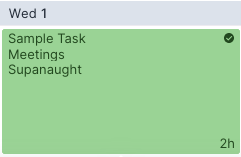
@float AA compliant colourways have just been applied to my account. Understand the value of the change, but the use of a tiny tick icon rather than transparency to indicate complete tasks removes visual immediacy. A style option would be a great future feature.
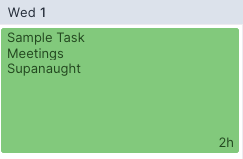
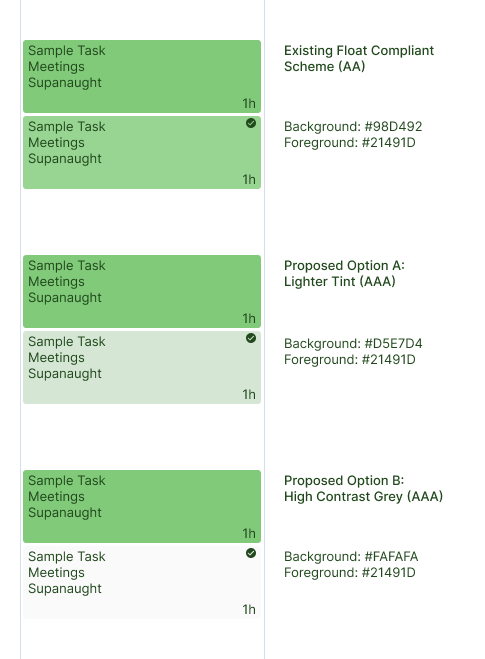
@float Actually those screengrabs are your UI / palette as it stands! I've mocked up the two proposals I suggested here, checked against WCAG tool they meet AAA standard so within your target for accessibility.
@float Really appreciate the reply. There is a colour state change for completed tasks, it's just very subtle (see attached). Could it be as simple as a lighter tint % or even greying out to preserved contrast with text?
@studiodbd@TomWalker1987@FontBaseApp Still have a master repository on my external HD (Dropbox in your case) as a failsafe, but you'd be amazed by how many of those 20,000 fonts you have amassed which have no practical day to day use and just take up disk space.
@studiodbd@TomWalker1987@FontBaseApp 4/4 I have project / client-specific fonts in Collections in FontBase, I keep everything deactivated until I need them for a particular job, then make active as prompted. Works 100% of the time across Adobe CC and Figma files and keeps everything neat on the Mac.
@studiodbd@TomWalker1987@FontBaseApp 2/4 Fontbase comes with all Google Fonts baked in, so no need to duplicate those, and the Adobe Creative Cloud desktop app handles activation for anything in there. So now, for any font sitting outside of those libraries, I add on an as needed basis to:
@studiodbd@TomWalker1987@FontBaseApp 1/4 Admittedly haven't tried running this over two machines, but changed my approach to storage using the new machine as a clean slate. Previously used to put everything into Mac HD > Library > Fonts (rather than user folder).
@TomWalker1987@studiodbd +1 for Tom's comment, but also been through the same process recently and finally ditched Font Explorer as it seemed to stagnate. Would highly recommend checking out @FontBaseApp and reintroducing / activating fonts on a per-project basis as you need them.