Obsidian now has official connectors for every agent.
That means you can easily give your agents access to a shared knowledge base, while keeping total ownership of your data.
You can switch agents, let them collaborate with each other, organize your knowledge as notes, diagrams, canvas, tables, kanban, and more. What you create is saved locally on your devices, in open formats files that you own forever and can access offline.
As always, Obsidian has no built-in AI, no account required, no analytics, and cannot access your data. Obsidian is free, private, and has no storage limits or gated features.
You are in control. You can choose to use Obsidian completely AI-free. That is the default experience.
Obsidian is 100% user-supported. You can use our affordable and end-to-end encrypted Sync service which helps support our team, or you can use one of many alternatives documented on our Help site: Git, iCloud, Dropbox, GDrive, OneDrive, NextCloud, and many more.
If you want to give agents access to your Obsidian vault, visit your agent's marketplace or plugin directory. Obsidian is available for Claude, ChatGPT, Grok Bot, Hermes, and more in the instructions linked below.
this is a great read! it really comes down to periodically resurfacing and thinking about the bottlenecks or limiting step in your coding workflow where human review is still required, and then putting in the work to let the agent (or code) drive it
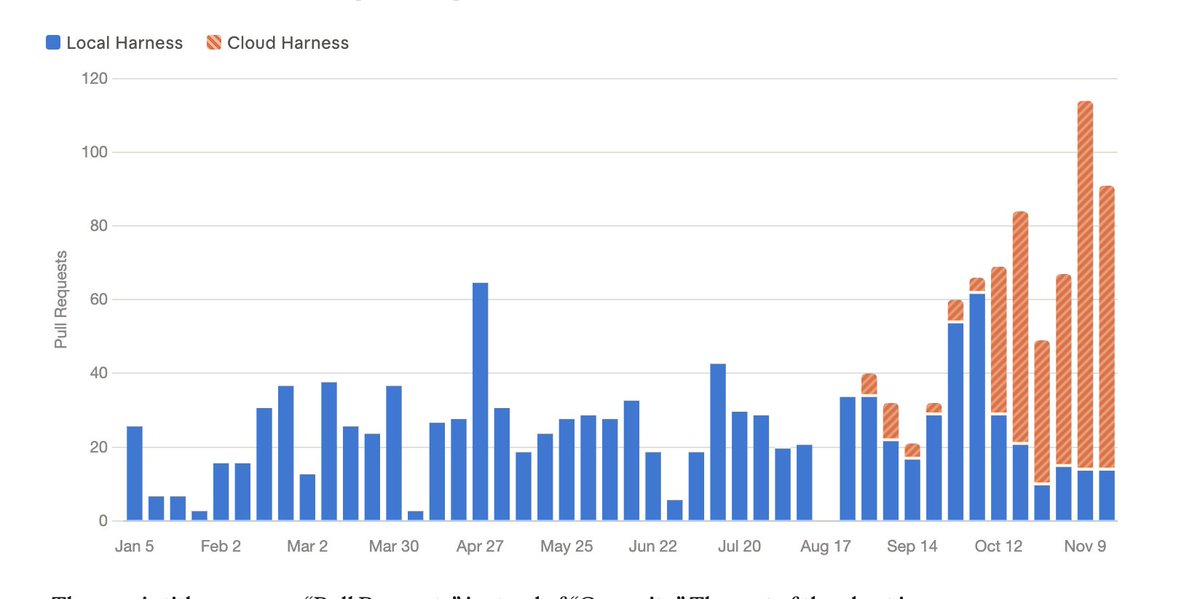
It took a while, but I finally got to 100 PRs deployed to production in a week of ~50% development time, albeit doing a fair number of hours. No silver bullets, just iteratively working the throughput model to solve bottleneck after bottleneck.
https://t.co/21TPCxrBEP
Experiment: how fast can pi-H3 go on my 5090? Result: pi-H3 is now faster than realtime on one RTX 5090!
5s of 864x480 video with audio in 4.6s, 2 steps. I got pi-H3's 2-step adapters running on my HyperFlow H3 Flash NVFP4 (wrote a node that remaps the blocks) and swapped ComfyUI's CPU video save for NVENC.
Same seeds vs the official pi-H3 workflow:
pi-H3 on my HyperFlow NVFP4: 4.6s
Official pi-H3: 4.8s
New prompt: 5.5s vs 9.77s
16 clips, 4 prompts, back to back: 77.5s vs 103.1s
1344x768, 2 steps: 12.7s vs 13.3 to 13.9s
1344x768, 4 steps: 20.2s vs 22.0s
The CPU MP4 save was eating 2s of every clip. NVENC cuts it to 0.8s.
Honest take: repeat runs barely differ. The real win is VRAM. My NVFP4 model and the text encoder fit on the card together, so a new prompt never kicks the model out. On the stock base, the first clips after a prompt change slow way down. The tradeoff is that spoken lines slip more on this hybrid HyperFlow Flash workflow. Same background dialog and unintended gibberish that pi-H3 seems to add if you aren't careful in your prompts.
480p is a drafting mode. Type a prompt, get a clip back in under 5s, keep the good ones. Audio and video are rough at 480p, but it scales up to higher res a lot better. Still remarkably coherent for 2 steps lol.
pi-H3 by @HanshengCh, HyperFlow H3 Flash by @video_rebirth. Nodes, workflows and weights below.
分享两个我最近常用的超级 Prompt
1. 复盘最近的全部会话,和我的行为习惯对齐,在对话里,我通常想要你告诉我的,是什么?有哪些虽然需要询问我,但实际上不需要我的了?哪些可以沉淀为该项目的 skill ? 能力? 或者脚本
2. 先别动手。用你自己的话说说:你认为我的目标是什么?我想解决的问题是什么?有哪些地方你还不确定,需要我补充?
restate in your own words what you think my goals are and what the problem i'm trying to solve is
HOLY F*CK. Lauren Tan ran 100 AI bots, cut them down to 12, and those 12 now get more done than the 100 ever did:
"Most people still just ask their bot questions. That's why it never actually does anything for them
I went from 0 bots to 100, then back down to 12"
in a 76-minute talk she shows how those 12 run her work, sit in her meetings and even turn the lights on when she joins a call
Asking Questions → 100 Bots → Cut To 12 → Work, Meetings And Home On Autopilot
If you still type questions into one chat window, this talk shows you what to hand off first
Worth more than a $6,000 AI bootcamp
Save it, watch it today
Then read how to build your own team of Grok Bots in the guide below ↓