Soon after independence, Kenya’s political elites embraced an Extractive System of government in which a small cabal use their positions to loot public resources at the expense of the ordinary citizen.
Today, under William Ruto, that extractive system has become a full-blown criminal enterprise. Across virtually every public sector, the President, his cabinet, top officials in government, and corrupt businessmen have turned government into their own business. #ukombozi
Expression Trees en .NET permiten que tu código también se convierta en data.
✔ Un Func<T> ejecuta lógica
✔ Un Expression<Func<T>> representa lógica para inspeccionarla, compilarla o traducirla a SQL con EF Core
👉 https://t.co/kEjCugDhS3
#dotnet#csharp#efcore
Most developers misunderstand DRY
They think it's about removing duplicate code.
It's not.
DRY is about duplicated knowledge, not the code.
Duplicate code is only a symptom.
The real problem is duplicated business rules hiding across the system.
When the same rule lives in five places, change becomes dangerous.
You fix one place and forget the other four.
Here is where most teams get it wrong:
❌ They extract shared helpers too early.
❌ They create generic utilities that are hard to maintain
❌ They couple unrelated features just to reduce duplication.
This actually makes the code worse.
Sometimes duplication is fine.
If two pieces of code change for different reasons, keep them separate.
This follows Single Responsibility better than forced reuse.
DRY is violated only when the same reason to change exists in multiple places.
Examples of real DRY violations:
→ Validation rules copied across controllers
→ Pricing logic repeated in services and background jobs
→ Authorization checks duplicated across different layers
Examples that are usually fine:
→ Similar loops doing different jobs
→ Repeated mappings near their usage
→ Small duplicated database query logic
Treating DRY in the wrong way leads to "enteprisy" code:
- Too complex code to understand, too many abstractions
If you have the same EF Core query (in 2 lines of code) present in 2 different classes, it's fine; you don't need a repository for this.
Here is how I apply DRY:
If I need to duplicate some logic in a third place, it's a sign that I should extract it elsewhere. Before that - no premature refactorings.
Next time you see duplication, ask one question first:
"Is this the same knowledge, or just similar code?"
That question changes how you design software.
What is one place where DRY caused more harm than good in your project?
——
♻️ Repost to help others understand DRY Principle
➕ Follow me ( @AntonMartyniuk ) to improve your .NET and Architecture Skills
EF Core feature of the day: Hi/Lo algorithm.
Here's how to use it and why it can be useful.
Hi/Lo lets you generate database identifiers on the client side.
You can minimize database round-trips and lock contention.
Here's how it works:
- Instead of generating a new ID, the application requests a batch of IDs
- The database maintains a "hi_value" tracking the highest ID
- When requesting a new batch of IDs, start from "hi_value" + 1
The trade-off is the possibility of gaps in IDs if an application crashes before it has used the full batch. Not the end of the world, IMO.
To use this with EF Core, you call the UseHiLo method.
This will create a sequence in the database to fetch a batch of IDs.
Now EF Core can set all the primary keys on the client side.
It's very useful for parent/child relationships.
Have you used the Hi/Lo approach in your projects?
Your C# lock works perfectly.
Until you run two instances of your app.
This is an easy problem to miss.
On one server, you can stop two tasks from changing the same data at the same time.
But once your app runs across many instances, each one has its own memory.
They cannot see each other's locks.
Now two workers may:
→ Run the same scheduled task
→ Refresh the same cache entry
→ Process the same shared resource
→ Generate the same report
→ Update data at the same time
That can lead to duplicate work, extra load, or broken data.
This is where distributed locking helps.
It gives several app instances one shared rule:
Only one of you can do this work right now.
You do not need it everywhere.
But for jobs that must run once, or shared work that must not overlap, it can prevent some very painful bugs.
If you already use PostgreSQL, advisory locks are a simple place to start.
And when you need a cleaner option across Postgres, Redis, or SQL Server, a distributed locking library can handle more of the hard parts.
Your app may look fine on one server.
The real test starts when you add the second one.
Here’s how to coordinate that work safely in .NET: https://t.co/ELbD0ZvL0C
Rate limiting works differently once your API scales out.
Local counters split the limit across instances. Redis gives them one shared counter + time window.
I built a distributed rate limiter in .NET 10 using Redis.
Learn more: https://t.co/9Nk0uJqP1h
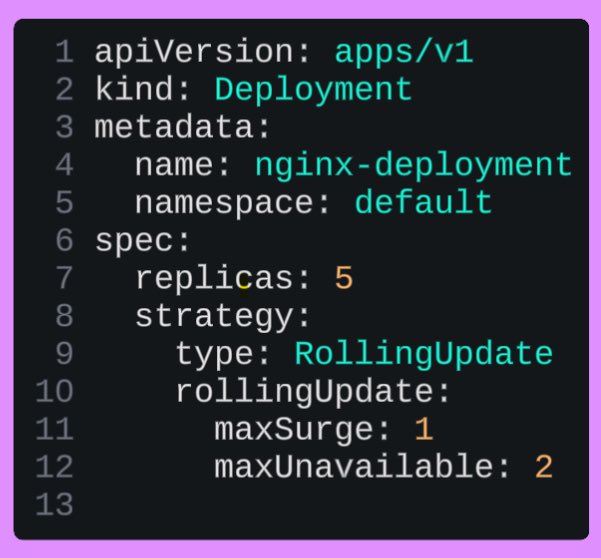
Kubernetes Deployment question:
Given this Deployment rolling update strategy:
replicas: 5
maxSurge: 1
maxUnavailable: 2
How many replicas will be running?
1. During the normal state?
2. Maximum Pods during the update?
3. Minimum available Pods during the update?
Kubernetes Services Cheat Sheet 🌐
4 service types every Kubernetes engineer should know.
🔹 ClusterIP
→ Internal pod-to-pod communication inside the cluster
🔹 NodePort
→ Exposes applications using a node’s IP and port
🔹 LoadBalancer
→ Creates a cloud load balancer for external traffic
🔹 ExternalName
→ Maps a service directly to external DNS
Understanding Services is the key to understanding Kubernetes networking.
EF Core's DbContext is not thread-safe.
This usually shows up when you try to make a slow endpoint faster.
Imagine a dashboard endpoint that needs:
- recent orders
- system logs
- user stats
The obvious code runs them one after another.
Clean.
Readable.
Slow.
So you reach for `Task.WhenAll`.
The queries are unrelated, so they should run in parallel, right?
Not if they all use the same injected `DbContext`.
That gives you the classic EF Core error:
"A second operation started on this context before a previous operation completed."
The problem is not `Task.WhenAll`.
The problem is sharing one `DbContext` across multiple concurrent operations.
`DbContext` is a unit-of-work object.
It has a change tracker.
It wraps a database connection.
It is designed for one operation flow at a time.
The right approach is to use `IDbContextFactory<T>`.
Each parallel query gets its own short-lived context.
Each context gets disposed as soon as the query finishes.
Now your unrelated queries can run at the same time without fighting over the same EF Core instance.
In my small demo, the endpoint went from roughly 36ms sequential to 13ms parallel.
But don’t use this everywhere.
A few trade-offs matter:
- each request can use multiple database connections
- high traffic can exhaust the connection pool
- very fast queries may not benefit
- this only makes sense for independent reads
So the rule is simple:
Don’t parallelize EF Core queries by sharing one `DbContext`.
Parallelize by isolating each query with its own context.
I wrote a full breakdown of how to do this safely: https://t.co/pdJ3cSFpTX
If you are starting with Kubernetes – this will help you.
I spent 10 hours digging into Kubernetes concepts, tools, and best practices this week – so you don’t have to.
Here are 20 must-know updates and tips to get started with Kubernetes:
1. Always start with `kubectl` – it's your gateway to the cluster.
2. Use Minikube or Kind to practice Kubernetes locally.
3. Master the YAML syntax – it's everywhere in Kubernetes.
4. Learn the difference between Deployments, StatefulSets, and DaemonSets.
5. Namespace everything to avoid conflicts in multi-team setups.
6. Use ConfigMaps and Secrets to separate configuration from code.
7. Set up resource requests/limits to prevent pod starvation.
8. Understand Kubernetes Services – ClusterIP, NodePort, and LoadBalancer.
9. Learn about Ingress for HTTP routing into your cluster.
10. Use liveness and readiness probes to manage container health.
11. Avoid storing credentials in plain YAML files – use Secrets instead.
12. Familiarize yourself with Helm for managing application releases.
13. Explore Kustomize for environment-specific configuration.
14. Use metrics-server for resource monitoring.
15. Set up Role-Based Access Control (RBAC) for secure operations.
16. Start with a simple CNI plugin like Flannel for networking.
17. Use Kubernetes Dashboard cautiously – it's great for beginners but can expose your cluster.
18. Experiment with auto-scaling – both HPA (pods) and Cluster Autoscaler (nodes).
19. Regularly clean up unused resources like pods, services, and images.
20. Document everything – Kubernetes has a steep learning curve.
Save this post for reference.
48K+ read my DevOps and Cloud newsletter: https://t.co/WBucLdwdsb
What do we cover:
DevOps, Cloud, Kubernetes, IaC, GitOps, MLOps
🔁 Consider a Repost if this is helpful
A lot of you went through my .NET interview questions last month.
And the feedback was always the same:
“Didn’t expect it to be this deep.”
So I made an update.
And honestly…this version is even tougher.
I added:
• List problems (the patterns that show up all the time)
• Tree problems (the ones people usually struggle with)
• full solutions with code
• everything updated to .NET 10
Because real interviews are not about:
- syntax
- or frameworks
- or remembering APIs
They’re about how you think.
Can you:
• reason about performance?
• explain trade-offs?
• recognize patterns under pressure?
• break down a problem without Googling?
That’s what separates mid from senior.
If you want to test yourself properly:
1. Take 5 minutes.
2. Go through the questions.
3. See where you get stuck.
4. That’s your roadmap.
Comment Interview, and I’ll send it to you 👇
Or grab it here: https://t.co/dyZ8KNRY4i