@mmisztal1980 I've just made my POC runtime public, with instructions on running it yourself if you wish :) It also has a link to the PR against roslyn for the CSX Syntax implementation https://t.co/57rGnt2kJ5
Your website search can return zero results.
Even when the right article is already there.
Why?
Because readers often search for a problem.
Your site searches for exact words.
Someone may search for "database performance issues".
But your best article may use words like:
→ Query tuning
→ Indexes
→ Slow EF Core queries
The content is useful.
The words simply do not match.
This is where semantic search helps.
Instead of matching only text, it tries to match meaning.
The flow is simple:
1. Turn your content into embeddings
2. Store those embeddings in a vector index
3. Turn each search query into an embedding
4. Find the content with the closest meaning
I built this in .NET using Semantic Kernel, Amazon Bedrock, and Amazon S3 Vectors.
For a blog, documentation site, or small app, this is an interesting way to add smarter search without setting up a separate vector database.
Keyword search still has value.
But your users should not need to know the exact words you used before they can find the right answer.
See how the full implementation works: https://t.co/seY3GtBEy0
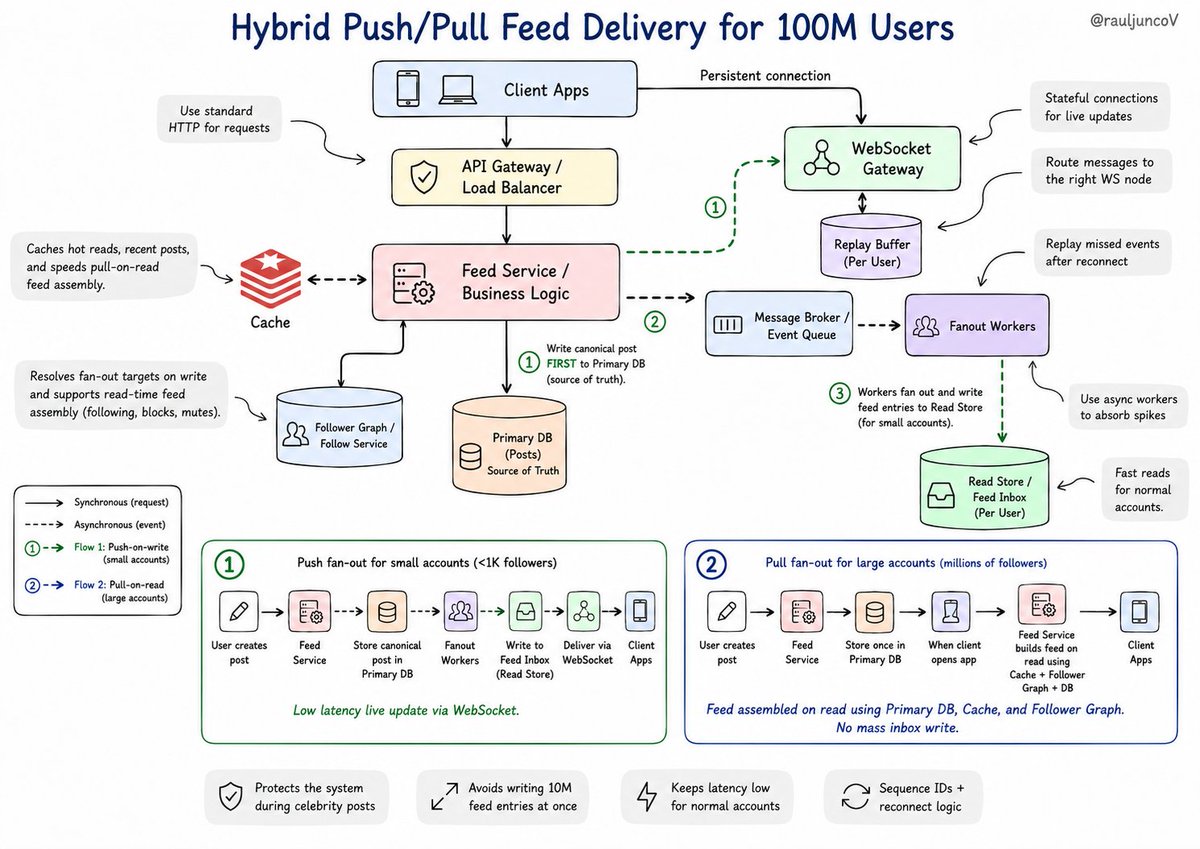
Push-based systems come up in 90% of system design interviews.
Here's the exercise you should be able to solve:
Design a notification system for 100M users. Some have 50 followers. Some have 10M.
The instinct is to hold a WebSocket connection open to every active user and push updates as they arrive. Clean mental model. It collapses the moment a celebrity posts.
When someone with 10M followers posts, you push to 10M open connections simultaneously. Your message broker saturates. Your WebSocket servers fall over. The system fails at the exact moment it needs to work.
That's the fan-out problem. And it kills more interview answers than any other mistake.
The production answer: push and pull aren't binary. You pick based on follower count. Users with fewer than 1,000 followers get push fan-out. Each follower gets notified immediately.
Users with millions of followers get pull fan-out. Their feed assembles on read. Nobody gets a push. Followers see the post when they open the app.
Twitter built exactly this: push-on-write for small accounts, pull-on-read for large ones.
But fan-out is only half the problem.
Push means stateful connections. Your servers now need to know which connection lives on which machine. You can't route blindly. Most teams reach for Redis pub/sub here; the WebSocket server subscribes, the backend publishes, the message finds the right node.
Add a 3-second network drop and you have another layer: what did the client miss? Now you need sequence IDs, a message buffer, and reconnect logic that replays missed events.
"Push-based" became push with a pull fallback, a message broker, sticky routing, and a replay buffer.
Most engineers stop at the first diagram.
The ones who get the offer keep pulling the thread until the system breaks.
We gave the iOS simulator Chrome DevTools.
Performance, networking, and logs from your app - in every test report.
Slow launch? Failing request? Poor performance? Find out why!
For two decades, S3 has been an object store, but today it's something broader. S3 Files lets you mount any bucket as a filesystem—no copies, no sync scripts, no choosing between file and object. @andywarfield tells the full story, including the "filerectories" that almost made the cut. https://t.co/zrkLOZS5Qe
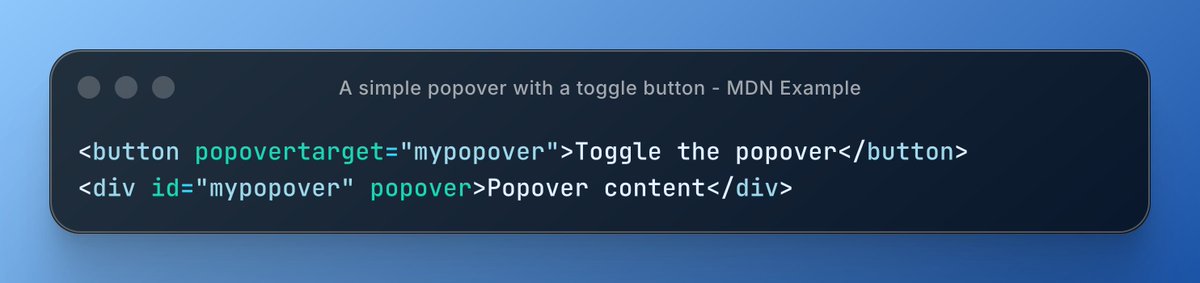
🆕 The Popover API is Baseline, no JavaScript needed
Tooltips, dropdowns, and menus with just HTML attributes.
⋅ popover attribute on any element
⋅ popovertarget to wire the trigger
⋅ Accessible by default, no ARIA hacks
Learn more 👇
https://t.co/fDxvVleL0Q
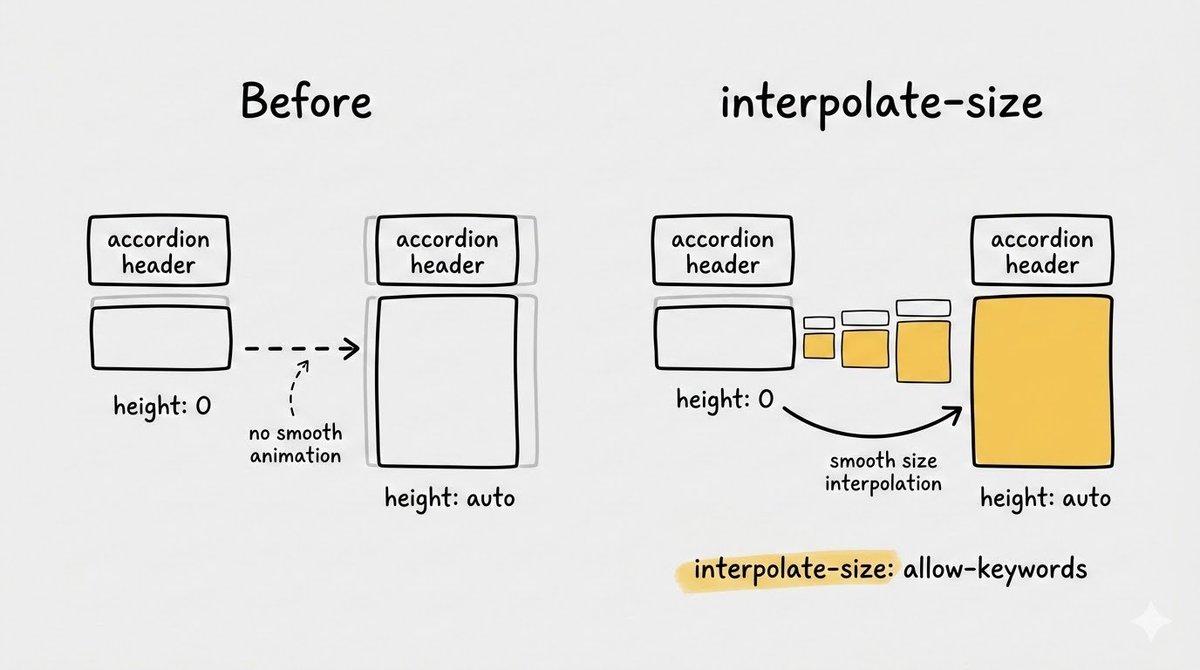
One CSS property just killed the need for JavaScript in every FAQ accordion you've ever built.
Seriously.
The property is interpolate-size: allow-keywords
HTML/JavaScript tip:
By useing the `commandfor` attribute on a button, you can point directly to an interactive element (like a `<dialog>` or a popover) and tell it what to do.
This is a billion-dollar idea!
This is an open-source tool that detects signs of burnout in employees before it becomes a problem.
The project is called On-Call Health, and here's how it works:
It combines two types of signals:
1. Objective data from tools like PagerDuty, Slack, GitHub, Linear, and Jira. Think of incident volume, after-hours pages, number of tasks, etc.
2. Self-reported check-ins. These are short surveys asking engineers how they actually feel.
Based on both, the application computes a burnout risk score.
For example, if you have someone on your team who's been troubleshooting multiple incidents outside working hours, the tool will signal you should check in with them.
Something that's really interesting:
The tool measures everything against individual and team baselines. It tracks trends over time rather than comparing people against each other.
They also use LLMs to summarize changes and give managers a quick readout before weekly reviews.
While none of this is medical advice, and scores are purely indicative, a tool like this can surface patterns that you wouldn't notice otherwise.
100% free. You can self-host it or use their hosted version.
I'm linking to it below:
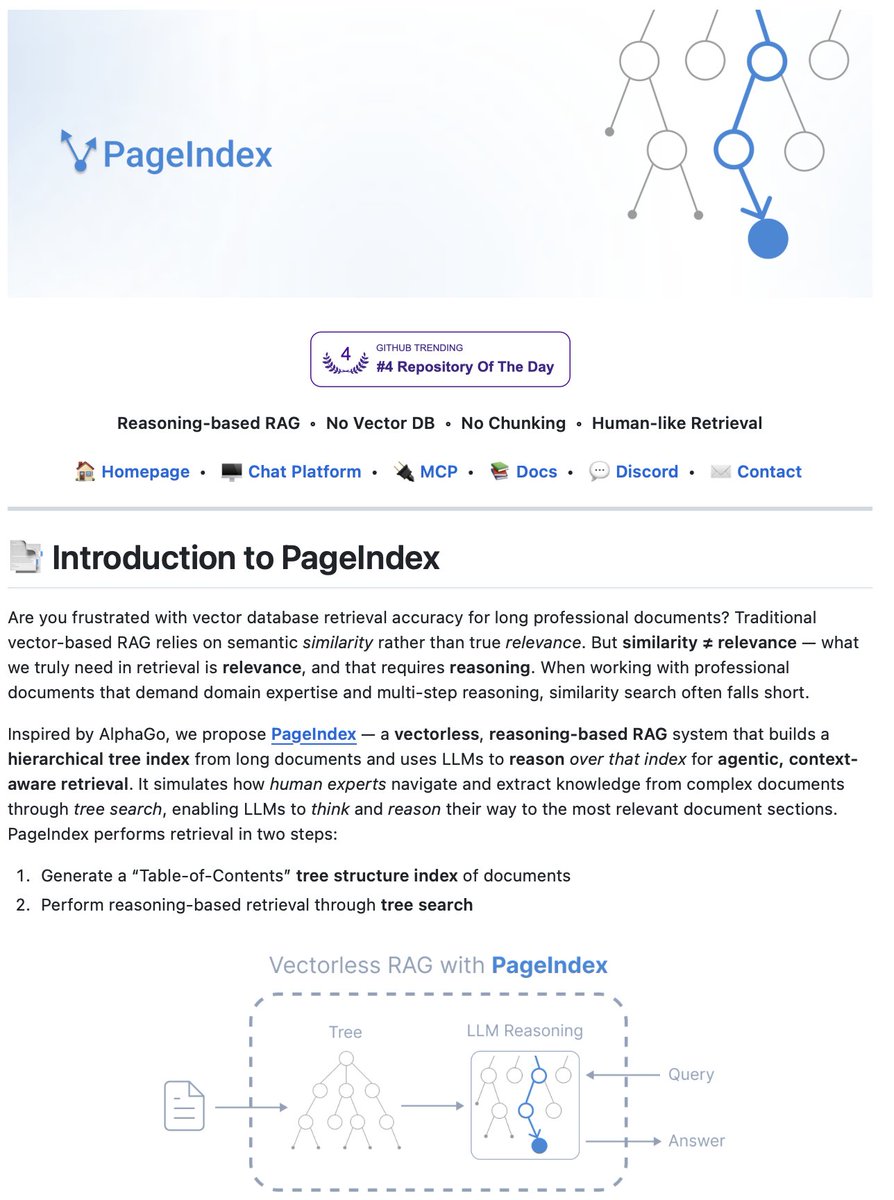
Document Index for Vectorless, Reasoning-based RAG!
PageIndex is an open-source RAG framework that removes vector databases and chunking from document retrieval.
Most RAG systems rely on semantic similarity. They chunk documents arbitrarily, embed them into vectors, and retrieve based on what looks similar.
But similarity ≠ relevance.
Professional documents like financial reports, legal filings, and technical manuals require multi-step reasoning and domain expertise. Vector search falls short when every section contains similar terminology.
PageIndex takes a different approach.
It builds a hierarchical tree structure from documents, similar to a table of contents but optimized for LLMs. Then it uses reasoning-based tree search to navigate and retrieve information the way human experts would.
Two-step process:
Generate a tree structure index of the document → Perform reasoning-based retrieval through tree search.
The LLM can "think" about document structure. Instead of matching embeddings, it reasons: "Debt trends are usually in the financial summary or Appendix G, let's look there."
Key features:
• No vector database infrastructure or embedding pipelines
• No artificial chunking that breaks context across boundaries
• Traceable retrieval with exact page-level references
• Reasoning-based navigation that mirrors human document analysis
PageIndex powers Mafin 2.5, achieving 98.7% accuracy on FinanceBench for financial document analysis.
The best part?
It's 100% open source.
Link to the GitHub repo in the comments!
Chinese scientists have developed,
The best shortest-path algorithm in 41 years!
A team from Tsinghua University has broken Dijkstra's "sorting barrier" - the first improvement since 1984.
Just use for a world-map 🤯
Paper - https://t.co/0AhR5O7vl4
https://t.co/a9KMVRuYGx
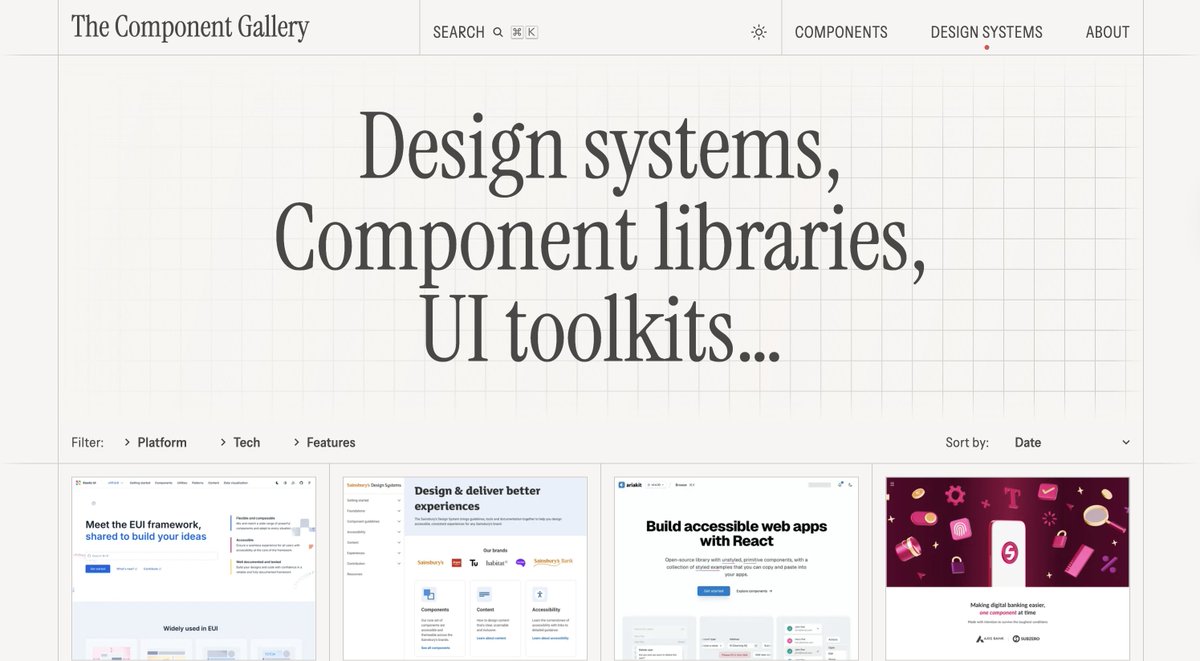
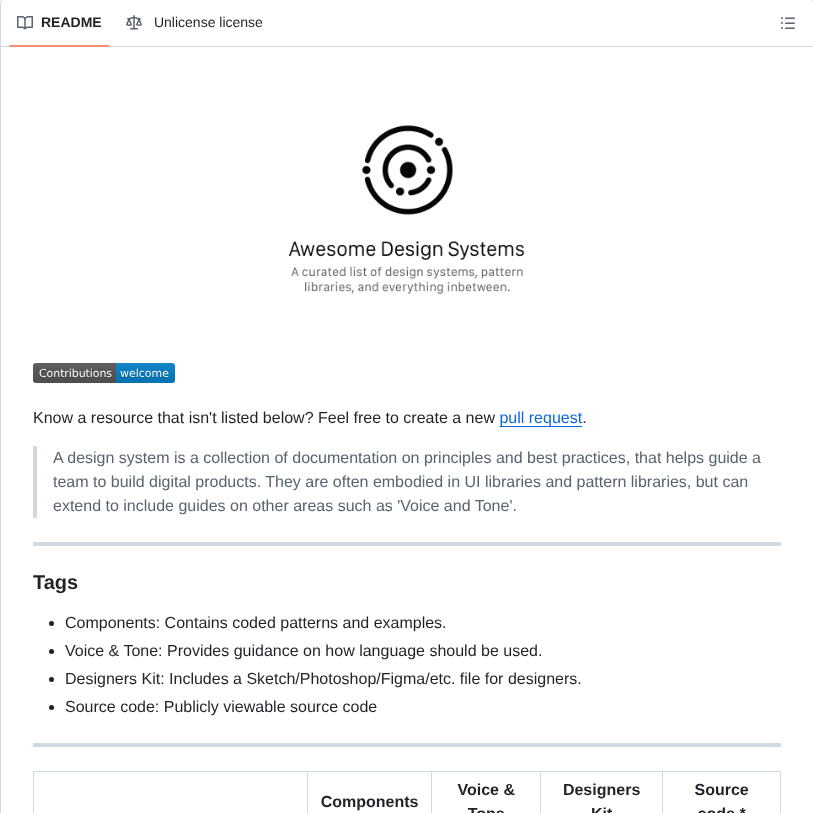
오늘의 사이트: The Component Gallery
디자인 시스템과 컴포넌트 예시 모음집.
특히 IBM 같은 대기업들의 디자인 시스템 자료도 잘 모아뒀으니, UX 하시는 분들은 각 다큐멘테이션에서 디자인 토큰이 어떻게 구성되어 있는지 시스템 설계 관점에서 참고하시는 걸 추천.
https://t.co/cUGyH2PaEN
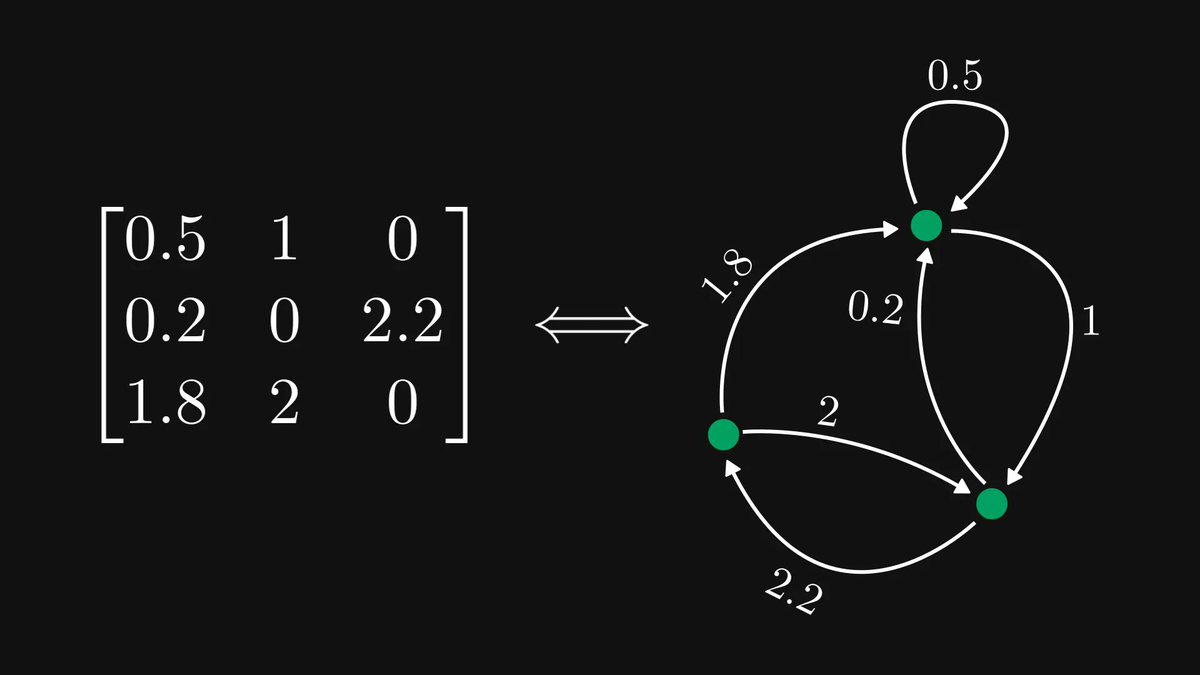
The single most undervalued fact of linear algebra: matrices are graphs, and graphs are matrices.
Encoding matrices as graphs is a cheat code, making complex behavior simple to study.
Let me show you how!
Domain-Driven Design (DDD)
→ Domain-Driven Design (DDD) is an approach to software design that focuses on modeling software around real business domains.
→ The goal is to align code structure with business concepts, making systems easier to understand, evolve, and maintain.
→ It emphasizes collaboration between developers and domain experts.
Core Concepts
➤ Domain
→ The real-world problem space the software is solving.
→ Example: e-commerce, banking, healthcare.
➤ Subdomain
→ A smaller part of the domain.
→ Core Subdomain → What gives the business its competitive advantage.
→ Supporting Subdomain → Helps the core but isn’t unique.
→ Generic Subdomain → Common functionality (auth, logging).
➤ Ubiquitous Language
→ A shared language used by developers and business experts.
→ The same terms appear in conversations, documentation, and code.
→ Reduces misunderstanding and mismatched logic.
➤ Bounded Context
→ A clear boundary where a specific domain model applies.
→ Same term can mean different things in different contexts.
→ Prevents large, tangled domain models.
➤ Entities
→ Objects with a distinct identity that persists over time.
→ Example: User, Order, Account.
➤ Value Objects
→ Objects defined only by their values.
→ Immutable and have no identity.
→ Example: Money, Address, Email.
➤ Aggregates & Aggregate Roots
→ A cluster of related entities and value objects.
→ Aggregate Root controls access and consistency.
→ Example: Order (root) → OrderItems.
➤ Repositories
→ Provide methods to access and store aggregates.
→ Hide database details from the domain logic.
➤ Domain Services
→ Handle domain logic that doesn’t naturally fit inside an entity.
→ Focused purely on business rules.
Flow (High-Level)
→ User Action → Application Layer → Domain Model (Entities, Aggregates, Services) → Repository → Database
→ Business rules live inside the domain, not in controllers or UI.
Benefits
→ Strong alignment between business and code.
→ Easier to scale and evolve complex systems.
→ Improved maintainability for large applications.
→ Clear boundaries reduce coupling.
Drawbacks
→ Requires deep understanding of the domain.
→ Higher upfront design effort.
→ Overkill for small or simple applications.
When to Use
→ Complex business domains.
→ Long-lived enterprise systems.
→ Large teams working on different parts of the same system.
→ Systems where business rules change frequently.
📘 Mastering Software Architectures Ebook: From Monoliths to Microservices and Beyond
→ Learn how DDD fits with Layered Architecture, CQRS, Event-Driven systems, SOA, Microservices, MVC/MVVM/MVP, and more.
→ Includes practical explanations, architecture patterns, and real-world system design strategies.
👉 https://t.co/rQ5uqOjgfE
Dialog и popover для слоистого UI. Дэвид Херрон показывает, как использовать `<dialog>` и `popover` для модалок с готовыми бэкдропами, управлением фокусом и верхний слой без кучи кастомного JS. #html#baseline
https://t.co/TnRFsepyvW