i don’t leave a Trello card open the whole time i’m working on it. why should i have to for the timer?
day 13 of building in public: start a timer on a card, close it, come back later. it’s still running.
try it free on one Trello card ↓
https://t.co/aA3b9RKLpD
day 12 of building in public
10 days ago, Tacto was on 6 Trello workspaces. today it’s on 12.
small milestone, but seeing that number double feels pretty good 😅
if your team runs on Trello, try Tacto for free. pick a card and log your first hour.
https://t.co/aA3b9RKLpD
@grigoryzero the blue version got me to look at the report before i read the headline. i’d be curious to test that against a hero that just shows the one thing a new user can do in their first minute: log time on a task.
@BudgetTooolsHQ for fixed-price work, moving a card to done is a nice trigger. for hourly work i’d add a review step first: pull the billable hours from the cards and check the total before anything goes to the client.
@TommyYTProducer the part about automating how the team already works hits home. i built a time tracker into our Trello cards because asking the team to copy hours into a second tool was one more thing to remember at the end of the day.
@Anoyroyc i built Tacto into Trello cards instead of making a separate app. that rules out a lot of people who might need a tracker, but the teams i built it for can log time without leaving the task.
@CreatorFuel11 none individually 😅 i picked the week in the report and grouped the logged hours by card. the screenshot uses our demo board, but that's the flow — no opening cards one by one.
day 11 of building in public
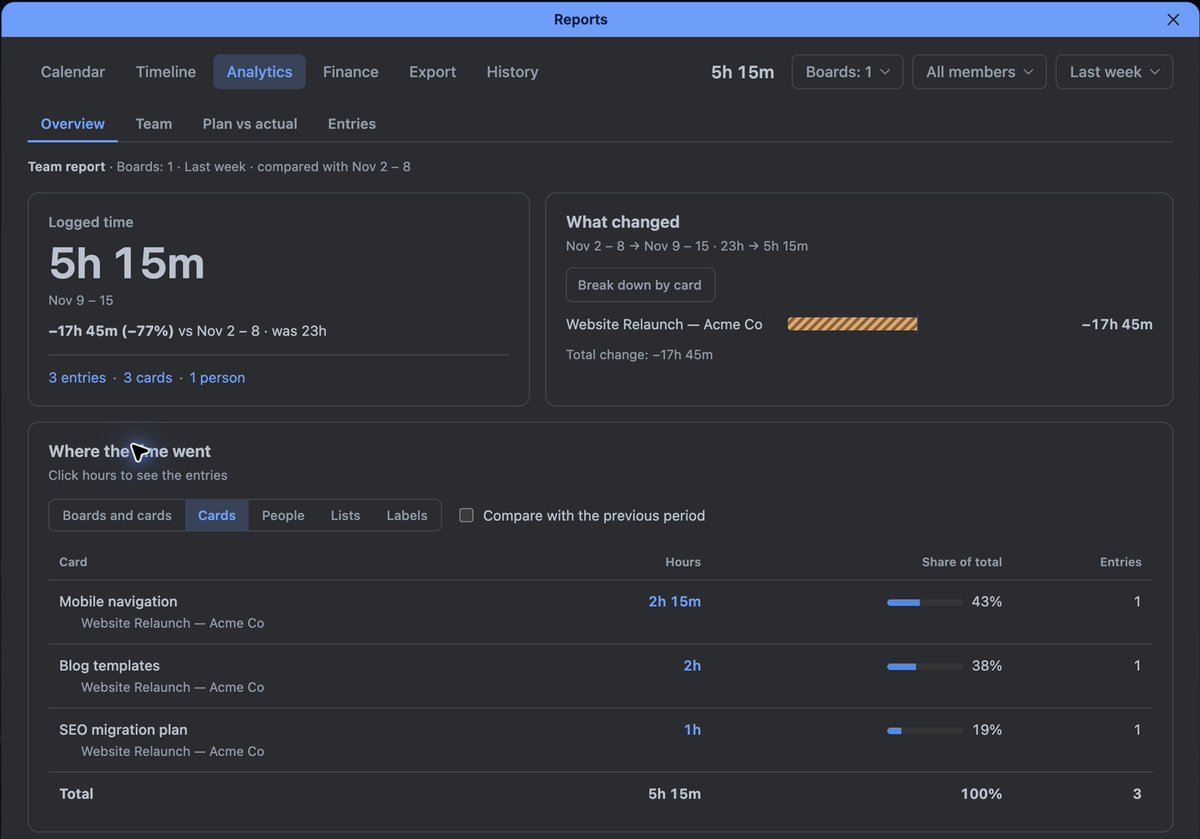
it’s friday. someone asks what you spent the week on. how many cards do you have to open to answer?
in Tacto, pick the week and see where the hours went, card by card.
already using Trello? try it on one board ↓
https://t.co/aA3b9RKLpD
@purvapande fair, i was picturing a review on every card. if you're testing a whole batch together, splitting that time across individual stories would just add admin. thanks for explaining how you actually run it.
@SteveJamesLaw yeah, switching between 15–20 matters a day makes every extra click hurt. and a guessed duration isn't good enough when you're billing someone. hadn't thought of the invoice itself as marketing material — makes sense you'd want control over how it looks.
@mondayrunner the “i just check the result” part is what i’m building around with tacto. you can ask claude to log 2h on a trello card, check the card and duration in the preview, then confirm right in the chat.
@tetrisgm the “ignore this one” bit is interesting. does the agent leave a note on the card about why you skipped it, so you have the context when you come back to it?
@jeffbullas i build a trello power-up, so i’m curious what your team got you hooked on first. was it seeing what everyone was working on, or having one place to hand work off?
@MicNguyenn105 you give it the duration. if i say 2h, the preview shows 2h, the exact Trello board and card, and the note. i check those before saying yes, and then it saves the entry.
day 10 of building in public
you just finished a task in ChatGPT. why open Trello just to log the hours?
with Tacto, i say “log 2h on the product page” in the same chat. check the preview, say yes, done.