@josefprusa for a printer that was assembled by me in 2017 and just getting some maintenance done, it still puts down an awesome 1st layer. This definitely shows the reliability of maintained printers. Is an MK2S still a good printer, yes, yes it is.
The Original Prusa MK4S - the latest iteration of our flagship 3D printing workhorse is here! 🎉 Get ready for completely redesigned 360° cooling with a high-performance turbine (inspired by our Prusa Pro HT90), higher printing speed, even better print quality, a new Prusa app for remote print management, plenty of quality-of-life enhancements based on your feedback, and an awesome GPIO "hackerboard" for custom mods and accessories. Upgrade your MK4 to MK4S for only 99 USD / 109 EUR! And there's much more! Read all about it in our latest article! ✨
https://t.co/83Eqerpp1Q
🥳 Today we calebrated xBuddy (@Prusa3D MK4) board number 100 000 at our in-house SMT line in Prague 🍾 That is 54 200 000 components with 3.4 ppm (parts per million) fail rate 🤯 Awesome job team 🧡 Local manufacturing makes sense 💪
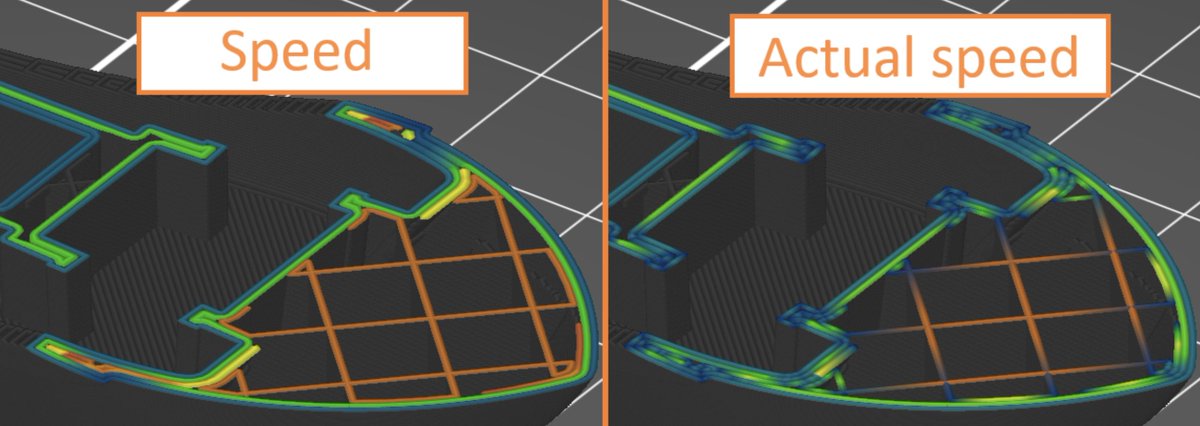
I absolutely love what the @PrusaSlicer team did with 2.8.0, and the final release is just around the corner 🚀 The new gcode viewer lets you visualize the actual speeds the printer will hit by simulating the print 🤯 We've been doing the light version of this for years to get precise print time estimates (who remembers the times in our industry when the estimates were off by hours?) but this is next level. Have you played with it yet?
I am so happy to be replacing my @BambulabGlobal printers with @Prusa3D.
After several back to back issues with Bambu support, we decided that moving to a platform with reliable support was the right move for our RnD team.
So excited to be part of the Prusa Family now.
3 Consejos Esenciales de ZBrush para principiantes
#ZBrush es una herramienta poderosa para crear modelos 3D de alta calidad y hay algunos aspectos adicionales que debes tener en cuenta si estás comenzando. 🔽🧵
✅Usa Dynamesh con moderación.
Es útil para mejorar la malla de tu modelo al estirarlo, pero evita configuraciones de resolución excesivamente altas. Esto podría generar más polígonos innecesarios, ralentizando tu sistema sin ofrecer cambios significativos en el modelo.
En el software de impresión 3D, puedes ajustar la configuración y obtener una vista previa de los resultados antes de imprimir. Sin embargo, las pruebas físicas te permiten analizar el modelo después de imprimirlo y post procesarlo para detectar cualquier expansión o retracción.