🚀 Curious about how Microsoft 365 Copilot can boost productivity?
Join our live webinar on May 28th for a practical walkthrough of how Sales Managers use the M365 Copilot app—insights that anyone can apply to streamline workflows, synthesize info, and work smarter!
🔗 Register now: https://t.co/yoSbPJjnpv
📣 New feature alert! 📣
Meet Pages, your new editing BFF! No need to start from scratch - just hit "Edit this Response," highlight text, and tap "Ask" to tweak, expand, or polish your writing.
Use it now at https://t.co/nQ5ORsYgOZ
Let’s talk about the future of work 👇
Not long ago, “AI at work” meant asking a bot to summarize your meeting. But according to Microsoft’s 2025 Work Trend Index, the next era is way bigger and way weirder (in the best way).
#WorkTrendIndex#AI#WTI2025
We’ve poured a lot into this — and we’re thrilled to finally share it. 🥹
Meet your new AI workspace 📓✏️ Copilot Notebooks is where you bring together your files, chats, meeting notes & more. Working on a proposal? Start a Notebook and let #Copilot focus only on your content.
Check it out now: https://t.co/CsvoEqTJPc
#CopilotNotebooks #WorkTrendIndex
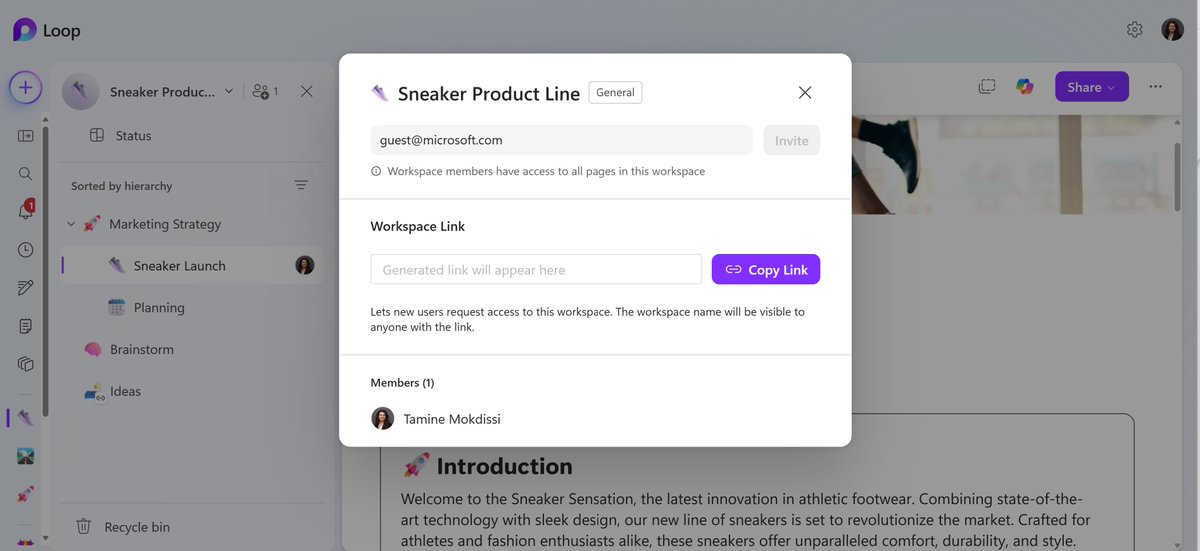
Ready to loop in your external team? Loop now supports guest sharing, so you can co-create with partners, clients, and collaborators outside your org. Just share the page or workspace and work together in real time 🤝 #NewinLoop
Calling all Brazilian Loopers: 🇧🇷
O @Mauricio_Cass fez uma live explicando como usar o Loop, novidades e atualizações de 2025.
Assista agora: https://t.co/nNu2YFGw34
External Sharing 🤝 Information Protection
Earlier this year, we shipped "Guest Sharing" feature to all except those who use MIP. Now that we support Workspace Sensitivity Labels, we have just enabled external sharing for all organizations that use MIP! 🏷️🔒 #NewInLoop
Tired of scrolling through weeks-long @MicrosoftTeams meeting chats to find shared files? Good news! You can now create a synced Loop workspace to automatically gather all the content ever shared in your recurring Teams meeting chat—and future content too! 👇 #HowtoLoop
#NewinLoop Workspace Sensitivity Labels!🛡️
Workspace Sensitivity Labels helps you:
➕ Manage access to your entire workspace
🔐 Prevent oversharing
➡️ Restrict sharing with guests or new guests
Learn more about #MicrosoftInformationProtection in Loop: https://t.co/qaz0Vwyd5J
The next chapter of Copilot Pages: rich artifacts.
Create content like interactive charts, diagrams, and code with Microsoft 365 Copilot, then add to a Page to edit with your team in real time.
Learn more: https://t.co/0T2T0IKZJf
#MSIgnite#AI
@kitmoro@MicrosoftLoop@MicrosoftTeams We are adding Loop workspaces directly into Teams channels. Stay tuned for more info. You can try Loop workspaces today at: https://t.co/skH8jCmvPE
@39digits@MicrosoftLoop@MicrosoftTeams Hi Christopher, I really appreciate your excitement about Loop. Unfortunately, there isn't a way to just add-on Loop. Your workspace would have to upgrade to the M365 E3 in order for you to have access to Loop at work. Learn more: https://t.co/TSXoPBIG47
#NewinLoop Workspace Sensitivity Labels!🛡️
Workspace Sensitivity Labels helps you:
➕ Manage access to your entire workspace
🔐 Prevent oversharing
➡️ Restrict sharing with guests or new guests
Learn more about #MicrosoftInformationProtection in Loop: https://t.co/qaz0Vwyd5J