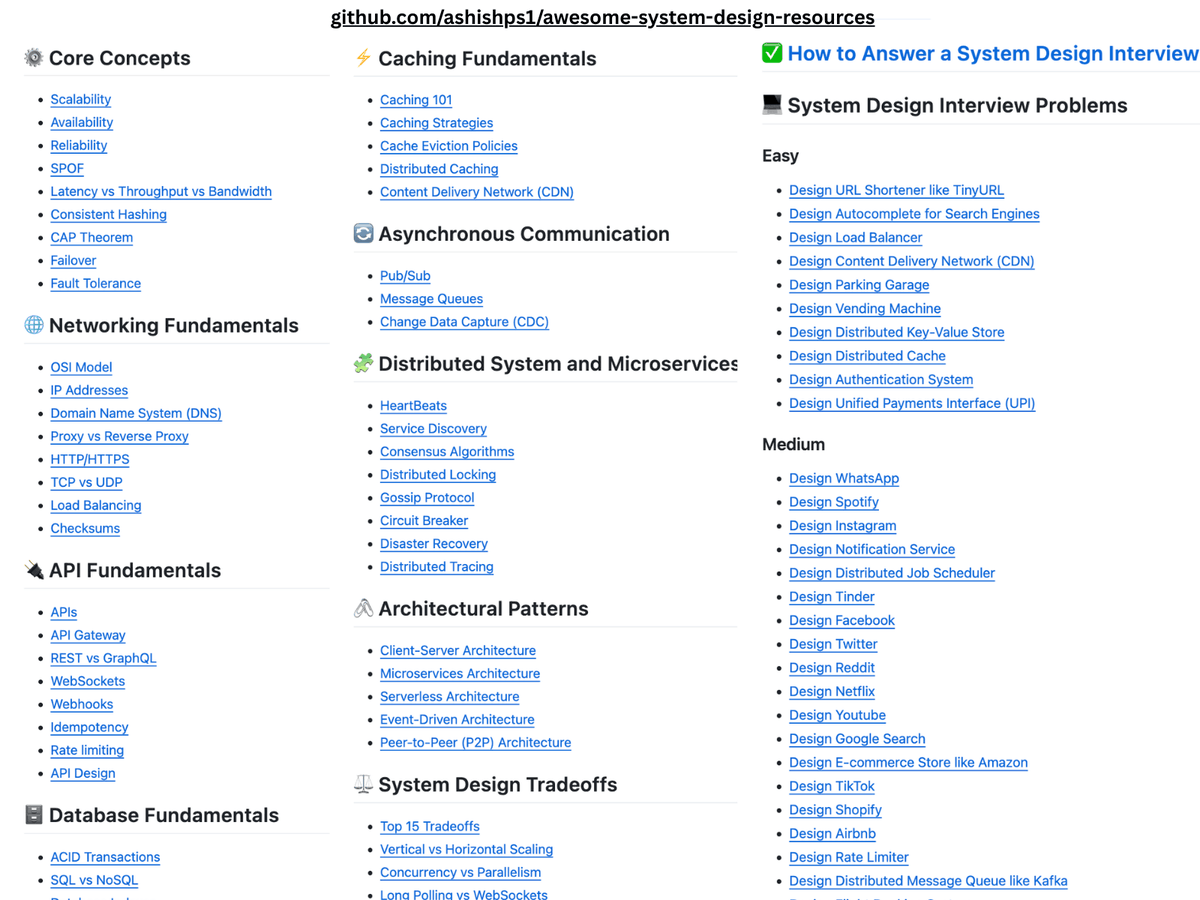
I created a Github repository to learn System Design, and I'm excited to share that it crossed 30k stars recently.
The repository contains a collection of resources to study:
- System Design Core Concepts
- Networking and API Fundamentals
- Database and Caching Fundamentals
- Distributed Systems, Microservies and Architectural Patterns
- System Design Tradeoffs
- 40+ System Design problems categorized by difficulty level
Check it out here: https://t.co/pkVpi6LxSV
If you find the repo valuable, consider giving it a ⭐️ and share with others.
Thanks to everyone who has starred or forked the repository!
Anthropic released a 33-page guide on building Skills.
Here's everything you need to know (under 370 words):
First, what are Skills?
A skill is a folder that teaches Claude how to handle specific tasks. You teach it once, and it works every time. No more re-explaining your preferences in every conversation.
Skills aren't locked to Claude. They've been published as an open standard, so you can use them with AI agents like OpenClaw, too.
Here's the simplest way to think about it:
MCP gives Claude access to your tools. Skills teach Claude how to use them well. One without the other is incomplete.
The guide breaks things down into 3 use cases:
1. Workflow Automation: You have processes that need to run the same way every time. A skill can pull your project status, evaluate team capacity, and create tasks without you walking Claude through each step again.
2. MCP Enhancement: Your team has years of accumulated knowledge about how things should work. A skill captures that expertise so Claude handles edge cases the way your best team member would.
3. Document Creation: Every team has standards for how presentations, code, and designs should look. A skill lets Claude follow those standards without you pasting your style guide into every conversation.
The setup is more straightforward than you'd think:
One SKILL. md file with some structured metadata at the top is all that's required. Scripts, templates, and reference docs are optional.
Two fields in that metadata matter most:
- name (lowercase with hyphens, no spaces or capitals)
- description (what the skill does + specific phrases that should activate it)
Nail the description, and Claude picks up your skill at exactly the right moment. Get it wrong, and it sits there doing nothing.
The guide walks through 5 patterns that actually work:
1. Sequential Workflow Orchestration: processes that need to happen in a fixed order, like onboarding a customer or deploying a service.
2. Multi-MCP Coordination: your workflow touches multiple services, say design in Figma, tasks in Linear, updates in Slack. One skill ties them together.
3. Iterative Refinement: the skill validates its own work, catches issues, and refines the output before handing it to you.
4. Context-Aware Tool Selection: Claude picks the right tool automatically depending on the file type, size, or situation instead of you telling it every time.
5. Domain-Specific Intelligence: your skill carries specialized knowledge like compliance rules or security checks that Claude wouldn't know on its own.
Pitfalls the guide warns you about:
- Vague descriptions like "Helps with projects" that never trigger
- Important instructions buried inside walls of text
- No fallback when a tool call fails
- One skill trying to do too much
Here's the bigger insight:
AI doesn't have to be general-purpose in every conversation. Give it focused knowledge for the workflows you actually repeat, and it stops being a chatbot and starts being a genuine part of how you work.
I've shared a link to the PDF in the next tweet.
I've never felt this much behind as a programmer. The profession is being dramatically refactored as the bits contributed by the programmer are increasingly sparse and between. I have a sense that I could be 10X more powerful if I just properly string together what has become available over the last ~year and a failure to claim the boost feels decidedly like skill issue. There's a new programmable layer of abstraction to master (in addition to the usual layers below) involving agents, subagents, their prompts, contexts, memory, modes, permissions, tools, plugins, skills, hooks, MCP, LSP, slash commands, workflows, IDE integrations, and a need to build an all-encompassing mental model for strengths and pitfalls of fundamentally stochastic, fallible, unintelligible and changing entities suddenly intermingled with what used to be good old fashioned engineering. Clearly some powerful alien tool was handed around except it comes with no manual and everyone has to figure out how to hold it and operate it, while the resulting magnitude 9 earthquake is rocking the profession. Roll up your sleeves to not fall behind.
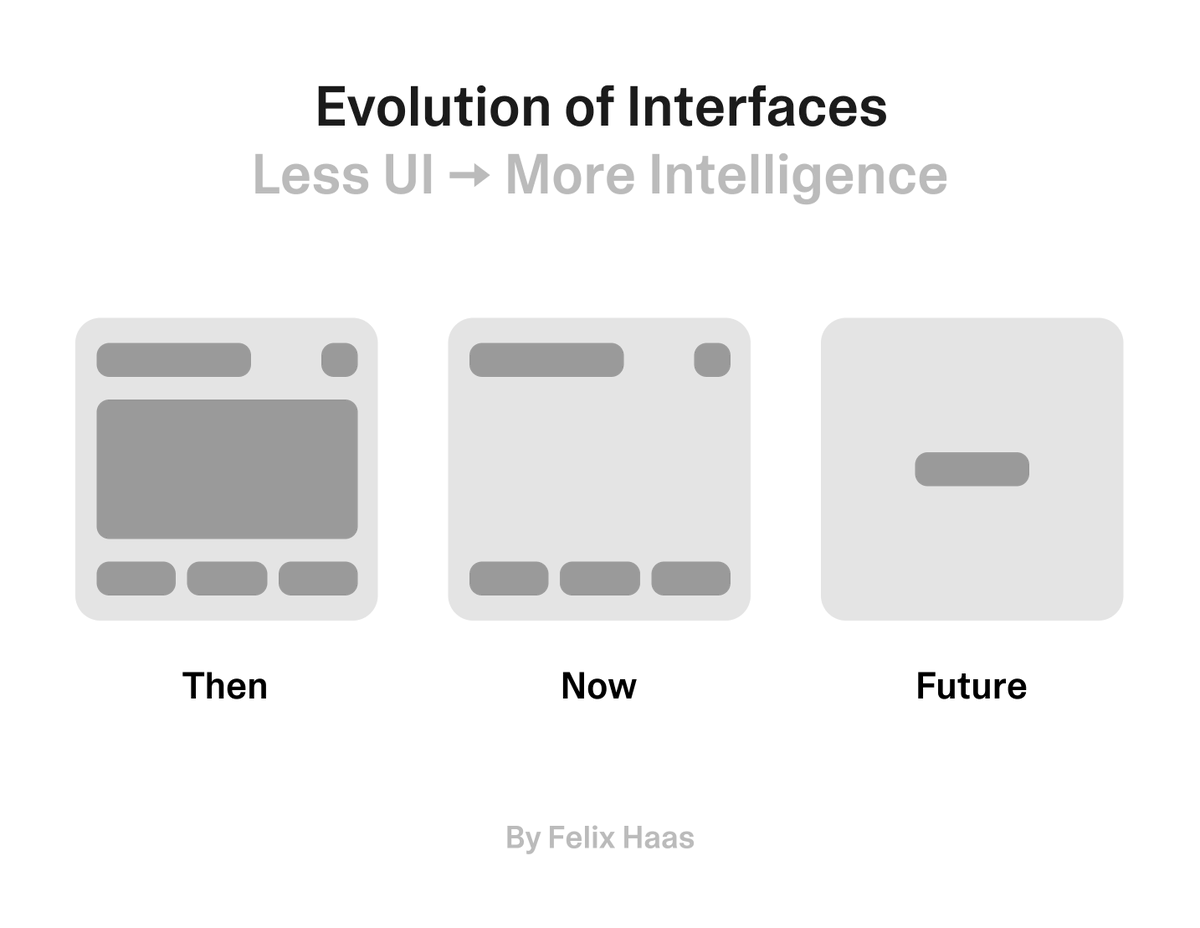
𝗣𝗿𝗲𝗱𝗶𝗰𝘁𝗶𝗼𝗻: 𝗜𝗻𝘁𝗲𝗿𝗳𝗮𝗰𝗲𝘀 𝘄𝗶𝗹𝗹 𝗳𝘂𝗻𝗱𝗮𝗺𝗲𝗻𝘁𝗮𝗹𝗹𝘆 𝘀𝗵𝗿𝗶𝗻𝗸
I see a lot of founders still building apps the same way they did before we had AI.
But if they don’t adapt, they will miss out.
Here’s why:
The way we interact with computers is fundamentally changing.
Historically, interfaces helped us communicate with computers because they couldn’t understand us. So we needed buttons, screens, and structured flows to tell them what to do and what we wanted.
But in the age of AI, that’s no longer relevant. We need to fundamentally rethink human-computer interaction.
AI is getting incredibly good at understanding intent. It can predict what we want before we even say it. It’s faster than any human, and with the right context, it can behave almost exactly like you would.
This has massive implications for interfaces and how we design products.
Take food delivery apps as an example.
Ordering food today takes 10+ clicks. You scroll, filter, customize, enter details, pick a payment method. Way too much effort for such a simple task.
Now, imagine an AI-powered flow.
The AI already knows your preferences and dietary restrictions.
Payment is set.
It suggests the best meal for you, right now.
You hit one button or just say "Go" and the job’s done.
Sure, the final step still needs your approval (for now), but everything else just happens.
The UI of food delivery apps and most service-based experiences will become obsolete.
Once AI knows who you are and how you think, you won’t need a traditional interface to get things done. At least not the way we think about UI today.
We’re moving from apps with 10 screens to apps with one.
From cluttered interfaces to minimal triggers.
The smarter the system, the less UI you need.
Eventually, the best UI might be no UI at all.
And the sooner you prepare for that, the better.
Spotify is already on this path. The more I use it, the less I search. The UI is still there, but I barely need it. It’s optional.
So think about this when designing interfaces.
What are the most essential elements I truly need?
And what can I reduce to the absolute minimum?
The less, the better. That’s never been more important than it is today.
Interfaces aren’t going away.
They’re just becoming invisible.
What's your take on this?
Sir @PiyushGoyal@Cyberdost AJIO's website is defrauding people, stealing wallet balance by locking the account, and not refunding or letting us use it. Please take the necessary action
@AJIOLife@AjioCares Why are you stealing people's money by locking their wallets? What kind of #fradu is this? After so much back and forth with your customer care, over the phone, email, neither leting me use balance or refunding money. #Ajiofradu.
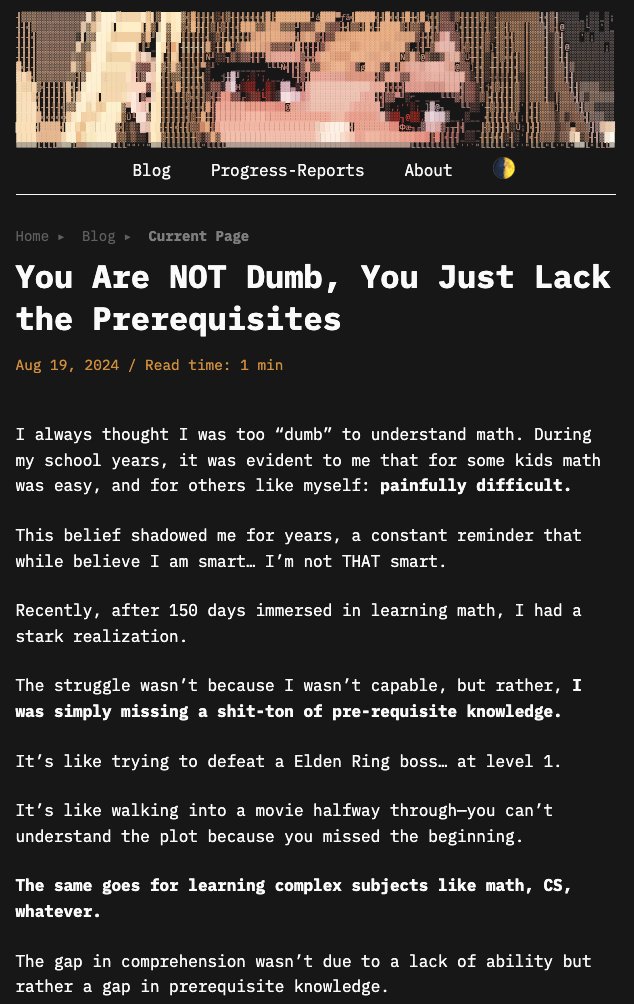
this helped me adjust my learning approach
was super lost in my ml class but took the time to revise the math, my mind can understand the content better now
thanks @lelouchdaily
My live cohort starts again in 2 weeks.
Let me explain what you'll get when you join:
1. 18 hours of live sessions where I'll teach you how to build machine learning systems.
(These sessions are not prerecorded. They are live. You can interrupt, ask questions, and have a conversation with me and your classmates.)
2. 10 hours of practical coding instructions where I'll help you build an end-to-end system with bells and whistles.
3. 100 hands-on exercises that will make you hate me.
4. Lifetime access to every cohort forever. You can take it as many times as you'd like.
I've been told—and I believe it—that this is the best Machine Learning Engineering program on the internet.
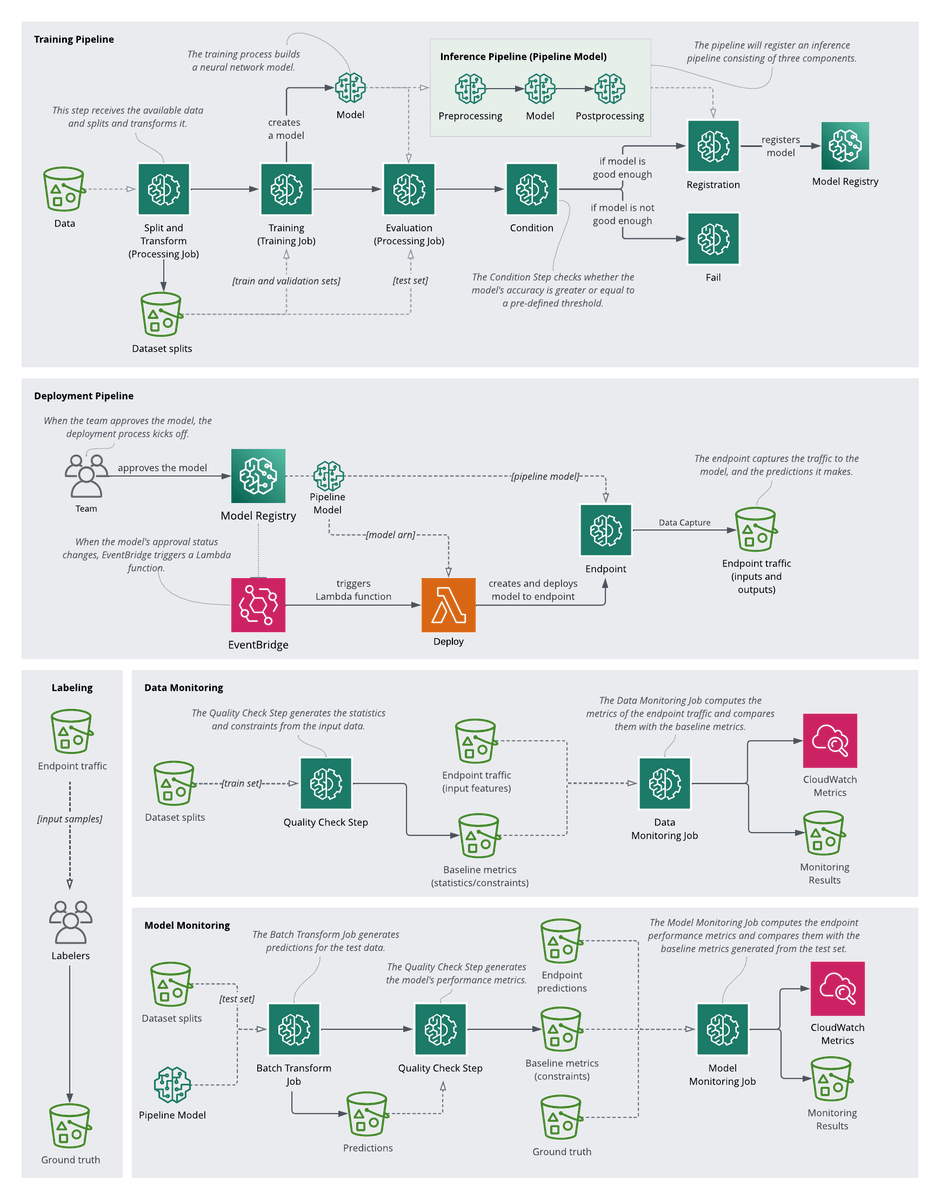
I'm attaching a picture of the system we'll build together. From scratch. It should give you a good idea of how much you'll learn.
You can join at https://t.co/iZifcK7n47.
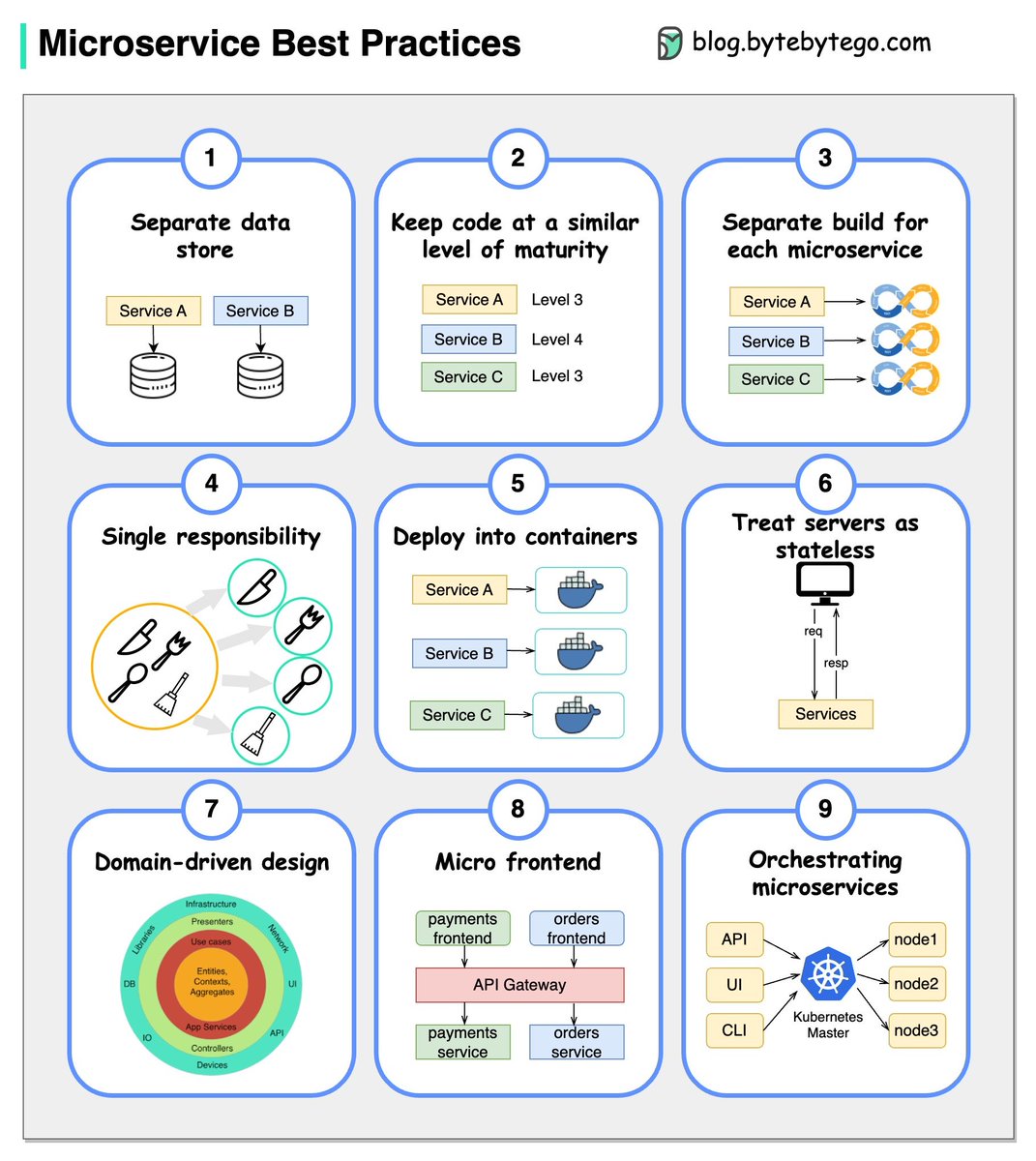
A picture is worth a thousand words: 9 best practices for developing microservices.
When we develop microservices, we need to follow the following best practices:
1. Use separate data storage for each microservice
2. Keep code at a similar level of maturity
3. Separate build for each microservice
4. Assign each microservice with a single responsibility
5. Deploy into containers
6. Design stateless services
7. Adopt domain-driven design
8. Design micro frontend
9. Orchestrating microservices
Over to you - what else should be included?
--
Subscribe to our weekly newsletter to get a Free System Design PDF (158 pages): https://t.co/FIzCeaWsZV
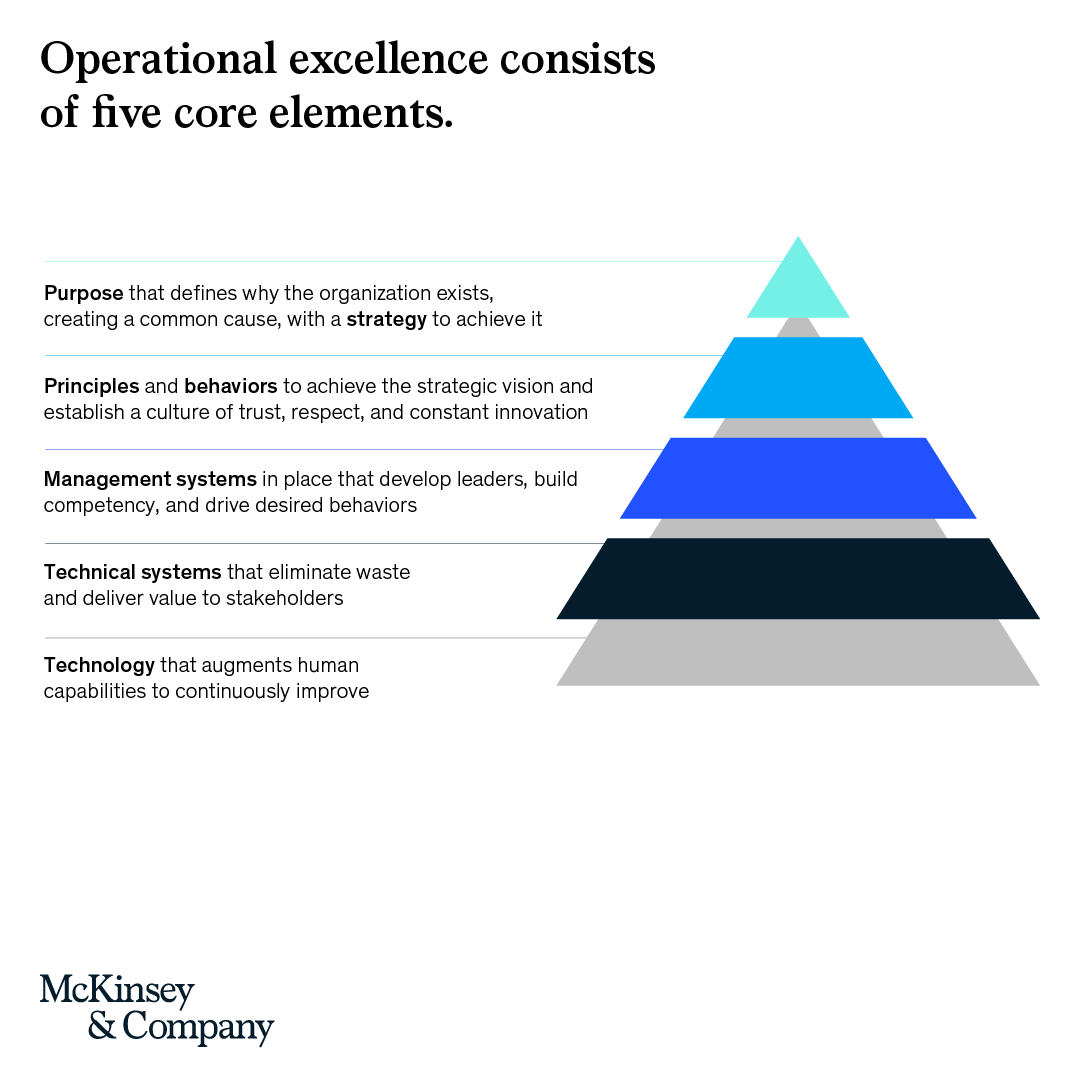
Unlocking lasting value from tech investments demands a fresh look at operational excellence.
It's not easy, but the payoff can transform an organization from challenged to competitive or strong performer to benchmark-setter. https://t.co/jRvWIzldHI
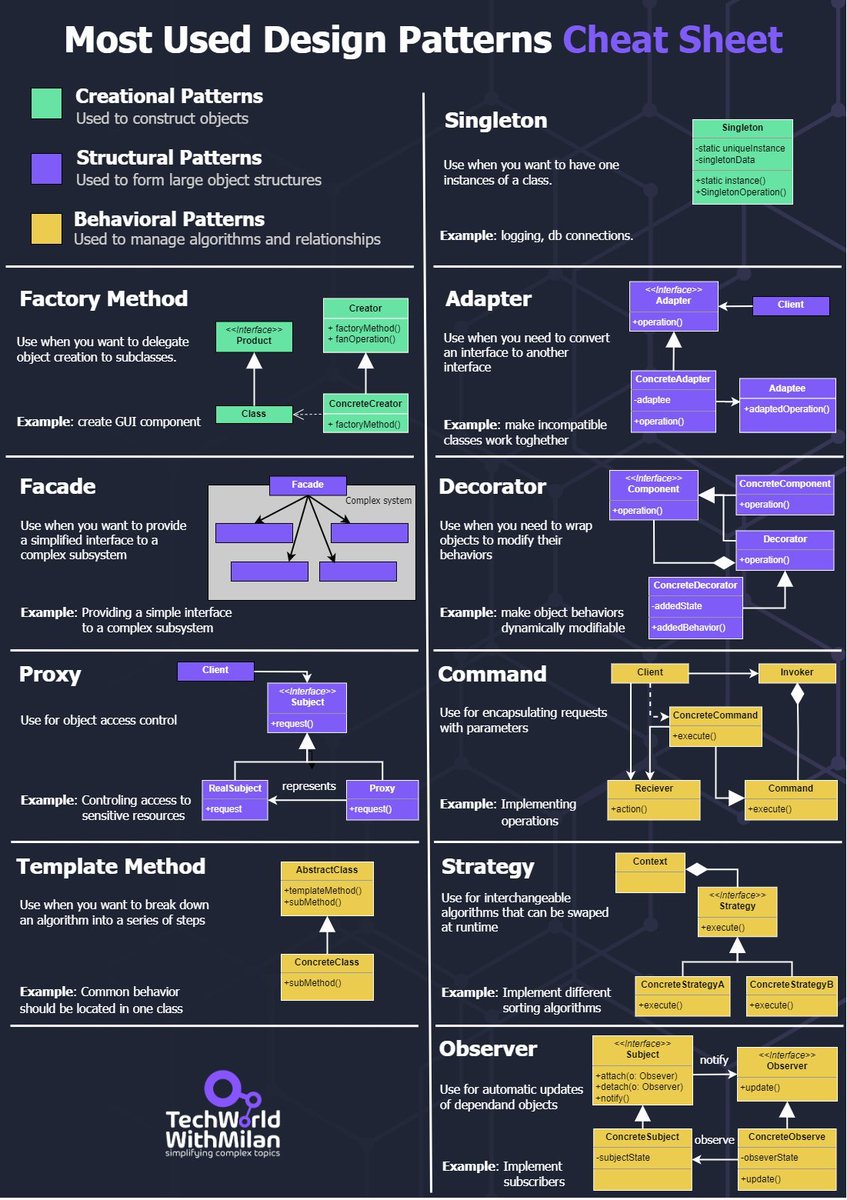
𝗗𝗲𝘀𝗶𝗴𝗻 𝗣𝗮𝘁𝘁𝗲𝗿𝗻𝘀 𝗖𝗵𝗲𝗮𝘁 𝗦𝗵𝗲𝗲𝘁
Design patterns can be divided into three main types:
𝟭. 𝗖𝗿𝗲𝗮𝘁𝗶𝗼𝗻𝗮𝗹 𝗣𝗮𝘁𝘁𝗲𝗿𝗻𝘀
These design patterns deal with object creation mechanisms, trying to create objects in a manner suitable to the situation.
Important patterns in this group are:
𝗙𝗮𝗰𝘁𝗼𝗿𝘆: This pattern allows delegating the instantiation logic to factory classes. The Factory Method creates objects without exposing the instantiation logic to the client.
𝗦𝗶𝗻𝗴𝗹𝗲𝘁𝗼𝗻 The Singleton pattern ensures that a class has only one instance and provides a global point of access to it. It's useful when exactly one object is needed to coordinate actions across the system.
𝟮. 𝗦𝘁𝗿𝘂𝗰𝘁𝘂𝗿𝗮𝗹 𝗣𝗮𝘁𝘁𝗲𝗿𝗻𝘀
These patterns deal with the composition of classes and objects that form larger structures.
Important patterns in this group are:
𝗔𝗱𝗮𝗽𝘁𝗲𝗿: This pattern works as a bridge between two incompatible interfaces. It wraps an existing class with a new interface to become compatible with the client's interface.
𝗙𝗮𝗰𝗮𝗱𝗲: The Façade pattern provides a unified interface to a set of interfaces in a subsystem. Façade defines a higher-level interface that makes the subsystem easier to use.
𝗗𝗲𝗰𝗼𝗿𝗮𝘁𝗼𝗿: This pattern dynamically adds/overrides behavior in an existing method of an object. This pattern provides a flexible alternative to subclassing for extending functionality.
𝗣𝗿𝗼𝘅𝘆: The Proxy pattern provides a surrogate or placeholder for another object to control access to it. In its most general form, a proxy is a class functioning as an interface to something else.
𝟯. 𝗕𝗲𝗵𝗮𝘃𝗶𝗼𝗿𝗮𝗹 𝗣𝗮𝘁𝘁𝗲𝗿𝗻𝘀
These patterns are specifically concerned with communication between objects and how they interact and distribute work.
Important patterns in this group are:
𝗖𝗼𝗺𝗺𝗮𝗻𝗱: The Command pattern encapsulates a request as an object, thus allowing users to parameterize clients with queues, requests, and operations.
𝗧𝗲𝗺𝗽𝗹𝗮𝘁𝗲 𝗠𝗲𝘁𝗵𝗼𝗱: This pattern defines the program skeleton of an algorithm in a method called template method, which defers some steps to subclasses.
𝗦𝘁𝗿𝗮𝘁𝗲𝗴𝘆: The Strategy pattern defines a family of algorithms, encapsulates each one, and makes them interchangeable. Strategy lets the algorithm vary independently from clients that use it.
𝗢𝗯𝘀𝗲𝗿𝘃𝗲𝗿: This pattern defines a one-to-many dependency between objects so that all its dependents are notified and updated automatically when one object changes state.
#technology #softwareengineering #programming #techworldwithmilan #developers
@netflix@NetflixIndia what’s wrong with you folks, I am watching on single device and have premium plan yet starting of every episode I am getting this error since yesterday.
@SwiggyCares This may look small on the surafcem but you are #cheating customers per order when there is memebrship fee paid already. You should cover your expnses in membeship. You are using shady pratices from other players, if you continue like you will soon loose market.
Machine Learning Notes
I've been writing notes introducing some of the most important topics in AI today.
This thread lists a few notes I've published so far: