MIT, July 1986. A course MIT later killed, and the tapes outlived it by nearly twenty years.
Hal Abelson and Gerald Jay Sussman stood in front of a room of Hewlett-Packard engineers and taught the whole of 6.001, MIT's introductory computer science subject, in one compressed run. Hewlett-Packard Television filmed all twenty lectures professionally.
They were not made for the public. In July 1986 there was no public to make them for.
Sussman opens by telling the room that the name of the subject is wrong. Computer science is not a science, and it is not about computers, in the same way geometry is not about surveying instruments.
What it is about is how to describe a process precisely enough that something with no judgement at all can carry it out.
The course follows from that one sentence. Nobody is taught a language for its own sake. They use Scheme, which has almost no syntax, precisely so that there is nothing to hide behind.
They build abstractions. Then they build the machinery that runs abstractions. Then, near the end, the students build an interpreter for the language they have been writing in all along. The course finishes by handing you the thing you have been standing inside.
Now the part that gives the tapes their strangeness.
6.001 became MIT's introductory subject in 1980 and ran for twenty-seven years. Sussman gave the final lecture after the autumn term of 2007, and MIT retired the course.
His own explanation is the interesting bit. He said the curriculum no longer matched what engineering had become. In the eighties you built large systems out of small parts you fully understood. Now, he said, programmers work with hardware and libraries nobody can fully see inside, so the job has shifted to poking at something to find out what it does.
MIT replaced it with a course built around Python and robots.
And the recordings kept going. The course they document has been dead since 2007. The tapes are still being watched by people who were not born when they were filmed, and courses built on that textbook are still taught at universities that never dropped it.
They are free. All twenty lectures, plus the complete textbook, plus a licence that lets you reuse them.
What it costs you is watching two men in 1986 teach a subject as a way of thinking, and then working out how much of what you know is just poking.
Ever wondered how two devices talk to each other without a shared clock?
That’s where UART (Universal Asynchronous Receiver/Transmitter) comes in.
UART is a simple, reliable serial communication protocol widely used in embedded systems. No clock line needed — just two wires and a matching speed.
🔧 Key Features
✅ Asynchronous – no clock signal
✅ Full‑duplex – send & receive simultaneously
✅ Only 2 lines: TX (transmit) and RX (receive)
✅ Predefined baud rate required (e.g., 9600, 115200)
⚙️ How it works (frame format)
➡️ Start bit (LOW)
➡️ Data bits (5–9 bits, LSB first)
➡️ Parity bit (optional – error detection)
➡️ Stop bit(s) (HIGH)
🔄 Basic flow
Microcontroller sends parallel data
UART converts to serial
Bits transmitted one by one via TX
Receiver UART reads via RX
Serial converted back to parallel
Data delivered to receiving device
📊 Example
Transmitting 0xA5 (10100101) at 9600 baud:
Start → 1 0 1 0 0 1 0 1 → Stop
📍 Real‑world applications
MCU ↔ PC communication
GPS modules
Bluetooth modules (HC‑05, HC‑06)
Serial debugging
⚠️ Critical note
Both sides must use the same baud rate — otherwise, no communication.
💡 Why UART matters
It’s simple, cost‑effective, and still the backbone of embedded communication.
👉 Found this useful? Repost to help others debug their serial connections.
♻️ Follow me for more embedded systems & electronics insights.
I made a video about what happens when you execute `c = a @ b` in PyTorch, from the code to silicon.
Hopefully it will help you appreciate that simple line of code more.
Made by Grok @bot. Enjoy!
Palantir sells governments a war room that costs millions a year.
So, a guy named Elie just rebuilt it, put it on GitHub, and gave it away.
It's called World Monitor.
Open it and you get a live 3D globe with 500+ news feeds pouring in across 15 categories, all summarized by AI as they land.
> Military movements.
> Economic shocks.
> Natural disasters.
> Cyber incidents.
> Flight paths.
> Shipping lanes.
+ 56 different map layers you can stack on top of each other.
It scores 31 countries on a stress index and updates the number as things happen.
It watches 29 stock exchanges, commodities, and crypto in one panel.
It runs local AI through Ollama, so you can use the whole thing without a single API key.
Native desktop app for Windows, macOS, and Linux. 25 languages. Works out of the box after one clone.
a physically based ray tracer fits in just 99 lines of C++
real reflections, refractions, soft shadows, and color bleeding
using just vectors, rays, spheres, and one recursive radiance() function
give it thousands of samples per pixel and it renders a Cornell box with mirror and glass spheres
this is smallpt by Kevin Beason, 2008
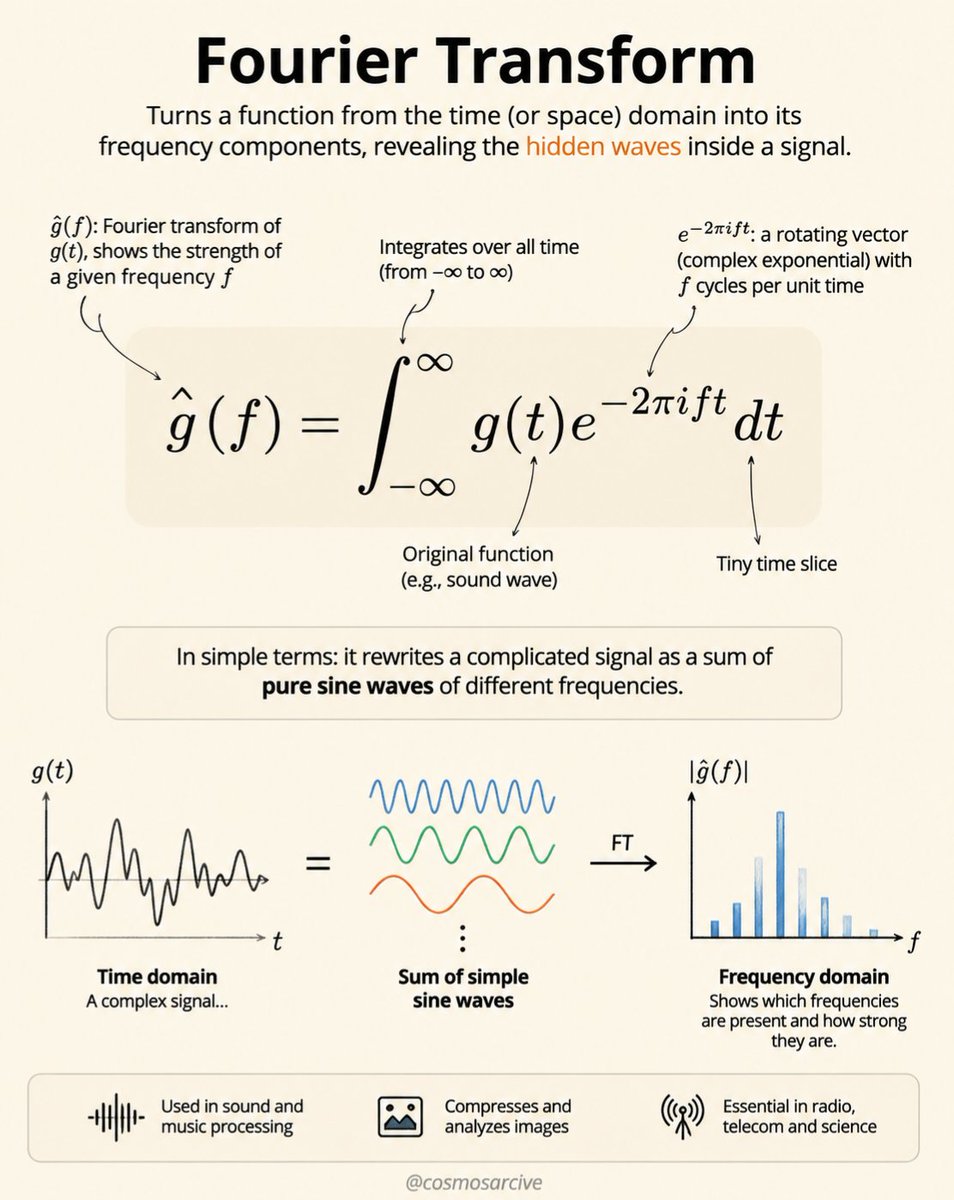
In 1822, Joseph Fourier introduced a powerful idea: any complex signal can be broken down into a combination of simple sine waves with different frequencies, amplitudes, and phases.
The Fourier Transform converts a signal from the time domain into the frequency domain, revealing the hidden frequencies inside it.
Its equation,
ĝ(f) = ∫ g(t)e⁻²πift dt
allows us to analyze everything from sound and images to MRI scans and quantum systems.
Fourier’s insight gave us a way to see patterns that were always there, but invisible.
Context vs. Graphs, clearly explained!
context engineering is great, but it has a ceiling:
you can make one window perfect. there is still only one of it.
every technique on that layer is rationing the same scarce thing. compact, retrieve less, delete, defer. all of it is deciding what to drop.
Graph engineering fixes this by moving the decision up a layer: not what goes in the window, but how many windows there are and what each one is for.
you need both. here's how it works:
↳ inside a window: context engineering. what loads, in what order, what gets compacted
↳ between windows: the graph. how many lanes, what each one is allowed to see, what comes back
Prompts → Context → Harness → Loops → Graphs
each lane gets a clean window, nothing in one competes with anything in another, and your main thread stops filling up.
the trick is being selective about what comes back.
a subagent reads six thousand tokens of files and hands you a four hundred token summary.
that ratio is the whole point. send back the raw material instead and you have moved the problem, not solved it.
one thing to know before you scale it.
not everything survives compaction equally, and almost nobody knows the table.
↳ the project-root rules file and auto memory are re-injected from disk. they come back intact
↳ path-scoped rules and nested rules files live in message history. they get summarized away and do not return until a matching file is read again
so a rule that genuinely must persist cannot be path-scoped. move it to the root and pay the always-loaded cost, or accept that it is advisory in any long session.
and the one that eats whole nights: shared context makes parallel agents converge.
four auditors on one window produce one opinion with three echoes. you paid four times for it.
below i have quoted my full guide on graph engineering. it covers the three topologies, the verifier patterns, and where the gate should actually open.
save this and read it below ↓
A 10,000-ft view of AI Agent Architecture
1. Interface & channels
The agent needs a way to receive a goal and return a result.
That could be a web application, chat interface, API, Slack, Teams, email, or another application.
2. Context & memory
The model needs more than the current prompt.
Conversation history, working memory, long-term memory and retrieved knowledge provide the context required to make useful decisions.
RAG is part of this layer, but retrieval doesn't necessarily mean “vector database.” Depending on the problem, it can involve keyword search, metadata filtering, SQL, graph retrieval, hybrid search, or reranking.
3. Agent runtime
This is the part that actually makes the system agentic.
A simplified loop looks like:
Understand goal → Plan → Select tool → Execute → Observe → Re-plan → Repeat
The agent doesn't necessarily follow a fixed sequence. It can react to the result of an action and decide what to do next.
That loop is far more important than the particular framework being used.
4. Models
An agent may use multiple models rather than one LLM.
A reasoning model might handle planning, while embedding models support retrieval and smaller/faster models handle classification, extraction or routing.
5. Tools & actions
This is where the agent interacts with the outside world.
Databases. APIs. Browsers. Code execution. Git. Search. File systems. Internal services.
But giving an agent access to a tool isn't enough.
You also need to think about tool schemas, permissions, authentication, failure handling and what happens when the tool returns an unexpected result.
6. State & data
Agents need somewhere to persist information.
Relational databases can hold application state, Redis can handle caching or short-lived state, vector databases can support semantic retrieval, object storage can hold documents, and queues can support asynchronous work.
The important point is that memory, state and storage are related — but they aren't interchangeable concepts.
7. Observability, safety & evaluation
This is where many agent diagrams become too simplistic.
You need to know:
- What did the agent decide?
- Which tools did it call?
- How long did each step take?
- How many tokens did it consume?
- How much did the task cost?
- Did retrieval provide useful context?
- Did the agent actually accomplish the goal?
- Did it violate any safety constraints?
Tracing, metrics, evaluations and guardrails become essential as the system moves beyond a demo.
8. Security & governance
An agent that can call APIs, access databases or execute code needs carefully scoped permissions.
Authentication, authorization, secrets management, privacy, audit logs and human approval become architectural concerns — not afterthoughts.
9. Deployment & infrastructure
Finally, the agent still has to run somewhere.
Containers, Kubernetes, cloud infrastructure, CI/CD, ingress, queues and other platform components support the system around the agent.
Matrix Calculus (for Machine Learning and Beyond) — Free PDF
📘 Matrix Calculus (for Machine Learning and Beyond)
📄 101 pages
🆓 Free PDF
This MIT course material covers matrix derivatives, Jacobians, gradients, Hessians, matrix factorizations, optimization, automatic differentiation, and applications in machine learning. MIT provides the complete lecture notes openly through OpenCourseWare.
👉 Read & access the free PDF: https://t.co/cknb3Chnk8
MarineSentinel is an Arduino UNO Q-controlled autonomous floating buoy that detects marine debris and monitors ocean water quality in real-time using edge AI and multi-sensor fusion: https://t.co/OGLwqUmR2r
😊 I also just uploaded a new version of the lecture notes. https://t.co/bpIvdgG8KO (it's still, and perhaps will always be work-in-progress, given the field is moving fast. Any mistakes are mine :) and any feedback is more than welcome :).
I did a video which I think you might enjoy if you really want to understand how to approach Spring and @SpringBoot, from a very fundamental perspective.
Watch this, understand it, and I promise you'll be MUCH better prepared for working with Spring
Enjoy!
https://t.co/1HgNiqrgHA
Predefined models offer a powerful starting point for understanding edge AI. However, @mcmchriis shares how you can easily expand those capabilities by training and deploying your own models in Arduino App Lab through its native @EdgeImpulse integration.
10 agent evals for AI engineers:
(explained with usage)
1) golden set
→ a fixed set of cases you never edit, run on every single change.
→ use as the baseline that tells you whether anything moved at all.
2) llm as judge
→ a second model scores the output against a written rubric.
→ use when the answer is open-ended and there is no string to match against.
3) rubric scoring
→ one number per dimension: correctness, tone, safety, cost.
→ use when a single score hides which part actually got worse.
4) trajectory eval
→ grade the path the agent took, not only the answer it landed on.
→ use when the right answer for the wrong reason is going to bite you later.
5) tool unit tests
→ test each tool on its own, with fixtures, no model in the loop.
→ use always. most agent bugs are tool bugs wearing a costume.
6) regression suite
→ replay past runs against the new prompt or model and diff the results.
→ use before every prompt change, because prompts have no type system.
7) a/b in prod
→ split live traffic between two versions and compare outcomes, not vibes.
→ use when offline scores stopped predicting what users actually do.
8) human review
→ sample a slice of runs and have a person grade them honestly.
→ use to calibrate your judge, because a judge nobody checks quietly drifts.
9) shadow run
→ the candidate runs on real traffic in parallel and its output is shown to nobody.
→ use before a risky rollout, when one bad answer would be expensive.
10) red team
→ deliberately attack it: jailbreaks, injection, exfil, tool abuse.
→ use before anyone external can reach it, not after.
offline evals tell you it works. online evals tell you it still works.
both sides matter, but not all ten do. run the two that would have caught your last outage.
save this. then read the full breakdown on loop engineering below.
Anthropic engineers just showed how they build a full app from scratch, using a loop of agents.
40 minutes from the team behind Claude Code.
They used three agents: one to plan, one to build, one to judge, cycling until the app actually works.
The winners won't have the smartest model, they'll have the best loop.
Watch it, then read the full guide on how to actually use loops below.
Anthropic just dropped a free 1-hour Claude Code course, taught by their own engineers:
00:00 - from autocomplete to real agents
04:50 - how the agentic loop actually works
14:07 - CLAUDE.md as project memory
33:31 - a live task, from brief to shipped commit
Most people still use Claude Code like a smarter autocomplete.
This is how Anthropic's own team uses it to plan, call tools, test, and ship.
Worth more than any paid Claude Code tutorial.
Watch it today, then save the loop guide below.
How Floyd’s Cycle-Finding algorithm (The Tortoise and the Hare) works in a Linked List.
The algorithm uses two pointers moving at different speeds: the Slow pointer moves 1 node at a time, while the Fast pointer moves 2 nodes at a time. If there is no cycle, the Fast pointer will eventually reach the end of the list. However, if a cycle exists, both pointers will get trapped inside the loop. Because the Fast pointer closes the gap by 1 node at each step, it is mathematically guaranteed to catch up to the Slow pointer from behind. The moment they meet on the exact same node, a cycle is detected.
Credit: ppixel.theory