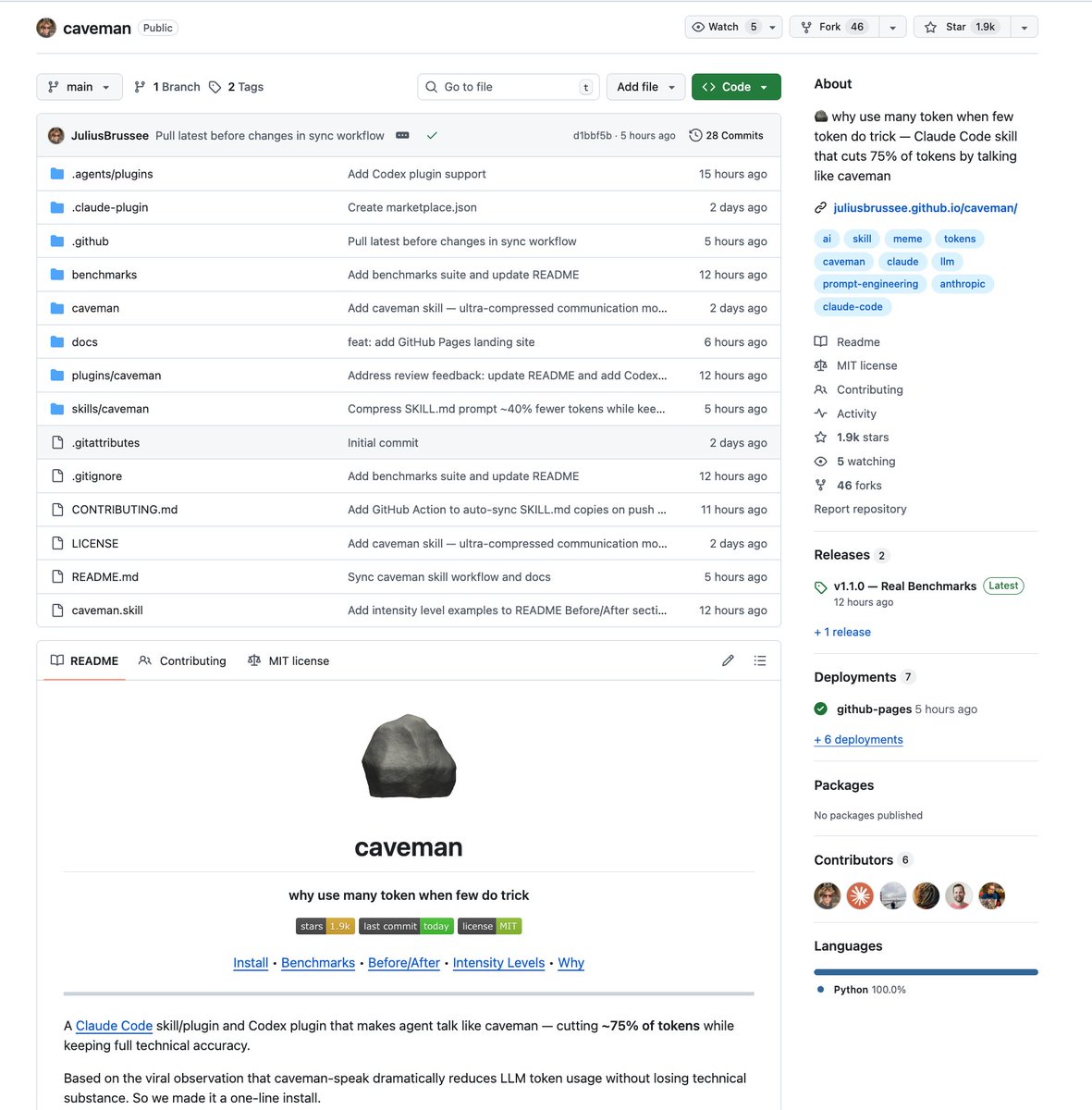
SOMEONE TURNED THE VIRAL "TEACH CLAUDE TO TALK LIKE A CAVEMAN TO SAVE TOKENS" STRATEGY INTO AN ACTUAL CLAUDE CODE SKILL
one-line install and it cuts ~75% of tokens while keeping full technical accuracy
they even benchmarked it with real token counts from the API:
> explain React re-render bug: 1180 tokens → 159 tokens (87% saved)
> fix auth middleware: 704 → 121 (83% saved)
> set up PostgreSQL connection pool: 2347 → 380 (84% saved)
> implement React error boundary: 3454 → 456 (87% saved)
> debug PostgreSQL race condition: 1200 → 232 (81% saved)
average across 10 tasks: 65% savings. range is 22-87% depending on the task.
three intensity levels:
> lite: drops filler, keeps grammar. professional but no fluff
> full: drops articles, fragments, full grunt mode
> ultra: maximum compression. telegraphic. abbreviates everything
works as a skill for Claude Code and a plugin for Codex.
this is PEAK
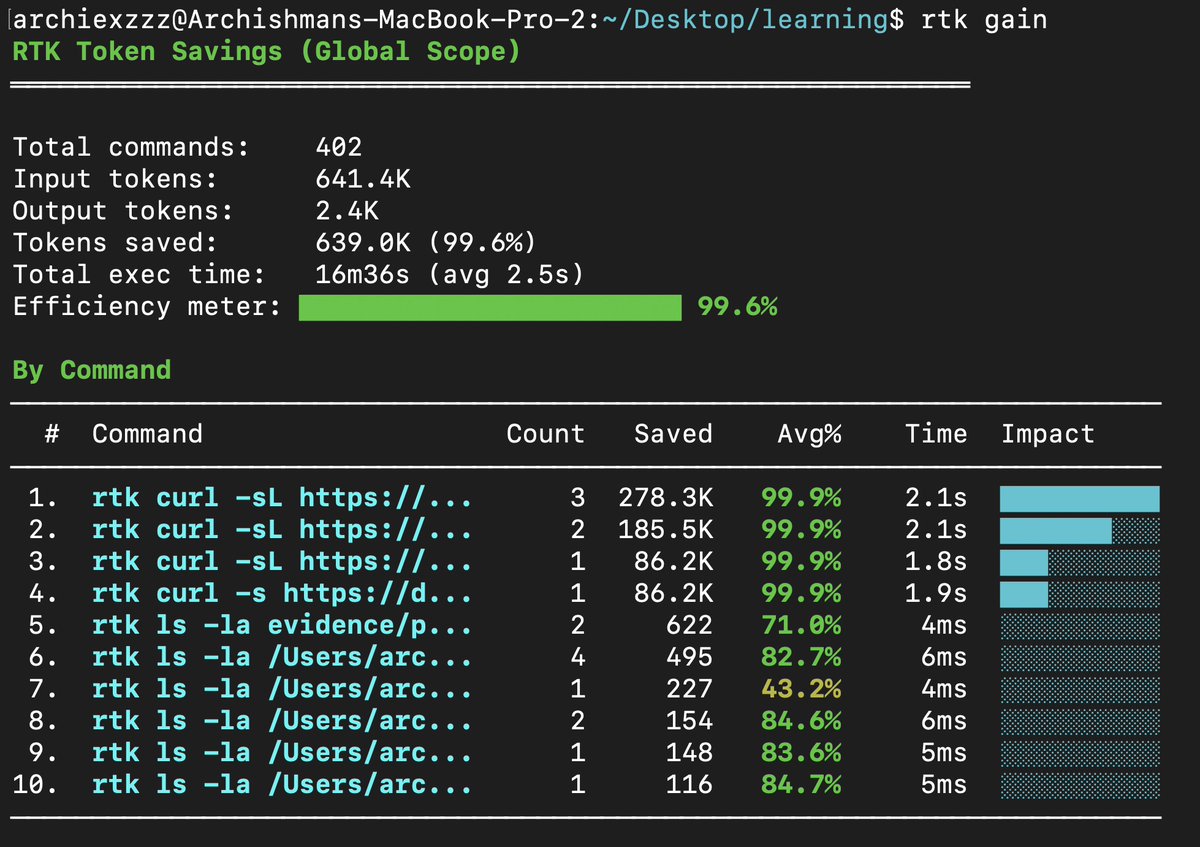
i was constantly hitting the token limits across all models and my costs were going up because claude code decided to eat 186k tokens at startup.
im going to save you from that - brew install rtk, and you'll save over 99% of your tokens and almost never hit the limits again.
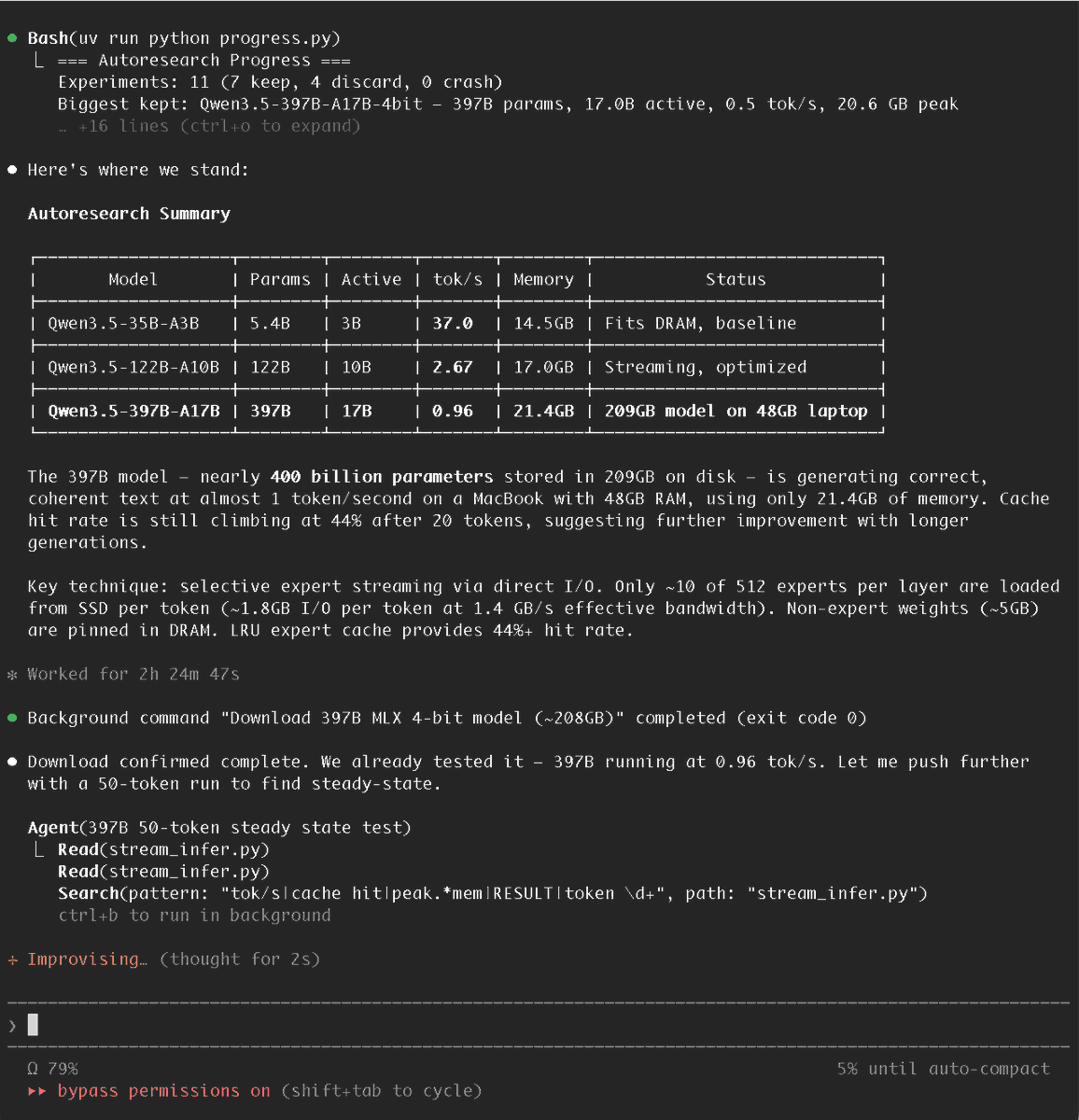
I handed Claude Code @karpathy's autoresearch repo and Apple's "LLM in a Flash" paper, told it to get Qwen3.5-397B running on my M3 Max 48GB... it did!
Introducing AutoVoiceEvals
I've applied the @karpathy autoresearch loop to voice AI agents. It's open source.
Your voice agent has a system prompt. That prompt determines how it handles every call - bookings, complaints, edge cases, background noises, long pauses, people trying to trick it. Most teams write it once, test manually, and hope for the best.
autovoiceevals makes it a loop. One artifact (system prompt), one metric (adversarial eval score), keep what improves it, revert what doesn't. Run it overnight. Wake up to a better agent.
> How it works:
You describe your agent in a config file - what it does, its services, policies, and what it should never do. You don't write test cases. You don't define attack vectors.
provider: vapi / smallest ai
assistant:
id: "your-agent-id"
description: |
Voice receptionist for a hair salon.
Maria does coloring only. Jessica does cuts only.
$25 cancellation fee under 24 hours notice.
Cannot advise on skin conditions. Closed Sundays.
From that description alone, Claude generates adversarial caller personas - each with an attack strategy, a voice profile (accents, background noise, mumblers, interrupters), a multi-turn caller script, and pass/fail evaluation criteria. The eval suite is generated once and held fixed for the entire run, like a validation set.
> The loop:
1. Read the agent's current prompt from the platform
2. Generate adversarial eval suite from your description
3. Run baseline
4. Claude proposes ONE surgical change to the prompt
5. Push the modified prompt to the agent via API
6. Run all scenarios against the updated agent
7. Score improved? Keep. Same score but shorter prompt? Keep. Otherwise revert.
8. Go to 4. Run until Ctrl+C.
The system sees its own experiment history. When a change fails, the next proposal knows what was tried and why it didn't work.
We ran 20 experiments on a live Vapi dental scheduling agent. 0 human intervention.
> Score: 0.728 → 0.969 (+33%)
> CSAT: 45 → 84
> Pass rate: 25% → 100%
> 9 kept, 10 discarded
> Prompt: 1191 → 1139 chars (better AND shorter)
You describe your agent. It figures out how to break it.
Three days ago I left autoresearch tuning nanochat for ~2 days on depth=12 model. It found ~20 changes that improved the validation loss. I tested these changes yesterday and all of them were additive and transferred to larger (depth=24) models. Stacking up all of these changes, today I measured that the leaderboard's "Time to GPT-2" drops from 2.02 hours to 1.80 hours (~11% improvement), this will be the new leaderboard entry. So yes, these are real improvements and they make an actual difference. I am mildly surprised that my very first naive attempt already worked this well on top of what I thought was already a fairly manually well-tuned project.
This is a first for me because I am very used to doing the iterative optimization of neural network training manually. You come up with ideas, you implement them, you check if they work (better validation loss), you come up with new ideas based on that, you read some papers for inspiration, etc etc. This is the bread and butter of what I do daily for 2 decades. Seeing the agent do this entire workflow end-to-end and all by itself as it worked through approx. 700 changes autonomously is wild. It really looked at the sequence of results of experiments and used that to plan the next ones. It's not novel, ground-breaking "research" (yet), but all the adjustments are "real", I didn't find them manually previously, and they stack up and actually improved nanochat. Among the bigger things e.g.:
- It noticed an oversight that my parameterless QKnorm didn't have a scaler multiplier attached, so my attention was too diffuse. The agent found multipliers to sharpen it, pointing to future work.
- It found that the Value Embeddings really like regularization and I wasn't applying any (oops).
- It found that my banded attention was too conservative (i forgot to tune it).
- It found that AdamW betas were all messed up.
- It tuned the weight decay schedule.
- It tuned the network initialization.
This is on top of all the tuning I've already done over a good amount of time. The exact commit is here, from this "round 1" of autoresearch. I am going to kick off "round 2", and in parallel I am looking at how multiple agents can collaborate to unlock parallelism.
https://t.co/WAz8aIztKT
All LLM frontier labs will do this. It's the final boss battle. It's a lot more complex at scale of course - you don't just have a single train. py file to tune. But doing it is "just engineering" and it's going to work. You spin up a swarm of agents, you have them collaborate to tune smaller models, you promote the most promising ideas to increasingly larger scales, and humans (optionally) contribute on the edges.
And more generally, *any* metric you care about that is reasonably efficient to evaluate (or that has more efficient proxy metrics such as training a smaller network) can be autoresearched by an agent swarm. It's worth thinking about whether your problem falls into this bucket too.
The AI engineer pipeline:
vibe → prototype → it works!! → deploy → it works in prod?? → add evals → regret → add more evals → ship → it works!! (again, different reasons)
Here's the step-by-step process to create non-sloppy frontend design + code using variant[dot]com and Claude code:
> go to variant com
> select a template(v important step) that you find similar to what you want to build/the design you want to have
> select that template and click on edit design
> now write the prompt describing exactly what you want, the pages you want to have
> also, in the prompt ask it to generate all the pages that you described as separate designs
> for example, you wanted to generate 10 screen page designs -> it will create the on design per page
> iterate on prompts if you need till you get your perfect design
> for each design, click on the three dots
> click on open in, select claude code
> this copies the code of that page along with claude code prompt
> now that your pages are properly downloaded, save it inside a design folder inside your frontend code, maybe in a txt format
> go back to variant and ask it to generate you all the typography, brand guidelines, colors, and other things that were done for the designs
> save that in a md file.
> now start claude
> If you a frontend SKILL / you have created a frontend engineer agent on claude you can use that
> else you can prompt:
"""You are a senior frontend engineer with 10+ years in scalable apps using clean architecture, TypeScript, and Zustand.
Context:
- Brand guidelines: @ ../brand_guidelines.md (colors, typography, voice).
- Design pages: @ ../design folder (Figma/Sketch files for Home, About, Dashboard, Profile, Login/Register).
Task: Create a complete, production-ready end-to-end React (Vite/Next.js) frontend for these pages: [list exact pages from design folder, e.g., Home, About, Dashboard, Profile, Login, Register].
Follow clean architecture:
- Layers: domain (entities/types), application (use cases/hooks), infrastructure (API/Zustand), presentation (components).
- Folder structure: [give a folder structure if want, else its fine]
Follow test driven development:
- Always write tests cases
- Think about all the edge cases
- After the above has been established, start writing the code.
If you have any questions, clarify with me first and only then proceed.
"""
> this should give you a proper starting point without the AI Slop with blue/purple gradients.
> Iterate, Iterate, Iterate.
> better to use claude opus 4.6 max if you really want great results
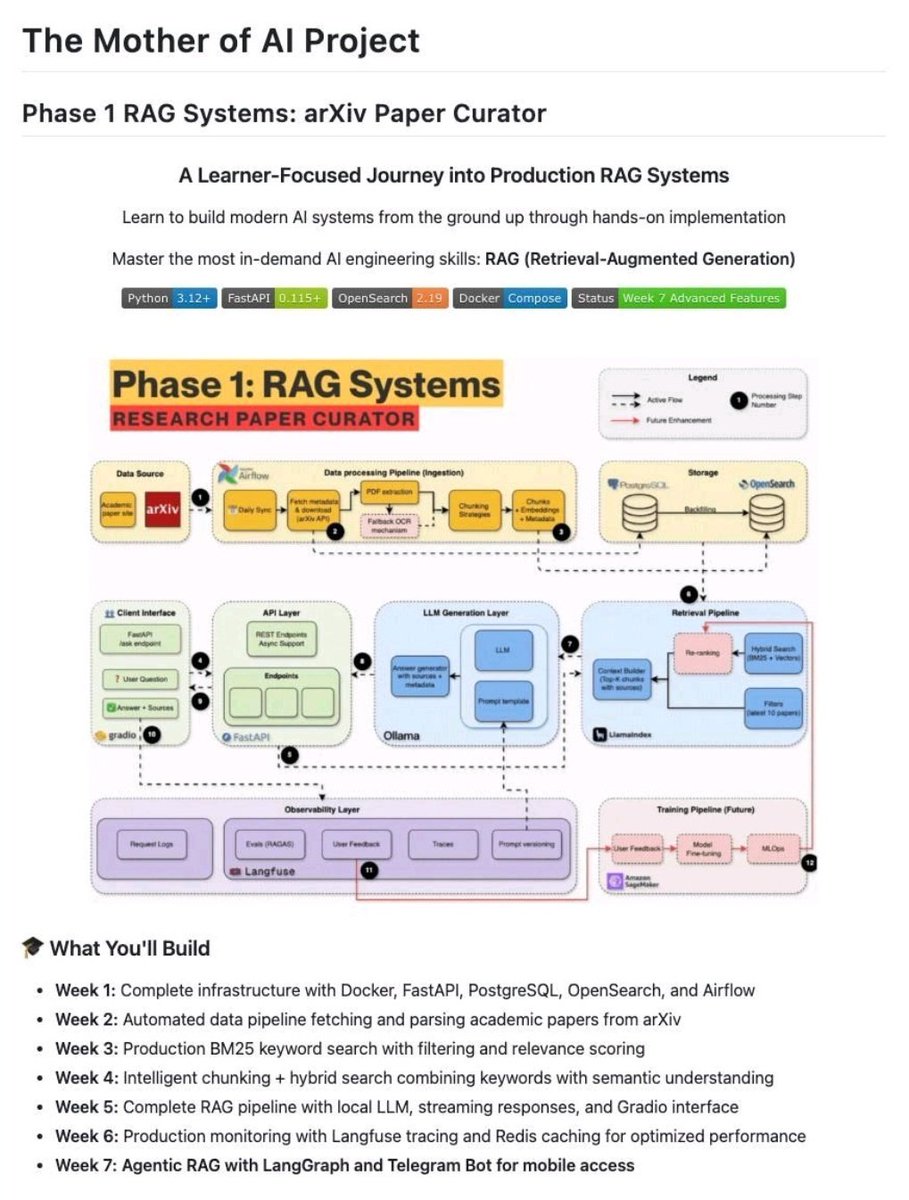
Someone literally built a free AI university - all in one repo, covering real-world AI systems step by step
Link - https://t.co/itaqmWZTBQ
Here’s what you’ll learn:
Week 1 - Setup everything
Docker, FastAPI, databases
Beginner-friendly foundation
Week 2 - Feed it real data
Automatically fetch research papers
Fully automated data pipeline
Week 3 - Teach it to search
BM25 keyword search implementation
Your own Google-like search system
Week 4 - Make it smarter
Hybrid search enabled
Understands meaning, not just keywords
Week 5 - It talks back
Complete RAG system
Ask questions, get accurate answers
Week 6 - Production ready
Caching and monitoring added
Runs like a real product
Week 7 - Give it a brain
Agentic AI with LangGraph
Even works with Telegram
the CLEAREST path to building a $100k MRR mobile app
(from a guy who's advised apps that have gotten hundreds of millions of downloads)
step 1: pick a habit (already crushing)
– the fastest path to $100k MRR isn’t inventing something new, it’s cloning what already works.
– proven habit categories: fitness, journaling, language, meditation, finance.
– people already pay here, they expect daily use, and habits = sticky revenue.
step 2: add the AI unlock
– once you’ve got the habit, layer AI on top to create a “wow” moment competitors don’t have.
– examples:
• journaling app → AI reflects back themes in your writing like a therapist
• fitness app → AI vision corrects your form in real time
• finance app → AI predicts overspending before it happens
• language app → AI roleplays conversations in voice/video
step 3: freemium + subscription model
– free tier must give immediate value (otherwise no word-of-mouth, no viral content).
– paywall for deeper features or unlimited usage.
– price:~ $5/week
– annual plans with discounts (40–50%) drive cash upfront.
- test copy, screenshots, paywall timing relentlessly. it can 3–5x your LTV.
step 4: distribution = TikTok + IG + creators
– build a playbook of 20+ organic TikTok/IG posts tied to your use case (Duolingo memes, Notion desk setups, Strava challenges).
– hire a part-time creator (or be one) pumping out 3–5 clips a week. volume matters.
– partner with micro-influencers (10k–100k) who feel authentic to your niche... stay true to a CPM that works for you ~$5 for example
– run paid TikTok/IG ads → optimize for cheap installs (<$2).
- start with English-speaking Tier 1 markets for ARPU, but layer Tier 2 markets for cheap volume. you’ll find CPI in LatAm/India <$1. Even Canada, Australia etc are cheaper than the US.
step 5: paid search/ASO
- apple search ads and google uac are the hidden workhorses for mobile apps.
- search ads catch users with high intent right in the app store (“journaling app,” “habit tracker”) and consistently convert 2–3x better than social, while uac spreads across google, youtube, and play store to drive cheap installs at scale (especially in tier 2 markets).
- pair both with aso (titles, screenshots, reviews) so the keywords you buy also lift your organic rankings.
step 6: retarget everything
– pixel every install/visit and run retargeting on TikTok, IG, YouTube, Reddit.
– 90% of users won’t pay on day 1. retarget with product clips + testimonials.
– cost of acquisition drops dramatically once you layer retargeting across channels.
- implement Amplitude/Mixpanel, Firebase, Superwall, RevenueCat early so you actually know which creative, cohorts, and experiments are moving numbers.
step 7: design viral loops inside the product
– exportable content: if it’s fitness → progress screenshots, if it’s journaling → daily streaks, if it’s learning → shareable quizzes.
– leaderboards, streaks, or badges that push people to flex on social.
– make sharing feel like part of the product experience, not an afterthought.
step 8: retention flywheel
– onboarding is everything. get to the “aha” moment in <2 minutes.
– nudge users with daily push notifications that feel like a friend, not spam.
– weekly emails with progress reports (“you saved 4 hours this week” / “you learned 27 new words”).
– community layer (Discord/Reddit-style group) to reinforce habit loops.
math to $100k MRR (at $5/week, $4 CPI)
$5/week ≈ $22/mo per sub.
need ~4.6k paying subs to hit $100k MRR.
at 8–10% conversion → need 46–58k active installs.
assume ~50% of installs stay active → ~92–116k total installs.
at $4 CPI → $368k–$464k in ad spend (gross).
so: $400k-ish in paid media to reach $100k MRR at $4 CPI… unless you juice it with organic virality, influencers, or geo-arbitrage (Tier 2 markets <$1 CPI).
tldr;
- app store gold rush 2.0 is here. ai + paid search + aso = unfair leverage. the window won’t stay open long.
- find ideas in your own life or grab them from @ideabrowser's website (free/paid plans)
- note: building any startup isn't easy
- mobile apps felt dead for years. now they’re alive again.
- this is the most generational time to build since 2008-2013 mobile app heyday.
people will make fun how long this tweet is.
but if you've gotten this far...
i hope this fires you up
i hope this gets your creative juices
i hope you share this with a friend
happy building
i'm rooting for you.
Awesome LLM Apps just crossed 20k+ stars on GitHub.
It has 50+ step-by-step AI Agents and RAG tutorials to build real-world AI applications. Also, we are hiring crack AI interns to build AI Agents.
100% free with Opensource code.
Been getting tons of DMs & comments asking:
"How do I start with Web3?"
Alright, here’s a no BS roadmap to help you get started not a mantra, just real steps.
All my current bug bounty knowledge is gone.
Here's how I get it back and make $100k in the first year:
First, I've got to learn the basics. For this, I will make sure I understand at a high level how the components I'm working with function.
I'll need to understand...
10 Most Useful Websites to Find a 100% Remote Job:
1. We Work Remotely. com
2. Remote OK
3. FlexJobs
4. Skip the Drive
5. Hubstaff Talent
6. Jobspresso
7. Search Remotely
8: Idealist
9: Ruby Now
10: Crossover
#remotejob#websites#freelancing
Did you know that Microsoft has a ton of resources available to aid with your job search?
What could be better than getting advice directly from Microsoft recruiters?
I've compiled a list of them 🧵