Think Like a Builder, Not Like a Prompt
You tell your coding agent:
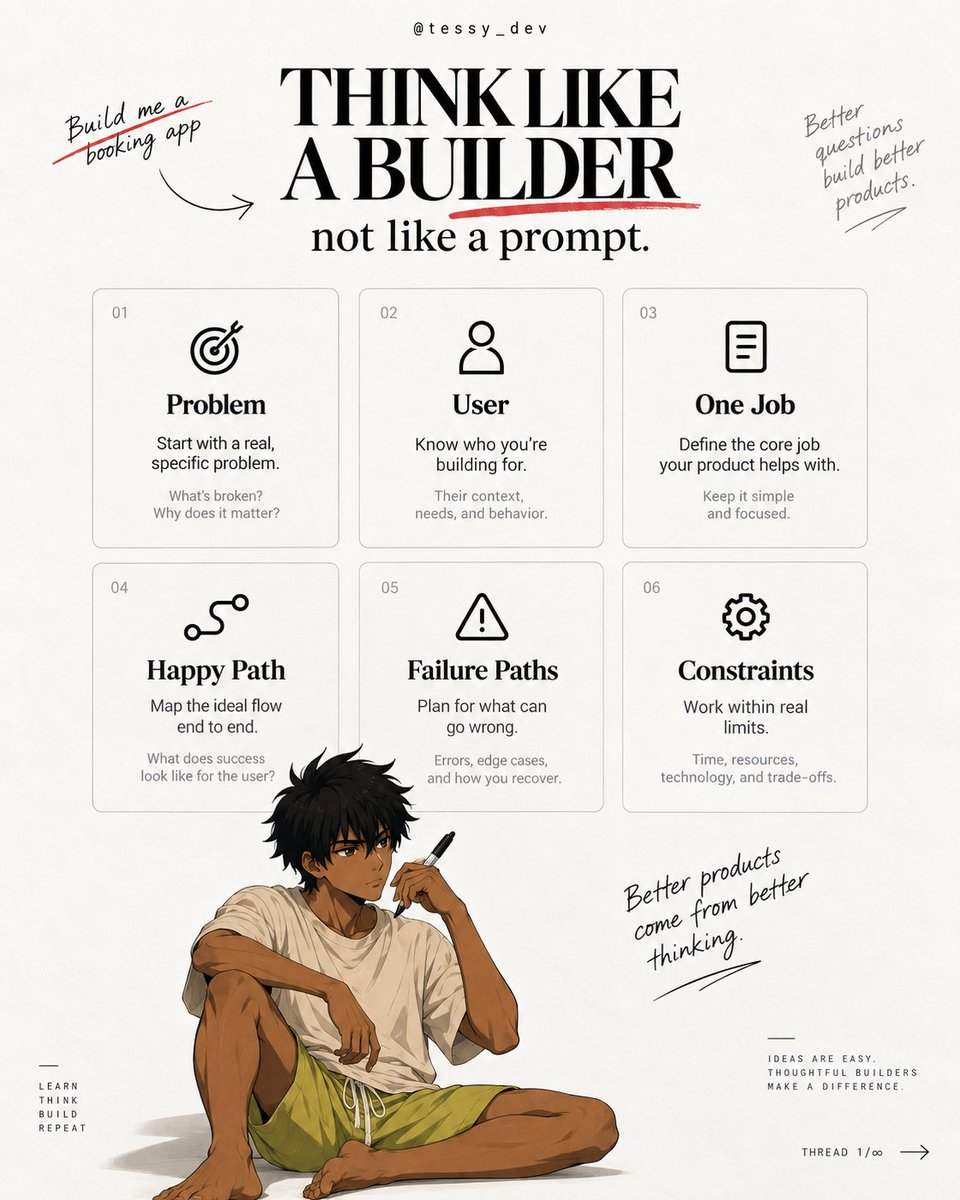
“Build me a booking app”
And it does.
Nice UI.
Clean dashboard.
Cute Colors
Everything looks like it works.
Then when a real user touches it that's usually where the cracks start showing.
The problem isn’t always the AI.
Sometimes, you just didn’t give it enough to think with.
And this is the part I think we need to talk about more.
Before you touch Cursor/Claude/Codex, before you start picking a stack, before you start asking your agent to generate files, you need to think like a builder.
When I’m thinking about a product, I’m not starting with:
Next.js or React?
Supabase or Firebase?
Flutterwave or Paystack?
That comes later.
I’m starting with:
Why should this exist?
Who is it actually for?
What problem am I solving?
What are people already using?
Why would they switch?
What do they gain?
And what do I gain from building it?(I must build a business)
That’s where the product starts.
Take something simple:
“Booking software for freelancers.”
Sounds clear, right? But it isn’t.
Which freelancers?
Is it designers, consultants, developers, coaches
What are they using today?
Calendly?, WhatsApp?, Google Meet?
What frustrates them about those tools?
Who else is solving this already?
What did those competitors get right?
What are users still complaining about?
That’s the stuff I want to know before I ask AI to build anything. Because if I don’t answer those questions, the AI will.
And that’s the dangerous part.
It will happily invent the missing product decisions for you.
Then I move to the business side.→
Who pays?
Is it the freelancers, the client or a company?
Is it B2B or B2C?
Subscription or transaction fee?
And probably the most ignored question:
How do people even find this product?
Because building something useful is one problem.
Getting people to care about it is another.
Then we finally get into the experience.
Let’s say the user opens a link, sees an available 30-minute slot, enters their details, books, and both sides get a confirmation.
Great.
That’s the happy path.
Now break it.
What if 4 people choose the same slot?
What if someone submits twice?
What if the booking succeeds but the email doesn’t send?
What if payment goes through but the booking fails?
What if someone needs to cancel?
What if support needs to step in?
That’s where you stop building a demo and start building a product.
And there’s still more actually.
How does the admin manage users?
Who can see what?
What happens when a third-party service goes down?
How do you track errors?
How do you protect user data?
How easy is this thing to maintain?
What happens when 100 users become 10,000?
You don’t need to overengineer everything from day one.
But you do need to think about what can break before it breaks.
Then, and only then, I care about the stack.
What technology actually fits the product?
What belongs on the frontend?
What belongs on the backend?
What should live in the database?
Which services are worth integrating?
What should I build now?
What should I leave for later?
The technology should follow the product.
Not the other way around.
That’s really the point.
Before I prompt, I want clarity around:
the problem, the user, the market, the value, the business model, the user flow, the failure paths, the operations, the security, and the scale.
I research.
I ask questions.
I use AI to challenge the idea.
I compare options.
I make decisions.
Then I prompt.
Because the less thinking you do before the prompt, the more thinking you hand over to the model.
And the model does not understand your product the way you do.
So yeah → “Build me a booking app. Make it clean.” might get you software.
But thinking like a builder is what gives you a product.
Lily CLI can help you explore and understand files in your current project.
You can ask questions about what a file does, how different parts fit together and where to look when you're trying to understand an unfamiliar project.
Whether you're exploring an unfamiliar project, trying to understand an error or working through a new idea, having the right assistance can make the process easier.
Lily CLI brings AI assistance into your terminal
Explaining your entire project every time you need help can get tiring.
Lily CLI works within your current project environment, giving you a way to interact with the project directly from your terminal.