If you want to learn AI infrastructure in 2026,
This is for you 👇
When it comes to running AI/ML workloads on Kubernetes, Kubeflow is the foundation platform.
When the project started, it was primarily built as an MLOps platform for Kubernetes to build and manage traditional ML pipelines.
Fast forward to 2026 and the platform has changed a lot.
It is no longer just an MLOps platform.
It has become a cloud-native AI platform for building and operating GenAI, LLMOps, Agentic AI, distributed AI training, and fine-tuning foundation models.
In our newsletter, we covered the following.
- Understand the Kubeflow stack
- Learn how Kubeflow Pipelines work
- Explore the KFP architecture and execution flow
- Creating a KFP pipeline from scratch on Kubernetes
- A look into Cloudflare’s in-house MLOps platform
and more..
𝗥𝗲𝗮𝗱 𝗶𝘁 𝗛𝗲𝗿𝗲: https://t.co/HICjMzsnWJ
♻️ If you find it useful, share it with fellow DevOps and Cloud Engineers.
#devops #MLOps #kubernetes
What if your entire data stack lived in ONE platform?
No more tool-hopping.
No more broken pipelines.
No more duplicated data fighting itself.
Microsoft Fabric just made that real.
Here's the full 7-layer architecture — and why it changes everything 👇
🔹 1. Real-Time + Batch Data
Event Streams AND structured datasets.
Both. Together. One ecosystem.
🔹 2. Data Ingestion Layer
Pipelines. Dataflows. Copy Jobs.
Data from every source — flowing in seamlessly.
🔹 3. Unified Storage (OneLake)
↳ No silos.
↳ No duplication.
↳ One centralized lake for everything your org produces.
This alone replaces 3–4 tools most teams are duct-taping together.
🔹 4. Data Preparation & Transformation
Notebooks + Dataflows = clean, structured, ready-to-use data.
No more raw data chaos.
🔹 5. Analytics & AI
SQL queries → ML models → AI pipelines.
All in one place. No context switching.
🔹 6. Visualization & Insights
Dashboards. Reports. Real-time monitoring.
Decision-makers get answers — not data dumps.
🔹 7. Integration Layer
Teams. Power BI. Copilot. Azure.
Everything your org already uses — now connected.
💡 Why this actually matters:
The #1 problem in enterprise data isn't technology.
It's fragmentation.
Your ingestion tool doesn't talk to your storage.
Your storage doesn't talk to your analytics.
Your analytics don't talk to your AI.
Fabric breaks that wall down.
One platform. One governance model. One source of truth.
If you understand this architecture —
you understand where data is heading.
Save this - it's your Microsoft Fabric cheat sheet.
Is your team on Fabric yet? What's holding you back?
𝗕𝗲𝗰𝗼𝗺𝗲 𝗯𝗲𝘁𝘁𝗲𝗿 𝗮𝘁 𝗔𝗜 𝗶𝗻 𝗷𝘂𝘀𝘁 𝟭 𝗺𝗶𝗻𝘂𝘁𝗲 𝗮 𝗱𝗮𝘆. 𝗝𝗼𝗶𝗻 𝗺𝘆 𝘄𝗲𝗲𝗸𝗹𝘆 𝗻𝗲𝘄𝘀𝗹𝗲𝘁𝘁𝗲𝗿 𝘄𝗵𝗲𝗿𝗲 𝗜 𝗱𝗼𝗰𝘂𝗺𝗲𝗻𝘁 𝘁𝗵𝗲 𝗿𝗲𝗮𝗹-𝘄𝗼𝗿𝗹𝗱 𝗷𝗼𝘂𝗿𝗻𝗲𝘆 𝗼𝗳 𝗔𝗜 𝘁𝗿𝗮𝗻𝘀𝗳𝗼𝗿𝗺𝗮𝘁𝗶𝗼𝗻.
👉 𝗦𝗶𝗴𝗻 𝘂𝗽 𝗳𝗿𝗲𝗲 now → https://t.co/Kj8zW95H9X
Follow @AiswaryaVenkit1 for more such insights!!
35. Your application can't reach the backend. 🚨
Security Group looks fine.
NACL looks fine.
Routes look fine.
So what actually happened?
Check VPC Flow Logs.
They can give you evidence about the traffic:
→ Source IP
→ Destination IP
→ Port / Protocol
→ Bytes / Packets
→ ACCEPT / REJECT
For example:
"10.0.1.10 → 10.0.2.20:443 → REJECT"
Now you know the traffic was rejected.
Then investigate:
→ Security Groups
→ NACLs
→ Route Tables
→ Other network configuration
But remember:
Flow Logs don't block traffic.
They record what happened.
Simple mental model:
VPC Flow Logs = network evidence 🔍
Don't guess.
Check the flow.
Kubernetes User Namespaces ⚡
It is a security feature that maps user and group IDs inside a container to a different set of IDs on the host (Rootless Isolation)
Here is the key idea.
A process running as root (UID 0) inside the container runs as an unprivileged user (eg, UID 100000) on the host.
Without user namespaces, when a container runs as root, it uses the same root identity as the host.
So if an attacker breaks out of the container, they get full host privileges.
We have published a hands-on guide covering the following.
- What are User Namespaces
- How the kernel does the root-to-non-root user mapping
- What changes when you set hostUsers: false
- Limiting host UID ranges using /etc/subuid file
- Hands-on deployment to understand User Namespace
- User Namespace limitations
𝗥𝗲𝗮𝗱 𝗶𝘁 𝗛𝗲𝗿𝗲: https://t.co/F6HmkliHvS
Have you tried this feature yet?
♻️ PS: Repost and share this with the community!
#devops #kubernetes
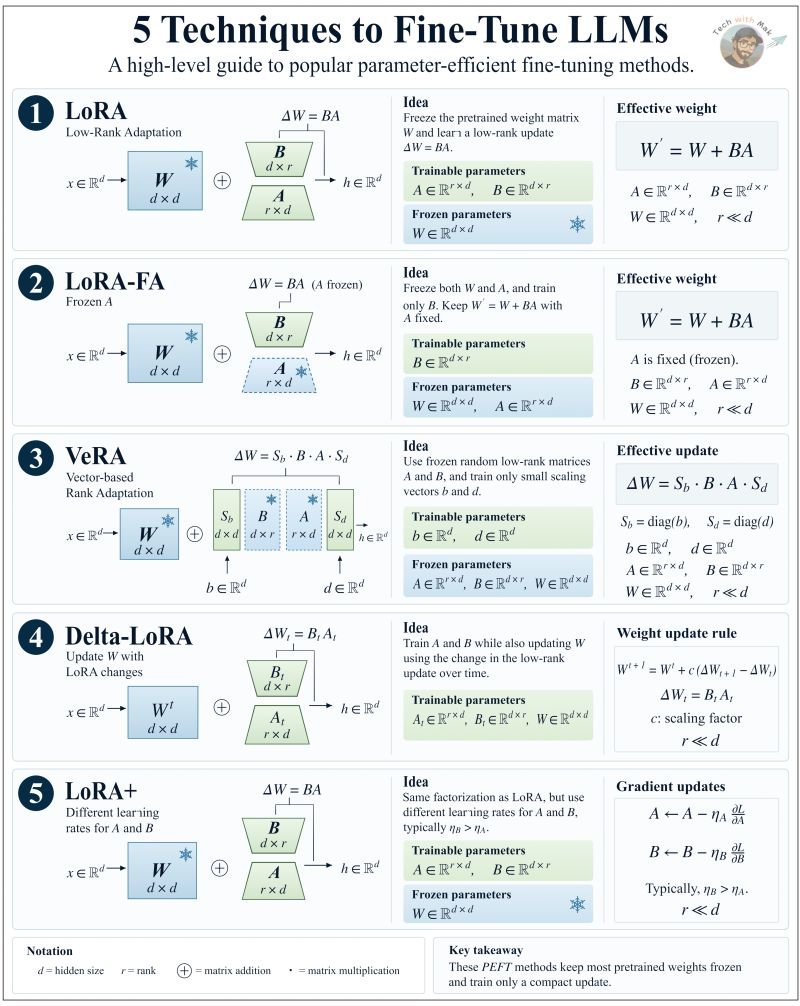
Everyone is fine-tuning LLMs.
Almost nobody understands what is actually being updated inside the model.
Here are 5 techniques that change how you think about model adaptation, and what each one is actually doing to the weights:
1./ LoRA - Learn the update, not the weights
The pretrained weight W is frozen. Completely untouched.
Instead of updating W directly, two small matrices are trained =>
A ∈ ℝʳˣᵈ and B ∈ ℝᵈˣʳ, where r ≪ d
The weight update is: ΔW = BA Effective weight: W' = W + BA
The entire adaptation happens in a tiny low-rank space. W never changes.
2./ LoRA-FA - What if we freeze even more?
Same structure as LoRA. One change.
A is frozen alongside W. Only B is trained. Effective weight: W' = W + BA (A is fixed)
Half the trainable matrices of LoRA. Same core idea. Fewer parameters.
3./ VeRA - What if the matrices don't need to be learned at all?
This is where it gets interesting.
A and B are both frozen, and randomly initialized. What gets trained are just two tiny scaling vectors =>
b ∈ ℝʳ and d ∈ ℝʳ
Instead of learning the low-rank matrices themselves, VeRA keeps them frozen and learns small scaling vectors that modulate their contribution.
Initialization => b = 0, d = 1
You're not learning matrices. You're learning how to scale them.
One of the most parameter-efficient techniques on this list.
4./ Delta-LoRA - What if W itself learns from the low-rank updates?
This one is fundamentally different.
Unlike standard LoRA, the base weight W is not fully frozen. It is updated through low-rank delta propagation at every step =>
W^(t+1) = W^t + c(B_(t+1)A_(t+1) − B_t A_t)
Where c is a scaling factor.
A and B are trainable. W evolves, but guided entirely by low-rank changes.
5./ LoRA+ - Same structure. Smarter learning rates.
Identical to LoRA, freeze W, train A and B.
One change => B is assigned a larger learning rate than A. η_B > η_A
A ← A − η_A · ∂J/∂A B ← B − η_B · ∂J/∂B
A small optimization change that can make LoRA training more effective.
The core idea running through all five:
You do not always need full fine-tuning to adapt a model.
LoRA updates two matrices.
LoRA-FA updates one.
LoRA+ updates two at different speeds.
Delta-LoRA lets W evolve - guided by low-rank deltas. VeRA updates two vectors.
Same goal. Five different answers to the same question:
=> What is the minimum we actually need to learn?
That is the core idea behind parameter-efficient fine-tuning.
And now you know what is actually happening inside the model.
Happy Learning!!!
I connected to my Ubuntu EC2 instance through SSH, and yesterday I went beyond simply accessing the server.
I explored user identities and administrative privileges, practised file permissions with `chmod` and `umask`, updated the Ubuntu system, and rebooted to apply a new kernel.
I also examined EC2 monitoring metrics, including CPU utilisation, network traffic and instance status checks.
Using Amazon CloudWatch, I reviewed EC2 performance metrics and instance health. With AWS CloudTrail, I learned how AWS API activity is recorded, including actions such as launching instances and modifying security configurations.
Next on my AWS roadmap: Storage…….moving into Amazon S3 and understanding storage configurations, access controls and security.
@awscloud@AWS_Edu
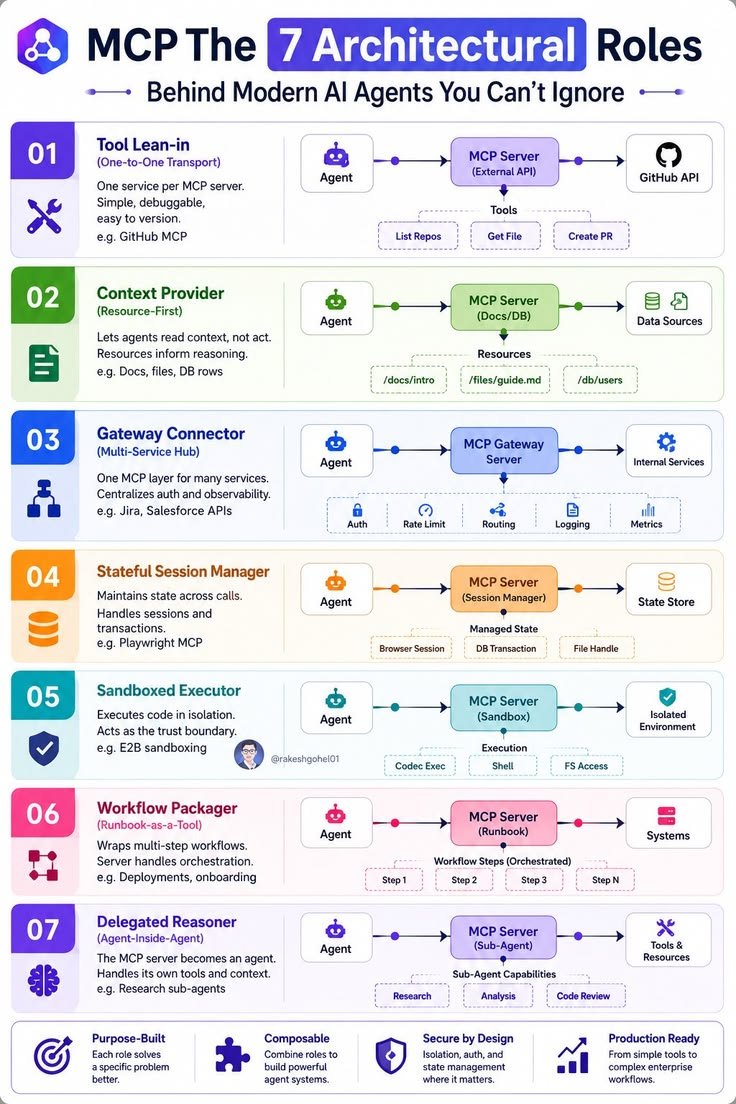
𝗠𝗖𝗣: 𝟳 𝗔𝗥𝗖𝗛𝗜𝗧𝗘𝗖𝗧𝗨𝗥𝗔𝗟 𝗥𝗢𝗟𝗘𝗦 𝗕𝗘𝗛𝗜𝗡𝗗 𝗠𝗢𝗗𝗘𝗥𝗡 𝗔𝗜 𝗔𝗚𝗘𝗡𝗧𝗦 🤖
MCP is more than just a way to connect AI models with external tools.
It provides a flexible architecture that allows AI agents to access data, execute actions, manage workflows, and collaborate with other agents.
Understanding these 7 architectural roles helps you design more powerful and scalable AI systems.
Let's break them down.
1. Tool Lean-in — Direct Tool Access
Connects an AI agent to a specific external service through an MCP server.
Examples:
- GitHub API
- Repository management
- File retrieval
- Creating pull requests
Best for simple, direct tool integrations.
2. Context Provider — Access to Knowledge
Provides agents with relevant information from external resources without necessarily executing actions.
Examples:
- Documents
- Files
- Database records
Best for knowledge retrieval and context-aware AI applications.
3. Gateway Connector — One Hub, Multiple Services
Connects multiple services through a centralized MCP gateway.
It manages authentication, routing, rate limits, logging, and monitoring.
Best for enterprise systems with multiple integrations.
4. Stateful Session Manager — Maintain Session Context
Maintains state across multiple interactions and tool calls.
Examples:
- Browser sessions
- Database transactions
- File handles
Best for workflows that require continuity across multiple operations.
5. Sandboxed Executor — Secure Code Execution
Allows AI agents to execute code inside isolated environments.
Examples:
- Code execution
- Shell commands
- File system operations
Best for secure experimentation and controlled execution.
6. Workflow Packager — Automate Multi-Step Processes
Packages multiple actions into a reusable workflow that an agent can trigger.
Examples:
- Software deployment
- Employee onboarding
- Multi-step business automation
Best for repeatable and complex workflows.
7. Delegated Reasoner — Specialized AI Sub-Agents
Uses an MCP server as a specialized agent that can handle its own tools, context, and tasks.
Examples:
- Research agents
- Analysis agents
- Code review agents
Best for multi-agent systems and complex problem-solving.
𝗪𝗵𝘆 𝗗𝗼 𝗧𝗵𝗲𝘀𝗲 𝟳 𝗥𝗼𝗹𝗲𝘀 𝗠𝗮𝘁𝘁𝗲𝗿?
These architectural patterns help developers build AI systems that are:
- More modular and scalable.
- Easier to integrate with external services.
- More secure and manageable.
- Capable of handling complex workflows.
- Ready for multi-agent collaboration.
The real value of MCP isn't just connecting tools. It's creating a structured ecosystem where AI agents can access resources, execute tasks, and work together.
Follow @AamirAnsar94694 for more AI tools & tech updates.
#AI #MCP #AIAgents #AgenticAI #AIArchitecture #Automation #ArtificialIntelligence #Tech
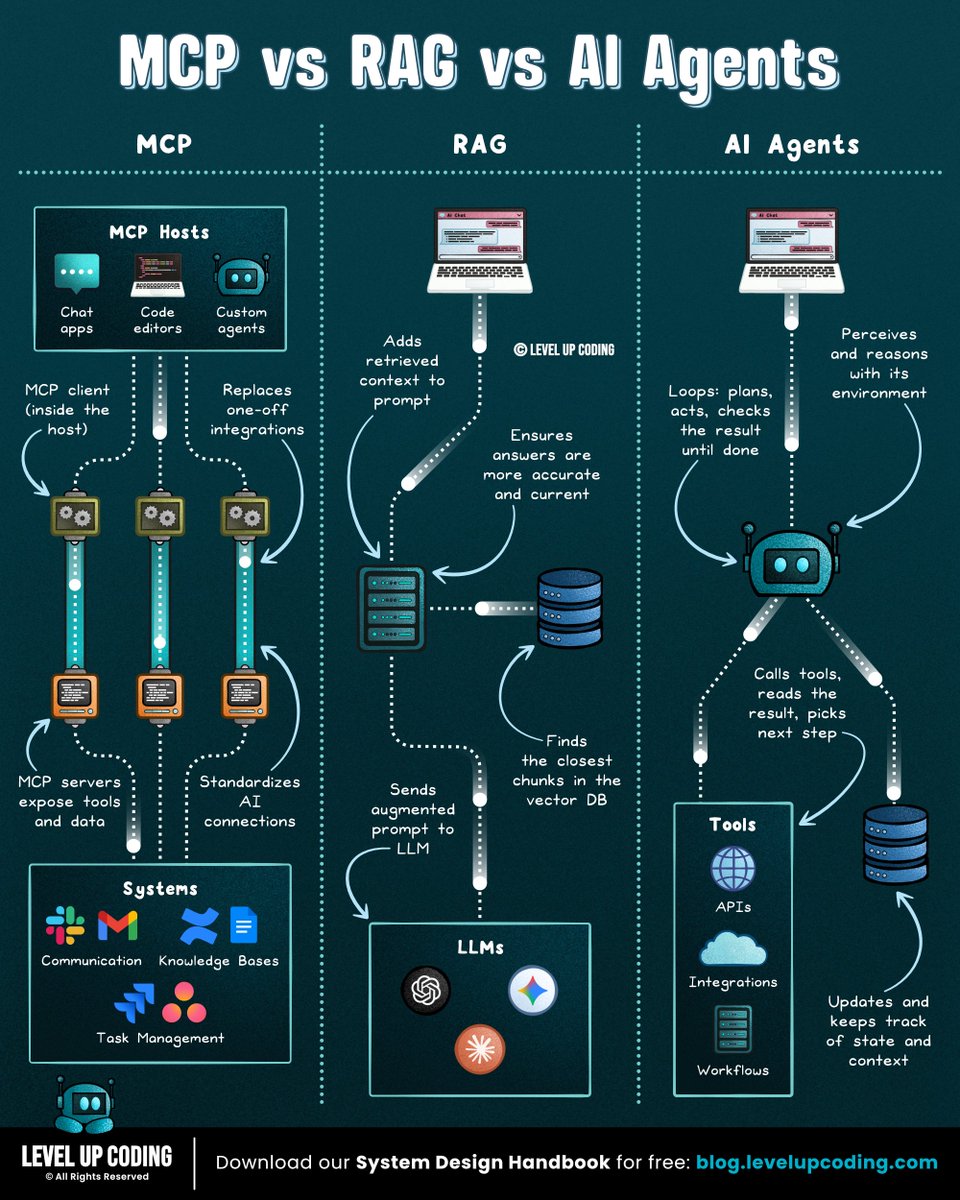
𝗠𝗖𝗣 𝘃𝘀 𝗥𝗔𝗚 𝘃𝘀 𝗔𝗜 𝗔𝗴𝗲𝗻𝘁𝘀.
𝗠𝗖𝗣 𝗶𝘀 𝘁𝗵𝗲 𝗰𝗼𝗻𝗻𝗲𝗰𝘁𝗶𝗼𝗻 𝗹𝗮𝘆𝗲𝗿. It gives AI systems a standard way to connect to external systems and capabilities. MCP servers expose tools for querying databases, calling APIs, or taking actions, without requiring custom integrations for every client. But it handles connectivity, not retrieval.
That's where 𝗥𝗔𝗚 comes in. It searches your docs at query time, pulling relevant chunks into the prompt so answers can draw from your data. Keeping it current means updating an index, not retraining the model. In a basic RAG pipeline, the flow is straightforward: retrieve, then answer.
Now with 𝗔𝗜 𝗔𝗴𝗲𝗻𝘁𝘀, the model runs in a loop: plan a step, call a tool, read the result, repeat until the goal is met. That handles multi-step tasks, at the cost of more latency, tokens, and failure points.
So the choice comes down to the gap you're closing: access to systems, knowledge from your data, or action over many steps.
But executing a task successfully doesn't necessarily mean it's still the right task.
Priorities shift, budgets change, and teams move between projects. Both humans and AI agents can keep executing work that no longer aligns with the bigger plan.
The problem is that strategy, capacity, spend, and execution data often live in different systems. By the time a quarterly review reveals the gap between plan and reality, time and budget have already been spent.
Catching that drift early means continuously connecting what was planned with the work actually happening, across both human teams and AI agents.
Tempo Loop brings together time, capacity, spend, and execution data in one unified view across human and AI-agent work.
It answers a simple question without chasing status updates: Are we still working on the right things?
When something drifts, Loop identifies the gap, recommends corrective actions with tradeoff context, and orchestrates approved changes back into the systems teams already use, like Jira.
𝗔𝗴𝗲𝗻𝘁𝘀 𝗹𝗼𝗼𝗽 𝗼𝗻 𝘁𝗮𝘀𝗸𝘀. 𝗧𝗵𝗶𝘀 𝗼𝗻𝗲 𝗹𝗼𝗼𝗽𝘀 𝗼𝗻 𝗽𝗿𝗶𝗼𝗿𝗶𝘁𝗶𝗲𝘀.
𝗦𝗲𝗲 𝗵𝗼𝘄 𝗧𝗲𝗺𝗽𝗼 𝗟𝗼𝗼𝗽 𝘄𝗼𝗿𝗸𝘀 → https://t.co/gG53bFKIYa
What else would you add?
——
♻️ Repost to help others learn AI.
🙏 Thanks to @TempoHQ for sponsoring this post.
➕ Follow me ( Nikki Siapno ) to improve at AI and system design.
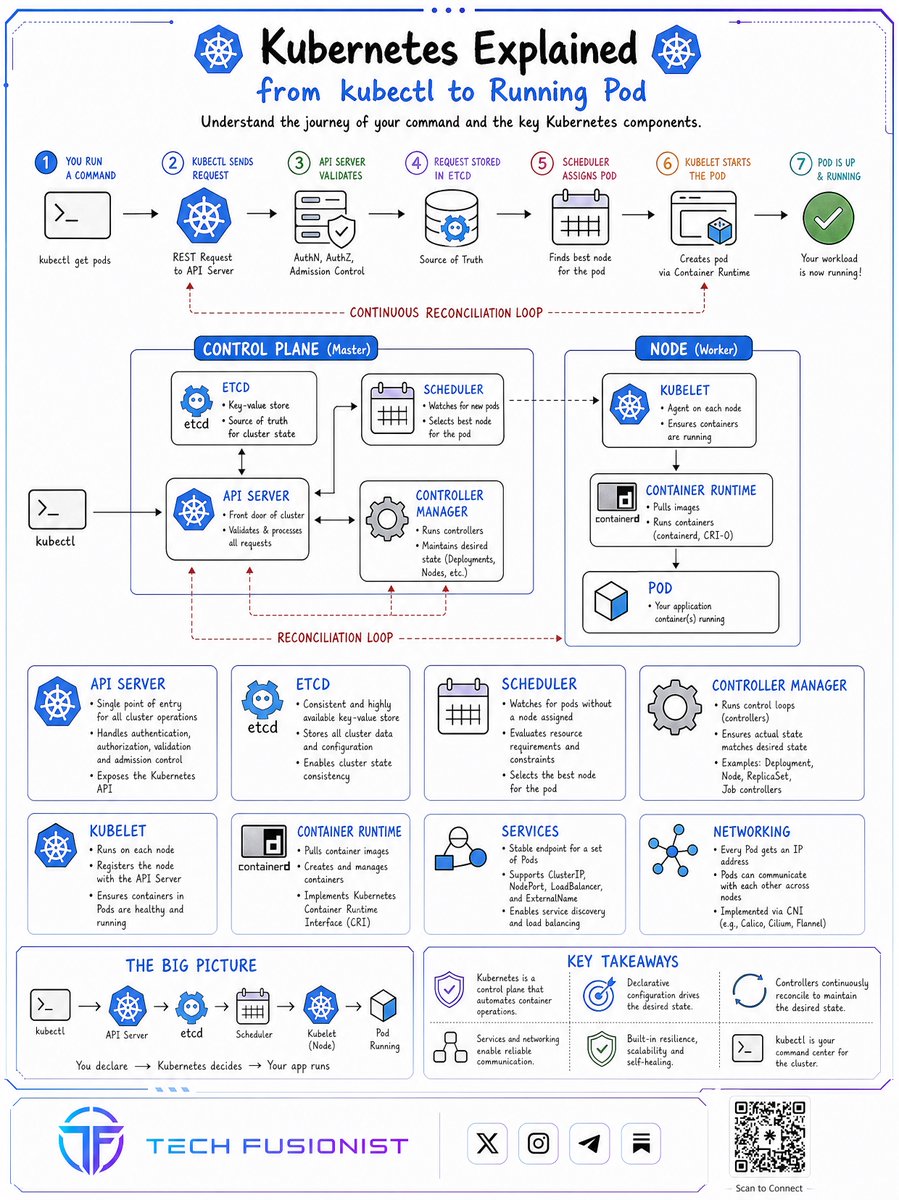
Kubernetes visually explained.
Want to learn more? Deep dive is available in my newsletter.
PS: System design is must for engineers. Download my 218 page System Design Handbook for free and join 35,000+ engineers who get my free weekly newsletter → https://t.co/2dn91uoVrJ
AI Agents are becoming one of the most valuable skills to learn in 2026.
But the learning path can get confusing fast.
LangGraph, MCP, A2A, memory, agent SDKs, ADK, security, orchestration. There is a lot to understand before you can build agents that actually work.
So I put together 9 videos that cover the concepts worth learning first.
You’ll learn:
→ How AI agents actually work
→ How to build your first agent
→ LangGraph for stateful agent workflows
→ OpenAI Agents SDK fundamentals
→ Model Context Protocol (MCP)
→ Agent-to-Agent communication with A2A
→ How memory works inside agentic systems
→ Google’s Agent Development Kit (ADK)
→ Debugging, reasoning and AI agent security
The goal is not to watch endless tutorials.
It is to understand the architecture, build small projects, connect tools, manage state and gradually move toward production-ready agent systems.
If you're an AI engineer, developer, data professional or simply trying to understand where agentic AI is heading, these resources can give you a solid starting point.
Comment “Links” and I’ll send you all 9 videos.
Which AI Agent concept are you learning right now?
#AIAgents #AgenticAI #AIEngineering #LangGraph #MCP