🚨 73 Microsoft GitHub repos just went dark.
They were hit by Miasma, a self-replicating supply chain attack spreading through trusted open-source channels.
Azure and MicrosoftDocs repos were among those impacted.
Read this: https://t.co/J1Pyrr4mlR
Conditional Access policies won’t stop token theft—and standard MFA won't fix it either.
When teams roll out Microsoft Authenticator push codes or SMS, some assume the cloud perimeter is safe. But sophisticated actors have moved completely past brute-forcing passwords. They use Adversary-in-the-Middle (AiTM) phishing frameworks like Evilginx.
The attack flow is clean: The proxy site mirrors your Entra ID login page. The user enters credentials and solves the genuine MFA challenge.
Once Entra ID validates the session, it issues an ESTSAUTH session cookie. The malicious proxy server snatches that cookie before passing it back to the victim’s browser.
The Result: The attacker drops that stolen cookie into their own machine. Because the session has already passed the MFA verification loop, they gain instant access to the mailbox or cloud apps. They bypass standard Conditional Access rules seamlessly.
, when an identical session jumps between network or device contexts
Advanced features like Continuous Access Evaluation (CAE), Token Protection session controls, or strict device compliance rules can mitigate this. But they are rarely part of an organization’s "default" browser-based setups.
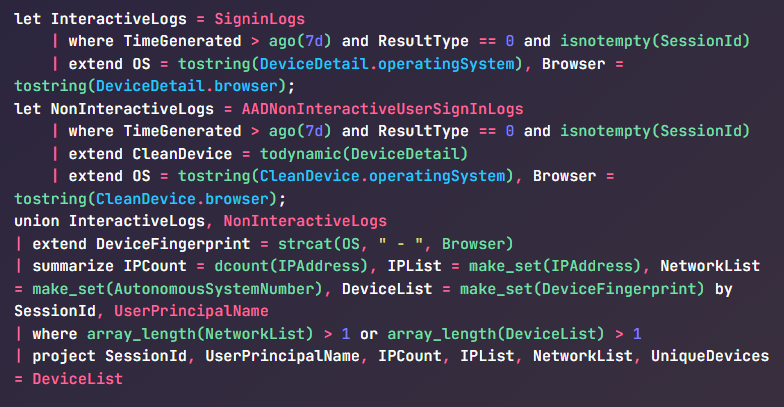
Because a stolen token completely bypasses the sign-in loop, you cannot hunt for it by looking for failed logins. You have to hunt for Session Anomalies—specifically when an identical session jumps network or device context mid-lifecycle.
From Sentinel or Entra ID Advanced Hunting, you can run the below KQL query to identify active token replays across interactive and non-interactive sign-ins:
BREAKING: MICROSOFT JUST ANNOUNCED TO BAN ITS OWN ENGINEERS FROM USING AI DUE TO THE COST OF USING IT.
VP OF NVIDIA SAID, “THE COST OF AI FOR MY TEAM WAS MORE THAN HUMANS”
“AI CAN COST MORE THAN HUMAN WORKERS NOW”
This 1h+ Stanford lecture on AI image generation is the kind of knowledge that gets you promoted
not because it's complicated - because almost nobody takes the time to learn it
save this for later, you won't regret it
As of right now, Microsoft are rolling our Passkey (FIDO2) registration campaigns! Read more here: https://t.co/xtiJWhD1Pw 💙
For clarity, you will only be impacted if:
• The Passkeys (FIDO2) authentication method policy is Enabled
• Allow self‑service setup is Enabled
• Target specific AAGUIDs is not selected (no AAGUID restrictions configured)
• The Registration Campaign state is set to Microsoft‑managed
• The tenant has at least one user enabled for both synced passkeys and device‑bound passkeys
It's worth checking your settings right away!
#Entra #Microsoft
‼️🚨 Microsoft just patched three critical M365 Copilot data leak vulnerabilities. All three are network-reachable, unauthenticated, and zero-click.
M365 Copilot Business Chat usually has access to a tenant's SharePoint, OneDrive, Outlook, Teams, and more.
▪️ CVE-2026-26129 (M365 Copilot Business Chat): improper neutralization of special elements. Information disclosure.
▪️ CVE-2026-26164 (M365 Copilot Business Chat): output injection into a downstream component. Information disclosure.
▪️ CVE-2026-33111 (Copilot Chat in Microsoft Edge): command injection. Information disclosure.
Copilot was server-side patched, so no customer action is required. Microsoft has published no technical details and there is no PoC.
‼️🚨 One of the world's largest Certificate Authorities, DigiCert, was compromised by a malicious screensaver file sent through a customer support chat. Their antivirus blocked the malware four times. The agent kept clicking. The fifth try got through.
27 code signing certificates were stolen and used to sign malware.
DigiCert ultimately revoked 60 certificates.
Per DigiCert's incident report, filed in Mozilla's CA compliance tracker as Bug 2033170, here is how it unfolded:
April 2: an attacker contacted a DigiCert helpdesk agent through the company's customer support chat channel, posing as a customer. The lure was a zip file pitched as a screenshot. Inside the zip was a .scr file. On Windows, .scr files are executables, and this one carried a malicious payload.
Opening a file a customer sent through the official support channel is what an agent is supposed to do. Support staff are the one role designed to accept files from strangers.
DigiCert's endpoint security blocked four infection attempts. On the fifth, the support analyst's machine was infected.
DigiCert detected the infection, ran an investigation, and concluded the incident was contained.
Eleven days later, an external researcher tipped DigiCert off about misuse of DigiCert-issued code signing certificates in the wild. That tip led to the discovery of a second compromised machine, belonging to a different support analyst, infected through the same vector. The EDR on that machine had not been functioning correctly, so the original investigation missed it.
The second machine gave the attacker access to DigiCert's internal support portal. That portal lets support staff reach limited views of customer accounts, including initialization codes for ordered but not-yet-issued code signing certificates. Combining a stolen initialization code with an approved order let the attacker pull a real, validly issued code signing certificate. They did this 27 times.
DigiCert's own list of what went wrong:
- File-type filtering on the customer support chat channel did not catch the .scr
- EDR coverage was inconsistent and incomplete, creating a blind spot
- Initialization codes for code signing certificates were not adequately protected
DigiCert says it got lucky. An outside researcher found the malware abuse before DigiCert did. Without that tip, the second machine and the active certificate theft might still be running today.
🚨 BREAKING: cPanel and WHM, the control panels behind an estimated 70+ million websites, have a critical security flaw that lets anyone become root admin without a password. CVE-2026-41940 affects every supported version. It’s already being exploited in the wild.
watchTowr Labs published the full attack today, after the hosting company KnownHost confirmed the bug was already being used to break into a significant chunk of the internet.
If you've never heard of cPanel: it's the dashboard that hosting providers and millions of website owners use to manage their servers, domains, email accounts, databases, and SSL certificates. WHM is the admin version that controls the entire server. If someone gets root access to WHM, they get the keys to the kingdom and to every apartment inside it.
How the attack works, in plain English:
🔴 Step 1: The attacker sends a deliberately wrong login. cPanel still creates a temporary "you tried to log in" record on disk and gives the attacker a cookie tied to it.
🔴 Step 2: The attacker tweaks the cookie to disable cPanel's password encryption. Normally cPanel encrypts the password field on disk. With one small change to the cookie, cPanel just stores it as plain text instead.
🔴 Step 3: The attacker sends a fake login attempt where the password field secretly contains hidden line breaks. cPanel does not strip these line breaks out, so they get written straight to the session file. Each line break creates a brand new fake record. The attacker uses this to inject lines that say "this user is root" and "this user already authenticated successfully."
🔴 Step 4: The attacker visits one more random page on the site to nudge cPanel into re-reading the file. cPanel then promotes the injected fake lines into its main session memory.
🔴 Step 5: On the next request, cPanel sees a flag that says "this user already passed the password check." cPanel trusts that flag, skips checking the actual password, and lets the attacker in as root.
From start to finish, the attack takes a handful of HTTP requests.
If you run cPanel or WHM, the patched versions are:
🔴 cPanel/WHM 110.0.x → 11.110.0.97
🔴 cPanel/WHM 118.0.x → 11.118.0.63
🔴 cPanel/WHM 126.0.x → 11.126.0.54
🔴 cPanel/WHM 132.0.x → 11.132.0.29
🔴 cPanel/WHM 134.0.x → 11.134.0.20
🔴 cPanel/WHM 136.0.x → 11.136.0.5
If your version is older than these, assume someone has already broken in and act accordingly. Patch right now, then rotate every password and key the server touched: root passwords, API tokens, SSL private keys, SSH keys, mail passwords, and database passwords.
Huh.
Am I the only one who didn't know that Microsoft makes a tool called EventLogExpert that is supposed to be an improved version of event viewer for IT/helpdesk people?
https://t.co/HzSzG1zSO0
OAuth consent phishing is the #M365 attack most orgs still aren’t watching.
No password stolen.
No MFA bypassed.
Just one ��Sign in with Microsoft → Approve” click.
Malicious app gets a refresh token with persistent access to mail, files & calendar. Bypasses Conditional Access. Logs look normal. Default detections miss it.
Fix: Monitor Entra audit logs for “Consent to application”. Alert on risky scopes (https://t.co/ko4wpoEH6n, Files.ReadWrite.All, offline_access) from unverified publishers.
Better: Disable user consent entirely. Force admin approval only, where practical.
This is the gap between “we have MFA” and real security. M365/SecOps pros: auditing your consents right now!
Microsoft introduces cross-tenant security group synchronization in Microsoft Entra ID!
A new capability that enables organizations to synchronize security groups across Microsoft Entra tenants.
This feature simplifies collaboration scenarios by allowing shared access to resources across tenants while maintaining centralized group management.
It also streamlines administration of multiple tenants by centralizing group membership control, reducing duplication and manual overhead.
𝐖𝐡𝐞𝐧 𝐭𝐡𝐢𝐬 𝐰𝐢𝐥𝐥 𝐡𝐚𝐩𝐩𝐞𝐧:
General Availability (Worldwide, GCC, GCC High, DoD): Rollout begins in late April 2026 and completes by end of May 2026.
Read more: https://t.co/TGDkT3japv
#EntraID #Microsoft365 #Microsoft
Entra Hardening Tip #3: Block device code authentication flow
Device code flow is a feature that allows users to sign into headless devices like Teams meeting rooms and CI/CD pipelines.
The problem:
Attackers are increasingly using this sign in flow to phish users by tricking them into clicking a link and signing in with device code flow. The result is the attacker gets a valid token of the compromised on the attacker's remote device.
1/3
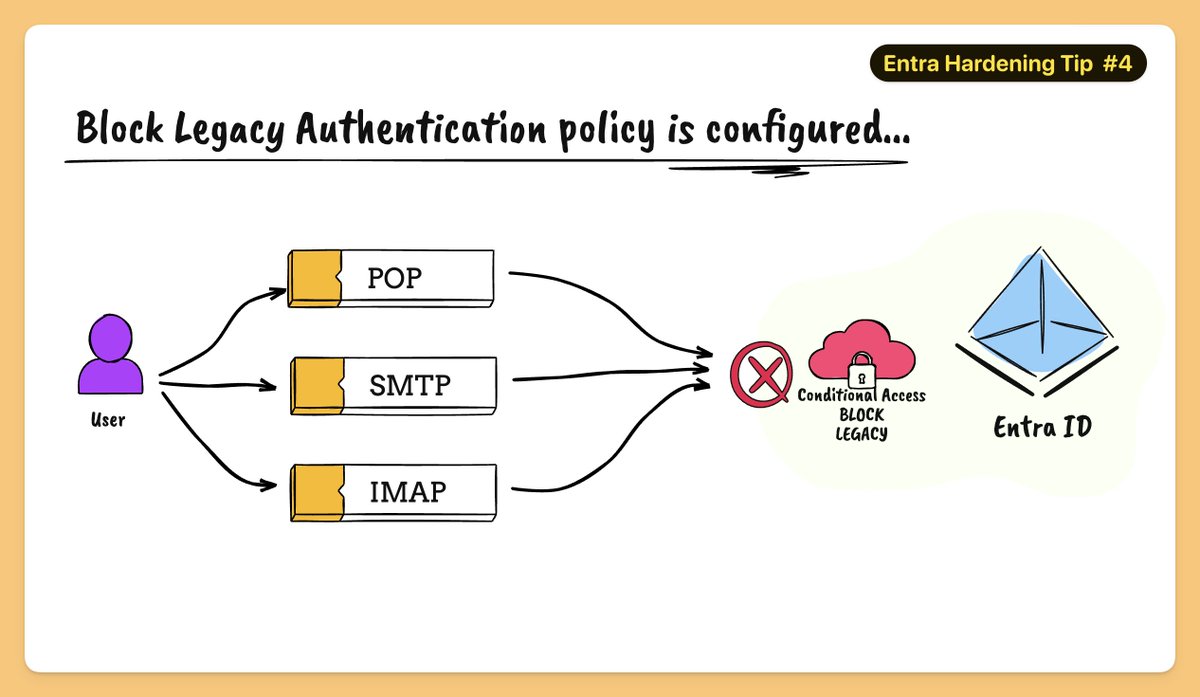
Entra Hardening Tip #4 - Block legacy authentication
Problem:
Legacy auth (SMTP/IMAP/ROPC) doesn’t support MFA, making it a prime target for password attacks and an easy entry point for attackers using stolen creds.
Legacy authentication also provides attackers with a consistent method to reenter a system using compromised credentials without triggering security alerts or requiring reauthentication.
@ellishlomo shared some insights on how attackers are still targeting tenants that allow legacy protocols (see below).
Fix:
- Assignments - All users
- Target resources > All resources
- Conditions - Client apps, set Configure to Yes.
- Check only the boxes Exchange ActiveSync clients and Other clients.
- Access controls - Block access
🛑 WARNING: Bitwarden CLI was compromised in a supply chain attack.
@bitwarden/[email protected] included malicious code after attackers hijacked GitHub Actions, stole secrets, and pushed a tampered version to npm.
🔗 Learn how the attack worked → https://t.co/xqqJ7a9REL




![MsftSecIntel's tweet photo. Compromised npm packages (utils-terminal@3.2.1, logger-active@3.2.1) are abusing Hugging Face repos as exfiltration infrastructure. The packages deploy a remote access trojan (RAT) that captures keystrokes, screenshots, and crypto wallet credentials.
Indicators of compromise (IOCs):
- npm user: hexalpha10 / author: toskypi
- 195.201.194[.]107:8010 (WebSocket C2)
- c2-toskypi.onrender[.]com (HTTP C2)
- huggingface[.]co/api (exfiltration endpoint)
- HKCU\Software\Microsoft\Windows\CurrentVersion\Run\MicrosoftSystem64 (persistence)
- MicrosoftSystem64.service (Linux systemd persistence)
- \MicrosoftSystem64 (Windows scheduled task)
- MicrosoftSystem64/payload.js (payload directory)
Defenders: treat unexpected huggingface[.]co/api calls from non-ML workloads as suspicious.](https://pbs.twimg.com/media/HJ2-JC6WQAEK6Pu.jpg)