Tonefold is live on Product Hunt today.Most AI music tools hand you a finished track you can't touch. This one writes MIDI (chords, melody, bass, drums) so every note stays yours to edit. Free, open source, macOS + Windows.https://t.co/oWPmc8jMTx
Saw all the hype about Opus making vector videos, so I gave it a shot 👀
It drew every stroke on canvas, rigged the character, planned the motion sequences, and rendered the whole video.
Looking at the results, I honestly didn't imagine AI had come this far 🤯
Music models hand you audio you can't open.
I've been experimenting with the middle: FLVSTX a plugin where the model decides form, harmony and motif, and a Rust engine performs it into your piano roll. fully editable Music Notes
https://t.co/hgc8q8R54h
https://t.co/tCQHoW9050
https://t.co/OdMeWiczaP
https://t.co/BGJ7bo5jQG
I was tired of browser-based Python playgrounds that feel sluggish and can't visualize algorithms. PyPad is for anyone who learns by seeing
Free Windows & macOS.
🚨Google lanzó CodeWiki y convierte código imposible en explicaciones simples.
Pegas cualquier repositorio y la IA lo convierte automáticamente en una documentación interactiva.
No solo resume el código:
• Genera diagramas automáticamente
• Explica cómo funciona cada parte
• Crea tutoriales paso a paso
• Detecta arquitectura y dependencias
• Y hasta monta un chatbot que entiende tu código completo
Básicamente:
convierte proyectos imposibles de entender en algo que cualquier desarrollador puede navegar en minutos.
Enlace abajo👇
Spark 2.0 is here! 🚀
We’re redefining what’s possible on the web with a streamable LoD system for 3D Gaussian Splatting.
Built on Three.js, you can now stream massive 100M+ splat worlds to any device from mobile to VR using WebGL2. All open-source.
Dive into the tech 👇
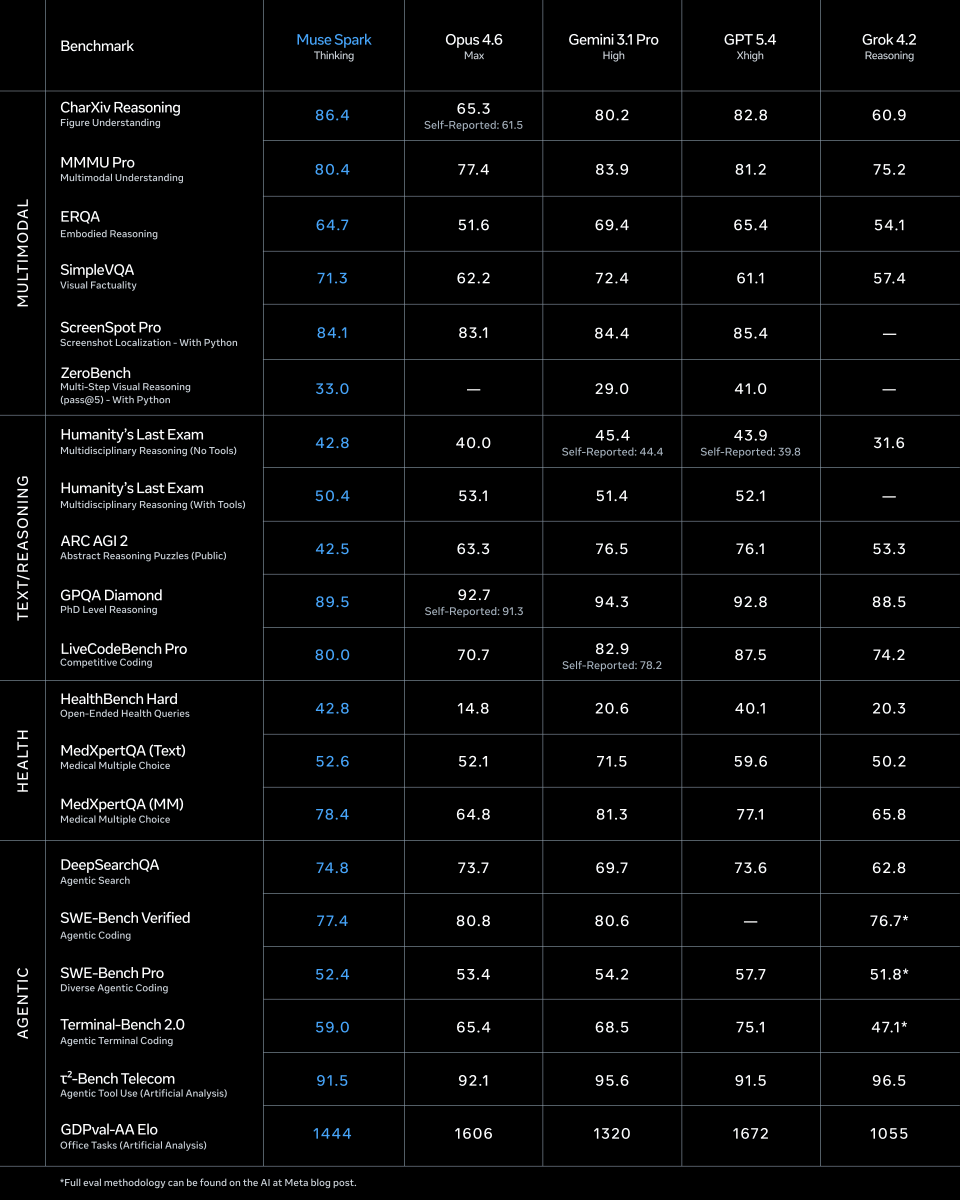
1/ today we're releasing muse spark, the first model from MSL. nine months ago we rebuilt our ai stack from scratch. new infrastructure, new architecture, new data pipelines. muse spark is the result of that work, and now it powers meta ai. 🧵
LLM Knowledge Bases
Something I'm finding very useful recently: using LLMs to build personal knowledge bases for various topics of research interest. In this way, a large fraction of my recent token throughput is going less into manipulating code, and more into manipulating knowledge (stored as markdown and images). The latest LLMs are quite good at it. So:
Data ingest:
I index source documents (articles, papers, repos, datasets, images, etc.) into a raw/ directory, then I use an LLM to incrementally "compile" a wiki, which is just a collection of .md files in a directory structure. The wiki includes summaries of all the data in raw/, backlinks, and then it categorizes data into concepts, writes articles for them, and links them all. To convert web articles into .md files I like to use the Obsidian Web Clipper extension, and then I also use a hotkey to download all the related images to local so that my LLM can easily reference them.
IDE:
I use Obsidian as the IDE "frontend" where I can view the raw data, the the compiled wiki, and the derived visualizations. Important to note that the LLM writes and maintains all of the data of the wiki, I rarely touch it directly. I've played with a few Obsidian plugins to render and view data in other ways (e.g. Marp for slides).
Q&A:
Where things get interesting is that once your wiki is big enough (e.g. mine on some recent research is ~100 articles and ~400K words), you can ask your LLM agent all kinds of complex questions against the wiki, and it will go off, research the answers, etc. I thought I had to reach for fancy RAG, but the LLM has been pretty good about auto-maintaining index files and brief summaries of all the documents and it reads all the important related data fairly easily at this ~small scale.
Output:
Instead of getting answers in text/terminal, I like to have it render markdown files for me, or slide shows (Marp format), or matplotlib images, all of which I then view again in Obsidian. You can imagine many other visual output formats depending on the query. Often, I end up "filing" the outputs back into the wiki to enhance it for further queries. So my own explorations and queries always "add up" in the knowledge base.
Linting:
I've run some LLM "health checks" over the wiki to e.g. find inconsistent data, impute missing data (with web searchers), find interesting connections for new article candidates, etc., to incrementally clean up the wiki and enhance its overall data integrity. The LLMs are quite good at suggesting further questions to ask and look into.
Extra tools:
I find myself developing additional tools to process the data, e.g. I vibe coded a small and naive search engine over the wiki, which I both use directly (in a web ui), but more often I want to hand it off to an LLM via CLI as a tool for larger queries.
Further explorations:
As the repo grows, the natural desire is to also think about synthetic data generation + finetuning to have your LLM "know" the data in its weights instead of just context windows.
TLDR: raw data from a given number of sources is collected, then compiled by an LLM into a .md wiki, then operated on by various CLIs by the LLM to do Q&A and to incrementally enhance the wiki, and all of it viewable in Obsidian. You rarely ever write or edit the wiki manually, it's the domain of the LLM. I think there is room here for an incredible new product instead of a hacky collection of scripts.
This 2 hour Stanford lecture on AI careers will teach you more about winning in the AI race than every piece of AI content you have scrolled past this year.
Bookmark this & give it 2 hours, no matter what. It'll be the most productive thing you could do this weekend.
I built a visual debugger for LangGraph agents (VS Code extension)
If you’ve spent any time debugging LangGraph agents, you know the pain: conditional branches, tool loops, human-in-the-loop interrupts and your only window into what’s happening is a wall of terminal output.
So I built VizLang a VS Code extension that lets you visually debug LangGraph agents in real time.
How it works
Right-click any Python file containing a LangGraph graph → the graph renders visually → hit Run and watch nodes light up as they execute.
You can:
•Step through execution node-by-node
•Hover to inspect state at each point
•See exactly where your agent branched or called a tool
Think Chrome DevTools, but for agent graphs.
What you can do with it
•Step-through execution with full state inspection at every node
•Chat with your agent directly in the panel
•Handle human-in-the-loop interrupts visually
•Manage threads and inspect tool calls
•Everything runs locally — no cloud, no accounts, no API keys
I’m launching it on Product Hunt today and would really appreciate the support and feedback from the community:
👉 Product Hunt:
https://t.co/G7UdPlzUyU
Would love to hear how you’re currently debugging your agents and what features would make this more useful for your workflows.
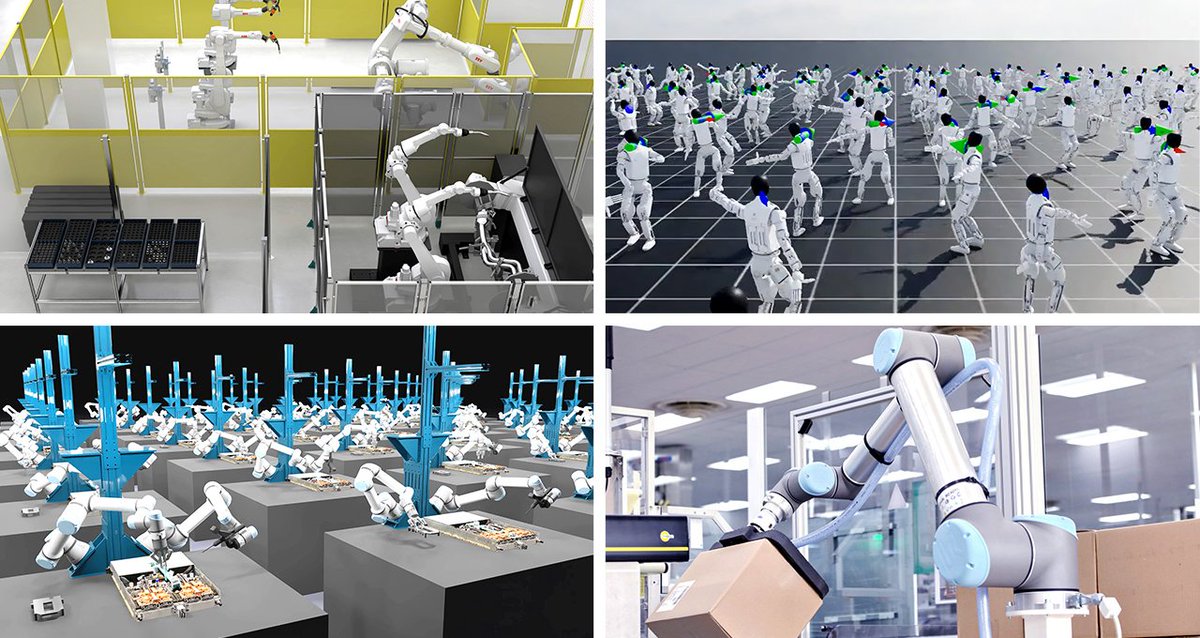
"Every industrial company will become a robotics company."
Jensen Huang just dropped that line at NVIDIA GTC 2026. And honestly? The announcements back it up.
Here's what NVIDIA just revealed for Physical AI
1. GR00T N2 - a next-gen robot foundation model built on DreamZero research.
It helps robots succeed at new tasks in new environments more than 2x as often as leading vision-language-action models.
This is the humanoid brain getting a serious upgrade.
2. Cosmos 3 - the first world foundation model that unifies synthetic world generation, physical AI reasoning, and action simulation.
Think of it as giving robots a realistic mental sandbox to practice in before touching the real world.
3. The Physical AI Data Factory Blueprint : an open architecture that automates how training data is generated and evaluated.
Solves one of the biggest bottlenecks in robotics: getting enough diverse, high-quality training data (including rare edge cases).
4. ABB is integrating NVIDIA Omniverse into RobotStudio. Fanuc is combining its systems with Isaac Sim and Omniverse. Hexagon is building digital twins with Cosmos models.
#NVIDIAGTC #PhysicalAI #Robotics #AI #DeepLearning
OpenAI wants to live on your desktop, not just in a browser tab.
The rumored "superapp" is a single client that folds ChatGPT, memory, file handling and plug-ins into one native shell. Think Slack-level shortcuts plus persistent context across every window you open.
they’re done competing with Google Search; they’re now coming for the OS itself.
If users bite, Microsoft and Apple have to decide whether to open the gate or build higher walls.
#AI #UX #OpenAI
Introducing LangSmith Fleet: an enterprise workspace for creating, using, and managing your fleet of agents.
Fleet agents have their own memory, access to a collection of tools and skills, and can be exposed through the communication channels your team uses every day.
Fleet includes:
→ Agent identity and credential management with “Claws” and “Assistants”
→ Sharing and permissions to control who can run, clone, and edit (just like Google Docs)
→ Custom Slack bots so each agent has its own identity in Slack
Try Fleet: https://t.co/yhv7mZUV92
Read the announcement: https://t.co/5P0KXV9C7y
2026 is becoming the year AI agents go from cool demos to real work.
NVIDIA just gave every company the toolkit to make it happen safely.
Open source. Enterprise ready. One command install.
This is how agents scale.
#NVIDIA#GTC2026#AIAgents#NemoClaw #MachineLearning
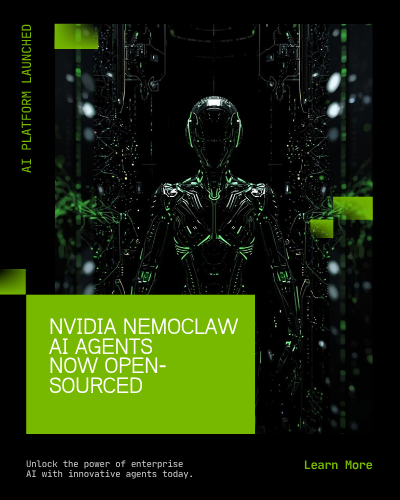
NVIDIA just solved the biggest problem with AI agents: trust. They launched NemoClaw at GTC
An open source platform that makes AI agents actually safe for enterprise use. Here's why this matters for everyone building with AI:
Why this matters more than most GTC announcements:
Every company wants AI agents.
Almost none trust them enough to deploy.
NemoClaw gives them a way to say: "Yes, the agent works for us. But it only does what we allow."
That's the missing piece.