@PacSurfliners What's the status of NB Train 777 from SOL tomorrow? The Pacific Surfliner website shows different information than Amtrak's alert bulletin in-app.
Last year I travelled to Japan and had a great time! I managed to pick up some #Arknights merch...and it just so happened to be the LAWSONS x Arknights collab. They came with furniture codes, but unfortunately, they are for the JP server only.
#アークナイツ
Also, this is probably the last time I'll be posting on Twitter. Third party API restrictions absolutely cratered my usage. I'm not hard to find on the internet, but I just won't be around here much.
The following tweets will be aimed at a very specific audience and will look really weird, but I couldn't really think of another way to give these codes out. So, with that out of the way, the next post will be in English, and the following will be Google Translated to Japanese.
@Kanjo As soon as I heard that I literally went oh great, so that means it was literally a business decision to not go through the certification process/pay licensing...which means it'll never happen. On the other hand, Apple did pay up, I guess. It's like IP certifications...I guess.
@Kanjo Well, according to my source at Google, apparently the reason that non-JP Pixels never got Suica support, is...licensing (as of 2020). Apparently certifying SE for all Android devices is a big decision. My read on that is that it means it'll likely never happen then.
@Kanjo@madebygoogle Fitbit was a particularly strange case, shame it wasn't better. Worked for Tokyo area trains, but a number of vending machines with the IC logo did not. Topping it up worked for about a week then started erroring out with an unhelpful message. Didn't work at all outside Tokyo.
The TL;DR of my Japan Android Suica adventure is that:
- US Fitbit worked OK in Tokyo until it stopped letting me add money
- Fitbit failed to work outside of Tokyo
- An old iPhone 8 worked perfectly in every other case
This is really embarrassing, @madebygoogle.
cc @Kanjo
@Kanjo Thought I'd send this your way. No particularly new info, but the documentation is good and the Github link (https://t.co/nEc24oI07A) is an interesting read.
Modders have figured out how to make Pixel phones purchased outside of Japan compatible with the country's mobile payment system, Osaifu-Keitai.
By default, only Pixel phones bought in Japan are compatible with Osaifu-Keitai, but this is a software and not a hardware limitation.
Shown below is a global Pixel 7 Pro (model ID GP4BC) purchased in Germany using Osaifu-Keitai in Japan.
For a bit of context, Osaifu-Keitai is the "de facto standard mobile payment system in Japan" as noted on Wikipedia. It's used for everything from electronic money to ID cards, loyalty cards, transit cards, and more.
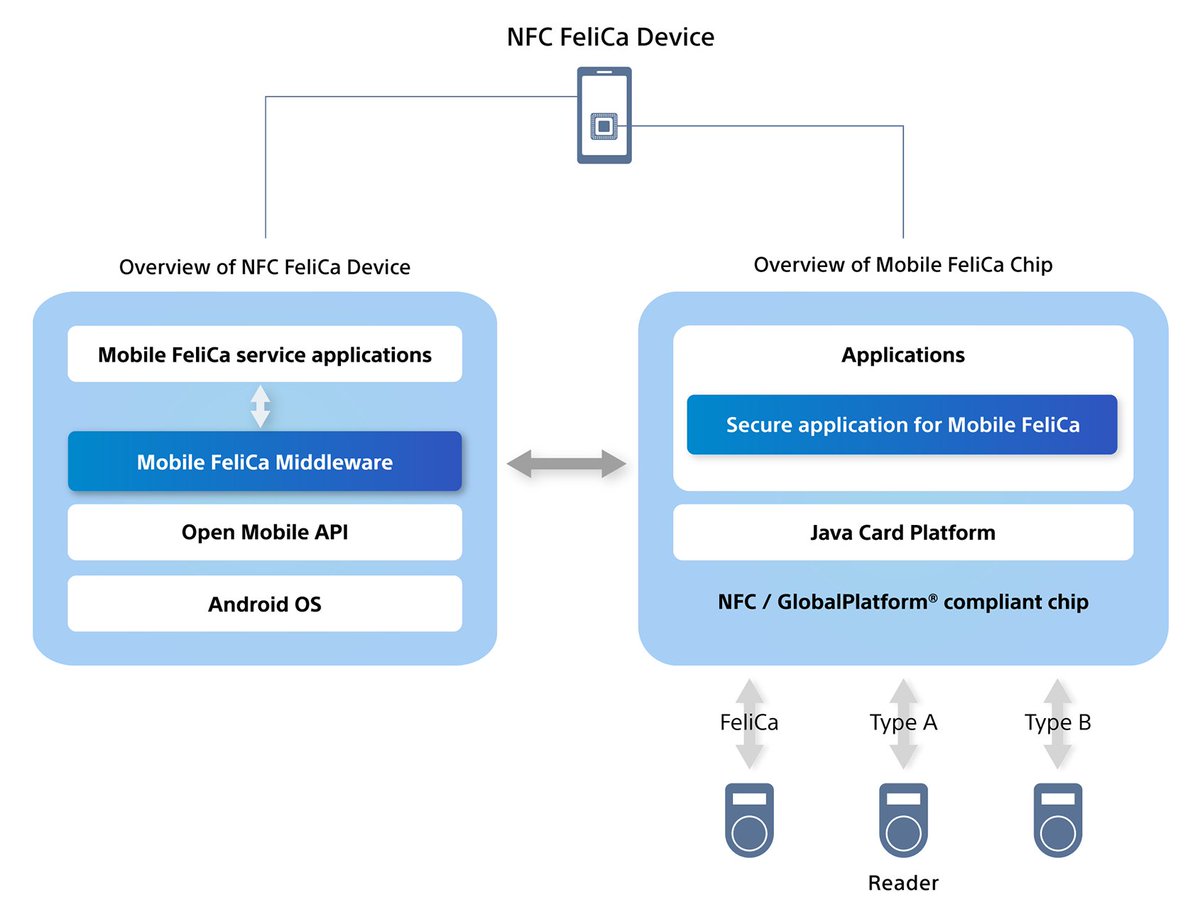
Osaifu-Keitai uses Sony's FeliCa RFID smart card technology. FeliCa is the standard technology for Japanese smart cards, and it's also used in other APAC markets. To support FeliCa, phones either ship with a mobile FeliCa IC or a NFC chip that supports the NFC-F (JIS 6319-4) standard.
(Graphic is from: https://t.co/VHTUbus1gq)
The Pixel 7, for example, ships STMicroelectronics' ST54K IC, a single-chip NFC controller and secure element. Pixels (as well as many other Android phones) use host card emulation (HCE) to essentially emulate a FeliCa RFID smart card that talks directly to the NFC reader.
This hardware is present on Pixel 7 phones globally, which means no matter where you buy the Pixel 7, it should be able to support Osaifu-Keitai. However, the Osaifu-Keitai app seems to implement multiple checks to see if FeliCa is supported on the device. One of those checks (on Pixel phones) ends up seeing if the device's SKU is found on an allowlist of Japanese-specific Pixel phone SKUs contained within the system "PixelNfc" app.
If your device's SKU is on that list, then you're able to use Osaifu-Keitai on your phone. If it isn't, then you're out of luck unless you root your phone to bypass this restriction (either by spoofing the SKU, modifying the FeliCa configuration file, or patching the PixelNfc app). Or, you buy a new, Japan-specific version of your phone.
As for why this limitation exists, I don't really know. Sony apparently has patents/earns licensing income from the use of FeliCa chips, so that could be one reason. This isn't an issue for iPhone, as any iPhone you buy can use Osaifu-Keitai, but it is an issue with many Android devices and is why Japan-specific SKUs for many phones exist.
For more info on this mod/issue, check out this great GitHub page by user kormax (which is where the screenshots come from): https://t.co/ONiS8yaFX5
And this AOSP document: Host Card Emulation of FeliCa: https://t.co/RUnNWq8oez
H/T @AndroPlus_org
@Kanjo@thinkaliker In summary, Android users get the short end of the stick once again.
Non-JP iPhone/Apple Watch: any recent model will work (except for Visa payments).
Non-JP Android phones: won't work at all.
Non-JP Fitbit devices: only AmEx payments (with the attendant fees) work.
@Kanjo I feel a bit silly, but wanted to check before I returned it. Picked up a Fitbit Sense 5. Attempted @quppa's guide to add Suica. No dice. Two potential thoughts, but don't know if you had more insight: 1) need to physically be in Japan 2) non-JP Google accounts won't work
@Kanjo@quppa I still have my second phone (with Apple Pay + Suica) as a backup that I plan to bring just in case, and it already has my non-JP Mastercard hooked up to it. We'll see if it still works to recharge by the time I go on my trip. All of these seem sort of like moving targets.
@quppa@Kanjo Here's the final card update for a US purchased Fitbit Charge 5:
All US issued cards, through US Google Pay
- Visa: Failed (err)
- Mastercard: Failed (err)
- Discover: not even an option
- AMEX: Success!
...I've got my own blog post that I'll post at some point about all this.
@quppa@Kanjo It's making me enter a name and phone number, for which I obviously don't have one in Japan. Says it'll be sent to JR East.
I've got a couple of cards I can try, and I'll update y'all with the results.