💥💥💥 HƯỚNG DẪN thử nghiệm nhu cầu trong môi trường sandbox FREE để lấy 30 point trên @deca_labs
✅Bước 1: Truy cập Vào tạo mở khóa API => Mở => sao đó tìm mục khóa mới => bấm tích cả 3 mục : Đọc -Trích Dẫn-Bài kiểm tra.
=> Điền Tên đại lý nguyên cứu (tên gì cũng được miễn dễ nhớ ví dụ Sandbox) => Phần dưới hiện 2 ô điền 0.1 và 1 => Make key nó sẽ ra kyc mới . Key này anh em lưu lại để chạy
✅Bước 2: Sau khi đã có khóa => anh em bấm Bấm phím Windows, gõ PowerShell hoặc Terminal.
=> dán lênh ở trong ngoặc đơn vào k lấy ngoặc đơn =>( curl.exe -H "Authorization: Bearer KHÓA_CỦA_BẠN" "https://t.co/ceUZf338rn" ) nhưng nhớ thay khóa của bạn
Lưu ý khi chạy lệnh curl trên Windows PowerShell: trong PowerShell, curl là lệnh viết tắt của một lệnh khác nên lệnh mẫu của trang sẽ báo lỗi. Bạn đổi chữ curl đầu dòng thành curl.exe, còn lại giữ nguyên
Dán tiếp lệnh : $KEY = Read-Host "Dan khoa API moi cua ban"
=> nó hiện mục dán Khóa mới của bạn : THÌ DÁN KHÓA VÀO
=> Dán tiếp nó: $body = @{ idea = "A simple app that helps people choose the right speaker for their room. The user enters the room size, how they will use it (music, movies, karaoke, small cafe or shop), and their budget. The app then shows 2-3 speaker types that fit, with a plain explanation of why." } | ConvertTo-Json
Invoke-RestMethod -Method Post -Uri "https://t.co/eejDU7ZajA" -Headers @{ Authorization = "Bearer $KEY" } -ContentType "application/json" -Body $body | ConvertTo-Json -Depth 10
=> sẽ hiên dòng chữ Past anyway thì bấm vào dòng chữ xanh đó tiếp
Lưu ý: nếu ra dòng báo đỏ thì dán tiếp lệnh này : $body = @{ idea = @{ pitch = "A simple app that helps people choose the right speaker for their room. The user enters the room size, how they will use it (music, movies, karaoke, small cafe or shop), and their budget. The app then shows 2-3 speaker types that fit, with a plain explanation of why." } } | ConvertTo-Json -Depth 5
try {
Invoke-RestMethod -Method Post -Uri "https://t.co/eejDU7ZajA" -Headers @{ Authorization = "Bearer $KEY" } -ContentType "application/json" -Body $body | ConvertTo-Json -Depth 10
} catch {
$sr = New-Object IO.StreamReader($_.Exception.Response.GetResponseStream())
$sr.ReadToEnd()
}
=> Để ý nếu hiện chữ USDC on Base thì có nghĩa Báo giá đã chạy được. Cuối kết quả ghi rõ bước tiếp theo: trả một mức bằng start_test, thử trước với sandbox: true trên Base Sepolia bằng USDC thử nghiệm. Mức được khuyến nghị là "signal".
=> Dán tiếp lệnh : $q = Invoke-RestMethod -Method Post -Uri "https://t.co/eejDU7ZajA" -Headers @{ Authorization = "Bearer $KEY" } -ContentType "application/json" -Body $body
$q.quote_id
$q.recommended
$q.options | Format-List *
=> Dán tiếp lệnh : $b2 = @{ quote_id = $q.quote_id; option = "signal"; sandbox = $true } | ConvertTo-Json
try {
Invoke-RestMethod -Method Post -Uri "https://t.co/xjWYncMA76" -Headers @{ Authorization = "Bearer $KEY" } -ContentType "application/json" -Body $b2
} catch {
$_.Exception.Response.StatusCode.value__
$sr = New-Object IO.StreamReader($_.Exception.Response.GetResponseStream())
$sr.ReadToEnd()
}
=> nếu có chữ by 1$ là đúng
✅Bước 3: Tạo thư mục và cài thư viện => dán lệnh này : node -v để kiểm tra phiên bản nếu báo đỏ thì Vào https://t.co/xmSlyQC9Yj và tải bản LTS (nút màu xanh, thường ghi "Recommended for most users"), loại Windows Installer (.msi).
=> Mở file vừa tải, bấm Next qua các bước và để mọi tùy chọn mặc định. Nếu có ô tick "Automatically install the necessary tools" thì không cần tick.
Cài xong, đóng hết mọi cửa sổ PowerShell (cả cửa sổ đang mở), rồi mở lại PowerShell mới.
Gõ : node -v => cho ra kết quả v26.13.1 là đúng
Gõ : npm.cmd -v => cho ra kết quả 11.20.0 là đúng
SAU ĐÓ DÁN TIẾP TỪNG DÒNG RỒI ENTER ( có 4 dòng tương ứng 4 lệnh dán) :
mkdir deca-sandbox
cd deca-sandbox
npm.cmd init -y
npm.cmd i @x402/fetch @x402/evm viem
✅Bước 4: Tiếp theo, tạo ví thử nghiệm (chỉ khi lệnh trên chạy thành công): Gõ : notepad gen.mjs
=> Nếu Notepad hỏi tạo file mới, bấm Yes.
Dán nội dung này vào, rồi lưu (Ctrl + S) và đóng
Notepad : import { generatePrivateKey, privateKeyToAccount } from "viem/accounts";
import { writeFileSync, existsSync } from "node:fs";
if (existsSync(".env")) { console.log(".env da ton tai"); process.exit(1); }
const pk = generatePrivateKey();
writeFileSync(".env", EVM_PRIVATE_KEY=${pk}\nDECA_KEY=\n);
console.log("Dia chi vi thu nghiem:", privateKeyToAccount(pk).address);
=> Nhấn Ctrl + S để lưu, rồi đóng Notepad.
=> Quay lại cửa sổ PowerShell (dòng phải là PS C:\Users\Hi\deca-sandbox>) và chạy: node gen.mjs
Nếu thấy dòng Dia chi vi thu nghiem: 0x... là thành công
✅Bước 5: Sau đó vào https://t.co/QDKxXeVyoU, chọn Base Sepolia và USDC, dán địa chỉ ví để nhận USDC thử nghiệm.
=> Dán lệnh này vào powershell : notepad run.mjs => để tạo file run.mjs => Yes => dán lệnh này vào : import { x402Client, wrapFetchWithPayment } from "@x402/fetch";
import { registerExactEvmScheme } from "@x402/evm/exact/client";
import { privateKeyToAccount } from "viem/accounts";
const BASE = "https://t.co/74demXQ8G1";
const headers = { Authorization: Bearer ${process.env.DECA_KEY}, "content-type": "application/json" };
const client = new x402Client();
registerExactEvmScheme(client, { signer: privateKeyToAccount(process.env.EVM_PRIVATE_KEY) });
const payFetch = wrapFetchWithPayment(fetch, client);
const pitch = "A simple app that helps people choose the right speaker for their room. The user enters the room size, how they will use it (music, movies, karaoke, small cafe or shop), and their budget. The app then shows 2-3 speaker types that fit, with a plain explanation of why.";
const q = await (await fetch(${BASE}/quote, { method: "POST", headers, body: JSON.stringify({ idea: { pitch } }) })).json();
console.log("Co quote_id:", !!q.quote_id);
const res = await payFetch(${BASE}/tests, { method: "POST", headers, body: JSON.stringify({ quote_id: q.quote_id, option: "signal", sandbox: true }) });
console.log("Ma trang thai:", res.status);
console.log(await res.text());
=> Rồi bấm ctrl+s để lưu
=>Quay ra dán lệnh này vào tiếp ở Powershell : $sec = Read-Host "Dan khoa Deca" -AsSecureString
$env:DECA_KEY = [Runtime.InteropServices.Marshal]::PtrToStringAuto([Runtime.InteropServices.Marshal]::SecureStringToBSTR($sec))
=> Dán khóa deca vào ra khóa dạng ********************************** là đúng
=> sau đó Enter tiếp 1 lần nữa rồi dán vào sau deca-sandbox lệnh này (nếu trả về true là đùng) : node --env-file=.env run.mjs
Thành công. Mã 201 nghĩa là bài kiểm tra sandbox đã được tạo và thanh toán xong: "sandbox": true và "simulated": true: đúng chế độ thử nghiệm, không chạy quảng cáo thật. Đã trả 1 USDC thử nghiệm trên Base Sepolia (có mã giao dịch tx và đường dẫn basescan).
Trạng thái hiện tại là in_review (đang chờ duyệt). Theo mô tả của Deca, bài sandbox chuyển qua các trạng thái trong vài phút.
🤣Việc tiếp theo: Vào trang Rewards của Deca, tải lại (F5) và xem dòng "Hãy thử nghiệm trong môi trường sandbox của API" đã +30 chưa. Theo trang đó, điểm tính khi phí sandbox được thanh toán bằng USDC thử nghiệm, nên có thể cập nhật ngay hoặc sau vài phút.
X Account Suspended → Here's How to Get It Back
Basically X suspends accounts for spam, inauthentic activity or automation but some legitimate accounts can get Suspended too.
If your account gets suspended, don't panic.
Here's what to do for Now 👇
1. Try account verification
→ Log in to your suspended account.
→ Complete any phone, email or CAPTCHA verification prompts.
→ Some temporary restrictions may be lifted after verification.
2. Submit an official appeal
If you're still suspended, stay logged in and visit:
🔗 https://t.co/AeJoUJ4uML
3. Write a proper appeal
→ Mention your username and suspension date.
→ Explain why you believe the suspension was incorrect.
→ Describe how you actually use your account.
→ Keep it short, polite and factual.
Sample appeal:
“Hello Team, My account @(username) was suspended on [date], and I believe this may have been a mistake. I primarily use my account to share original content about crypto and Web3, and to engage with the community.
I have reviewed X's rules and am committed to following them. I kindly request a manual review of my account and reconsideration of the suspension. Thank you for your time and assistance.”
4. After submitting
→ Wait for an official response.
→ Check your registered email, including the spam folder.
→ Avoid submitting duplicate appeals.
→ Never pay someone promising to recover your account.
What NOT to do:
❌ Create accounts to evade suspension.
❌ Spam X support or the appeal form.
❌ Share your password with recovery services.
❌ Make false claims in your appeal.
There's no guaranteed recovery or fixed response time.
Save this guide in case you ever need it.
Hope everyone affected gets their account back. 🤞
🚨 New Airdrop Opportunity | DECA Labs – $12M Funding 🪂
@deca_labs is building an Agent-Led Software Commercialization Network, backed by some big names in the industry.
💰 $12M Raised from Polychain Capital, Pantera Capital, Accel & dao5.
📝 How To Get Started:
🔗 Join here - https://t.co/K75YtFhu5d
• Sign up with your email
• Open the Rewards section
• Complete all available social tasks
• Claim your badges & increase your level
🔥 It’s completely free to join, and everyone can participate.
Get started early, complete all tasks, and maximize your points and level. 👀
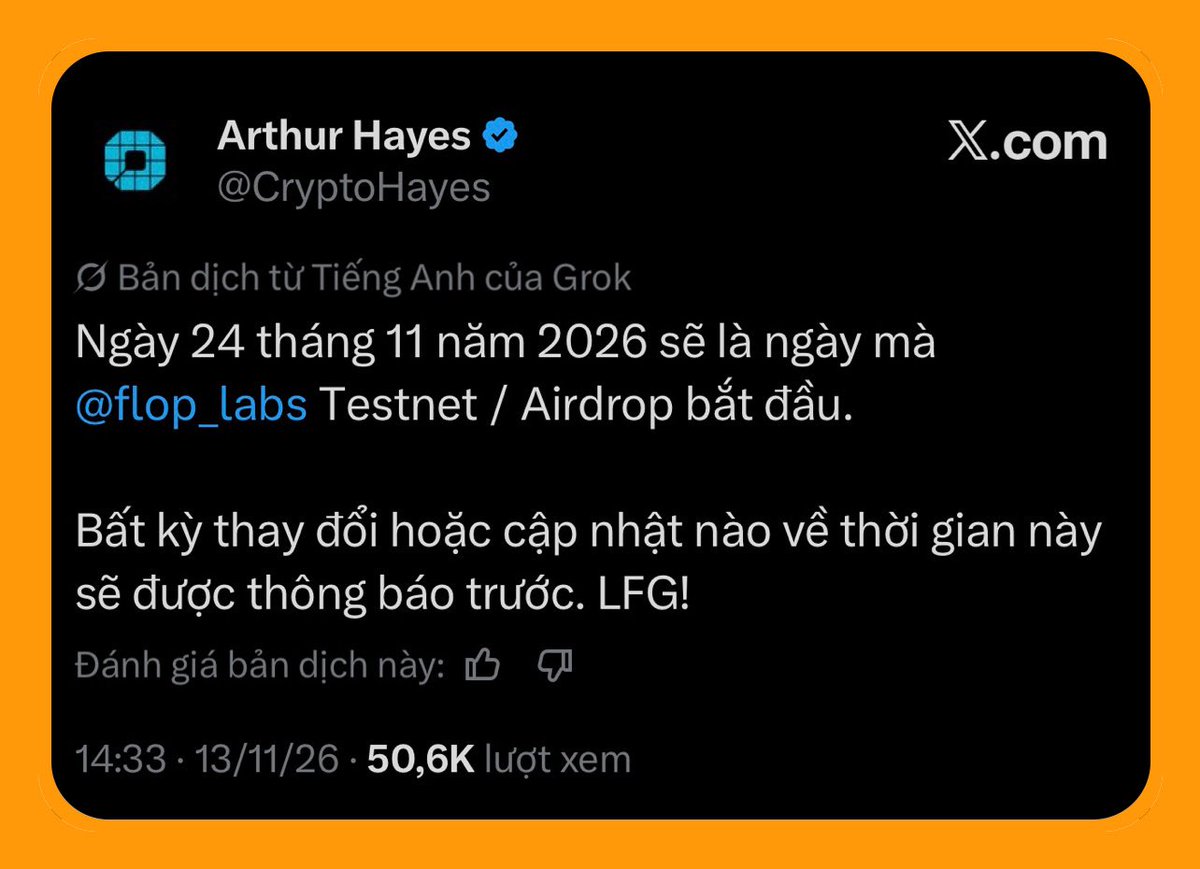
Chuẩn bị chiến kèo Testnet có Airdrop nha!
Flop Labs sắp mở Testnet / Airdrop vào ngày 24/11/2026!
Arthur Hayes (CEO của Flop Labs, tài khoản @CryptoHayes) vừa chính thức xác nhận trên X
Testnet và giai đoạn airdrop của Flop Labs sẽ chính thức bắt đầu vào 24 tháng 11 năm 2026.
Trọng sẽ bám sát, và chiến mạnh kèo này @flop_labs
@MyDogeVN@MyDogeCTO@MyDoge mình chưa tham gia được nhóm luôn bác ơi, rời nhóm nào được bác, mấy link discord của #dogeosfun#dogeosnft tất cả các nhóm discord thuộc hệ sinh thái #dogeos đều vào được, mỗi cái discord chính của dogeos thì không vào được tạo tài khoản mới cũng không vào được
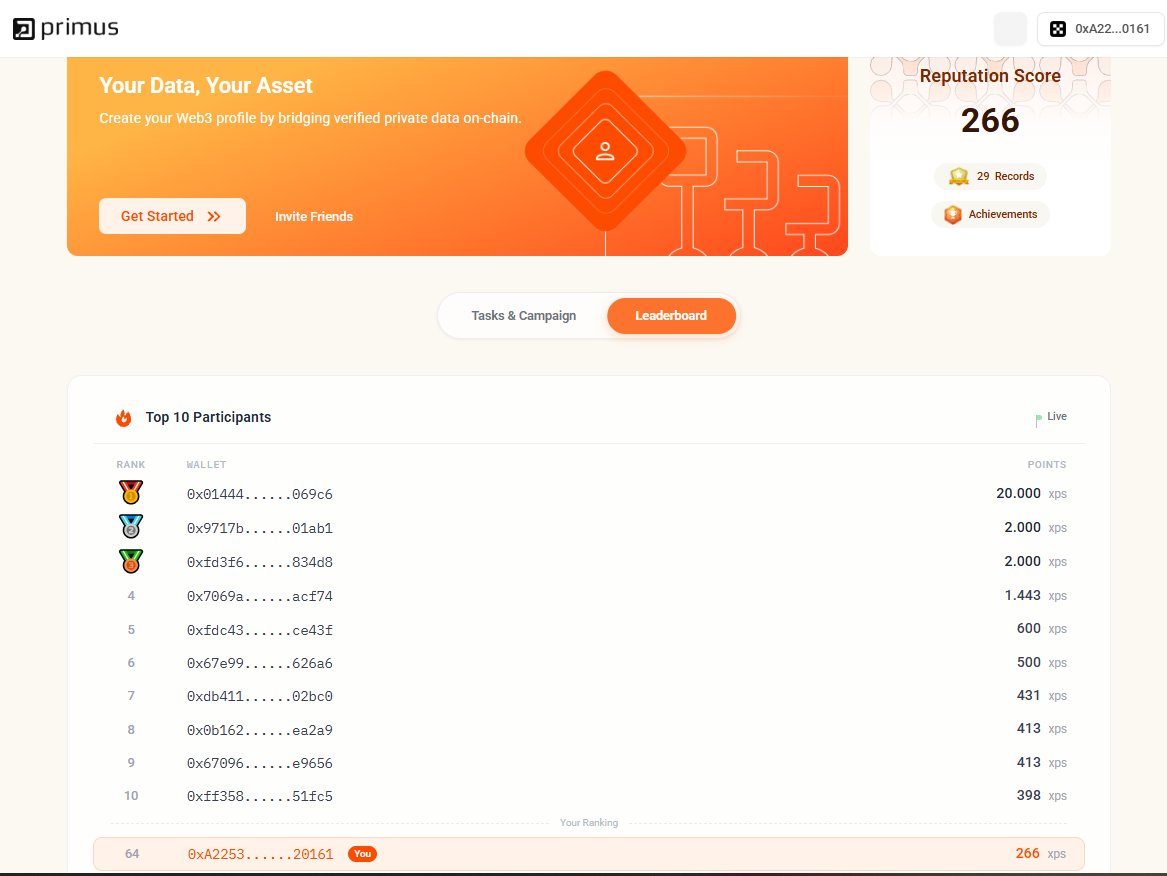
Tính ra kèo @primus_labs này dễ leo top mà ít anh em chú ý quá ta
✅Binance YziLabs vừa rót thêm 500.000$ vào 25 tháng 8 - 2026 nâng tổng số vốn đã raised lên 7M$
✅Backer Binance, Vaneck, Amber, Samsung thì không phải vừa
Nhiệm vụ đơn giản , tốn 0.000035 $ETH mỗi lần xác thực, 1u là vi vu
🥰Hướng dẫn chi tiết hết sức :
- Tham gia click https://t.co/Ft5DmbE6bT
- Connect bằng ví EVM bất kỳ, tốt nhất làm ví mới cho chắc cú
- Click vào 1 task bất kì dự án sẽ yêu cầu tải extension trên chrome, tải và cài đặt
- Chuẩn bị khoảng 0.5-1$ gas $ETH hệ base (xài tẹt vi vu)
- Xong vào từng mục xác thực tài khoản bạn đã có, nếu chưa có thì tạo mới vẫn được tính điểm mỗi nhát tốn 0.000035$ETH khoảng 0.07$.
- Một nhiệm vụ sau vài ngày có thể xác thực lại và nhận ít điểm hơn
💯Thành quả của mình
Đạt top 100 và luôn giữ vững từ khi dự án launch chương trình mặc dù bỏ ra khoảng vài chục phút làm task và để đó
Ngoài ra còn chương trình Yaps bên Kaito chia sẻ 0.3% total suply . Hy vọng lại là kèo ngàn đô cho các Yap thủ
Epoch 0 eligibility starts at 1,000 XP.
Until 30 November, UserOps XP earns three times as much, so the activity you already do on Incentiv gets you there sooner.
What are you waiting for? → https://t.co/TDt14S6L0u
⛏️ HƯỚNG DẪN CÀY GEM ĐỔI TOKEN $BULL (BULLSHOT QUEST MINING - $7M RAISED) 💎
Link: https://t.co/b7w9ZbTuOU
Tokenomics: Pool Public/Airdrop chiếm 15% và UNLOCK 100% tại TGE
Mục tiêu duy nhất là: Cày GEM
(Cơ chế: Gem ➔ $BULL Token)
Kiếm Energy:
• Vào mục Daily Check-in để điểm danh nhận Energy mỗi ngày
• Hoàn thành các nhiệm trong mục Quests để nhận thêm lượt năng lượng ban đầu
Vận hành máy đào (Deploy Miner) & Thu hoạch:
• Vào tab Mining ➔ bấm Deploy Miner để bắt đầu đào đá quý/khoáng sản
• Mỗi lượt đào kéo dài 10 phút
• Sau 10 phút, bấm Collect Reward để nhận khoáng sản
Quy đổi ra Gem & Nâng cấp
• Vào mục Swap: Đổi toàn bộ khoáng sản đào được sang Gem.
• Vào mục Upgrade: Giai đoạn đầu hãy dùng Gem để nâng cấp cấp độ máy đào và dung lượng Energy Cap
• Máy cấp càng cao ➔ tốc độ đào càng nhanh ➔ mở thêm mỏ cấp cao để kiếm nhiều Gem hơn.
CHIẾN LƯỢC TỐI ƯU:
• Tuần đầu: Đào ➔ Swap sang Gem ➔ Tái đầu tư Upgrade tối đa công suất máy.
• Giai đoạn sau: Khi máy đạt level cao, dồn toàn lực tích trữ số lượng Gem ròng lớn nhất để chờ snapshot đổi sang $BULL
Season 0 is live.
The NoahAI Points leaderboard is now open.
- Build with Noah
- Ship real products
- Complete challenges
- Do social quests
Earn points, and climb the leaderboard: https://t.co/P6GL7yAnAO
Details ⬇️
.@hinkal_protocol Wallet is now live on BNB Chain, bringing private balances, hidden payment details, private swaps and self-custody into one wallet!
Note: This post is for informational purposes only and not financial advice. DYOR.
https://t.co/tYLplYBT3y