Launch a token in minutes, not weeks — create ERC-20s & memecoins, run presales, add liquidity, swap at the best rate, and manage everything. Zero code, 6 EVM chains.
Website: https://t.co/PfZYiIRS8C
App (free on testnet): https://t.co/kgGebVfCfd
X: https://t.co/sMWW0Wm5Ke
Telegram: https://t.co/c7V9HSCBJi
⚠️ Educational content, not financial advice. Launchpad not available in the EU/EEA. Always DYOR.
#crypto #web3 #memecoin #erc20 #defi #tokencreator #cryptocurrency #blockchain #nocode
🚀 Launching a token used to take a dev team and weeks of work. Now it takes minutes.
The Tokentry Launchpad is live — create a presale or fair launch on 6 blockchains (Ethereum, BNB Chain, Polygon, Avalanche, Base, Arbitrum) with zero coding:
✅ Whitelist rounds for private sales
✅ Vesting schedules & cliffs
✅ Anti-bot protection (1 transaction per block)
✅ Soft/hard caps with automatic refunds if softcap isn't met
✅ Liquidity locked on-chain for 365 days — real rug-pull protection your community can verify
✅ A live activity feed streaming every contribution from the blockchain
Everything runs on audited smart contracts — the chain is the source of truth, not us.
👉 Try it: https://t.co/EJjvypvxRc
"Your token is live. Now what? Create a branded profile page with https://t.co/ysMsnWq6Vv. Showcase your token's value and build trust before the big launch!"
🚀 We just launched Tokentry Swap.
Swap any token across 6 chains — Ethereum, BNB Chain, Polygon, Arbitrum, Base, Avalanche — with smart routing across 1,000+ liquidity sources for the best rate.
No signup. No KYC. No email. Connect your wallet, pick your tokens, swap. That's the whole thing.
Try it 👉 https://t.co/CGyMcJLp7U
What's the worst experience you've had with a crypto swap? Tell us in the comments and we'll see if we've solved it.
⚡ THE STACK IS LIVE ⚡
5 tools. 6 EVM chains. Zero Solidity.
Creator · Memecoin · Manager · Liquidity · Profile.
Deploy your token in minutes 👇
https://t.co/VCT7Nw8zyF
#DeFi#ERC20#memecoin
📝 New Blog Post Published
How to List Your ERC-20 Token on CoinGecko and CoinMarketCap
Learn how to list your ERC-20 token on CoinGecko and CoinMarketCap. Our guide simplifies the process for greater visibility.
🔗 https://t.co/GDvgzXTvmw
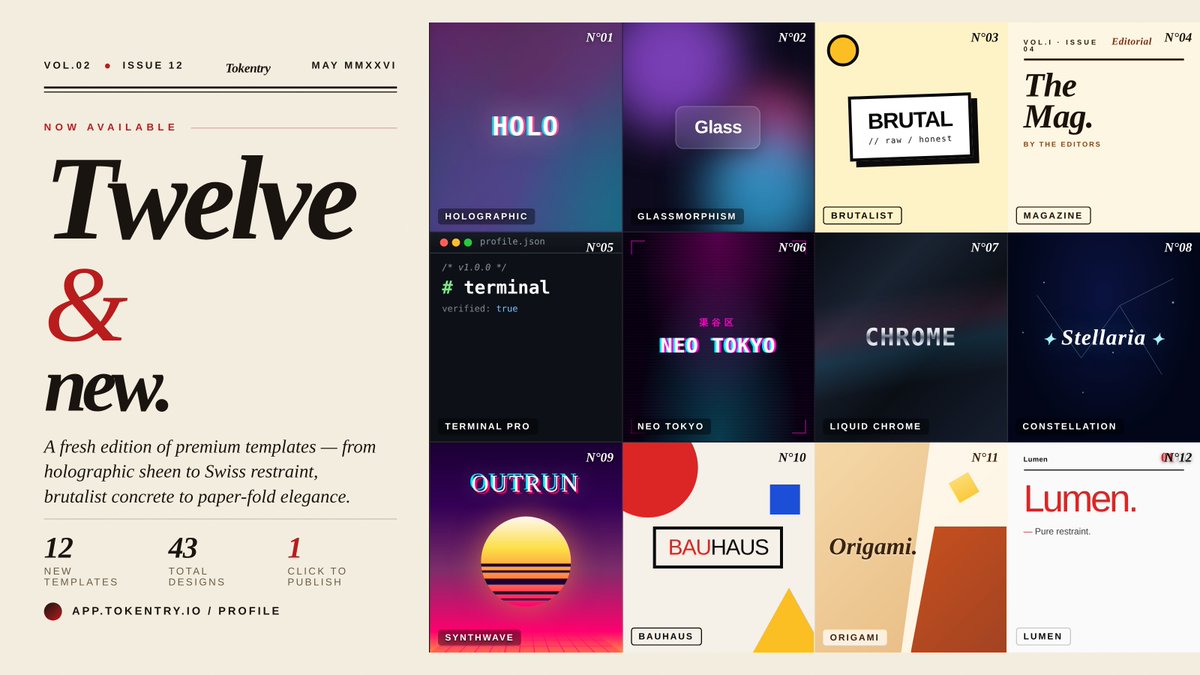
new edition out: 12 premium templates added to the profile builder.
from holographic sheen to swiss restraint, brutalist concrete to paper-fold elegance — every one fully bespoke.
43 templates total. one click to publish.
https://t.co/C6QTFXSKa2
"Nobody checks supply until it's too late. ⚠️ Set your token's supply and decimals accurately on https://t.co/VCT7Nw97od. A simple mistake can cost you. Get it right!"
When deploying on Arbitrum, understanding supply and decimals is crucial for your token's success. Too often, builders overlook this, leading to misconfigurations that can damage user trust.
**1. Set your supply correctly:** If your token is meant to have a total supply of 1 million, input that exact figure rather than a rounded number. This ensures clarity for investors.
**2. Adjust decimals wisely:** A common mistake is setting decimals too high (say, 18 for a token intended for microtransactions). For low-value tokens, consider 2 to 8 decimals. This simplifies transactions and reduces gas costs.
**3. Use Tokentry's Token Creator** to set these parameters accurately: https://t.co/mVs7C45aBT.
Check your supply and decimals before hitting deploy to avoid post-launch headaches.
Ready to launch? Dive in: https://t.co/mVs7C45aBT. #Web3Builders
"Your token is live. Now what? Manage it effectively! Use our Token Manager to update metadata, burn, or airdrop effortlessly. Don't leave your strategy to chance. Start here: https://t.co/lbBVJQ6U9A"
🚀 Launching a token can feel overwhelming, especially for non-developers. Many founders overlook critical details that can derail their project.
Common pitfalls include misconfiguring supply and decimals. When using the Token Creator, ensure your total supply is aligned with your project’s goals—too high or too low can impact perceived value. Set decimals thoughtfully; for most tokens, 18 decimals is standard, but adjust if your use case demands it.
After creating your token, leverage the Token Manager to oversee your asset. Utilize the Add Liquidity feature to establish a trading pair on BNB Chain—typically a 50/50 ratio with your token and BNB to facilitate smooth trades. Double-check your slippage settings to avoid transaction failures.
Ready to start? Head to the Tokentry app and take control of your token journey: https://t.co/mVs7C45aBT. #Web3Builders
🧵 **Deploying on Arbitrum? Don’t overlook your supply and decimals.**
1/ Setting your token supply incorrectly can lead to severe issues down the line. Ensure you understand the total supply—this determines how many tokens will ever exist.
2/ Decimals matter more than you think. For example, setting decimals to 18 aligns with ETH standards but can cause user confusion if your token's purpose is microtransactions.
3/ Always simulate a transaction before going live. Use the Arbitrum testnet to catch any issues early without risking real funds.
→ Want to create your token with confidence? Start here: https://t.co/mVs7C45aBT
Launching a token on Polygon? Here’s a common mistake: skipping liquidity. Without it, your token has no market, and that can kill your project.
**Step 1:** Use the **Token Creator** at [Tokentry](https://t.co/SWc4CDzdqQ) to deploy your ERC-20 token. Set supply, decimals, and choose the owner wallet wisely—these parameters matter.
**Step 2:** After launch, head to the **Add Liquidity** tool ([link](https://t.co/O1NBIb3p26)) to provide liquidity on DEXs like QuickSwap. Specify your LP tokens and set slippage to avoid failed transactions.
**Step 3:** Manage your token post-launch via the **Token Manager** ([link](https://t.co/czfQ2zUyMt)). Update your metadata or adjust taxes as needed.
Don’t skip these steps; they’re essential for a successful launch. Start now: [Tokentry Token Creator](https://app