@NotedByRyan@ryanyates1990 @paulcam206 New features will come through Office Updates, so just select the inner-most Office update channel available to you (that you’re comfortable with 😉).
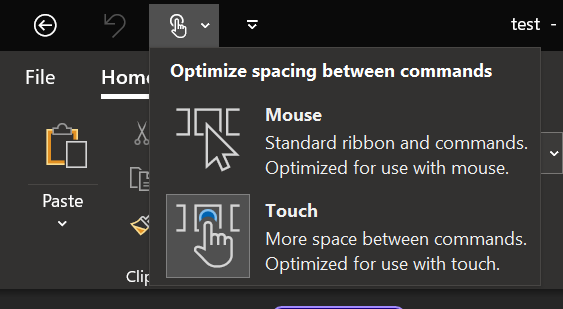
@joe_block@msonenote In the upper left corner, can you double check to see if your spacing option is set to Touch or Mouse? Try setting it to Mouse and see if the spacing reverts to what you expect.
@MrWillisICT @msonenote@Office365 Yup! In Outlook, go to File>Options>Advanced. Check the last advanced option that says "Use Send to OneNote with OneNote for Windows 10, if available"
@MrWillisICT @msonenote@Office365 If OneNote 2016 was installed as part of the Office suite, it's tied to the suite and can't be uninstalled separately (just like Word/Excel/PPT). But you can set Windows defaults to match your preference for OneNote for Windows 10: https://t.co/j8yJUzfDmU
@MrWillisICT @msonenote@Office365 Hi Lee - do you have an installed printer called "OneNote" or "OneNote for Windows 10"? And can you select this printer from Chrome? This should allow you to print to the OneNote client you prefer.
@RalphEmmers@msonenote Can you try Settings>OneNote>Reset OneNote>Delete All Notebooks. Sounds scary, but this clears the OneNote data cache on your phone. Your synced changed and notebooks in the cloud will not be touched.
@b33rdy @msonenote Thank you, Kieron, for working with me over email. It's too bad we didn't have enough info to root cause it, but I'm glad you're back up and running with OneNote and the rest of the Office suite. @msonenote - please reach out to me if you see any similar reports.
We hear you loud and clear — We are bringing OneNote Desktop (Win32) back into active development with Dark Mode being our first new feature. Our Win10 app remains in active development as well. https://t.co/C3ApyOVF1u