All motion in Treeo is spring-driven: I set mass, damping, and stiffness, then a physics solver generates the motion as keyframes for Core Animation
Recently I added the ability to smoothly splice two springs together, so the end of an animation can be governed by completely different physics than the start
This lets me start motion with smooth overdamped easing and finish with an overshooting spring bounce, or the other way around, or basically any combination, letting me create iOS animations that I don't think are achievable using any other library or framework
I can also control the transition point between the two physics systems, letting the second spring take over earlier or later in the motion
Last night I had Codex build me a Mac visualizer with real-time tuning and savable presets so I can dial everything in visually, it's tons of fun
You can choose the exact angle of every sticky reaction you attach to someone's vote in Treeo
For a while it was tied to the phone’s accelerometer (tilt up/down to change the angle) but I thought it’d be more fun if you just had to time your tap to lock it in
I try to preserve object permanence throughout every interaction in Treeo
The reaction picker emerges from its button, then returns to it. The reaction you choose is the exact one that flies out and sticks to the row
Building user trust through physical continuity
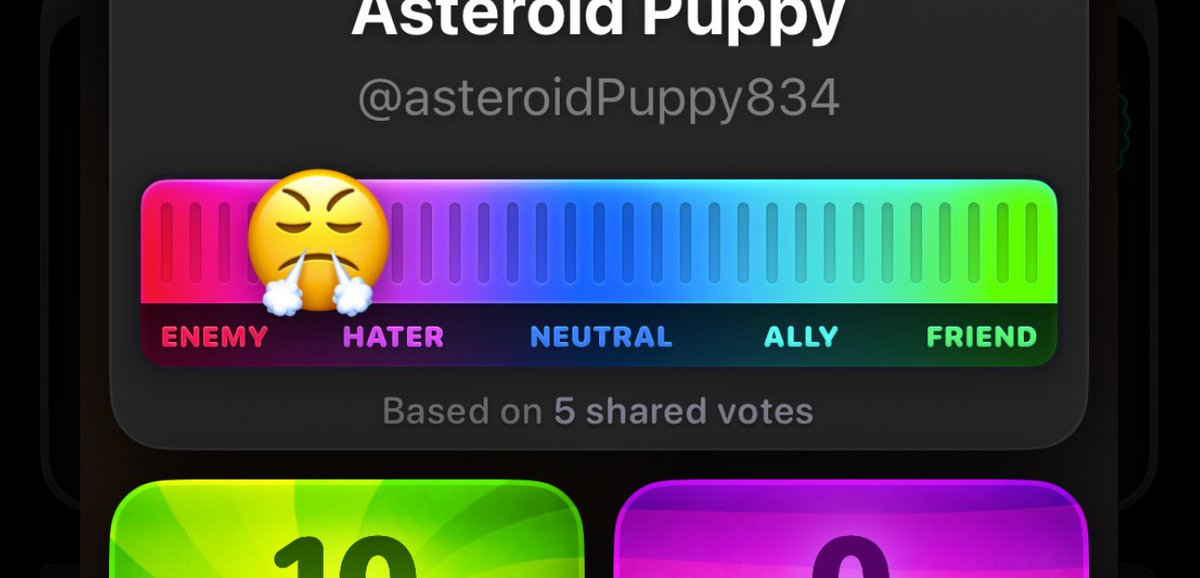
Found my #1 hater on the Treeo beta and I have absolutely no idea who they are
This person's votes on food, TV, cities, and kitchen interior design are the complete opposite of mine
Building consumer apps is so ridiculously fun
New Favorites screen just landed in the @treeo beta build 🖤
Users get faster access to hashtags and people they follow, with rows sorted by recent activity
Hashtag popup modals now use the same layout system as their user profile counterparts
By posting Treeo’s opening screen on here I have now legally forfeited my right to keep tweaking it and must reluctantly go finish the last parts of the app
AI changes what I’m willing to attempt in Treeo
If I were coding it all myself, I probably never would’ve attempted a full-panel interactive LED display with a dissolve transition for this widget
AI lets me explore bolder UI options without anxiety about how I’m gonna build it
Sometimes you need to redesign the most important screen of your app to bring content one tap closer
Little detail I like → the Treeo card slides up on pressdown, not when the user releases the button. Feels even snappier that way ✨