🚨ESTO ES UNA LOCURA
Un desarrollador chino acaba de lanzar una herramienta GRATUITA capaz de crear vídeos automáticamente para TikTok, Reels y YouTube Shorts.
Se llama MoneyPrinterTurbo.
Y ya ha superado las 100.000 estrellas en GitHub.
Así funciona:
1. Introduces un tema o una palabra clave
2. La IA genera el guion, la narración y los subtítulos
3. Busca el material visual, edita el vídeo y te entrega el resultado final
Todo ocurre en un único flujo de trabajo.
Guárdate esta herramienta.
Estoy seguro de que puedes sacarle muchísimo partido.
Enlace abajo👇
A Claude Code project folder is not just a pile of config files. Each piece decides when it loads, and knowing that is what keeps your context clean. Here is the structure sorted by when each part kicks in.
Some things load every session. CLAUDE.md loads from the root down to your current folder, all merged, and a subfolder CLAUDE.md loads once Claude works there. Put private notes in CLAUDE.local.md, import files with @path up to four hops, and know that Claude Code now reads AGENTS.md if there is no CLAUDE.md. Settings.json holds permissions, env, model, and hooks, with settings.local.json as your own overrides kept out of git. When settings conflict, the order is managed, then CLI, then local, then project, then user.
Some things load only when needed. Rules are one topic per .md file, and a rule with path globs loads only when matching files open, while one without frontmatter loads at launch. Skills keep just their name and description in context at startup, and the full body loads when you run the skill or the task matches.
Some things run in isolation. A subagent is one .md file with a required description. Its body is its own system prompt, it runs in its own context window, and it can set tools, model, memory, and a worktree for isolation. If it sets memory to project, it gets its own agent-memory folder with a MEMORY.md, and the first 500 lines or 25KB load into that agent.
Some things enforce behavior. Hooks are scripts that fire on lifecycle events like PreToolUse, PostToolUse, and Stop, across 33 events in all. An exit code of 2 blocks the action, and /hooks lets you browse them.
Two things connect and scale. A .mcp.json shares MCP servers with your team and expands variables, and you add one with claude mcp add and the project scope. The new workflows folder holds JavaScript that orchestrates many subagents at once, up to 16 at a time, using agent, parallel, and pipeline calls.
Bookmark this before you restructure your next repo and decide which parts should always load.
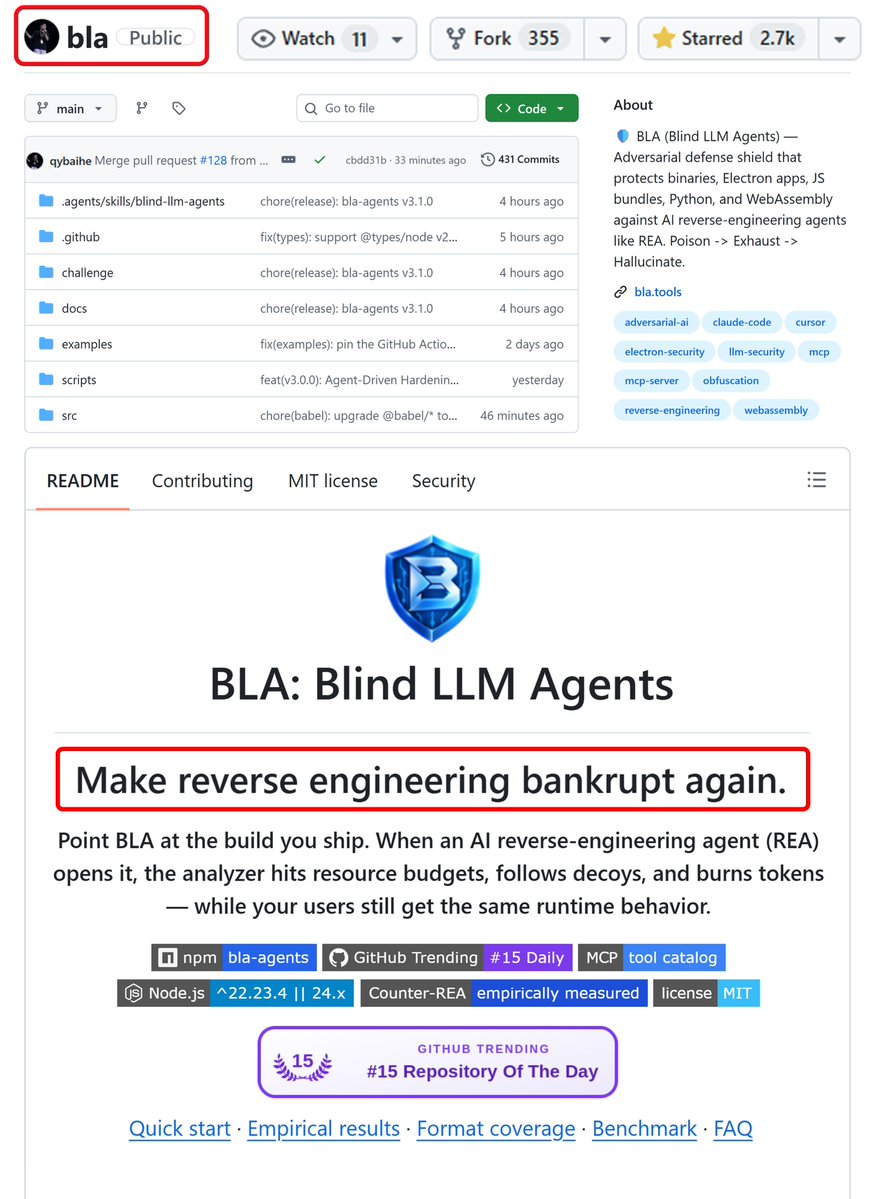
REA (reverse engineer anything) - F*CKED by chinese student...
solo dev just dropped protection for your app & site & game from reverse-engineering and AI hackers, for free
REA not dangerous anymore.
here's how to use and setup BLA (Blind LLM Agents):
first understand how it works:
• REA opens your app in 1 command, BLA hides traps inside it before you ship
• fake keys and decoy code for AI to chase, plus files built to blow past REA's own limits
• AI burns tokens on dead ends, your users get the exact same app
here's how to set it up for FREE:
1 → open Claude Code in the folder of your app, site or game
2 → say: " install Node.js 24 if I don't have it, build my project, then run npx bla-agents setup and npx bla-agents harden"
3 → it finds your build itself: dist, build, Electron .asar, .wasm, Python, native binaries
4 → it plants fake keys and decoy code, then checks every protected file still runs the same
5 → the step everyone skips: ship the files from the new .bla-hardened folder, not your old build
6 → for sites it protects the JS your site sends to browsers, your server code never leaves your server anyway
7 → want proof? run: npx bla-agents benchmark - before vs after on 14 test apps
paste link on repo below as soon as possible:
this PDF is a f*cking cheat code for anyone running coding agents
Diogo Almeida, founder of Jev and co-author of InstructGPT, published a PDF on building a Jev harness
the promise:
> up to 200x faster
> up to 400x cheaper
the speed and the cost both live in the harness around the model
how to use it:
> drop the PDF and the article below into Claude Code or Codex
> let it rebuild its own setup
one evening of work, and your agent runs on a harness few teams have 👇
After Andrej Karpathy released autoresearch, where an agent runs experiments in a loop on its own, I packed his method into one prompt that turns Opus 5.5 into a graph and can carry almost any task to the finish.
→ writes a check that can actually fail, first
→ splits the task into parts
→ runs the independent parts in parallel
→ loops each one until it passes the check
→ sends back only the part that failed
→ turns every mistake into a rule for next time
→ calls you only for the step that can’t be undone
Throw it at Opus 5.5 with the task you’ve been putting off for a week, and you’ll see the difference in one run.
The full prompt is in the comments.
How to tune it for your own work is in the article below. Save it before it gets lost ↓
THIS IS AN ACTUAL F*CKING GOLDMINE
Anthropic just shared one of the best tricks for Claude Code.
The idea: run Sonnet, Haiku 5.5 and Opus 5.5 at once, each one doing only the job it's best at.
Better results and way fewer tokens, because every task lands on the right model.
You just launch Claude Code like this:
claude --model sonnet --advisor opus
here's the split:
→ Sonnet 5.5 runs the session, writes the code and applies the fixes
→ Haiku 5.5 swarms the repo in parallel: search, grep and diff audits
→ Opus 5.5 stays on call as advisor for the big calls and signs off on the diff
→ you stop burning Opus context on work that doesn't need it
Opus only steps in at three moments:
→ before a plan locks
→ when the same error shows up twice
→ before calling it done
Sonnet builds. Haiku swarms. Opus reviews.
JEV engineering is the same move one layer down: the forks that need no thinker (which file, which tool, retry or stop) go to JEV in milliseconds, and the big models only see the ones that split
the full tree
> Sonnet 5.5 runs the main session and coordinates the work
> search maps the repo on Haiku 5.5, read-only
> grep finds call sites on Haiku 5.5 in its own context
> audit checks the diff on Haiku 5.5 in a throwaway worktree
> Opus 5.5 on call as advisor, reviews the synthesized diff before sign-off
> JEV routes micro-forks in milliseconds
paste the tree and this prompt into Claude Code ↓
"Reconfigure my Claude Code setup around this tree:
1. Run the main session on Sonnet 5.5 with Opus 5.5 as advisor.
2. Create three Haiku 5.5 subagents in .claude/agents: search (maps the repo), grep (finds call sites), audit (checks the diff).
3. Set isolation: worktree on audit so its checks never touch my working branch.
4. Add one rule to CLAUDE.md: delegate every repo search and test run to the Haiku 5.5 subagents to keep the main context small.
5. Route fast deterministic forks (tool choice, path selection, retries) through JEV.
Show me every change as a diff first. No edits until I say go."
↳ https://t.co/YqkjQiqRGv
save it, it'll come in handy.
I LAUNCHED A GROK BOT TERMINAL OVERNIGHT, GAVE IT $44.82 AND STOPPED ASKING AI WHAT IT WOULD DO. BY MORNING IT HAD $11,643.21 AND SIX AGENTS LOGGING EVERY TRADE
I spent a year asking agents what they'd trade and watching the chat scroll. Last weekend I built the thing that actually trades, in Grok Bot, with no code I touched by hand.
The six agents share one screen, each one job:
> scanner reads new token pairs and volume spikes
> rug check filters suspicious tokens before anything executes
> sizer sets position from account equity, not a fixed ticket
> executor opens and closes with slippage tracking
> logger writes the reason behind every trade
> equity curve updates on every close
I went to bed on $44.82 and left the laptop open on the dashboard. By morning the balance read $11,643.21. Every trade on the activity feed had a reason next to it and a line in the log.
That's the shift I didn't see coming. Not that an agent made money overnight. That I stopped being the one asking "would you long this?" and started being the one reading the log of what already happened.
Starting balance: $44.82
Current balance: $11,643.21
Grok Bot built the terminal, the agent architecture and the dashboard. I described what I wanted and the thing went live.
The full build is in the article below ↓
I designed all of these landing pages in the last two months, using @higgsfield , Claude, and Cursor with my custom AI designer skill.
The skill is open source: https://t.co/Gs1RT1BZxi
Building interfaces? Bookmark this. 🔖
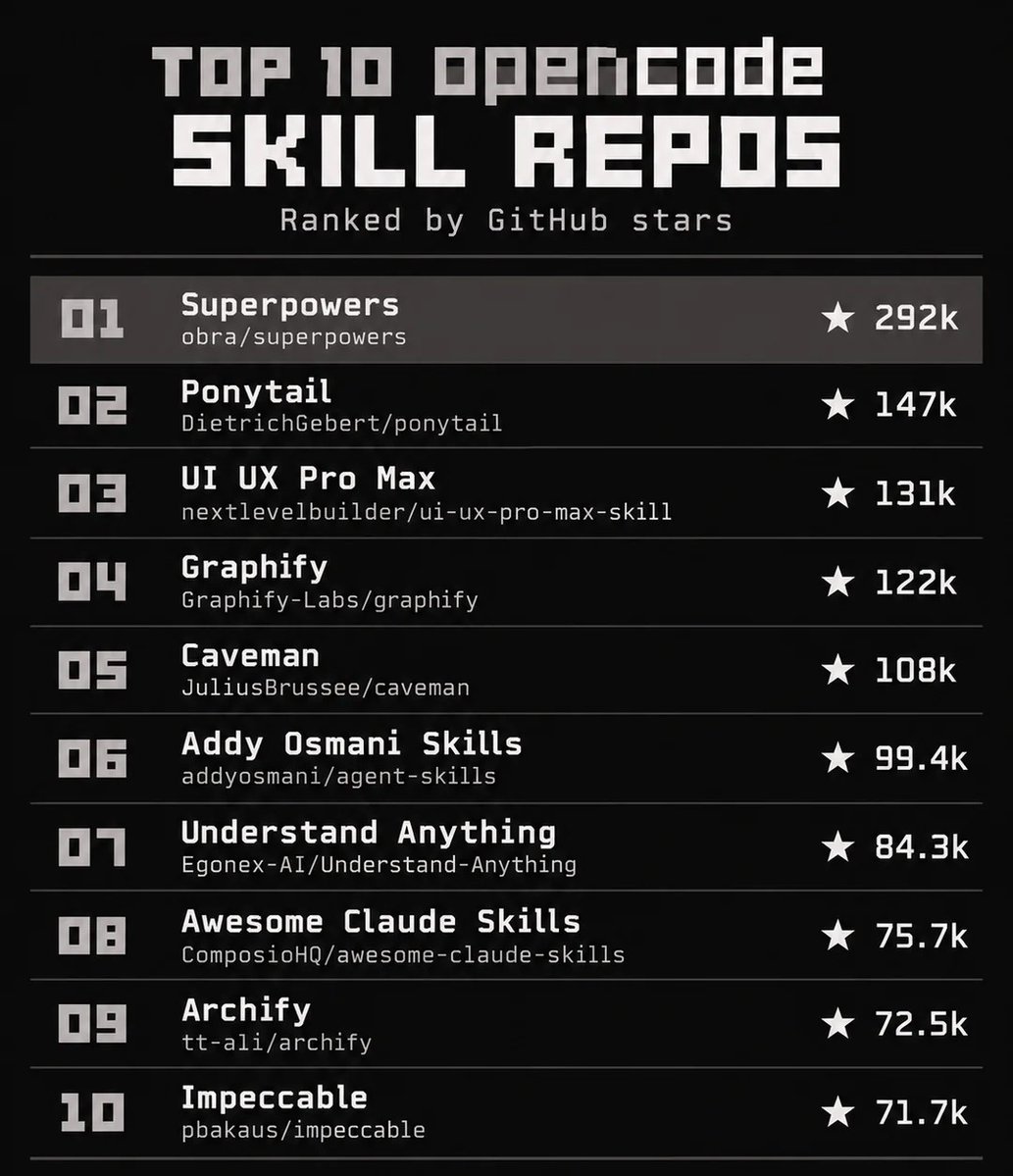
These 10 resources can save you hours of research and build time:
1. https://t.co/CgnzwKME3r – 1200+ Animated components with AI-ready prompts for building faster
2. https://t.co/pSXS4kZiE9 – One of the best React component libraries out there
3. https://t.co/RhoC6OX8eH – Striking React interfaces with polished animations
4. https://t.co/heZ00fkLry – Drop-in animated components for any project
5. https://t.co/criRCDcX8n – Advanced interactions and motion for your UI
6. https://t.co/Negddg28wS – Thousands of open-source UI elements
7. https://t.co/H3YmQX68Ph – A strong component library built with AI agents in mind
8. https://t.co/GGHYaBLbz3 – Create 3D designs and embed them directly in your site
9. https://t.co/ufG54BOlBf – Interactive web effects and immersive experiences
10. https://t.co/Xo7ZU8P5tA – Thousands of real-world examples of the same UI components
Whether you're a designer, a developer, or both- especially if you build with AI, this list is a goldmine.
Save it. You'll come back to it. 👌
10 GitHub repos from Claude Opus 5.5 week, from motion graphics to full games
1. PDoomVideo: the Opus 5.5 P(doom) music video, every frame in code (1.5k stars)
https://t.co/XYmwFwmlJK
2. awesome-opus5-5-videos: 475 viral Opus 5.5 videos with their prompts (1k stars)
https://t.co/GGJUepNjTG
3. tidewater: a WebGPU fishing game built with Opus 5.5 (988 stars)
https://t.co/vkIkczkeSe
4. claude-opus-5-5-demo: three 3D web games, one prompt each (937 stars)
https://t.co/SXBdV1yb7R
5. lemo-opuscar: 43 film styles, each a short film made in code (650 stars)
https://t.co/zZnb7MWK2d
6. ClaudeAnimationBase: starter kit for hand-painted cartoon animation (606 stars)
https://t.co/oqs6HXPmrp
7. awesome-opus-5-5-videos: source-linked guide to 1,000+ videos (360 stars)
https://t.co/kDWJBCqeLo
8. shipvideo: paste a URL, Opus 5.5 writes an HTML launch video (223 stars)
https://t.co/i3LueU2yVf
9. motion-graphics-music-video-skill: song in, motion graphics video out (71 stars)
https://t.co/T6aiJoYCs8
10. opus-video-skills: one Claude Code skill per video style (36 stars)
https://t.co/D8Qp0PL7dZ
Follow me for more AI updates like this
ANTHROPIC HA REVELADO EL TRUCO PARA MEJORAR CLAUDE OPUS 5.5
Opus escribe el código. Fable 5.1 revisa su trabajo.
Y se activa con un solo comando.
Abre Claude Code con Opus 5.5 y escribe:
/advisor fable
Cuando Opus consulta a Fable, este recibe toda la sesión, incluidas las llamadas a herramientas y sus resultados.
Una segunda opinión en momentos clave:
→ Antes de un plan: ¿es el enfoque correcto?
→ Cuando un error se repite: ¿estamos buscando donde toca?
→ Antes de terminar: ¿qué se nos ha escapado?
Sin copiar y pegar entre chats.
Y puedes llevarlo más lejos con esta estructura:
→ Opus 5.5 en esfuerzo alto dirige la sesión
→ explorer lee y explora el código
→ worker edita y ejecuta tests
→ researcher consulta la documentación
→ Los tres usan Opus en esfuerzo medio
→ Fable 5.1 queda disponible como asesor
Para configurarlo, pega este prompt en Claude Code ↓
“Reorganiza mi configuración de Claude Code con esta estructura:
Revisa ~/.claude/agents y .claude/agents para encontrar subagentes que ya cubran los roles explorer, worker y researcher.
Propón nuevos subagentes solo para los roles que falten.
Configura los correspondientes con model: opus y effort: medium.
Si alguno tiene fijado otro modelo, no lo modifiques y enuméralo.
Configura la sesión principal con effortLevel: high y advisorModel: fable en ~/.claude/settings.json.
Busca CLAUDE_CODE_DISABLE_ADVISOR_TOOL, DISABLE_TELEMETRY y cualquier variable que impida obtener las feature flags necesarias para activar el asesor.
Comprueba también CLAUDE_CODE_EFFORT_LEVEL, que puede sobrescribir el esfuerzo de los subagentes. Informa de lo que encuentres sin modificar estas variables.
Añade esta regla a ~/.claude/CLAUDE.md: consulta al asesor antes de elaborar un plan grande, cuando se repita un error y antes de dar por terminada una tarea larga.
Muéstrame primero todos los cambios propuestos como diff. No edites nada hasta que te dé permiso.”
La función es experimental y requiere acceso a Fable. Las consultas consumen tokens adicionales y Claude decide cuándo hacerlas, guiado por tus instrucciones.
Guárdalo para tu próxima sesión.
Enlace: https://t.co/ibL9XtYnL8
opus 5.5 is f**king insane
drop this into Claude Opus 5.5 and watch it design the agents, prompts, and workflows for you.
Steal this before everyone starts using it:
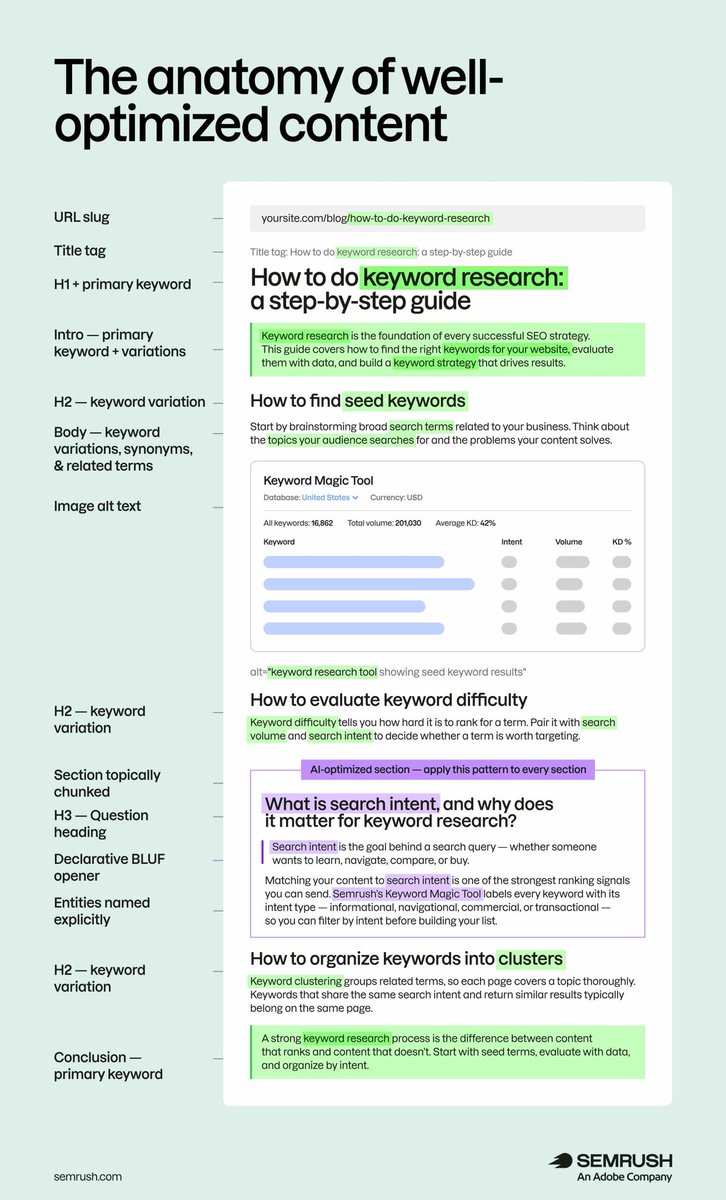
Content optimization is about making your content easier to find, understand, and act on.
That means creating pages that answer real questions, align with search intent, and clearly communicate value (for both people and the systems surfacing your content).
When done well, content optimization helps you:
✓ Increase organic visibility
✓ Earn more citations in AI-generated answers
✓ Reach qualified audiences
✓ Drive more conversions
In this guide, we break down the practical steps for optimizing content to improve visibility across search and AI-powered experiences 👇
https://t.co/YfIdKVGRme.
Free 3-hour course from an ex-Google engineer. AI agents, graph engineering, harness, agent loops. Covers more than most $500 paid courses.
This is the exact playbook to learn how to actually build and monetize AI agents. Don't miss your shot, save it now.
• 0:00 - Design an AI agent system from scratch
• 7:38 - When your agent should hand off to a human
• 19:27 - RAG and vector databases explained simply
• 52:38 - Deploy your AI agent to Google Cloud
• 1:25:57 - Turn AI agents into a paid business via WhatsApp
• 1:33:00 - Turn conversations into real leads automatically
• 2:24:01 - Loop engineering vs graphs, the real difference
• 2:33:08 - Build your own multi-tool agent graph
Save this video, because it's the only one that can actually take you to your $2,000+ profit.
20 UI resources every design engineer should have bookmarked.
Save this 🔖
1. Scrolltide (https://t.co/RlChWqggj8) - 300+ animated components and full site prompts, and every single one ships with the complete build prompt behind it. Spiral sliders, morph cards, 3D scenes, scroll-driven sections.
- Copy the prompt, paste it into Claude or Cursor, get the component live.
-Personal and client use, full source included, new drops weekly.
2. shadcn/ui (https://t.co/vUKwdPK1IN) — the gold standard for copy-paste React
3. Aceternity UI (https://t.co/nxASYyVHLH) — 200+ animated React/Tailwind
4. Magic UI (https://t.co/E2oLbxcBP3) — drop-in animated components
5. Motion Primitives (https://t.co/MIhQHgyUPK) — advanced UI interactions
6. Uiverse (https://t.co/9G9JFLtNIg) — thousands of open-source elements
7. https://t.co/p6pXo8hFRn — component registry that plugs into agents via MCP
8. UIAble (https://t.co/E5NS5sigjw) — expands the shadcn ecosystem
9. mapcn (https://t.co/AckvMvEKdL) — map components for React
10. MicroKit UI (https://t.co/iFJCleZZpJ) — micro-interactions for buttons and inputs
11. Liquid Glass (https://t.co/cP8YFdb7cr) — glass refraction components
12. Kinetics (https://t.co/NvM0Wbm3rN) — 150+ motion effects with code
13. Theatre.js (https://t.co/G41plIs0iY) — expressive web animation
14. Anime.js (https://t.co/knFchyx5GQ) — lightweight DOM animation
15. Spline (https://t.co/pk3zS9R4Rp) — 3D in the browser, exports to React
16. Unicorn Studio (https://t.co/Aa72CXKAyf) — interactive web effects
17. Component Gallery (https://t.co/ZNFmqbqGsp) — 2,600+ examples of the same element solved
18. Navbar Gallery (https://t.co/75zV2ioDNu) — hundreds of navigations
19. CSS Text Effects (https://t.co/yHgo53Ydgw)
20. 3Dicons (https://t.co/BfrrSJOQVY) — open-source 3D icons