I honestly didn't expect a 15 minute check to make me feel this stupid about my own phone.
Your camera roll is probably the least protected place on your iPhone, and you don't even think about it
I let Opus 5.5 go through mine last night and it found years of stuff I forgot I ever saved
Here's how it happened. I plugged my iPhone into my MacBook to make a regular backup, and while it ran I asked Opus 5.5 to do a quiet privacy sweep. No fancy setup, just the backup folder and the permissions list. What you see on the screen in the video is it going through photo after photo and sorting them into what's fine and what absolutely should not be sitting there
I expected maybe a couple of awkward selfies. That's not what came back
Here is what it actually flagged:
screenshots of banking apps with full balances and card details
photos of my passport and ID that I took once for some form and never deleted
screenshots of a recovery phrase I "temporarily" saved back in 2022
a photo of a whiteboard with a WiFi password and a door code on it
screenshots of private chats I thought I deleted months ago
receipts with my home address, full name and phone number
QR codes for things I don't even remember signing up for
All of that was just sitting in my main library, synced to the cloud, available to any app I ever gave full photo access to
And that's the second part that got me. Opus 5.5 pulled the list of apps that have Photos permission. I expected 5 or 6. It was way more than that. Editors I used once. A scanner app from years ago. Two random games. A food delivery app. Every single one of them had full access to my entire library, not just the photos I picked
Then there's Recently Deleted. When you delete a photo on iPhone it doesn't disappear, it sits there for 30 days. Half of what I "cleaned up" last month was still there, just one tap away from coming back
What I liked about doing this with Opus 5.5 is that it didn't just dump a giant list on me. It grouped everything by risk, explained why each thing mattered, and gave me a short order of what to fix first. It also didn't touch anything on its own. It showed me, I decided
Here's what I ended up doing in about 15 minutes:
moved every ID and document photo into a locked folder and deleted the rest
deleted the recovery phrase screenshot and moved the funds to a fresh wallet just in case
switched almost every app from full access to limited or none
emptied Recently Deleted for real
turned off the old apps that still had access to Photos, Contacts and Local Network
My honest take: we spend so much time worrying about hackers and passwords, and then we keep a photo of our passport next to 4,000 memes. The risk isn't some movie-style breach. It's the boring stuff we saved once and
🚨 this broke my brain
THIS PAD HASN'T NEEDED YOU IN DAYS
16 agents. 336 turns on one session. $712 estimated cost. Still running.
1. One pocket screen. 4x4 grid.
Each tile is one coding-agent session. Pixel creature, a name and a state.
2. Two sessions working. One hungry.
The rest finished hours to days ago. None asked for help.
3. Tap a tile. CMM server opens a detail card.
Context at 50%. 4.5m tokens out. 2478m cache read.
336 turns deep. Opus 5.5.
4. Two buttons at the bottom of the card.
Focus terminal. Interrupt.
Full cockpit control from a USB-wired slab in one hand.
Every running agent is one tap from takeover.
Most builders stare at 16 terminal tabs on a monitor.
This pad collapses the whole stack into a pocket grid.
Save this. The HUD below maps every step of the pad ↓
What does it take to power a nation's AI ambitions?
SNS Network has made Sovereign AI central to Malaysia's national AI ecosystem. Dell Technologies is deepening that work through co-innovation, expanded infrastructure, and new AI solutions.
The Dell AI Factory with @NVIDIA gives Malaysian organizations the scalability to lead, accelerating time to market by up to 2x. ⬇️ https://t.co/WtFDuElCsb
Quick question: If quantum computing changed today's security standards tomorrow, would you know where to start? Understanding where cryptography is used today is the first step toward post-quantum readiness. 🛡️
Dell Technologies helps organizations prepare for post-quantum security and resilience.
Learn more: https://t.co/4Y4HxXfvvb
this is actually insane..
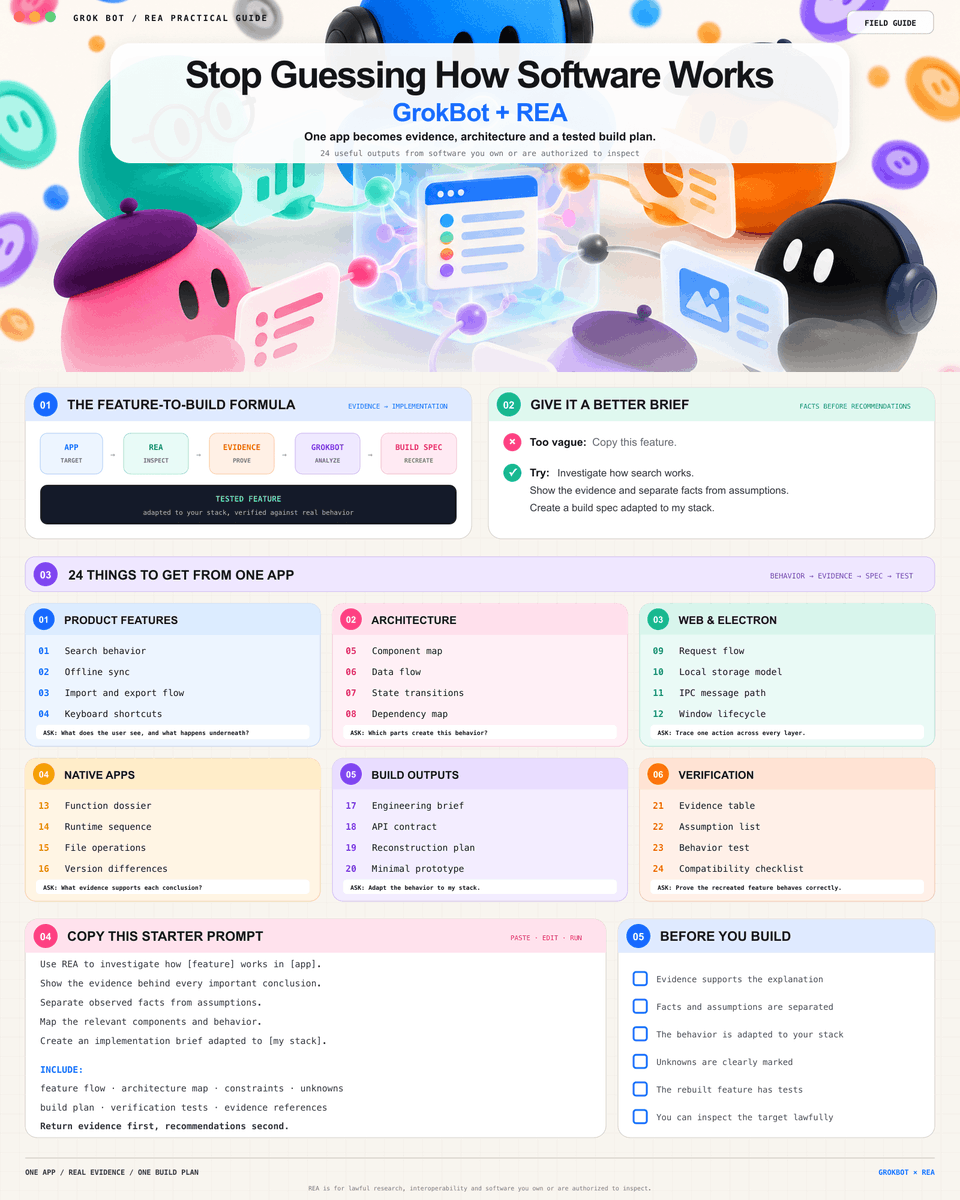
GrokBot can now reverse engineer how software works without access to the original source code
connect it to REA, give it one feature, and it handles the full loop:
→ inspect the shipped app
→ map the architecture
→ create a build spec
→ rebuild it for your stack
→ verify the result
basically:
app → REA → evidence → GrokBot → tested feature
you are not asking AI to copy what it sees in a screenshot
you are giving an agent the tools to understand what actually happens before it writes code
use it on software you own or are allowed to inspect
save now, then send to your GrokBot
THIS IS A PURE F*CKING GOLDMINE
Official Anthropic tip for Claude Code: stop resolving Git merge conflicts by hand when isolated worktrees solve it in zero seconds
The idea: every parallel Claude session gets its own independent working copy without risking your local work
True concurrent development with zero dirty diffs: one agent builds a feature, a second patches a bug, and your main branch stays untouched
You just launch Claude Code like this:
claude --worktree feature-auth
here's the split:
→ each session automatically checks out an isolated branch under .claude/worktrees/
→ .worktreeinclude automatically mirrors your local .env and secrets into the new workspace
→ built-in sandboxing strictly blocks the agent from touching or overwriting files in your main checkout
→ you can run 5 terminal sessions in parallel with zero git collisions
Worktree isolation triggers at three critical moments:
→ spinning up parallel features without switching your active local branch
→ auditing external pull requests instantly via claude --worktree "#1234"
→ automated branch cleanup and directory pruning the moment a session exits
Agent builds · Worktree isolates · Main branch stays clean
Repository protection executes one layer down: file edits, redirects, and git operations targeting the main checkout get blocked in milliseconds before they ever touch the disk
the full tree
> launch sessions with the --worktree flag on an isolated working copy
> custom subagents in .claude/agents/ take isolation: worktree for background refactoring
> .worktreeinclude guarantees local environment variables and API keys carry over
> ExitWorktree checks for uncommitted changes before pruning temporary branches
> claude --resume returns you directly to the active worktree without losing session context
paste the tree and this prompt into Claude Code ↓
"Rebuild my Claude Code setup around this tree:
1. Configure parallel session isolation to always branch from clean origin/HEAD
2. Create .worktreeinclude at repository root to automatically mirror .env and local secrets into every new worktree
3. In .claude/agents/, set isolation: worktree on all refactoring and test-runner subagents
4. Add one rule to CLAUDE.md: never execute file writes targeting the main checkout while running inside an isolated worktreeShow every change as a diff first, no edits until I say go"
https://t.co/GypBCh5m1O
save it, it'll come in handy