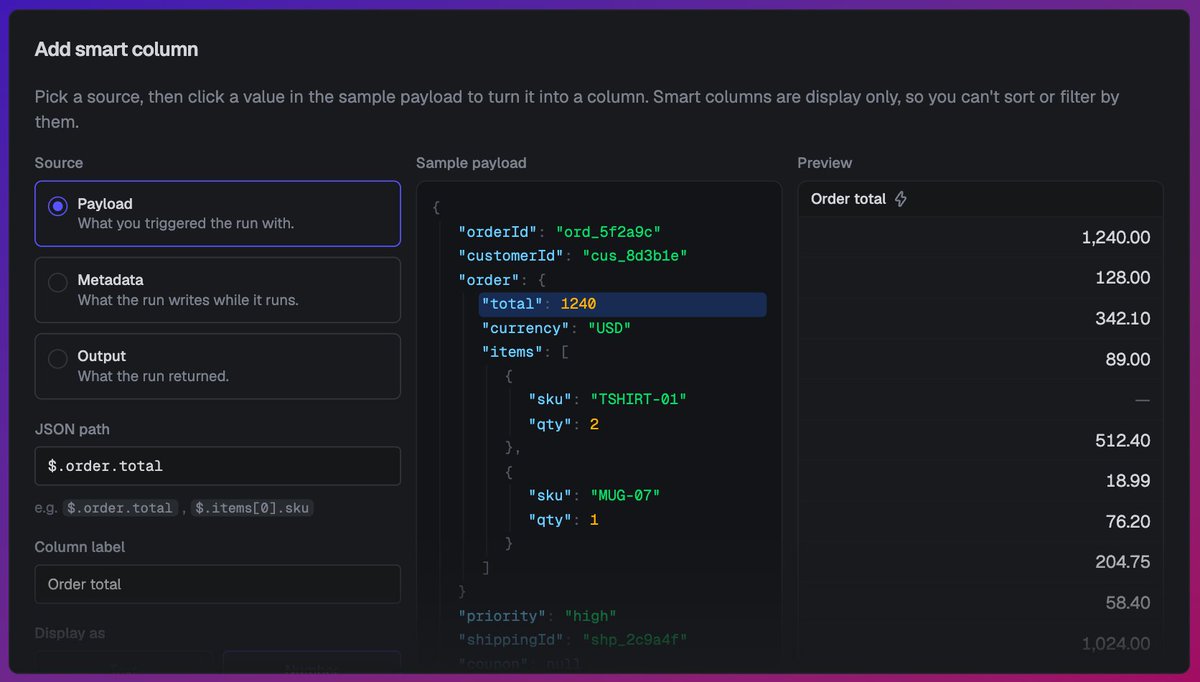
You can now show, hide, or reorder columns on the @triggerdotdev runs list. You can also add smart columns that pull a single value straight out of a run and display it for every row. ↓
Setup a Smart column to point at a run's payload, metadata, or output with a JSON path:
$.𝚘𝚛𝚍𝚎𝚛.𝚝𝚘𝚝𝚊𝚕 as a number
$.𝚌𝚞𝚜𝚝𝚘𝚖𝚎𝚛𝙸𝚍 as text
$.𝚜𝚝𝚊𝚝𝚞𝚜 as a badge
Give it a label and it fills in down the whole list.
Arena Conversations: @petergostev sat down with @mattaitken, founder and CEO of @triggerdotdev, to discuss building infrastructure for long-running agents, including retries, API reliability, and why customers are switching frontier models faster than ever.
Watch the full episode at the link below.
Every environment in @triggerdotdev used to authenticate with a single secret key.
Now each environment can hold as many keys as you want. Every service, CI job, and integration gets its own scoped credential.
↓
𝚝𝚛𝚒𝚐𝚐𝚎𝚛 𝚍𝚎𝚙𝚕𝚘𝚢 can authenticate with a Deploy-only key set as 𝚃𝚁𝙸𝙶𝙶𝙴𝚁_𝚂𝙴𝙲𝚁𝙴𝚃_𝙺𝙴𝚈.
The full key value shows once at creation, then it's hashed at rest. The dashboard only ever displays an obfuscated suffix.
Kick it off, then 𝚛𝚞𝚗𝚜.𝚋𝚞𝚕𝚔.𝚙𝚘𝚕𝚕() waits for it to finish and returns live counts. 𝚛𝚞𝚗𝚜.𝚋𝚞𝚕𝚔.𝚊𝚋𝚘𝚛𝚝() stops one mid-flight.
Changelog: https://t.co/gwttbSZRzH
You can run bulk cancel and replay straight from the SDK.
Point 𝚛𝚞𝚗𝚜.𝚋𝚞𝚕𝚔.𝚛𝚎𝚙𝚕𝚊𝚢() or 𝚛𝚞𝚗𝚜.𝚋𝚞𝚕𝚔.𝚌𝚊𝚗𝚌𝚎𝚕() at a filter and it hits every matching run, from a handful to millions. ↓
The filter is the same shape as 𝚛𝚞𝚗𝚜.𝚕𝚒𝚜𝚝(): status, task, tags, queue, version, region.
So after you ship a fix, you replay exactly the runs that failed. No looping over run IDs by hand.
Built into @triggerdotdev.
New in @triggerdotdev: the health report.
One command tells you if your project is actually healthy:
– is work starting?
– are runs succeeding?
– is your telemetry fresh?
𝚝𝚛𝚒𝚐𝚐𝚎𝚛 𝚛𝚎𝚙𝚘𝚛𝚝 𝚑𝚎𝚊𝚕𝚝𝚑 ↓
Every generation records the version that produced it.
So when an output goes bad, you open the call and see the exact template (and model) behind it.
Changelog: https://t.co/yngetsQQyO
Define your prompts in code. Override them live when you need to.
On @triggerdotdev a prompt is an id, a model, typed variables, and a template, and every deploy creates a new version.
Override the text or model from the dashboard, no redeploy ↓
Need to change wording or swap the model right now?
Pin an override from the dashboard or the SDK. Live calls resolve there until you remove it. One per prompt per environment, so staging doesn't touch prod.