Your transcript was right. The last 10 minutes weren't formatted like the first 10.
Final pass: search for what the guide bans, like "S1:" or "..."
Guideline Format marks each rule applied or needs review: https://t.co/Y6YgnOpWCu
What's your last check before you submit?
@SayItAgainAI Good list. One check worth adding to every take: the captions. A few words at a time, timed to the voice, and kept out of the bottom 20% where the app buttons sit. Most people watch these muted, so the captions carry the script.
@chrisralarcon Captions on the chin is a classic. What helps: give it a fixed caption zone up front (say, above the bottom 20%, max 2 lines of about 32 characters) and check frames at each cut before rendering, instead of letting it fix things after the full render.
@SuppsCopyChief One thing still worth a human pass on DR video: the captions. Product names, prices and claims spelled exactly as approved, and no line break splitting a number or a key phrase. That's where compliance notes tend to come from.
@strawbemmmy Fair point. Most transcription work defaults to clean verbatim: drop the ums, stutters and false starts. Full verbatim, where every stutter is typed, is usually only for legal or research jobs. For a fan clip, clean is almost always the right call.
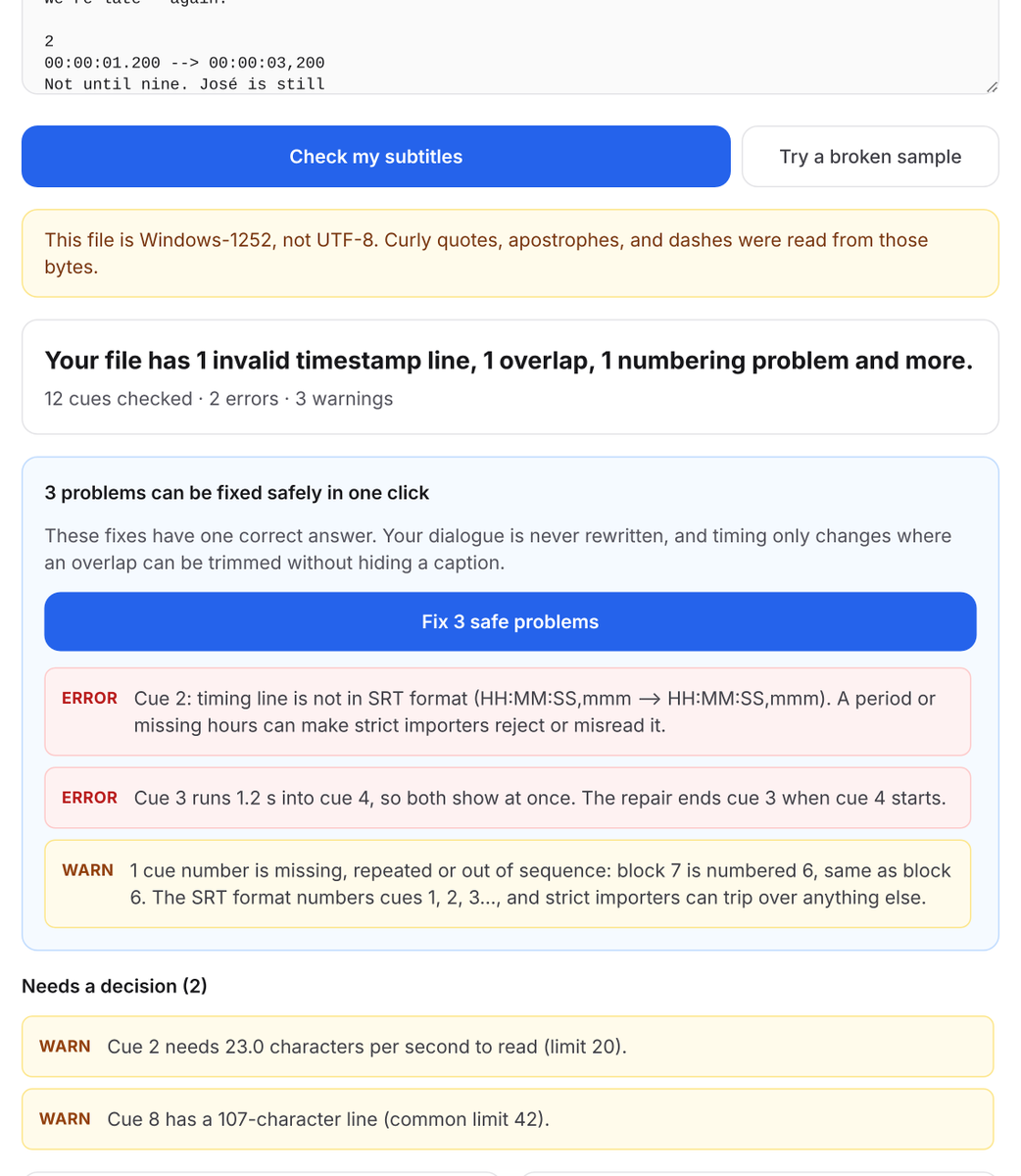
Your captions blink between lines. The file isn't broken.
A gap under 0.1 s between two cues makes the caption flash off and back on.
Subtitle Validator flags tiny gaps and can close them: https://t.co/y9ik9rxnk1
Do your clients set a minimum gap between subtitles?
@Zsooncoma@ecomuniversity Solid set of formats. One caption tip for ads: get the hook line on screen in the first second, keep each caption to a few words timed to the voice so it reads on mute, and keep text out of the bottom 20% where the app buttons sit.
@petergyang@jake11moran@HeyGen Nice workflow. If clips like these go out on social, burn in short captions (one or two lines, around 40 characters each) since most feeds autoplay muted, and keep a soft .srt too so you can fix a word later without re-rendering.
@TomReichertWA Live captions are a big one. For recorded video, edited captions go further: name the speaker when the voice changes, and add sound tags like [music] or [laughter] so deaf viewers get the whole scene, not just the words.
@AdarshChetan For anyone starting out: transcribe the same 5-minute clip twice, once clean verbatim (drop fillers and false starts) and once full verbatim (keep every um and stutter). Knowing that difference cold is one of the first things a test looks at.
@konig0000 Tip before any transcription test: ask for the style guide first and note three things. Clean or full verbatim, how to tag words you can't make out, and the timestamp format. Plenty of tests are failed on formatting, not hearing.
You kept every stutter for full verbatim. It came back over how you typed them.
One guide wants "I- I think." Another wants "I-I think."
Guideline Format applies your client's rules and lists each one applied: https://t.co/Y6YgnOpoMW
How do your clients want stutters typed?
@QRCodeART@BuzzcastPodcast@buzzsprout Exactly. A simple timestamp offset isn't enough in those cases. If an ad interrupts a cue, that cue needs splitting. If the audio rewinds 5 seconds after the ad, those captions need to appear again. The VTT needs to match the final audio timeline, not just the original episode.
@MisoraUni Agreed, and a quick fix for creators is to upload an .srt or edited caption track instead of leaving auto-captions on. Even a fast pass on names and accented words makes them far more watchable.
Your transcript was clean. It came back over "4 clinics."
Many guides spell out one to nine, numerals from 10 up. Easy to miss on page 30.
Guideline Format applies your client's number rule and lists every change: https://t.co/Y6YgnOpWCu
What's your client's number rule?
@everwall One more worth asking: are the captions on the wall pre-made or generated live, and can you check a sample before the event? A quick test with names, jargon and accents tells you more than a yes on a checklist.
@ChuksEmma947401 For anyone applying in Yoruba, Hausa or Igbo: ask how they want English words mid-sentence handled, whether tone marks are required, and how to tag words you can't make out. Those rules change per client and are easy to miss on a test.
@RemotejobWtessy Tip for anyone applying: turn the style guide into a one-page checklist (verbatim choice, speaker labels, how unclear audio is tagged, timestamp format) and run it as a separate pass before you submit. Formatting gets graded as closely as the words.
@Jeyraident Have fun at VAX! One tip worth passing on there: caption clips in short lines timed to the speech, and spell character and lore names the same way every time. Lots of people watch muted, and consistent names make clips easier to search.