Today, we change how the world uses computers. No keyboard. No mouse. Just you, and your voice.
For the first time, you can simply talk to your computer and have it do the work for you.
Open apps. Find things. Click through websites. Type. Navigate. Complete tasks.
Just say what you want done, and Incredible uses your computer to make it happen.
https://t.co/SlDhjaGnDT
Been improving Incredible’s browser harness.
On a 50-task subset of WebArena, we confirmed:
- Incredible: 78%
- @browser_use OSS: 70%
Still tweaking. Here’s one task with both agents side by side.
Full benchmark next 💪
Computers have spent 50 years teaching us how to use them.
We think it’s time to flip that!
We’ve quietly brought on additional pre-seed funding, bringing Incredible’s total pre-seed funding to $2.7M — as we build a new way to use computers: just talk, and the work gets done.
More ↓
https://t.co/loN61efKa0
I think everyone is feeling that the next big thing is approaching. I want to call it "vibe-computing". The first time I felt it was when I used WisprFlow to dictate into Claude Code/Codex. Pretty obvious that was a great experience. Kinda naturally created more things that I wanted to do that I just gave to these strong models hoping for good results. Ended up starting to create spreadsheets and stuff just by talking to the spreadsheet or the stuff. And then, after a while, it started becoming more and more capable. It became this natural flow of just everything I do on my computer now, I just kind of talk to it. And once I hooked up voice to voice and that became very natural, all of a sudden it feels more and more like I don't really need to look at my screen or touch my keyboard, and I barely have to think about the type of task that is currently going on and how to approach it. I kinda just describe what outcome I want.
Funnily enough, this has created a weird but slightly hilarious situation. When at home, I get asked constantly by my partner if I'm talking to them, when I'm really just "vibe-computing". I have to now tap them on the shoulder or literally yell out their name for them to understand when I'm talking to them versus when I'm talking to my computer. I've even had to throw a crumpled-up piece of paper to get their attention sometimes, because now they're kind of just ignoring me whenever I'm talking if I have my computer on. I'm guessing I'm not the only one who has experienced this in the last couple of weeks or months.
Surprisingly, at work, most people just think that I'm constantly in a digital meeting. So it's kind of accepted that I do speak. But in reality, obviously that's not the case haha.
ngl we surprised ourselves with this one.
it's called Vibe Computing and we're testing it now.
waitlist → https://t.co/GPhtKJ8fyc
(started as a voice-command pilot with 80 users, escalated quickly)
Grateful for the incredible support on @ProductHunt yesterday!
Because of this amazing community, we’re #1 Product of the Day 🏆🚀
Thank you to everyone who supported, shared, and believed in us. This is just the beginning! 🧡
its time to work Incredible, with just your voice! we call this vibe computing :D
@karpathy we think youll really dig our product, since you use superwhisper and coined vibe coding using that!! maybe this can increase that threshold for you!
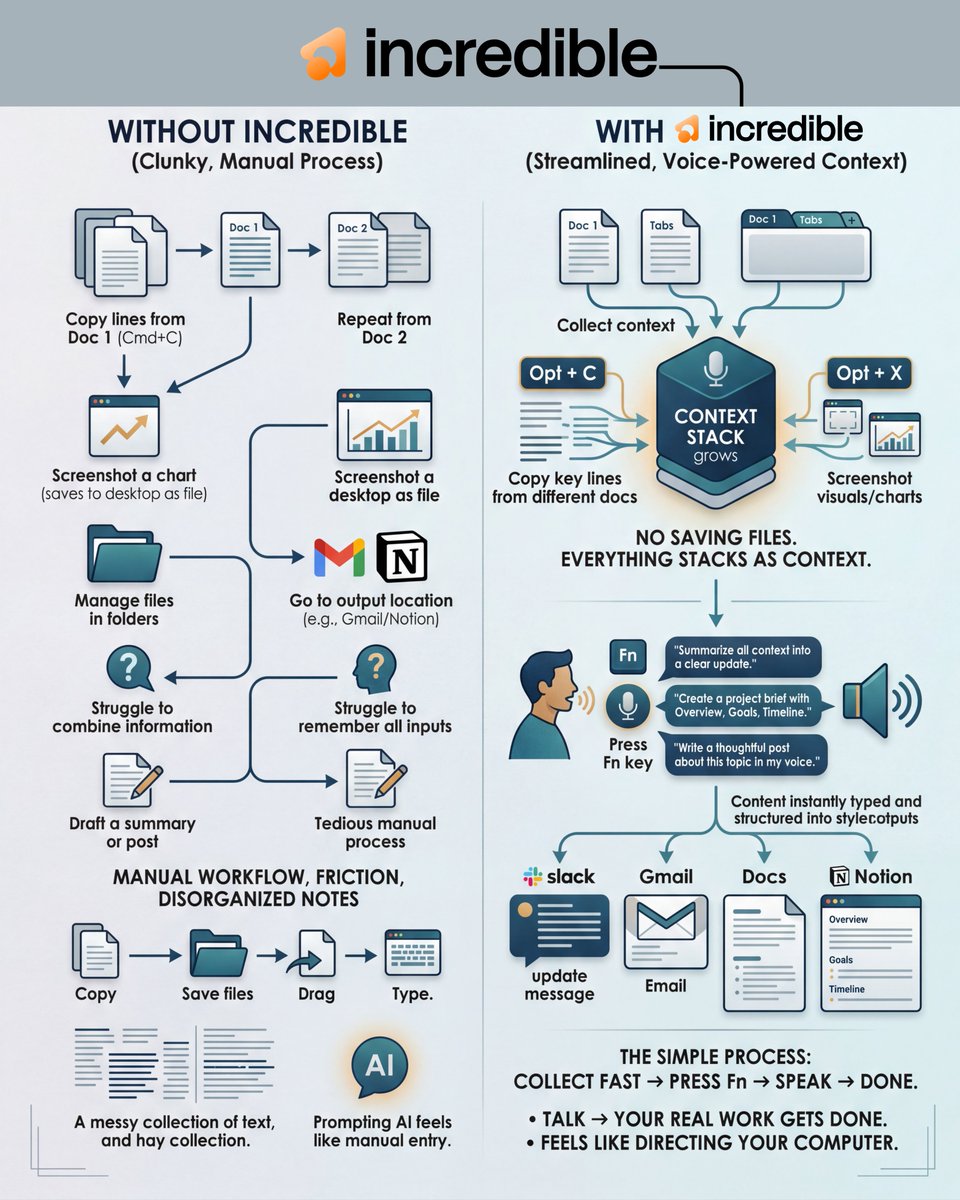
I’ve been using this incredible AI for a few days and it genuinely changed how I handle scattered work.
The real power isn’t just “voice AI.”
It’s context.
Here’s what that actually looks like in my workflow:
I’ll copy key lines from one doc using Opt + C.
Then grab relevant parts from another tab using Opt + C again.
If there’s a chart or visual I need, I hit Opt + X and screenshot it.
No saving files. No dragging images around. It just stacks everything as context.
Then I go to where I actually need the output. Slack. Gmail. Docs. Notion.
I press Fn and say: “Summarize all the context into a clear update.”
It synthesizes everything and types a clean, structured summary right there.
Same thing when I’m building a Notion page.
I gather messy meeting notes, requirements, screenshots of designs using Opt + X, open a new page,
press Fn and say: “Create a project brief with Overview, Goals, and Timeline.”
It generates a properly structured page using everything I collected.
Even for writing posts:
I screenshot ideas with Opt + X, copy specific lines with Opt + C, open a blank post, press Fn, and say:
“Write a thoughtful post about this topic in my voice.”
It drafts something original based on what I fed it.
The shift is simple:
Collect context fast.
Press one key.
Speak.
Done.
Try Incredible now: https://t.co/6SuYLUXYD1
PS:) I’ve got 10 invite codes for commenters who want to try becoming absurdly productive. To get this leave a comment, and REPOST it. And I'll DM you
.
.
.
@SmedleyCollin@Ai_Vaidehi@sakhil_ai Hey thanks for your interest and we'd love for you to try out Incredible, and well get some incredible work done today. Heres a free invite code for you - https://t.co/W0e5J9QXWJ
@pushkersoni72@Ai_Vaidehi Hey thanks for your interest and we'd love for you to try out Incredible, and well get some incredible work done today. Heres a free invite code for you - https://t.co/W0e5J9QXWJ
@aastha_mhaske@Ai_Vaidehi Hey thanks for your interest and we'd love for you to try out Incredible, and well get some incredible work done today. Heres a free invite code for you - https://t.co/W0e5J9QXWJ
@sakhil_ai@Ai_Vaidehi Hey thanks for your interest and we'd love for you to try out Incredible, and well get some incredible work done today. Heres a free invite code for you - https://t.co/W0e5J9QXWJ
We might be one of the last generations typing everything manually on our computers.
I’ve been testing Incredible and it feels like a glimpse of what’s coming next.
It’s a voice-first desktop copilot that works inside the apps you already use like Slack, Gmail, Docs, Sheets and your browser.
Instead of opening another AI tab, you just press a key and speak.
Your ideas → instantly structured into emails, reports, notes, or messages right where your cursor already is.
No copy-paste loops.
No prompt gymnastics.
No losing context between apps.
You literally talk → your real work gets done.
Feels like your computer finally keeps up with your brain.
This is what vibe computing looks like.
I’ve got 10 invite codes for people who want to try it early. Comment if you want one.
hey @bygregorr you just press Opt C (to copy any text on your screen or files on your computer) and/or Opt X (to capture a screenshot of what youre looking at). It keeps getting added to the Content Stack - that will be used to give relevant accurate output when you ask Incredible to do a task with that context . Just press an shortcut, grab context and go to the next (without copy pasting one by one, or saving to desktop etc and then compiling all that and prompting AI on a different tab to get the output that you anyway have to copy paste back to your destination app. all this slows you down)
talk to AI → AI gets your work done
just say:
“hey incredible, research profitable SaaS markets that aren’t saturated and have high profit margins”
and know what to build today 💰
it really is an https://t.co/ZoB0b4VKIm
I’ve been using this incredible AI for a few days and it genuinely changed how I handle scattered work.
The real power isn’t just “voice AI.”
It’s context.
Here’s what that actually looks like in my workflow:
I’ll copy key lines from one doc using Opt + C.
Then grab relevant parts from another tab using Opt + C again.
If there’s a chart or visual I need, I hit Opt + X and screenshot it.
No saving files. No dragging images around. It just stacks everything as context.
Then I go to where I actually need the output. Slack. Gmail. Docs. Notion.
I press Fn and say: “Summarize all the context into a clear update.”
It synthesizes everything and types a clean, structured summary right there.
Same thing when I’m building a Notion page.
I gather messy meeting notes, requirements, screenshots of designs using Opt + X, open a new page,
press Fn and say: “Create a project brief with Overview, Goals, and Timeline.”
It generates a properly structured page using everything I collected.
Even for writing posts:
I screenshot ideas with Opt + X, copy specific lines with Opt + C, open a blank post, press Fn, and say:
“Write a thoughtful post about this topic in my voice.”
It drafts something original based on what I fed it.
The shift is simple:
Collect context fast.
Press one key.
Speak.
Done.
Try Incredible now: https://t.co/6SuYLUXYD1
PS:) I’ve got 10 invite codes for commenters who want to try becoming absurdly productive. To get this leave a comment, and REPOST it. And I'll DM you
.
.
.