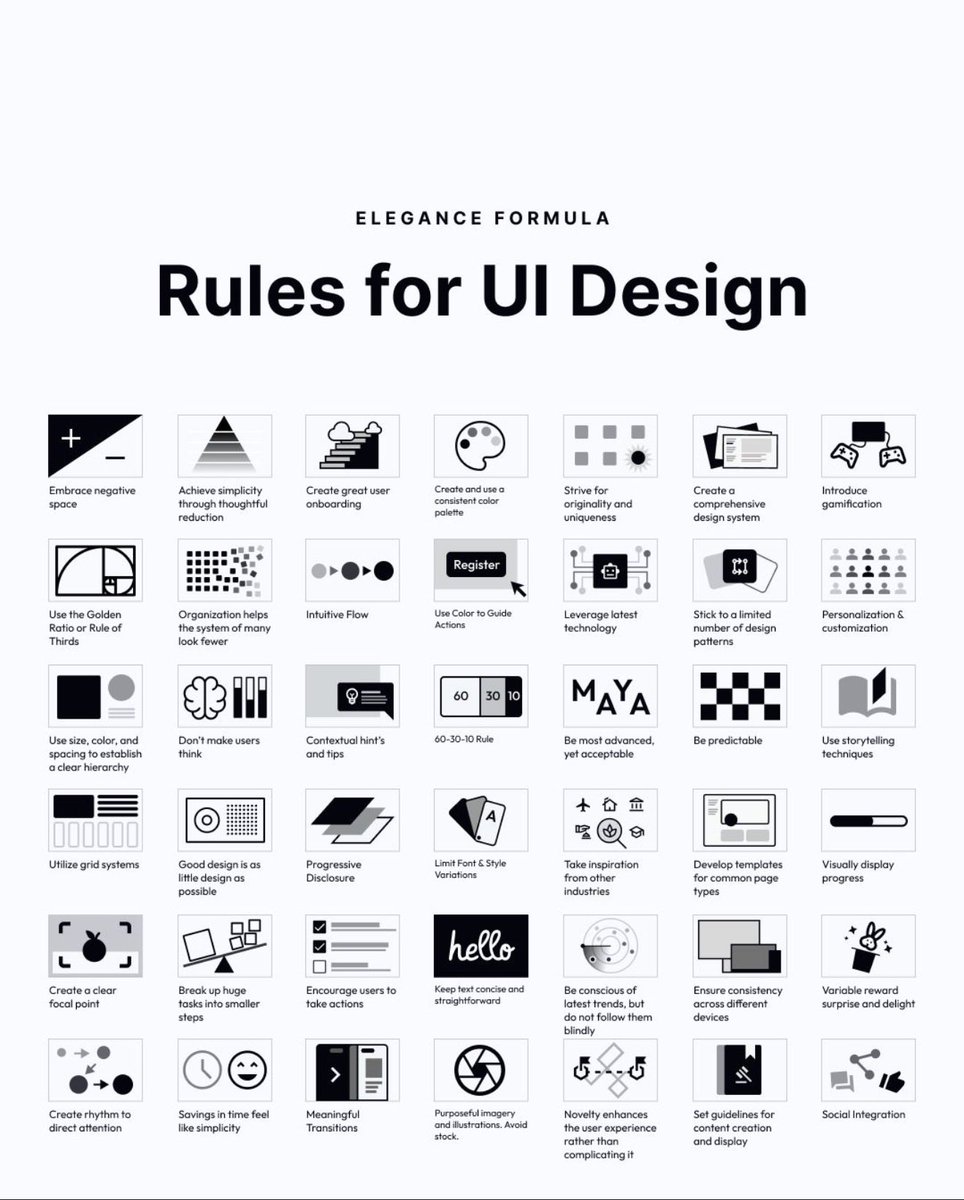
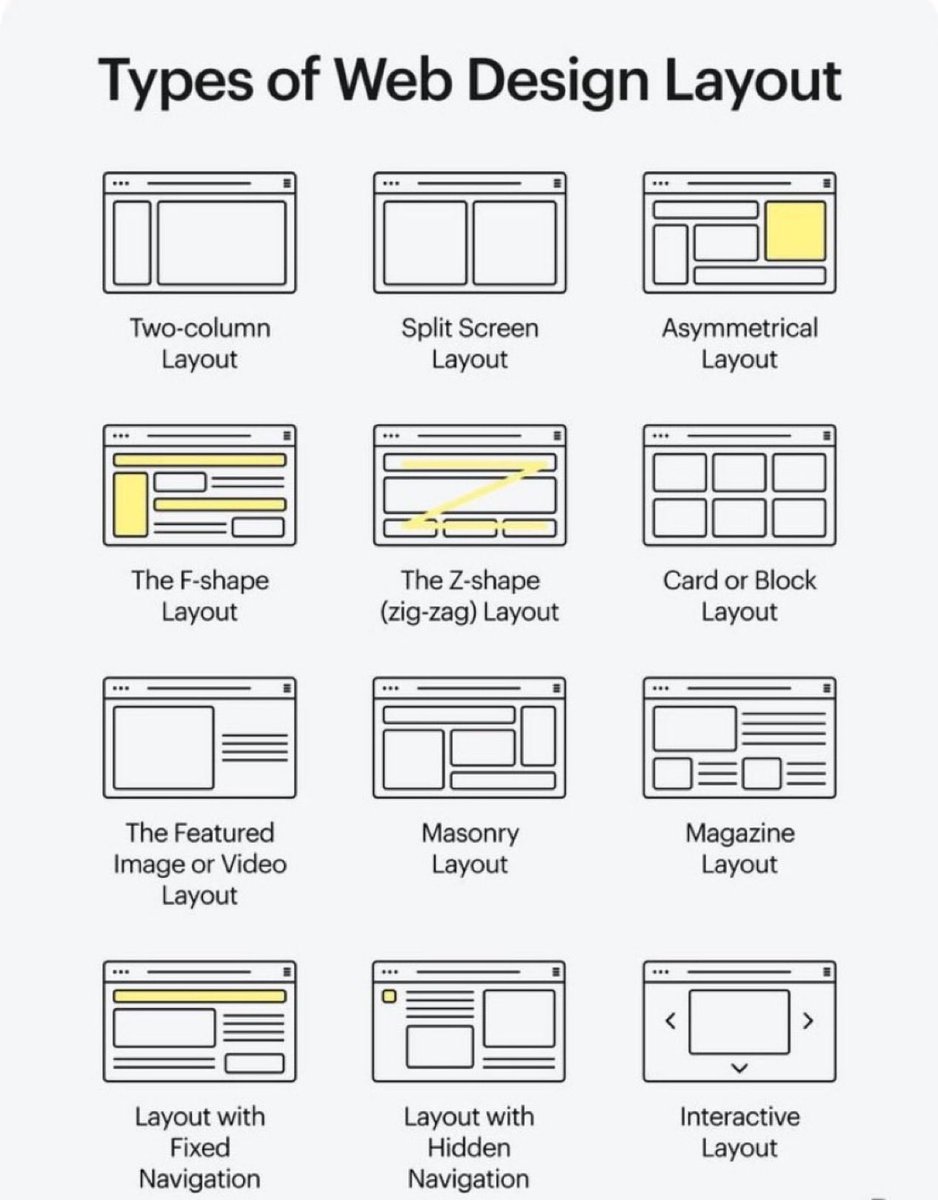
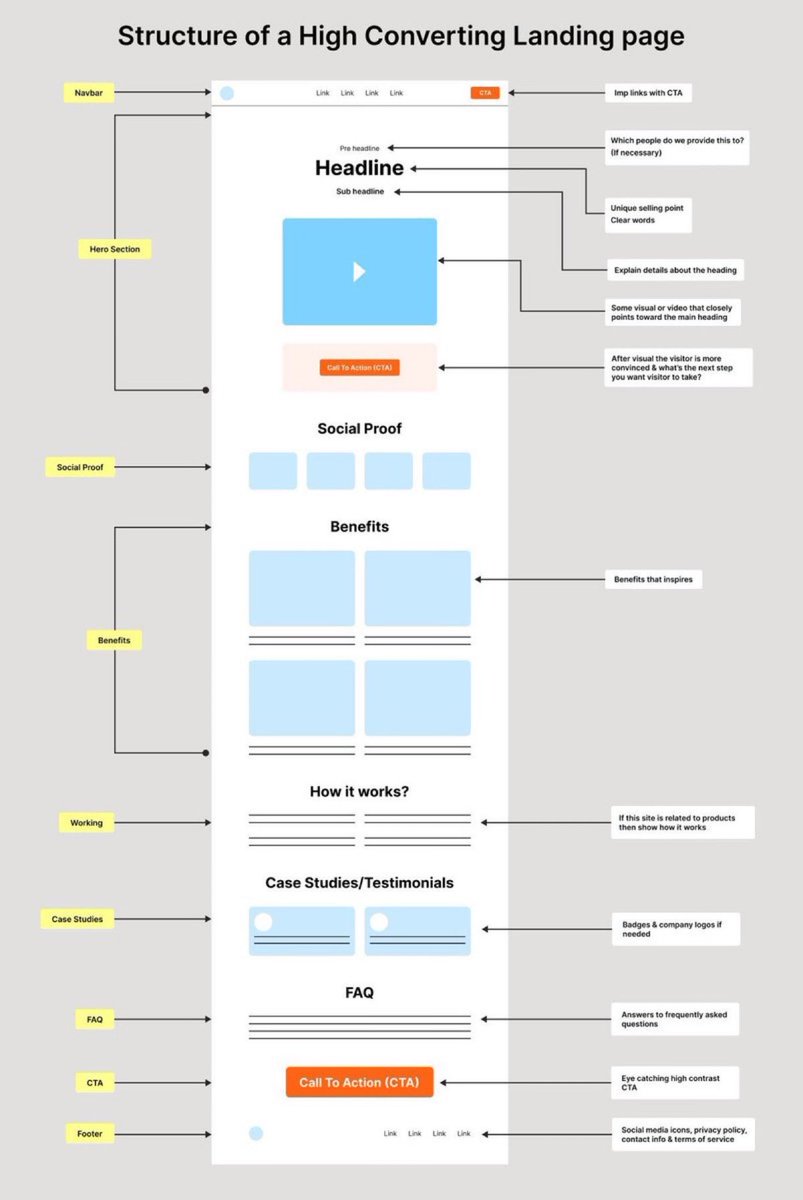
58 rules for beautiful UI design 🙌
Save to bookmarks for reference 🔖
Hierarchy. Simplicity. Predictability. Progressive disclosure. Meaningful transitions.
A solid reminder that great interfaces are systems — not decoration.
#UX#UI#UXDesign#UIDesign#ProductDesign
Excellent UX Ideation Template to Boost your next Design Project! 🔖
FREE Miro template! 🙌
A process our UX community uses to generate hundreds of ideas for new and existing features and flows across a wide range of topics. You’ll learn how to run an ideation session that connects UX ideas to business objectives, factors in competitive insights, and involves all crafts at the start.
Overview:
Pre-session
1 Collecting data across the three pillars
- User needs & pain points
- Business goals and objectives
- Competitive insights
Ideation session
2 Clustering data points into themes
3 HMW for every theme
4 Grouping ideas for every theme
Post-session
5 Prioritizing & visualizing concepts
#UX #UI #UXDesign #UIDesign #ProductDesign
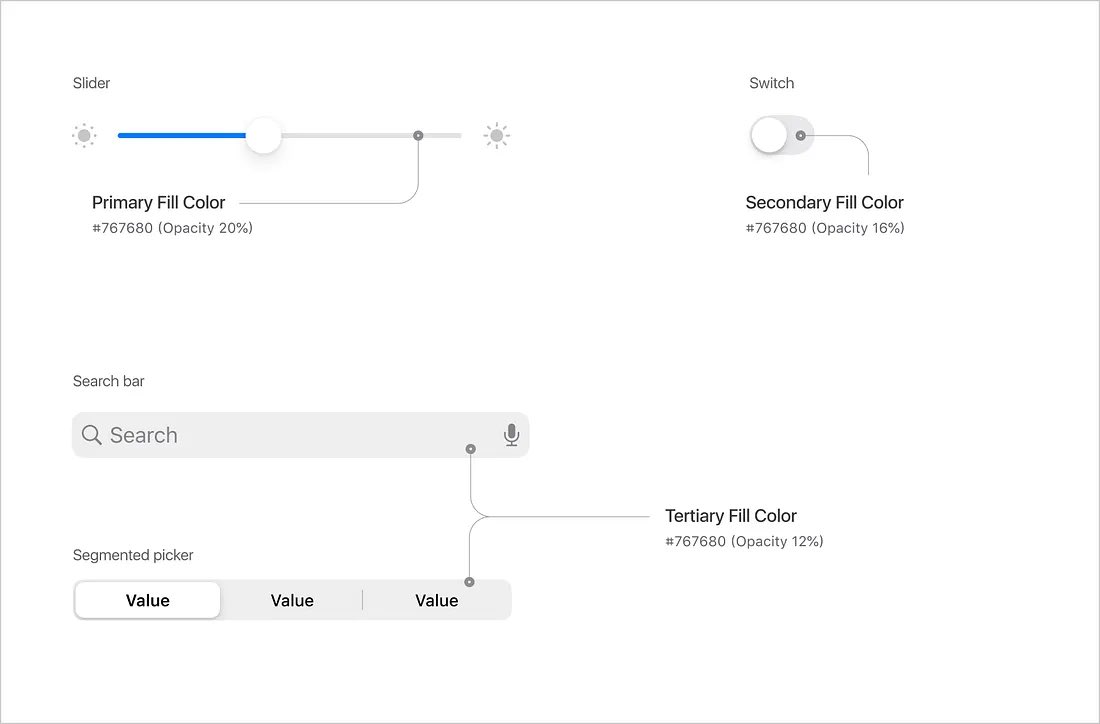
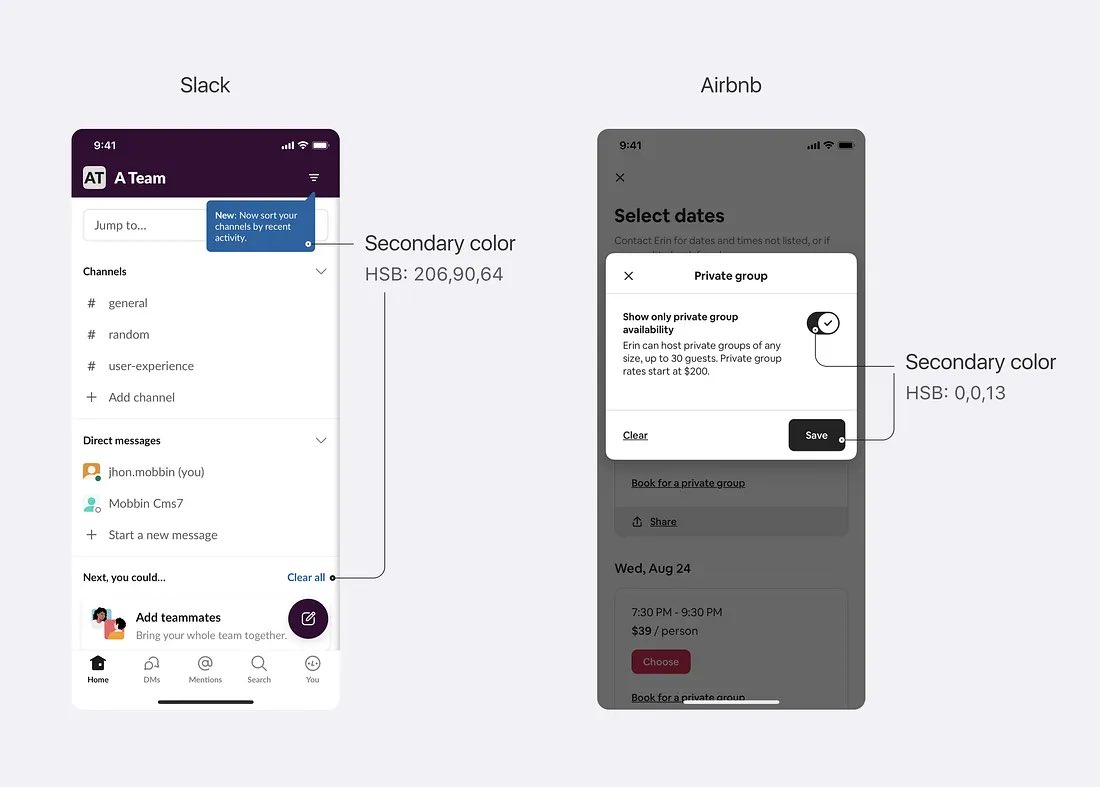
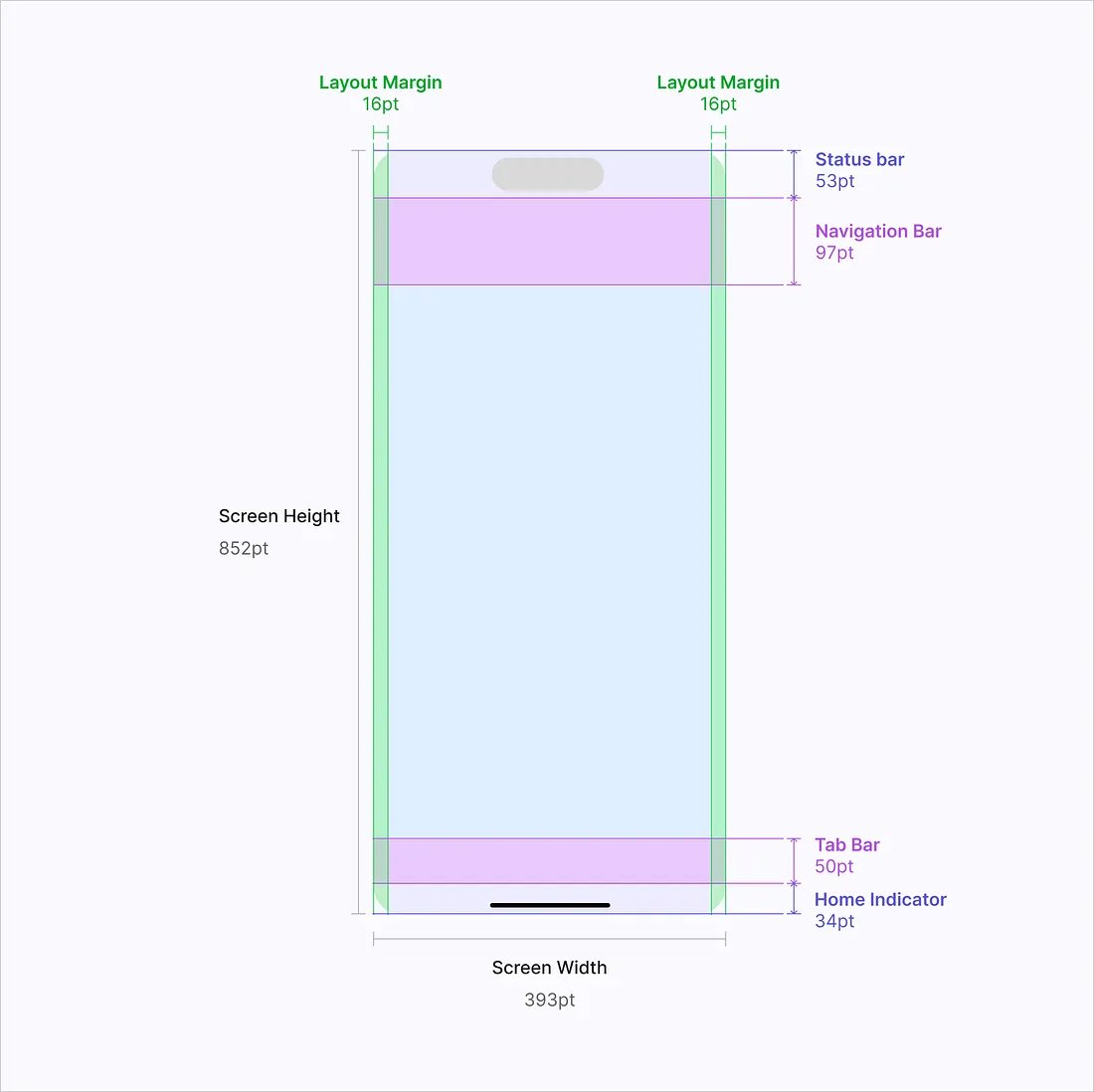
Excellent comprehensive guide on creating UI designs for iOS to boost your app designs! 🙌
This guide covers essential topics that we need to know to make high-quality designs that are consistent with Apple’s guidelines!
Structure:
- Layout and Grid
- Colors
- Typography
- Iconography
- Components
- Transitions
Link below 👇
#UX #UI #UXDesign #UIDesign #ProductDesign
Excellent comprehensive guide on creating UI designs for iOS to boost your app designs! 🙌
This guide covers essential topics that we need to know to make high-quality designs that are consistent with Apple’s guidelines!
Structure:
- Layout and Grid
- Colors
- Typography
- Iconography
- Components
- Transitions
#UX #UI #UXDesign #UIDesign #Mobile #iOS #ProductDesign
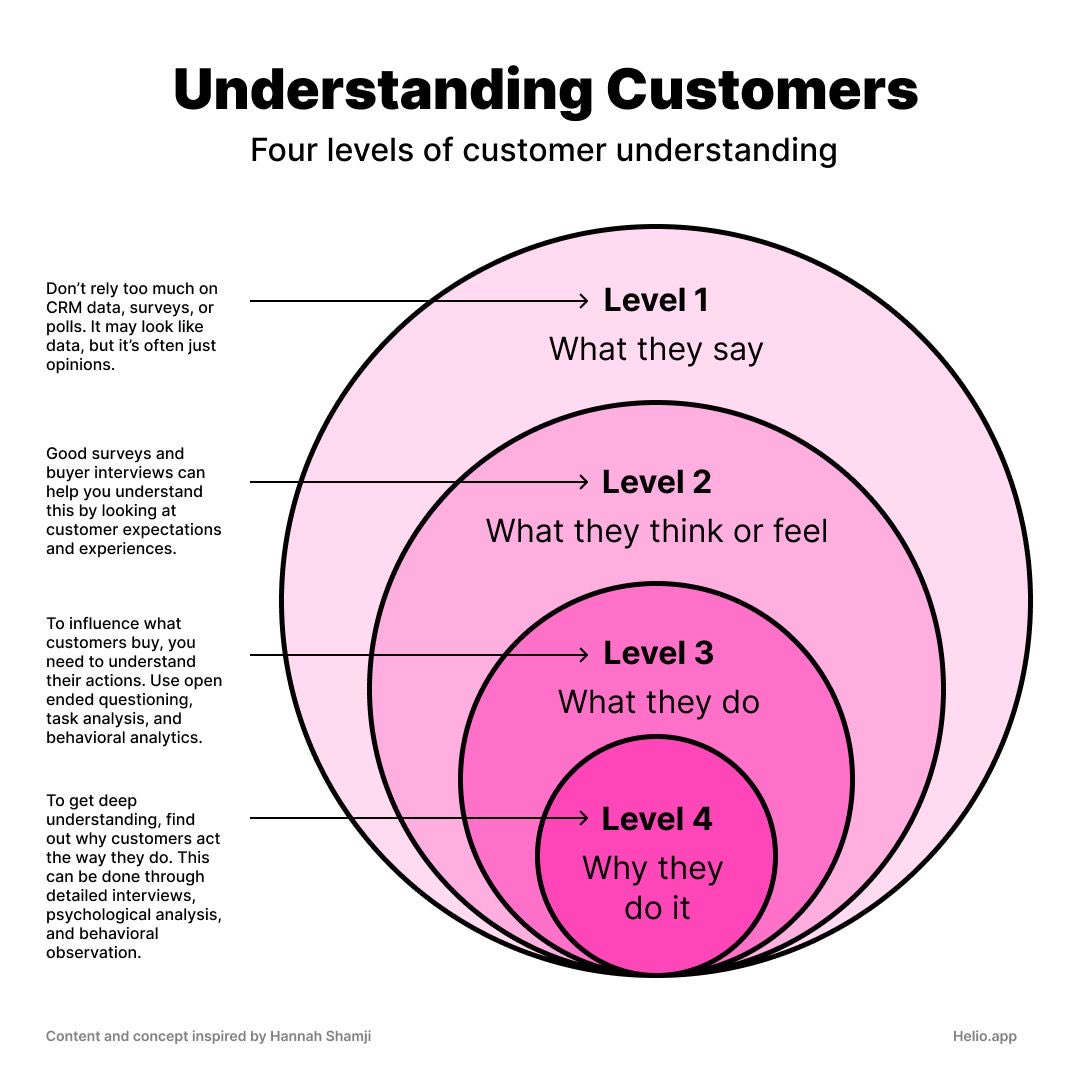
Excellent Cheatsheet to Help You Understand Your Customers in Your Next Design Project 🙌
FREE Cheatsheet attached
Four levels of customer understanding
Level 1
What they say
Don't rely too much on CRM data, surveys, or polls. It may look like data, but it's often just opinions.
Level 2
What they think or feel
Good surveys and buyer interviews can help you understand this by looking at customer expectations and experiences.
Level 3
What they do
To influence what customers buy, you need to understand their actions. Use open ended questioning, task analysis, and behavioural analytics.
Level 4
Why they
To get deep understanding, find out why customers act the way they do. This can be done through detailed interviews, psychological analysis, and behavioural observation.
#UX #UI #UXDesign #UIDesign #ProductDesign #UXResearch
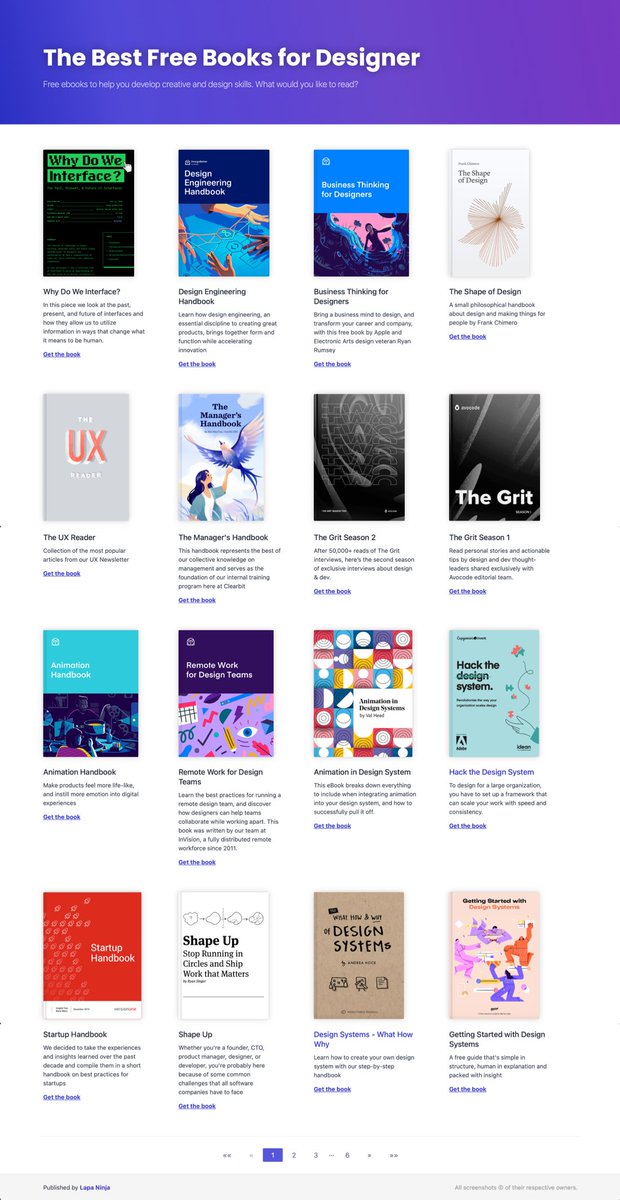
Excellent Resource with FREE eBooks for Designers to 10x Your Knowledge! 🙌
Save to Bookmarks for reference 🔖
FREE Book Collections for:
- Design systems
- User Experience (UX)
- Visual design
- Usability
- Typography
- Front-End Development
- Startup
- Career
#UX#UI #UXDesign #UIDesign #UserExperience #ProductDesign
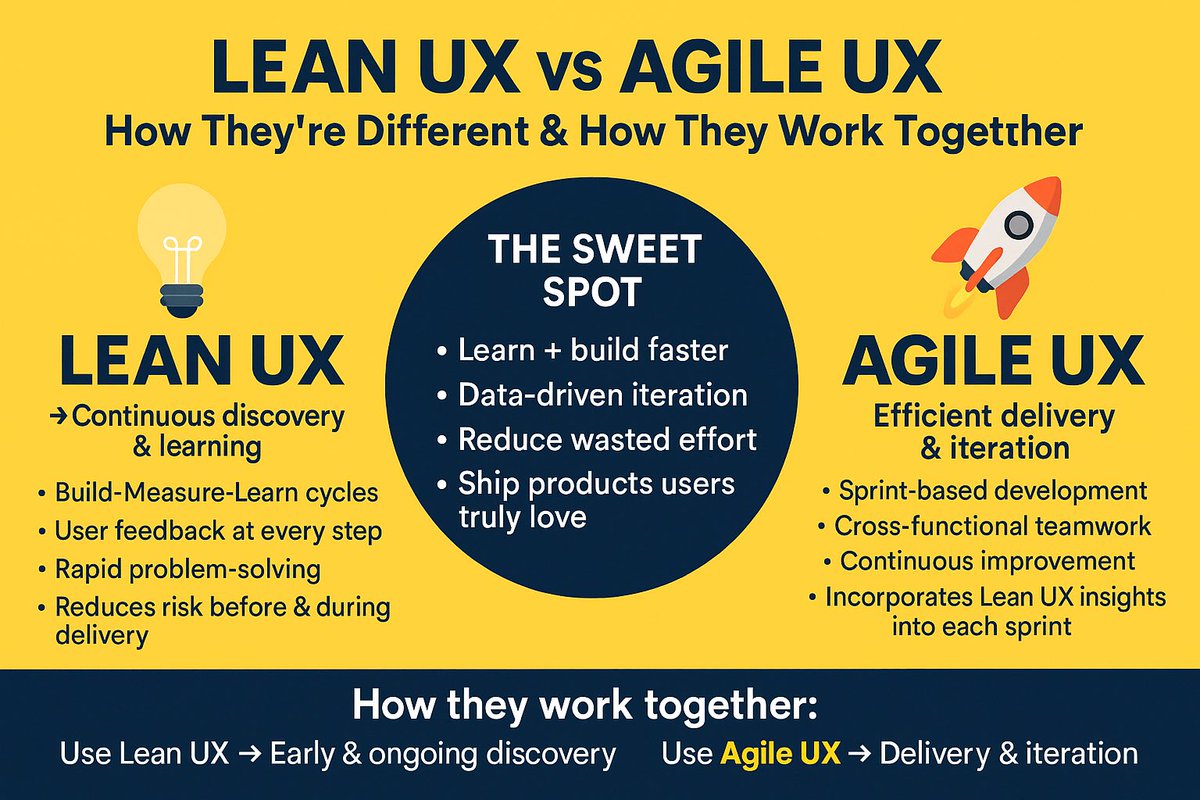
Lean UX vs Agile UX — How They’re Different & How They Work Together 🙌
FREE cheatsheet attached 🔖
💡 Lean UX → Continuous discovery & learning
•Build-Measure-Learn cycles
•User feedback at every step
•Rapid problem-solving
•Reduces risk before & during delivery
🚀 Agile UX → Efficient delivery & iteration
•Sprint-based development
•Cross-functional teamwork
•Continuous improvement
•Incorporates Lean UX insights into each sprint
✨ The Sweet Spot:
•Learn + build faster
•Data-driven iteration
•Reduce wasted effort
•Ship products users truly love
How they work together:
•Use Lean UX to validate ideas early and continuously throughout the Agile process.
•Use Agile UX to deliver those validated ideas in quick, incremental releases.
#UX #LeanUX #AgileUX #UserExperience #ProductDesign
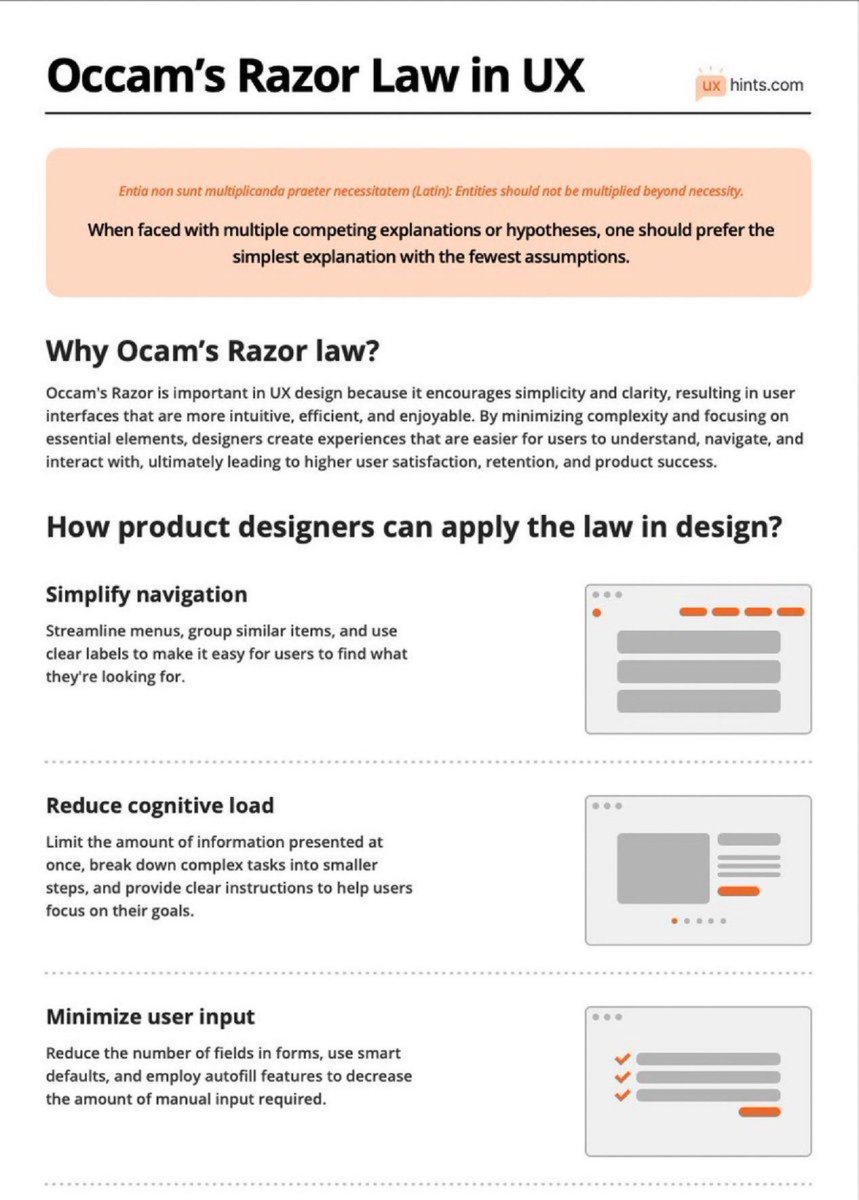
Learn How To Use Occam’s Razor Law to Boost Your Next Design Project! 🙌
Occam’s Razor is a problem-solving principle stating that the simplest explanation or solution, with the fewest assumptions, is often the most likely to be correct.
Summary:
Why Ocam’s Razor law?
Occam's Razor is crucial in UX design for promoting simplicity and clarity. By focusing on essential elements and minimizing complexity, designers create intuitive and efficient user interfaces. This leads to higher user satisfaction, retention, and product success.
How product designers can apply the law in design?
Simplify navigation
Streamline menus, group similar items, and use clear labels to make it easy for users to find what they're looking for.
Reduce cognitive load
Limit the amount of information presented at once, break down complex tasks into smaller steps, and provide clear instructions to help users focus on their goals.
Minimize user input
Reduce the number of fields in forms, use smart defaults, and employ autofill features to decrease the amount of manual input required.
Emphasize clarity and consistency
Use consistent visual elements, typography, and color schemes throughout the design to help users build a mental model of the interface.
Remove unnecessary elements
Eliminate any extraneous features, buttons, or content that don't directly contribute to the user's goals or improve their experience.
Optimize for mobile
Design with mobile devices in mind, ensuring that interfaces are responsive, touch-friendly, and easily navigable on smaller screens.
Prioritize usability over aesthetics
While an attractive interface is important, prioritize functionality and ease of use over purely visual design elements.
Test and iterate
Conduct user testing to identify potential issues or areas for improvement, and continually refine the design based on user feedback.
#ux #uxdesign #ui #uidesign #productdesign
Learn the User-Centric Content Design Process to Boost your Next Design Project! 🙌
Save to Bookmarks for reference 🔖
Empathise/ Understand
- Research user needs/ business needs
- Understand current landscape and assumptions
- Identify current user behaviour
Discovery typically includes:
- Capturing insights through research, analysis and stakeholder interviews
- Project canvas
- Empathy map
- Journey map
- Product strategy
Define
- Define strategy
- Define scope of work and resource/time needed
- Define success criteria and measures
Planning typically includes:
- Defining strategy including content
- Gathering requirements
- Creating epics and user stories
- Estimating time/resource
Ideate
- Co-design potential solutions (determine flow, features, format, structure
Ideation typically includes:
- Organising journey flow and features
- IA, content prioritisation and messaging hierarchy
- Sketching basic designs
- Journey mapping
- Language suggestions, defining voice/tone and key messages
Design/ prototype
- Collaboratively design solution
- Write the content that will be tested with users
- Document design decisions
Prototyping typically includes:
- Further design and content exploration
- Using collaborative tools to design your proposed solution including content
- Sharing design and rationale with key stakeholders
- Pair writing
Review
- Peer reviews
- Stakeholder reviews
- Tech feasibility reviews
Review typically includes:
- Crits
- Stakeholder feedback sessions
- Show and tells
Implement
- Document content (if necessary
- Work with dev to ensure accuracy of content
- Work with other teams to ensure content alignment
Implementation may include:
- QA
- Production of content including SEO requirements such as metadata and tags
- Launch management/ internal communication of new features
Test and learn
- Test your solution through
- AB testing, usability testing, or against success measures
- Report on progress
- Create hypotheses for optimisation
Measurement typically includes:
- Research methodology
- Data and sentiment analysis
- Content audits
- Creating test plans
#ux #ui #uxdesign #uidesign #productdesign #uxstrategy #visualdesign #mobile #webdesign #appdesign #design #userexperience #business #marketing #startup #business
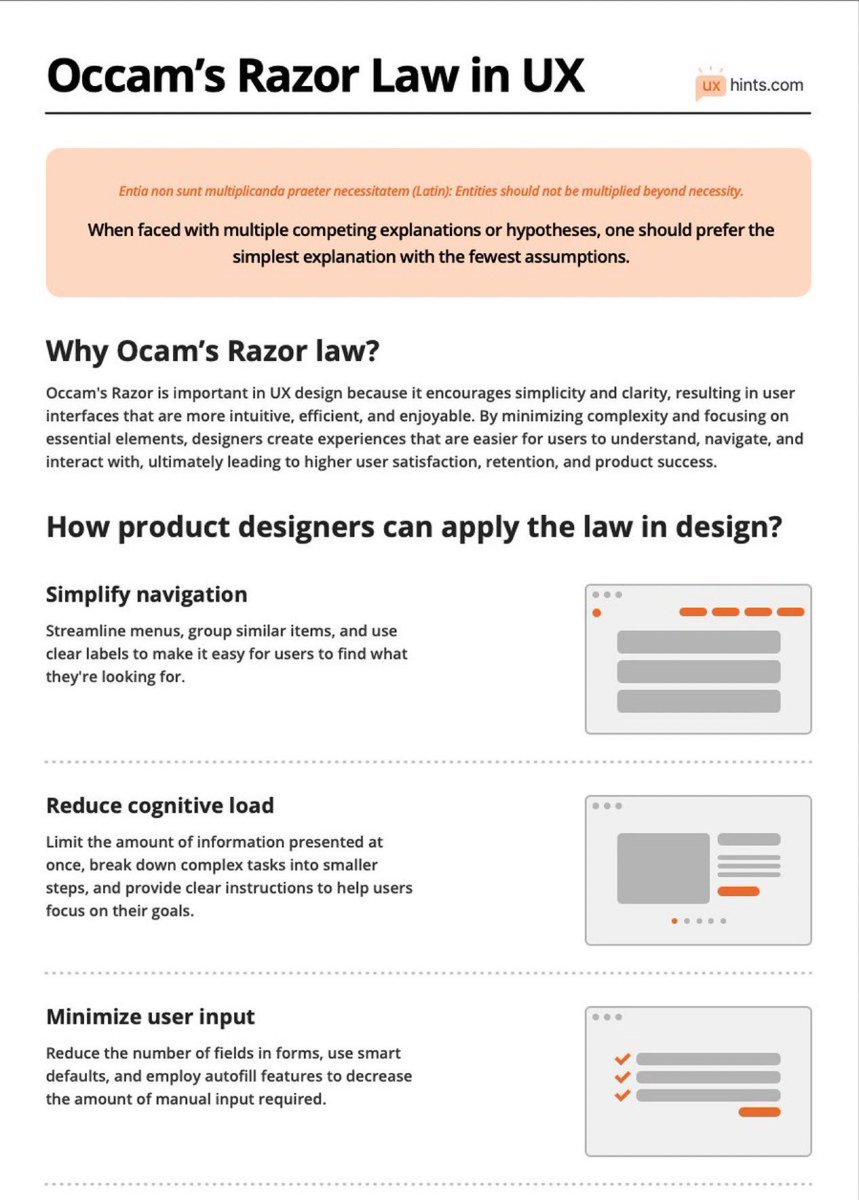
Learn How To Use Occam’s Razor Law to Boost Your Next Design Project! 🙌
Occam’s Razor is a problem-solving principle stating that the simplest explanation or solution, with the fewest assumptions, is often the most likely to be correct.
Summary:
Why Ocam’s Razor law?
Occam's Razor is crucial in UX design for promoting simplicity and clarity. By focusing on essential elements and minimizing complexity, designers create intuitive and efficient user interfaces. This leads to higher user satisfaction, retention, and product success.
How product designers can apply the law in design?
Simplify navigation
Streamline menus, group similar items, and use clear labels to make it easy for users to find what they're looking for.
Reduce cognitive load
Limit the amount of information presented at once, break down complex tasks into smaller steps, and provide clear instructions to help users focus on their goals.
Minimize user input
Reduce the number of fields in forms, use smart defaults, and employ autofill features to decrease the amount of manual input required.
Emphasize clarity and consistency
Use consistent visual elements, typography, and color schemes throughout the design to help users build a mental model of the interface.
Remove unnecessary elements
Eliminate any extraneous features, buttons, or content that don't directly contribute to the user's goals or improve their experience.
Optimize for mobile
Design with mobile devices in mind, ensuring that interfaces are responsive, touch-friendly, and easily navigable on smaller screens.
Prioritize usability over aesthetics
While an attractive interface is important, prioritize functionality and ease of use over purely visual design elements.
Test and iterate
Conduct user testing to identify potential issues or areas for improvement, and continually refine the design based on user feedback.
#ux #uxdesign #ui #uidesign #uxlaws #productdesign #userexperience #design #usertesting #agile #mvp #startup