#Veyon 4.7.3 fixes several low-risk security issues on #Linux and ships updated 3rdparty components in the Windows version. It also supports new path variables for more flexibility when working with redirected folders on Windows. More info and downloads at https://t.co/pldiHp3Xr5
The highlight of our recent #Veyon 4.7.1 release is the new Screen Recorder plugin. It's part of the Veyon Add-ons package and allows you to record your student's computer screens into video files. Find all details and downloads at https://t.co/T43r54tKnN – #opensource#classroom
#Veyon 4.7 brings a screen selection menu to the remote access window, a new chat module in the Veyon Add-ons package (for free until 03/2022!), support for location detection in the Network Discovery add-on and much more. Check out our latest #release at https://t.co/Rn9HBxDkGK
#Veyon 4.6.0 is here with improved remote view/control performance, a new computer zoom feature, a more reliable Veyon Service on Linux and new CLI modules. All downloads at https://t.co/RnFWJdfqn3 + release notes at https://t.co/wNR0QwSoLr #opensource#education#linux#windows
We're happy to announce #Veyon 4.5.7! The new release fixes problems with server start on Linux + an LDAP-related regression on Windows. All 3rdparty libraries shipped with the Windows version are now fully security-hardended. Downloads and details at https://t.co/myKsxd84hR
#Veyon 4.5.6 adds support for nested user groups in Active Directory, comes with security-hardened 3rdparty libraries on Windows and fixes several bugs. See https://t.co/Squ0rxnptt for details and all downloads.
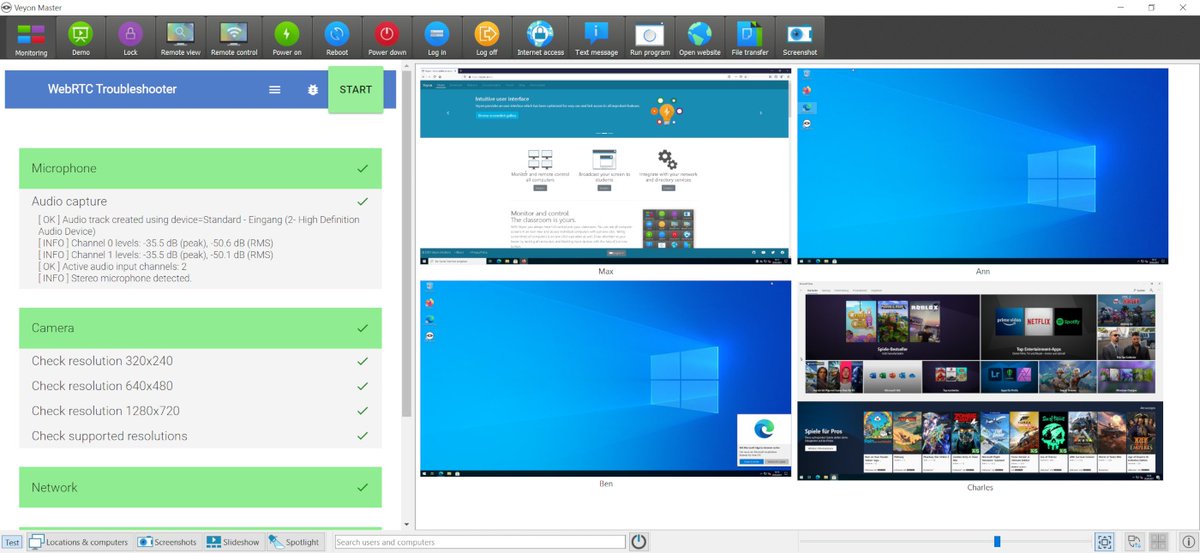
#Veyon 4.5.5 has just been released! Highlights: WebTabs add-on supports #WebRTC (audio/video conferencing in Veyon!) and InternetAccessControl add-on gains Linux support via new #nftables-based firewall backend. Download at https://t.co/GcCL2IDeY9 and https://t.co/whD2Z5eWfc.
#Veyon 4.5.4 significantly improves the reliability of the demo mode (screen broadcasting) and contains many improvements in the Veyon Service component on Linux. All downloads available at https://t.co/3ISXpfKup6
Just before the end of this extraordinary year, we have released #Veyon 4.5.2. It incorporates the latest #UltraVNC server release for better Windows 10 compatibility and fixes a security issue in a 3rdparty component on Linux. All downloads and changes at https://t.co/3ISXpfKup6
#Veyon 4.5.1 contains important improvements and bug fixes compared to 4.5.0. The screenshot feature works again and computer icons are now resized more dynamically and reliably. Find all downloads and changes at https://t.co/3ISXpfKup6 #digital#education#software
Our Add-ons have been updated for use with #Veyon 4.5.0 and can be downloaded at https://t.co/d6VbAPUJJj – most notably the InternetAccessControl add-on now supports blocking traffic to (e.g. proxy or DNS) servers.
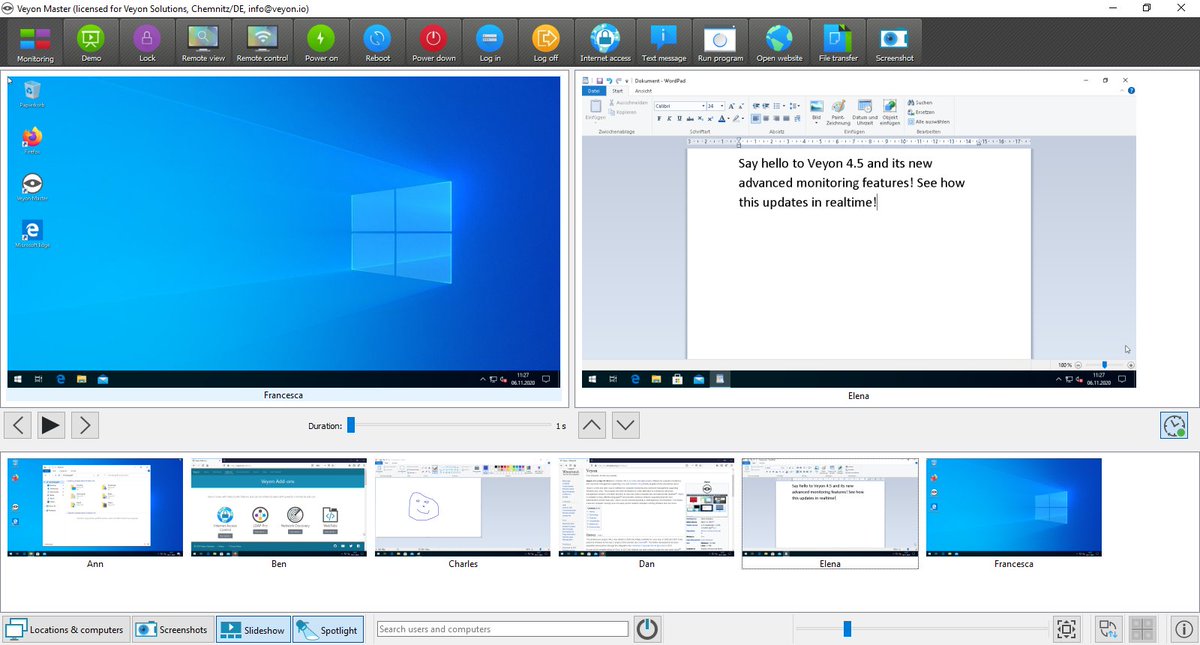
We're proud to announce the release of #Veyon 4.5.0 coming with the largest number of improvements and changes we ever had. Download at https://t.co/RnFWJdfqn3 and discover the new Slideshow and Spotlight monitoring panels as well as the revised screen sharing features.
@GeniusGeek1 Please try the daily build at https://t.co/EmwrP5jjpc which includes support for blocking a dedicated IP address such as a proxy server. It'll be part of the 4.5.0 release as well.
#Veyon 4.5 will be released soon and introduces advanced monitoring features. Both the Slideshow and Spotlight panels will give you completely new ways to work with Veyon. Watch our latest video to learn more: https://t.co/6GFlehoGc6 #digital#opensource#classroom
Attention: Veyon users on Windows should upgrade to the latest 4.4.2 release in case some of your regular users have administration rights. Previous versions suffer from CWE-428 allowing admin users to gain system privileges through the Veyon Service ➡️ https://t.co/RnFWJdfqn3
The 4.4.1 release allows broadcasting the screen (demo mode) when running #Veyon Master in an RDP session. CSV import/export has been improved. Last but not least packages are now also available for #CentOS 8, #openSUSE 15.2 and #Ubuntu 20.04 → https://t.co/3ISXpfKup6
Did you know? Starting with #Veyon 4.4 you can try all add-ons without requesting trial license keys. Simply install the Veyon Add-ons package (https://t.co/PlhfnySBXK) and explore the advanced functionalities such as Internet Access Control and Network Discovery.