Claude Code is (actually) easy.
The 12-step roadmap in plain English:
If you're totally new to Claude Code:
Beginner: https://t.co/6tspWbpnOy
Intermediate: https://t.co/cBoOryuKn8
Advanced: https://t.co/8i2hgtqXcA
PHASE 1: Context (what Claude knows about you)
Step 0: Install the CLI
One terminal command gets it running:
"npm install -g @anthropic-ai/claude-code"
Step 1: Projects
- Give Claude its own folder.
- Everything you build stays tied to it.
"I'm creating a new folder for my [project]. Create it for me and set it up so I can start working in it."
Step 2: claude .md
- Claude reads this before every chat.
- Role, voice, defaults. Set once, it sticks.
"Help me build my CLAUDE.md from scratch. Use Boris Cherny's CLAUDE.md as a starting template. Ask me about my business, voice, banned words, output defaults, and how I want you to work. Save the final file to ~/CLAUDE.md."
Step 3: Memory
- Every correction becomes a saved lesson.
- Same mistake never lands twice.
"From now on, whenever I correct you, save it as its own .md file at ~/.claude/projects/{project}/memory/, prefixed feedback_, user_, project_, or reference_. Index everything in MEMORY.md."
PHASE 2: Fire (how you trigger work)
Step 4: Skills
- Wrap a workflow in one keyword.
- Fire it from any chat, any folder, any time.
"Turn this workflow into a skill called /[name]. Set it up so I can fire it from any chat."
Step 5: /commands
Type the name and Claude fires the workflow.
"Save this prompt as a /[name] command. Set it up so I can run it any time."
Step 6: /plan
- Type /plan before starting any task.
- Claude lays out the steps. You approve it.
"/plan I want to [your task in plain English]."
PHASE 3: Extend (wire it to your stack)
Step 7: Hooks
- Auto-run something the moment an event fires.
- You never have to trigger it manually.
"Set up a hook that runs [thing you want] every time I [event]. Wire it up for me."
Step 8: MCP
- Plug Claude into Slack, Notion, Gmail, etc.
- You get live data from the tools you use.
"Connect Claude to [tool]. Set it up for me and walk me through it."
Step 9: Plugins
Install skills, agents, and MCPs in one command.
"/plugin install [plugin-name]"
PHASE 4: Scale (delegate and autopilot)
Step 10: Subagents
- Send out parallel workers.
- Get three jobs done at once.
"Use subagents to handle [task A], [task B] and [task C] in parallel."
Step 11: Agent Teams
- A pipeline of specialist AI agents.
- Each owns one job, hands off to the next.
"Build me an agent team for [process].
Step 12: Routines
- Schedule your agent team on the cloud.
- You set it once, walk away forever.
"/schedule [agent or skill] every [schedule]."
That's Claude Code from zero to autopilot.
12 steps with no coding background needed.
Repost ♻️ to help someone in your network.
Cc : Charlie
Claude Code is now free.
Here’s the stack:
→ Free Claude Code
→ Free models
→ 1M context window
→ Agent OS
→ Obsidian memory
So instead of paying for the full stack, you can build a free AI coding system that gets smarter over time.
If you're making technical decisions that shape a system, you're already doing software architecture.
The difference is whether you're doing it intentionally.
In Grokking Software Architecture, @codeliftsleep gives developers the vocabulary, frameworks, and thinking process needed to make better long-term technical decisions.
Watch the First Chapter Summary: https://t.co/z8tejnhusJ
🚨 THIS IS INSANE!!! 🤯
Converts PDFs, images, videos, and documents into clean structured JSON for LLMs.
No more messy parsing or broken formatting.
Just feed it your data and get AI-ready output instantly.
Built for developers who want better RAG pipelines, agents, and document understanding.
🔗 https://t.co/aAf62MpSCG
Basic web scrapers often break as soon as they hit CAPTCHAs, IP bans, or 403 errors.
In this course, Gavin teaches you how to build production-ready web scrapers that work on modern websites.
You'll use Playwright, Cheerio, residential proxies, and a MERN dashboard to scrape and visualize live data.
https://t.co/okNzAZEIWZ
Fundamentals of a 𝗩𝗲𝗰𝘁𝗼𝗿 𝗗𝗮𝘁𝗮𝗯𝗮𝘀𝗲.
With the rise of GenAI, Vector Databases skyrocketed in popularity. The truth - Vector Databases are also useful outside of a Large Language Model context.
When it comes to Machine Learning, we often deal with Vector Embeddings. Vector Databases were created to perform specifically well when working with them:
➡️ Storing.
➡️ Updating.
➡️ Retrieving.
When we talk about retrieval, we refer to retrieving set of vectors that are most similar to a query in a form of a vector that is embedded in the same Latent space. This retrieval procedure is called Approximate Nearest Neighbour (ANN) search.
A query here could be in a form of an object like an image for which we would like to find similar images. Or it could be a question for which we want to retrieve relevant context that could later be transformed into an answer via a LLM.
Let’s look into how one would interact with a Vector Database:
𝗪𝗿𝗶𝘁𝗶𝗻𝗴/𝗨𝗽𝗱𝗮𝘁𝗶𝗻𝗴 𝗗𝗮𝘁𝗮.
1. Choose a ML model to be used to generate Vector Embeddings.
2. Embed any type of information: text, images, audio, tabular. Choice of ML model used for embedding will depend on the type of data.
3. Get a Vector representation of your data by running it through the Embedding Model.
4. Store additional metadata together with the Vector Embedding. This data would later be used to pre-filter or post-filter ANN search results.
5. Vector DB indexes Vector Embedding and metadata separately. There are multiple methods that can be used for creating vector indexes, some of them: Random Projection, Product Quantization, Locality-sensitive Hashing.
6. Vector data is stored together with indexes for Vector Embeddings and metadata connected to the Embedded objects.
Learn all you need to know about vector databases in my End-to-End AI Engineering Bootcamp.
Just this week 25% off: https://t.co/2LY420tzJK
𝗥𝗲𝗮𝗱𝗶𝗻𝗴 𝗗𝗮𝘁𝗮.
7. A query to be executed against a Vector Database will usually consist of two parts:
➡️ Data that will be used for ANN search. e.g. an image for which you want to find similar ones.
➡️ Metadata query to exclude Vectors that hold specific qualities known beforehand. E.g. given that you are looking for similar images of apartments - exclude apartments in a specific location.
8. You execute Metadata Query against the metadata index. It could be done before or after the ANN search procedure.
9. You embed the data into the Latent space with the same model that was used for writing the data to the Vector DB.
10. ANN search procedure is applied and a set of Vector embeddings are retrieved. Popular similarity measures for ANN search include: Cosine Similarity, Euclidean Distance, Dot Product.
How are you using Vector DBs? Let me know in the comment section!
I think you’ll really like Opus 4.8
It’s as smart as its benchmarks show but expresses and utilizes that intelligence in a warm and collaborative way.
Workflows are a great way to utilize it- I’m hooked. Article on that soon.
Someone open-sourced a PDF parser that converts 100 pages per second to Markdown.
100% free. on a CPU. no GPU. no cloud. no API key.
→ 100 pages per second.
→ handles tables, nested layouts, complex docs.
→ built-in OCR for 80+ languages via hybrid mode.
→ official LangChain integration.
It's called OpenDataLoader and it just took the #1 spot in every PDF-to-Markdown benchmark.
The wildest part is that docling scores 0.86 and is 15x slower. marker needs a GPU and is 1,000x slower. Pymupdf4llm is fast but scores 0.40 on tables.
This thing beats every one of them. on a CPU.
Built with the PDF Association and the veraPDF team the people who literally write the PDF standards.
8.6k stars. Apache 2.0. zero proprietary dependencies.
NotebookLM just got an update nobody is talking about. And it fixed the biggest problem with AI.
Before today, your AI was always reading old files.
You had to delete old notes and upload new ones every single week.
It was a massive waste of time.
Now, NotebookLM connects right to Google Drive.
You type in your Google Doc, and your AI learns it instantly.
It builds a living brain for your business that never gets old.
You can turn your boring guides into podcast chats or smart mind maps.
Link your business guides to it right now.
Let the AI do the heavy work for you.
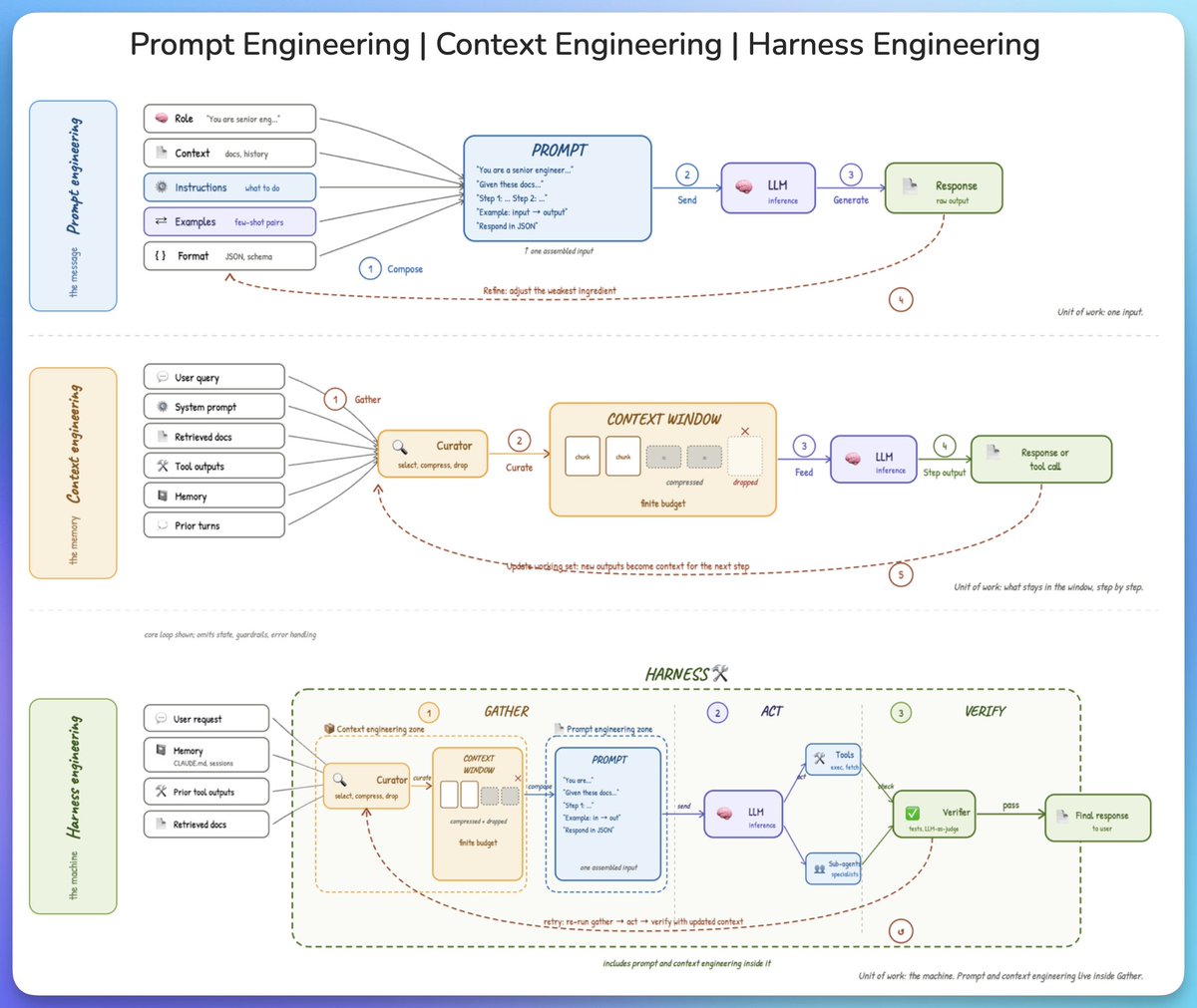
from prompt to context to harness engineering.
three terms keep coming up in AI engineering, and they get conflated all the time. here is the cleanest way to understand what each one is and how they fit together.
𝗽𝗿𝗼𝗺𝗽𝘁 𝗲𝗻𝗴𝗶𝗻𝗲𝗲𝗿𝗶𝗻𝗴 𝗶𝘀 𝘁𝗵𝗲 𝗺𝗲𝘀𝘀𝗮𝗴𝗲.
the model has no memory of anything before this single call, so the prompt has to carry the full universe of what it needs to know. that means a role, some background, the instructions, a few examples, and a format.
these get assembled into one input and sent to the model. when the output falls short, the skill is figuring out which ingredient is actually letting you down, not rewriting the instructions every time.
the unit of work is one input.
𝗰𝗼𝗻𝘁𝗲𝘅𝘁 𝗲𝗻𝗴𝗶𝗻𝗲𝗲𝗿𝗶𝗻𝗴 𝗶𝘀 𝘁𝗵𝗲 𝗺𝗲𝗺𝗼𝗿𝘆.
across multiple steps, the window is finite and the information available is not, which forces a curation step. without it, important details get buried under stale tool outputs and old turns, and the model's attention degrades on the things that actually matter.
a curator selects what stays, compresses what is useful but bulky, and drops the rest. each step's output then feeds into the next step, where good curation is more about knowing what to throw away than packing more in.
the unit of work is what stays in the window, step by step.
𝗵𝗮𝗿𝗻𝗲𝘀𝘀 𝗲𝗻𝗴𝗶𝗻𝗲𝗲𝗿𝗶𝗻𝗴 𝗶𝘀 𝘁𝗵𝗲 𝗺𝗮𝗰𝗵𝗶𝗻𝗲.
on its own, a model just generates text. the harness is what turns it into something that can take actions, check its own work, and recover when a step goes wrong.
the full loop has three phases:
- 𝗴𝗮𝘁𝗵𝗲𝗿 pulls together everything the model needs
- 𝗮𝗰𝘁 runs the model and calls tools or sub-agents
- and 𝘃𝗲𝗿𝗶𝗳𝘆 checks the output with tests or a judge
on failure, the whole loop retries with updated context, which is the entire difference between calling an API and running an agent.
the unit of work is the machine itself.
here is the part that ties it together.
prompt engineering and context engineering both live inside 𝗴𝗮𝘁𝗵𝗲𝗿. the harness is the outer container, context is what it curates, and the prompt is what it finally hands to the model.
zoom out and the unit of work gets bigger. zoom in and you are back at the prompt.
i also published this deep dive (article) on agent harness engineering, covering the orchestration loop, tools, memory, context management, and everything else that transforms a stateless LLM into a capable agent.
the article is quoted below.
Many devs are using Retrieval Augmented Generation - or RAG - to improve their LLM's capabilities.
And in this course, you'll learn RAG fundamentals, along with key model context protocol concepts.
The course uses the Python SDK and covers chunking strategies, working with AI agents, and lots more.
https://t.co/tcG07C3e22
If you're preparing for technical interviews, you may be working through a bunch of LeetCode problems.
And this is helpful, but you should really understand the key concepts behind these DSA problems first.
In this visual handbook, Eda goes over the Data Structures & Algorithms concepts you'll need to know - for both LeetCode & job interviews.
https://t.co/s4QKk5gBs3
GitHub has a GitHub Actions certification exam.
And if you're a developer, DevOps, or automation lover, this course can help you study.
In it, @andrewbrown covers runners and commands, advanced workflows, publishing and deployment, and lots more.
https://t.co/UyA7ycPxzc
This Red Hat Lightspeed remediation workflow is now available for a new, streamlined way to patch critical vulnerabilities in RHEL. https://t.co/6ZITncfJNC #RedHatAccelerator#RHEL





![Tanaypawar27's tweet photo. Claude Code is (actually) easy.
The 12-step roadmap in plain English:
If you're totally new to Claude Code:
Beginner: https://t.co/6tspWbpnOy
Intermediate: https://t.co/cBoOryuKn8
Advanced: https://t.co/8i2hgtqXcA
PHASE 1: Context (what Claude knows about you)
Step 0: Install the CLI
One terminal command gets it running:
"npm install -g @anthropic-ai/claude-code"
Step 1: Projects
- Give Claude its own folder.
- Everything you build stays tied to it.
"I'm creating a new folder for my [project]. Create it for me and set it up so I can start working in it."
Step 2: claude .md
- Claude reads this before every chat.
- Role, voice, defaults. Set once, it sticks.
"Help me build my CLAUDE.md from scratch. Use Boris Cherny's CLAUDE.md as a starting template. Ask me about my business, voice, banned words, output defaults, and how I want you to work. Save the final file to ~/CLAUDE.md."
Step 3: Memory
- Every correction becomes a saved lesson.
- Same mistake never lands twice.
"From now on, whenever I correct you, save it as its own .md file at ~/.claude/projects/{project}/memory/, prefixed feedback_, user_, project_, or reference_. Index everything in MEMORY.md."
PHASE 2: Fire (how you trigger work)
Step 4: Skills
- Wrap a workflow in one keyword.
- Fire it from any chat, any folder, any time.
"Turn this workflow into a skill called /[name]. Set it up so I can fire it from any chat."
Step 5: /commands
Type the name and Claude fires the workflow.
"Save this prompt as a /[name] command. Set it up so I can run it any time."
Step 6: /plan
- Type /plan before starting any task.
- Claude lays out the steps. You approve it.
"/plan I want to [your task in plain English]."
PHASE 3: Extend (wire it to your stack)
Step 7: Hooks
- Auto-run something the moment an event fires.
- You never have to trigger it manually.
"Set up a hook that runs [thing you want] every time I [event]. Wire it up for me."
Step 8: MCP
- Plug Claude into Slack, Notion, Gmail, etc.
- You get live data from the tools you use.
"Connect Claude to [tool]. Set it up for me and walk me through it."
Step 9: Plugins
Install skills, agents, and MCPs in one command.
"/plugin install [plugin-name]"
PHASE 4: Scale (delegate and autopilot)
Step 10: Subagents
- Send out parallel workers.
- Get three jobs done at once.
"Use subagents to handle [task A], [task B] and [task C] in parallel."
Step 11: Agent Teams
- A pipeline of specialist AI agents.
- Each owns one job, hands off to the next.
"Build me an agent team for [process].
Step 12: Routines
- Schedule your agent team on the cloud.
- You set it once, walk away forever.
"/schedule [agent or skill] every [schedule]."
That's Claude Code from zero to autopilot.
12 steps with no coding background needed.
Repost ♻️ to help someone in your network.
Cc : Charlie](https://pbs.twimg.com/media/HJ37LLQbkAA4rA0.jpg)