Usage limits are up, effective today we're:
1) Doubling Claude Code's 5-hour limits for Pro, Max, Team and seat-based Enterprise plans
2) Removing peak hours limit reduction on Claude Code for Pro and Max plans
3) Substantially raising our API rate limits for Opus models
In Claude Managed Agents, we’ve added multiagent orchestration, an outcomes loop for rubric-driven self-improvement, dreaming for self-learning, & webhooks.
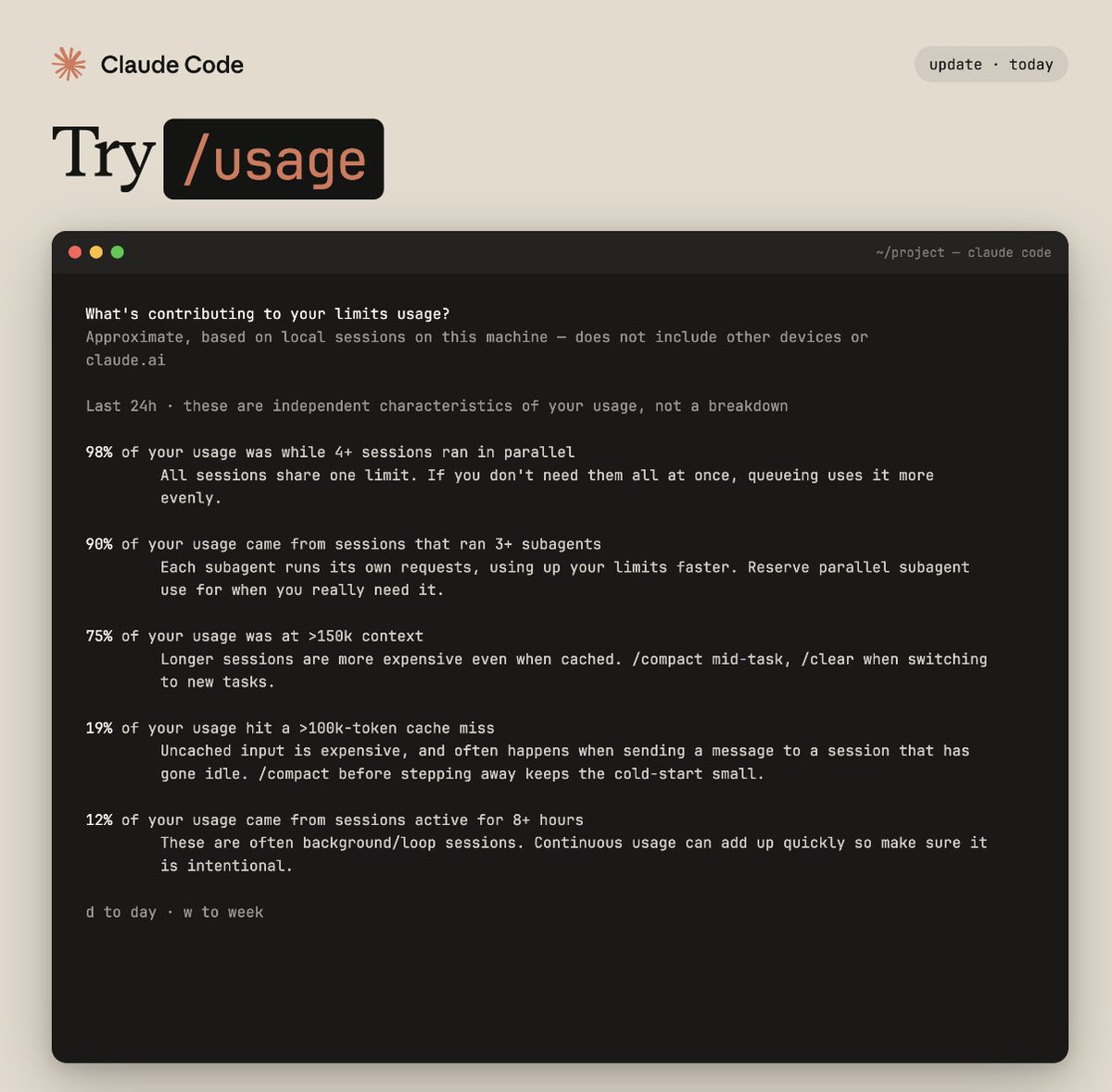
We’re adding more visibility into where your Claude Code usage goes.
Run /usage to see a breakdown of what's driving it: parallel sessions, subagents, cache misses, long context, plus tips to optimize each.
LLM Knowledge Bases
Something I'm finding very useful recently: using LLMs to build personal knowledge bases for various topics of research interest. In this way, a large fraction of my recent token throughput is going less into manipulating code, and more into manipulating knowledge (stored as markdown and images). The latest LLMs are quite good at it. So:
Data ingest:
I index source documents (articles, papers, repos, datasets, images, etc.) into a raw/ directory, then I use an LLM to incrementally "compile" a wiki, which is just a collection of .md files in a directory structure. The wiki includes summaries of all the data in raw/, backlinks, and then it categorizes data into concepts, writes articles for them, and links them all. To convert web articles into .md files I like to use the Obsidian Web Clipper extension, and then I also use a hotkey to download all the related images to local so that my LLM can easily reference them.
IDE:
I use Obsidian as the IDE "frontend" where I can view the raw data, the the compiled wiki, and the derived visualizations. Important to note that the LLM writes and maintains all of the data of the wiki, I rarely touch it directly. I've played with a few Obsidian plugins to render and view data in other ways (e.g. Marp for slides).
Q&A:
Where things get interesting is that once your wiki is big enough (e.g. mine on some recent research is ~100 articles and ~400K words), you can ask your LLM agent all kinds of complex questions against the wiki, and it will go off, research the answers, etc. I thought I had to reach for fancy RAG, but the LLM has been pretty good about auto-maintaining index files and brief summaries of all the documents and it reads all the important related data fairly easily at this ~small scale.
Output:
Instead of getting answers in text/terminal, I like to have it render markdown files for me, or slide shows (Marp format), or matplotlib images, all of which I then view again in Obsidian. You can imagine many other visual output formats depending on the query. Often, I end up "filing" the outputs back into the wiki to enhance it for further queries. So my own explorations and queries always "add up" in the knowledge base.
Linting:
I've run some LLM "health checks" over the wiki to e.g. find inconsistent data, impute missing data (with web searchers), find interesting connections for new article candidates, etc., to incrementally clean up the wiki and enhance its overall data integrity. The LLMs are quite good at suggesting further questions to ask and look into.
Extra tools:
I find myself developing additional tools to process the data, e.g. I vibe coded a small and naive search engine over the wiki, which I both use directly (in a web ui), but more often I want to hand it off to an LLM via CLI as a tool for larger queries.
Further explorations:
As the repo grows, the natural desire is to also think about synthetic data generation + finetuning to have your LLM "know" the data in its weights instead of just context windows.
TLDR: raw data from a given number of sources is collected, then compiled by an LLM into a .md wiki, then operated on by various CLIs by the LLM to do Q&A and to incrementally enhance the wiki, and all of it viewable in Obsidian. You rarely ever write or edit the wiki manually, it's the domain of the LLM. I think there is room here for an incredible new product instead of a hacky collection of scripts.
Wow, this tweet went very viral!
I wanted share a possibly slightly improved version of the tweet in an "idea file". The idea of the idea file is that in this era of LLM agents, there is less of a point/need of sharing the specific code/app, you just share the idea, then the other person's agent customizes & builds it for your specific needs.
So here's the idea in a gist format: https://t.co/NlAfEJjtJV
You can give this to your agent and it can build you your own LLM wiki and guide you on how to use it etc. It's intentionally kept a little bit abstract/vague because there are so many directions to take this in. And ofc, people can adjust the idea or contribute their own in the Discussion which is cool.
Introducing Project Glasswing: an urgent initiative to help secure the world’s most critical software.
It’s powered by our newest frontier model, Claude Mythos Preview, which can find software vulnerabilities better than all but the most skilled humans.
https://t.co/NQ7IfEtYk7
/autofix-pr now lets you kick off autofix straight from the command line.
After finishing up a PR, just run /autofix-pr. It sends your session to the cloud so the PR autofixer has full context to address CI failures and comments.
Hugely win for my productivity.
Introducing Claude Managed Agents: everything you need to build and deploy agents at scale.
It pairs an agent harness tuned for performance with production infrastructure, so you can go from prototype to launch in days.
Now in public beta on the Claude Platform.
you'll need to explicitly prompt Claude Code to use it, but the Monitor Tool is super powerful
e.g. "start my dev server and use the MonitorTool to observe for errors"
Managed Agents is the first 'agent in the cloud' API that has the right mix of simplicity and complexity.
Implementation details like how you manage a sandbox are abstracted, but you have a lot of control over the actual execution of the model.
Starting tomorrow at 12pm PT, Claude subscriptions will no longer cover usage on third-party tools like OpenClaw.
You can still use these tools with your Claude login via extra usage bundles (now available at a discount), or with a Claude API key.
Mistakes happen. As a team, the important thing is to recognize it’s never an individuals’s fault — it’s the process, the culture, or the infra.
In this case, there was a manual deploy step that should have been better automated. Our team has made a few improvements to the automation for next time, a couple more on the way.
You can now schedule recurring cloud-based tasks on Claude Code.
Set a repo (or repos), a schedule, and a prompt. Claude runs it via cloud infra on your schedule, so you don’t need to keep Claude Code running on your local machine.