An SDK to build WebXR-powered 3D, VR & AR apps using .NET, C# & XAML. Created by Userware (@OpenSilverTeam). Powered by @ThreeJS & @AFrameVR. Now in Pre-Alpha.
Steady progress on our next-gen UI framework.
Now supports iOS/Android too, and the 3D TextBox is shaping up.
Check out this browser demo powered by #threejs: https://t.co/FHJgHETweV
It seems that we've been working on basically the same thing. Our tech XRSharp is a XAML wrapper around Three.js (and it's powered by OpenSilver, which compiles C# to WebAssembly). While currently positioned around XR, it also works on flat displays and could be used as a 3D engine. Maybe we can join forces someday. https://t.co/tx0Q29cTk2
Big update to https://t.co/9enTyWD0I1 today:
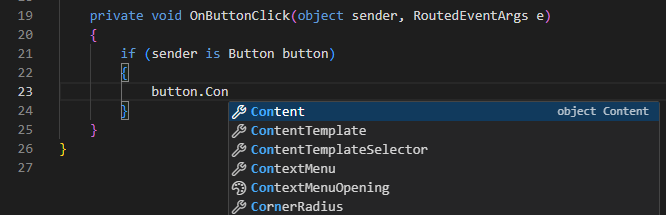
C# IntelliSense/autocomplete is now live.
You can now design, build, and run .NET (C# + XAML) entirely in the browser, with a visual designer and WebAssembly compilation.
No install. No signup.
OpenSilver is not an emulator, a wrapper, or an Electron-style bundled browser. It is a complete reimplementation of the WPF/Silverlight API from scratch, using modern .NET, WebAssembly, and the browser's DOM.
On the Web, your C# code compiles to WebAssembly. Unlike canvas-based rendering approaches, XAML is rendered at runtime using real HTML elements: TextBox becomes <textarea>, MediaElement becomes <video>, PasswordBox becomes <input type="password">, Image becomes <img>, and so on. This unlocks native browser behaviors like Ctrl+F search, text selection (to copy text), screen readers, SEO indexing, browser translation, mobile long-press, UI automated testing, and accessibility compliance. The compiled app is a set of static files (WebAssembly, JS, index.html...) that can be hosted anywhere: Azure, AWS, GitHub Pages, or any basic web server. No special server technology is required.
On desktop and mobile (via MAUI-OpenSilver Hybrid or Photino), the UI is still rendered as HTML/CSS, but C# runs as native .NET instead of WebAssembly. This preserves full compatibility with JS libraries and Blazor components (because the UI is still HTML/CSS), while adding native performance and direct access to platform APIs (because the runtime is native .NET).
Many people still think OpenSilver is an emulator or wrapper around Silverlight.
It is not.
We did not inherit any Silverlight code. Silverlight was closed source.
We reimplemented the Silverlight/WPF public API from scratch, using modern .NET, WebAssembly, and the browser’s DOM.
Why does this matter to WPF developers?
Because Silverlight was a backward-compatible subset of WPF. Same namespaces, same XAML, same patterns.
This means what began as a Silverlight migration path has naturally evolved into a realistic way to bring WPF-style applications to the web using C#, XAML, and MVVM, without rewriting everything in JavaScript.
And here is what most people do not know:
OpenSilver does not render everything in a canvas. We render XAML using real HTML elements:
• TextBox → <div contenteditable="true">
• MediaElement → <video>
• Hyperlink → <a href>
• WebBrowser control → <iframe>
Why is that a big deal?
Because rendering to the DOM unlocks native browser behaviors:
Ctrl+F, text selection, screen readers, right click on links, SEO, browser translation, copy and paste, mobile long-press, browser extensions, and regulatory accessibility compliance.
You cannot get any of that in a giant canvas rendering model.
This is not just “bringing Silverlight to the web”.
This is bringing WPF-style architecture to the web, in a truly web-native way.
That is why many enterprise teams are migrating, not rewriting.
I just verified that this other SSGINode example below runs great (and very smoothly) on iOS 18.7.1, even though WebGPU isn’t officially supported on that version: https://t.co/o0gFsQdOYR
Maybe Apple quietly added some support for it. I double-checked that the experimental WebGPU flags are off. Weird…
(BTW, it doesn’t seem to work on Firefox for Windows, where it fails with "this.cNode.getNodeType is not a function")
@mxyws@threejs@claudeai I've noticed that this SSGINode demo works properly on iOS 18.7.1 (which, as far as I know, doesn't support WebGPU): https://t.co/Igy4OVGhm3
Is it because SSGINode now supports WebGL as well? Really curious to know. Thanks a lot!
going through some models to see the difference that ssr + ssgi makes. it still doesn't seem to handle roughness correctly (or at all), but even in its current form it's pretty amazing. 🥲
sandbox/link below this post ↓
Most browser IDEs fake it: the build actually happens on a remote server.
https://t.co/hS3Vp2sLmD is different: it compiles .NET GUI apps right in your browser via WebAssembly.
No backend at all (except for saving to the cloud or optional AI), which makes it ridiculously scalable.