The reason I use moomoo for $SKHY is that it connects three checks in one workflow. The 2H chart shows VWAP and moving averages; Gamma Exposure maps the Jul 24 gamma flip at 175.29, call wall at 180 and put wall at 150; Trade Stats adds 360.44K options volume and a 0.84 put/call ratio. Having these together makes it easier to cross-check price and options positioning.
For $SKHY, price near 162.3 is above VWAP at 161.365 but below the gamma flip. I’m watching whether it holds VWAP and builds toward 175–180, while 150 remains the lower positioning reference. The 0.84 ratio shows slightly more call than put volume, but it isn’t a directional signal by itself.
That’s why moomoo fits my process: chart structure, gamma levels and options activity are connected in one place. I’d compare the same signals across $MU, $SNDK and $NVDA to see whether the move is isolated or part of the broader memory/HBM/AI trade.
Would you focus more on the VWAP hold or the 175–180 area here, and why?
#moomoo @moomoo
Not financial advice.
I’m using moomoo to track $MU with a 3-part workflow instead of only watching price.
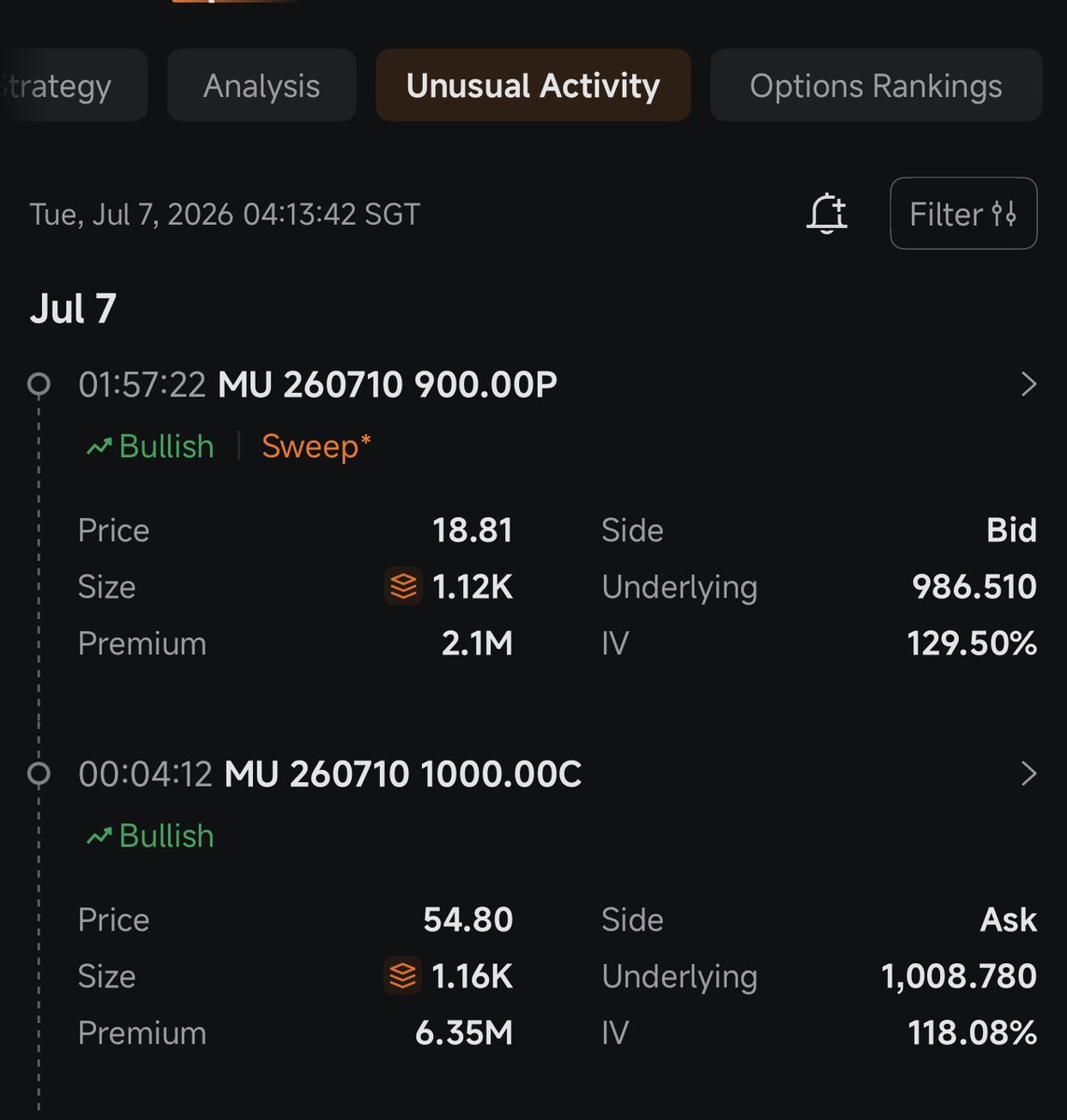
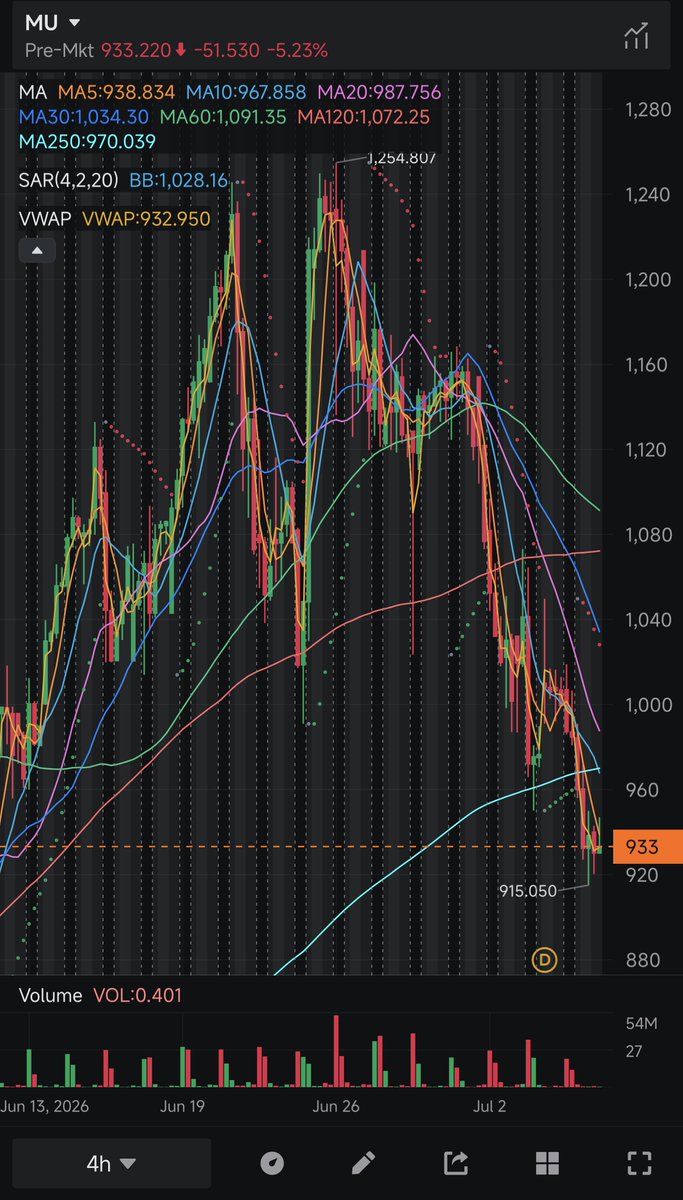
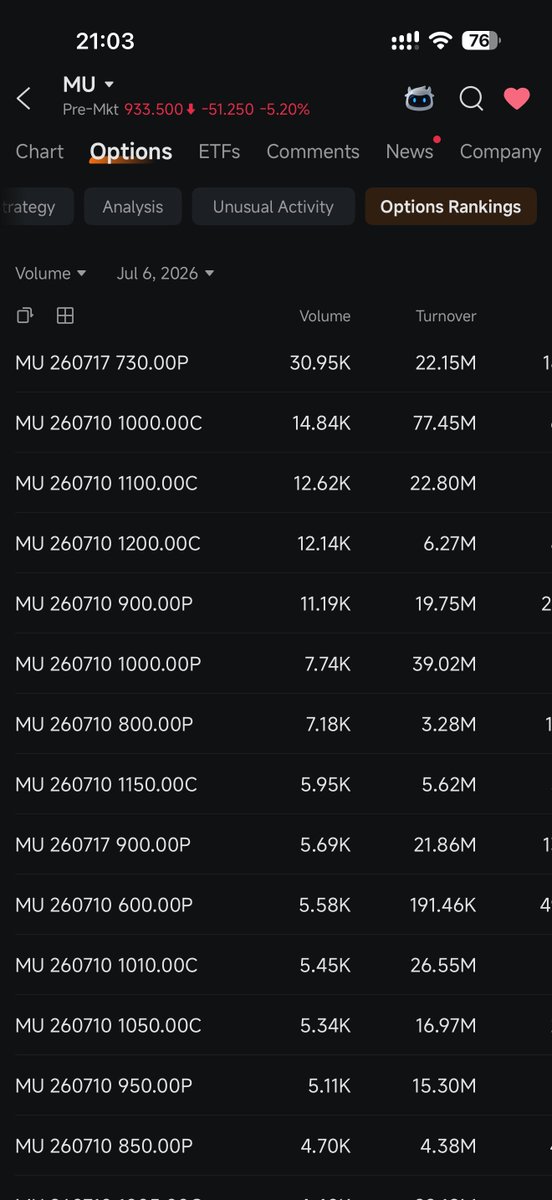
First, I use the 4H chart to mark key zones. Then I check Options Rankings to see where volume/turnover is clustering. After that, I look at Unusual Activity to see whether bigger orders are leaning bullish, defensive, or mixed. What I like is that moomoo lets me connect the chart setup with options positioning in one place.
For $MU, the main level I’m watching is the 915–933 support zone after the pullback from the 1,000 area. If support holds and call flow builds near 1,000 again, that would look constructive. If put flow grows around 900, I’d be more cautious.
Also watching $DRAM $SNDK $SKHY since this is part of the broader memory/HBM/AI server trade.
Would you buy the $MU dip here, or wait for a reclaim of 1,000 first?
#moomoo @moomoo
Not financial advice.
CLAUDE CODE CAN NOW PULL LIVE DATA FROM 17,000+ STOCKS, CRYPTO PRICES, AND FINANCIAL STATEMENTS IN SECONDS.
One command. 60 seconds. Done.
Here is the exact setup:
Step 1: Open Claude Code and paste this:
claude mcp add --transport http financial-datasets https://t.co/4twbpUMYd6
Step 2: Authenticate
Type `/mcp` inside Claude Code and complete the OAuth flow in your browser.
Verify the connection anytime:
claude mcp list
Step 3: Start prompting
- "What is Apple's current P/E ratio and market cap?"
- "Show me Tesla's income statement for the last 4 quarters."
- "How has Bitcoin's price changed over the past year?"
That is it.
Claude Code now has direct access to real financial data across 17,000+ stocks, earnings reports, balance sheets, income statements, cash flow data, and crypto prices.
The analysts paying $24,000 a year for a Bloomberg Terminal are not going to be happy this exists.
Before this you needed a Bloomberg Terminal or a complex financial data API or hours of manual research across multiple sources.
Now you need one command and 60 seconds.
The quants, analysts, and portfolio managers who figure out how to combine Claude Code's reasoning with live financial data access will have a research edge that compounds every single day.
Bookmark this before you open your next brokerage account.
Docs if you run into errors: https://t.co/CgF6B3dS5V
Follow @cyrilXBT for every Claude Code integration that changes how you work with data.
You can earn $9,000 per month if you have ChatGPT, a laptop, and 60 mins a day.
Usually, I'd charge $97 for this proven guide, but today it's yours 100% FREE.
Like + reply 'Money' & I'll send you my complete guide for FREE.
Must follow me @AiandTechHub to get DM.
FREE for 48 hrs only.
hoy me apareció este mensaje en Claude Code y me pareció un buen reminder de lo importante que es manejar bien el contexto.
si arrancás una tarea que no tiene nada que ver con la anterior, el contexto acumulado en la conversación sigue formando parte de las nuevas interacciones, aunque ya no sea relevante.
eso consume más tokens, aumenta el gasto si pagás por uso y puede sumar ruido que termine empeorando los resultados.
el flujo es algo así:
1) le pedís una tarea
2) Claude lee archivos, ejecuta comandos y todo ese intercambio va ocupando la ventana de contexto
3) enviás un nuevo mensaje y el contexto anterior viaja junto con él
4) esto se repite en cada interacción
si la nueva tarea no necesita nada de la anterior -> usá /clear.
si querés liberar espacio sin perder lo importante -> usá /compact para resumir la conversación.
manejar bien el contexto tiene un impacto directo en cuántos tokens consumís y en la calidad de las respuestas que obtenés.
I used Claude to create a simple $9 digital asset.
It made $7,200 in just 29 days.
I've recorded a 5+ hour course breaking down my entire system.
(Including every AI prompt I use.)
Like + reply 'Claude' and I'll send the entire breakdown to you absolutely for free.
Free for 48 hours only.
Ingeniero de Anthropic lo deja claro:
“No necesitas mejores prompts.
Necesitas ingeniería gráfica: memoria que se queda para siempre… para que tu agente NUNCA olvide nada.”
En 28 minutos muestra exactamente lo que Anthropic hace diferente y cómo estructurar el trabajo real con agentes.
Supera cualquier curso de agentes de pago que haya visto en mi vida.