Kubernetes made simple. Container versus Pod versus Deployment, why ReplicaSets matter, and what actually happens when a Pod gets deleted.
A mental model worth remembering: Deployment leads to ReplicaSet, which leads to Pods, which leads to Containers.
SECURITY TOOL SPOTLIGHT: METASPLOIT
Every system has vulnerabilities.
The question is whether you find them before someone else does.
Metasploit helps you find out.
Metasploit is a penetration testing framework that lets you find, exploit, and validate vulnerabilities in systems you're authorized to test.
Think of it like a toolkit for breaking into your own house to see which doors and windows were left unlocked.
With Metasploit, you can:
- Search a database of known exploits for specific vulnerabilities.
- Test whether a system is actually exploitable, not just theoretically vulnerable.
- Launch payloads against a target in a controlled lab environment.
- Practice post-exploitation techniques like privilege escalation.
- Validate whether patches and defenses actually work.
- Simulate real attacker behavior to test detection tools like Wazuh.
Getting started is simple:
1. Install Metasploit Framework, or use it on a pentesting distro like Kali.
2. Set up a vulnerable target in a lab, such as Metasploitable.
3. Launch msfconsole to open the framework.
4. Search for an exploit matching a known vulnerability.
5. Configure the exploit and set your target.
6. Run it against your lab environment and review the results.
The best part about Metasploit is that it turns "this system might be vulnerable" into a tested, confirmed answer.
If you're learning offensive security, it's one of the tools that shows you how real exploitation works, always inside a legal lab, never against systems you don't own or have permission to test.
Kubernetes Objects Cheat Sheet ☸️
→ Pod – The smallest deployable unit that runs one or more containers.
→ Deployment – Manages stateless applications with rolling updates and scaling.
→ StatefulSet – Designed for stateful workloads like databases with persistent storage.
→ Service – Exposes Pods through a stable network endpoint.
→ Ingress – Routes external HTTP/HTTPS traffic to Services.
→ Gateway API – The next-generation, more flexible replacement for Ingress.
→ ConfigMap – Stores non-sensitive application configuration.
→ Secret – Stores sensitive data such as passwords, API keys, and certificates.
→ Namespace – Organizes and isolates resources within a Kubernetes cluster.
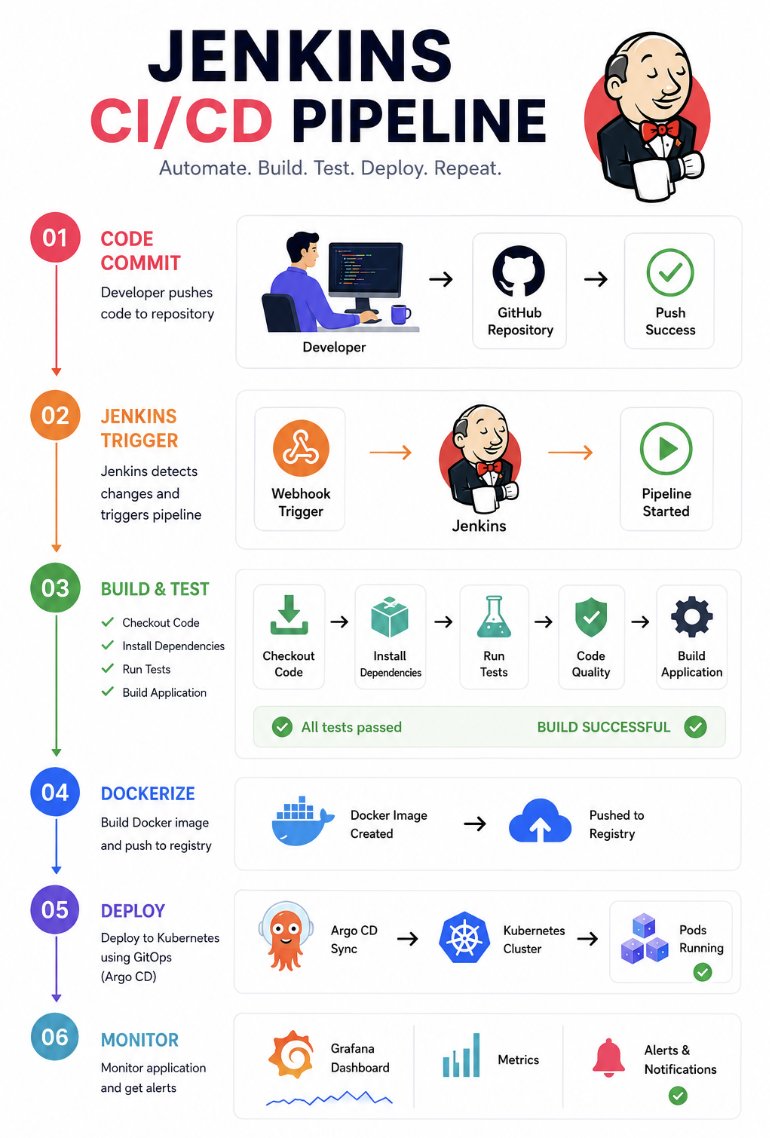
Jenkins CI/CD Pipeline Explained 🔁
1. Code Commit
→ Developers push code changes to a GitHub repository.
2. Jenkins Trigger
→ A GitHub webhook automatically triggers the Jenkins pipeline.
3. Build & Test
→ Jenkins checks out the code, installs dependencies, runs tests, performs code quality checks, and builds the application.
4. Dockerize
→ A Docker image is built and pushed to a container registry.
5. Deploy
→ Argo CD syncs the latest manifests and deploys the application to the Kubernetes cluster.
6. Monitor
→ Grafana and monitoring tools track application health, metrics, and alerts after deployment.