When I set up my @muse a while back, one of the first things I did was to let it create an automation to ask me a question every day, so that it can know more about me.
I've consistently been answering the questions, and my muse now knows what are good questions to ask, and what's more, it knows many details about me.
Creating such automations is a good way to let your muse consistently learn and be more useful to you.
Let AI see your screen when you explain product changes you want to make.
Many product builders take a screenshot of the product and explain to their agent what changes they want.
What I found more effective has been to record my screen, talk through the change I want to make, and send the recording to the agent.
I give the agent some light instructions (through a skill) on how to understand the recording: how to cut the frames of the video & what tool to use to do voice transcription - but even without it, the agent can also figure that out.
This trick has been a huge productivity unlock for me. For example - instead of sending the agent a screenshot and say "change the text on the button on the top right, the one next to the green button, from A to B", I can just move my mouse over that exact place and say "change this from A to B".
That was just a simple example - it gets even more effective when I click around the product / across multiple pages to explain my request to the agent.
Videos as input to the agent contain so much more information than a static screenshot.
The trick above can also be integrated into agentic interfaces / built as a standalone productivity tool: e.g. click a button to start screen recording; stop the recording and a prompt is generated for the agent to follow the instructions in the video
看大家做 AI 项目赚到钱,我气的整晚睡不着。
这玩意我也能做啊,怎么钱让别人赚走了?
前两天跟 @ai_muzi 聊了一场,把很多短视频不适合讲的东西摊开聊了一下 。
结合 AI 可以做什么项目、怎么发现需求、怎么找到客户、怎么做自动化。会做和能卖出去,中间差什么?如果没有客户,也没有行业资源,第一步能干什么?想必这些也是大家比较关心的问题。
如果 AI 学了不少,不知下一步该做什么,也可以看看这期。
At work I talk to my agent (chief of staff) exclusively through Slack.
I ask it to monitor things I care about, and in the mornings I wake up to several messages about what it thinks I should know.
Even though I've tried to coach it to send information at the right granularity, I still feel the pain that even reading a few messages can be stressful - each message requires my decision / followup. I usually mark those messages as unread and go back to them later.
If the agent were a human, I would ask the agent to hop on a quick call with me to go through the items - talking is way more efficient than reading+typing. Even if I already use voice dictation to give input to my agent, it's not the same as carrying on a natural conversation with it.
For my AI agent, I hope that every morning I can similarly hop on a quick call to discuss, instead of relying solely on text interactions.
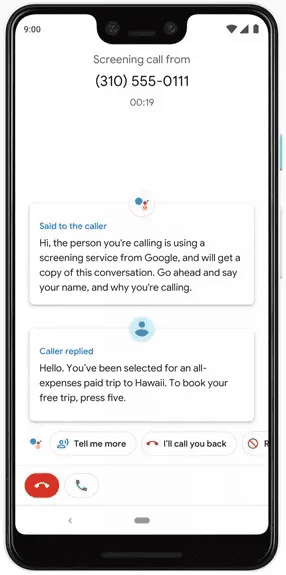
I got a call on my Google Pixel phone today from a number that looks like it's from a recruiter, and saw the "Call Screen" button.
I clicked on it rather than answering the call directly, and it showed me the transcript of what the person on the other end was asking about.
He was indeed a recruiter and I was able to hang up the phone right away without having to talk to the person.
This is such a nice feature - previously even if I said I'm not interested, almost all recruiters that called me asked me to explain more, and I had to uncomfortably find a way to hang up.
With this Call Screen feature that I just discovered, it'll make it much easier for me to process those calls.
I've been using Claude Code to edit all my past 20+ videos on YouTube.
My default model has been Opus 5.5 - essential for creative editing work; but for well-defined tasks such as uploading the final video to YouTube and making sure that the upload is successful, I've been letting my main agent delegate to a Sonnet subagent.
Since I don't have unlimited tokens on my personal Claude account, I've been more mindful to spend the Opus tokens where they're most needed.
I interact with Muse, Claude Code, and Codex.
Muse on my phone, and the latter two on my laptop.
They all have access to the same Google drive folder of markdown files, which acts as their shared memory about me: what are my priorities, what are my personal preferences.
Muse has its own memory system, and I set up a daily automation for it to sync changes to the Google drive folder.
Then on my laptop I also have an automation for Claude to review those changes and merge them with the main markdown files.
This system works really well - I never need to be worried about being locked in to a single agent provider, since I own the context.
Traveling in Southern California and Las Vegas this week.
Used @Muse extensively for our trip:
- we gave our Muse Humi a list of places we wanted to visit every day, and asked it to generate a artifact that contains a Google Map link and some background information for each location
- as we left our hotel several hours later than planned, we asked Humi to quickly update the itinerary, and it told us what to cut out
- it told us to visit Mesquite Flat Sand Dunes which was perfect for star watching - we didn't even have that in our original plan
- for restaurants Humi knew my preferences and recommended Asian restaurants near Las Vegas. We then asked it to look harder and suggest cuisines that we couldn't easily try in NYC - it found the "Balkan Bar and Grill" - a Balkan restaurant where we enjoyed some delicious mixed grill
I've been using @orca_build for my personal projects.
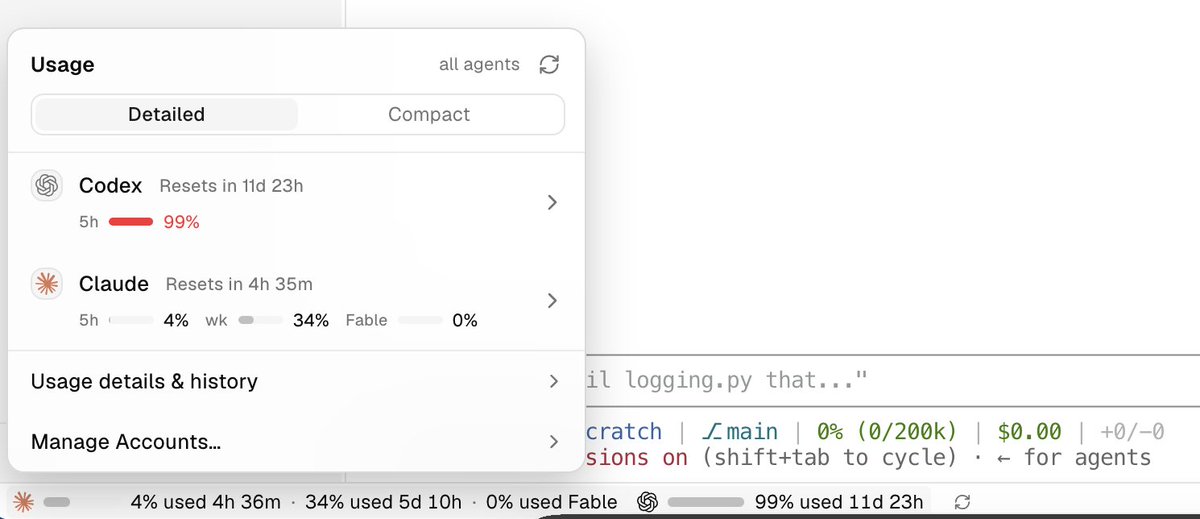
The first thing that caught my eye was that it shows my usage against my daily & weekly quota.
At work I don't need to worry too much about token spend (yet), but for my personal projects (e.g. video editing - https://t.co/xFBqOvl8wZ), I still have to care).
I know I can theoretically also configure to show such usage information directly through the statusline, but it's a really nice feature that Orca shows them by default.
I even told my agent "check from time to time how much usage you have before you max out, so that you prioritize task X. Such information is definitely available - go check how Orca shows it". - my agent learned from Orca.
For the past few weeks I've been exclusively interacting with agents at work through a chief of staff agent, which I talk to directly on Slack.
I've stopped using any terminal or agent chat webpage - I do everything on Slack.
So far it's been working great.
Whenever I send a message, the same session picks it up. If the task is complex, the session spawns new sessions to handle it.
Instead of managing individual contributor (IC) agents, now I manage my "manager" agent that controls all the IC agents. I've promoted myself from a M1 to an M2 of agents.
Actually one can go even one step further to become a D1 (director) of agents - talk to an M2, which talks to multiple M1 agents with well defined scope.
I still guide the agents to define the scope of each M1, and work with the M2 to organize re-orgs if needed (though very infrequent).
@DreamtuneLabs@ManusAI for me specifically - I have some videos that I let Claude Code bulk edit before it ran out of weekly quota; then I used the free credits to upload those videos
@ManusAI gives 300 daily free credits.
AFAIK it's the only tool that gives out daily free credits.
I use them for some simple tasks when waiting for the weekly quota of my Claude subscription to reset.
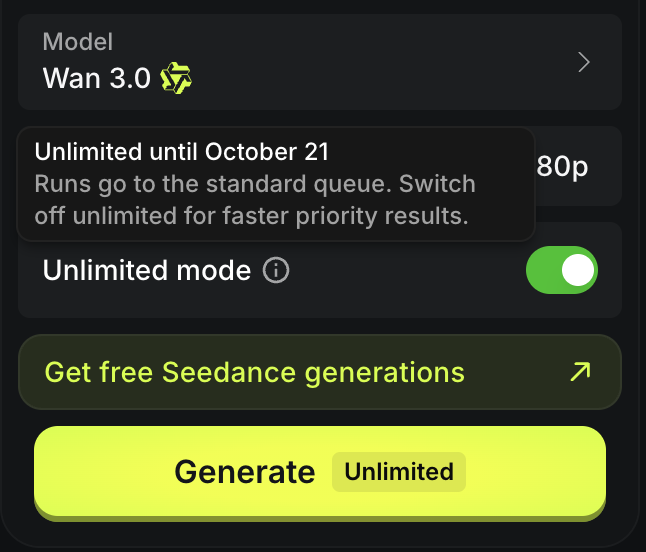
Trying out Wan 3.0 after reading a lot of positive feedback posts on X - you need to turn on the "Unlimited mode" toggle to enable free video generation.
It only allows you to generate 1 video at a time under Unlimited mode, and it's painfully slow to generate a single 30-second video under 1080p - taking as long as 20 minutes to generate one.
Wan 3.0 is now UNLIMITED on Higgsfield for 7 days.
60% OFF on Higgsfield API.
> Advanced motion design, animation and live-action realism
> Consistent characters across every shot
> Top-tier quality at an affordable price
Available now at Higgsfield. Limited offer.
We should not only care about what AI can do to make existing workflows 10x faster.
We should also look for opportunities for AI to unlock opportunities that were never possible before.
^ that's a saying I heard last week and it stuck with me .
Recently we've seen lots of impressive demos of AI-generated videos, powered by Opus 5.5. Those fit into the "AI-unlock" category.
Looking for other AI-unlock opportunities in both work and life.
“Share Your Work” - finished this book in on go.
Key learnings: be an amateur, share in the open, share something new every day, and stick around.
I'll practice that by posting more on X.