மக்கள் மனங்களில் புதிய நம்பிக்கையையும், புத்துணர்வையும், மகிழ்ச்சியையும் மலரச் செய்யும் தீபாவளித் திருநாளில், அனைவருக்கும் எனது மனமார்ந்த நல்வாழ்த்துகள்!
இருள் நீங்கி ஒளி பிறக்கும் நாளாகவும், தீமைகள் அழிந்து நன்மைகள் பெருகும் வெற்றித் திருநாளாகவும் கொண்டாடப்படும் தீபாவளிப் பண்டிகையைப் பாதுகாப்போடும், மிகுந்த உற்சாகத்தோடும் கொண்டாடி, அளவற்ற அன்பையும், மகிழ்ச்சியையும் அனைவருடனும் பகிர்ந்து கொள்வோம்.
இல்லங்கள்தோறும் ஆனந்தம் பெருகி, அனைவரின் வாழ்விலும் புது நம்பிக்கை பிறந்து, உற்சாகம் பொங்கிப் பெருகும் நாளாக இத்திருநாள் அமையட்டும்!
#CMJosephVijay
My friend recently attended a Kubernetes-focused interview and got grilled for almost 20 minutes straight on K8s.
The JD was heavily tilted toward Kubernetes expertise and almost every question came from real troubleshooting scenarios.
Here are the questions he was asked 👇
1️⃣ Pod is running fine, all parameters look good, but traffic is not reaching the pod when users access the application.
What could be the possible reason?
2️⃣ What is ImagePullBackOff?
Why and when does it usually occur?
3️⃣ How do you debug inside a container?
4️⃣ If there are multiple pods, how do they identify and communicate with each other?
5️⃣ How do Helm charts work?
6️⃣ Do you actually use Helm for deployments in real projects?
7️⃣ Explain rolling updates in Kubernetes.
8️⃣ If a deployment fails, what are the next steps you perform?
9️⃣ How do you approach debugging a deployment failure?
🔟 If sensitive data needs to be passed in a deployment, how do you handle it?
1️⃣1️⃣ What are Kubernetes Secrets?
For what type of applications do we need them?
1️⃣2️⃣ Deployment is successful, but accessing the app returns 404. Why?
1️⃣3️⃣ What API errors have you faced?
What are 504 and 501?
1️⃣4️⃣ Explain what an API is.
1️⃣5️⃣ Difference between Authentication and Authorization?
Key takeaway:
Most questions were real-world troubleshooting based not theory.
If you're preparing for DevOps interviews (especially K8s-heavy roles), focus on:
- Networking
- Services & Ingress
- Debugging pods
- Rollbacks
- Secrets & ConfigMaps
- API fundamentals
Kubernetes interviews are no longer basic YAML questions.
They test how you think when production is broken.
Prepare accordingly.
1. Generative AI
This learning path offers a comprehensive introduction to generative AI. This specialization explores the foundations of large language models (LLMs), their diverse applications, and the ethical considerations crucial for responsible AI development and deployment.
🔗 https://t.co/aiMW65291W
How Computer Networking actually works
① Client → sends a request
② DNS → resolves domain to IP
③ Router → finds the best path
④ Switch → forwards inside the network
⑤ Firewall → checks allowed traffic
⑥ TCP/UDP → delivers data
⑦ Server → processes request
⑧ Response → sent back in packets
⑨ Latency → distance + delay
⑩ Reliability → retries, acknowledgements
Networking isn’t memorizing terms.
It’s understanding how data travels end to end.
R.I.P. LinkedIn in 2026.
R.I.P. Upwork in 2026.
R.I.P. Indeed in 2026.
I spent 5 years applying. 1 interview.
A friend spent 4 hours on these 10 sites. 5 job offers instantly.
Use these 10 platforms to find remote jobs that actually want to hire you:
Everyone tells you to learn Linux before DevOps, but no one tells you what specific parts of Linux to focus on.
✅ Here are the Linux stuff I use most in Devops workflow.
🔺 Process Management: Check running processes, their CPU and memory utilization using commands like ps, top, htop, and kill. View process hierarchy with pstree to understand parent-child relationships
🔺Networking: Master commands to check network interfaces (ifconfig, ip), firewall configuration (iptables, ufw), used ports (netstat, ss), and general connectivity (ping, traceroute, dig, nslookup, curl, wget)
🔺Critical Network Files: Understand /etc/hosts (hostname to IP mapping), /etc/resolv.conf (DNS configuration), /etc/hostname, /etc/nsswitch.conf (name resolution order), and /etc/network/interfaces or /etc/sysconfig/network-scripts/
🔺File Structure Manipulation: Get comfortable with file/directory creation, copying/moving data, navigating directory trees, and understanding absolute vs. relative paths (mkdir, cp, mv, cd, pwd, ls, tree)
🔺File Permissions & Ownership: Learn to manage who can read, write, or execute files using chmod, chown, and chgrp. Understand numeric and symbolic permission notation (755, u+x), SUID, SGID, and sticky bits
🔺File System Usage: Learn commands like df (disk free space), du (disk usage), lsblk (list block devices), mount/umount, and tools to monitor storage
🔺Search & Filter: Practice finding files with various parameters (find, locate), searching patterns in files (grep, sed, awk), and filtering data outputs (cut, sort, uniq, head, tail, wc)
🔺Package Management: Understand how to install/uninstall packages using package managers like apt, yum, dnf, or zypper. Learn about package repositories and how to add/manage them
🔺System Configuration Files: Learn about critical files like .bashrc, .bash_profile, .profile (user shell configuration), /etc/profile (system-wide shell settings), .bash_history (command history), /etc/environment (environment variables), and .ssh/config (SSH client settings)
🔺Important System Files: Understand /etc/fstab (file system mounts), /etc/passwd (user accounts), /etc/group (group information), /etc/shadow (encrypted passwords), /etc/sudoers (sudo permissions), and /etc/crontab (scheduled tasks)
🔺Log Files: Know where to find logs in /var/log/ including syslog, auth.log, kern.log, and application-specific logs. Learn to use journalctl for systemd logs
🔺System Monitoring: Master commands to check system load (uptime, w), CPU and memory usage (free, vmstat, sar, iostat), and swap utilization (swapon –show)
🔺Service Management: Get familiar with both systemctl commands (systemctl start/stop/restart/status/enable/disable) and legacy service commands for managing system services
🔺SSH Configuration: Learn to set up secure remote connections, configure SSH keys (~/.ssh/id_rsa, ~/.ssh/authorized_keys), and customize settings in /etc/ssh/sshd_config and ~/.ssh/config
🔺Basic Shell Scripting: Learn how to automate routine tasks with bash scripts, including variables, loops, conditionals, functions, exit codes, and debugging with set -x
🔺Environment Variables: Understand how to set, export, and use environment variables. Know the difference between local and exported variables, and how PATH works
🔺Text Editors: Be comfortable with at least one terminal text editor like vim, nano, or emacs for quick file editing
🔺System Information: Use commands like uname (kernel info), hostnamectl, lscpu (CPU details), lsmem (memory info), and dmidecode for hardware information
🔺User & Group Management: Learn to create/modify users and groups using useradd, usermod, userdel, groupadd, and related commands
🔺Archiving & Compression: Master tar, gzip, bzip2, zip/unzip for creating and extracting archives
Remember, you’ll always pick up additional Linux skills while working in DevOps.
I DON’T UNDERSTAND WHY PEOPLE DON’T USE CHATGPT FOR JOB SEARCHES.
I got 5 interview calls in 7 days, all with ChatGPT as my recruiter.
Here are 6 prompts that turn your job hunt into a strategy.
[Save this thread]
PYTHON is difficult to learn, but not anymore!
Introducing "The Ultimate Python ebook "PDF.
You will get:
• 74+ pages cheatsheet
• Save 100+ hours on research
And for 48 hrs, it's 100% FREE!
To get it, just:
1. Like & RT
2. Reply "Python"
இதயம் நொறுங்கிப் போய் இருக்கிறேன்; தாங்க முடியாத, வார்த்தைகளால் சொல்ல முடியாத வேதனையிலும் துயரத்திலும் உழன்று கொண்டிருக்கிறேன்.
கரூரில் உயிரிழந்த எனதருமை சகோதர சகோதரிகளின் குடும்பங்களுக்கு என் ஆழ்ந்த அனுதாபங்களையும், இரங்கலையும் தெரிவித்துக்கொள்கிறேன். மருத்துவமனையில் சிகிச்சை பெறுவோர், விரைவில் குணமடைய பிரார்த்திக்கின்றேன்.
தமிழ்நாட்டிற்கு வாய்த்திருக்கும் முதலமைச்சர், எப்படிப்பட்ட பொம்மை முதலமைச்சர் என்பதற்கு இன்று அவர் வெளியிட்டுள்ள போட்டோஷூட் வீடியோவே சாட்சி!
நேற்று, நான் கரூர் சென்று உயிரிழந்தோருக்கு அஞ்சலி செலுத்தி, சிகிச்சை பெறுவோருக்கு ஆறுதல் தெரிவித்து செய்தியாளர்களை சந்தித்த போது, எந்த வித அரசியலுக்கும் இடமின்றி, மக்களின் உணர்வாக எனது கருத்துகளைத் தெரிவித்து, அதே சமயம், மக்களின் சந்தேகங்களையும் பதிவு செய்தேன்.
அதற்கெல்லாம் உரிய பதில் அளிக்க திராணி இல்லாமல், சமூக வலைதளங்களில் அவதூறு பரவுகிறது என்று கூறுகிறீர்களே...
என்ன அவதூறு பரவியது?
-உங்கள் கட்சிக் காரர்கள், "தமிழ்நாடு மாணவர் சங்கம்" என்ற பெயரில் போஸ்டர் ஒட்டிக்கொண்டு இருக்கிறார்களே- அந்த அவதூறா?
-உங்கள் அரசின் காவல்துறை பிரச்சாரம் செய்ய ஒதுக்கிய இடத்தில் உள்ள குளறுபடிகள், திமுக-வின் வழக்கமான ஆம்புலன்ஸ் அரசியல், தடியடி நடந்த காட்சிகள் வெளிவந்து, அதைப் பற்றி பொதுமக்கள் பேசுவது- இவை எல்லாம் வதந்தியா?
பொறுப்போடு நடந்து கொள்வது என்றால் என்ன?
உங்கள் அமைச்சர் ஒருவர் அழுவது போல் நடிக்கத் தெரியாமல் மாட்டிக் கொண்டாரே- அதுவா?
அல்லது, உங்கள் மகனும், துணை முதல்வருமானவர், கரூர் வந்து சம்பிரதாயத்திற்கு போட்டோஷூட் எடுத்த கையோடு, துபாய்க்கு Vacation பறந்து சென்றுவிட்டாரே- அதுவா?
கள்ளக்குறிச்சியில் உங்கள் ஆட்சியின் அலட்சியத்தால் ஏற்பட்ட கள்ளச்சாராய மரணங்களுக்கு கனக்காத இதயம், கலங்காத கண்கள், இப்போது மட்டும் கலங்குகிறதா?
சென்னை ஏர் ஷோ-வை நீங்கள் குடும்பத்துடன் உட்கார்ந்து கண்டு களித்த போது, கூட்ட நெரிசலில் சிக்கி 5 பேர் உயிரிழந்தார்களே- அப்போது மட்டும் வீட்டிலேயே இருக்க முடிந்ததா? யாரை ஏமாற்றப் பார்க்கிறீர்கள் @mkstalin அவர்களே?
எதிர்க்கட்சிகள் யாரும் இதுவரை எந்த அரசியலும் செய்யவில்லை. ஆனால், உங்களின் இந்த வீடியோ தான், பல அரசியல் சந்தேகங்களை ஏற்படுத்துகிறது!
இதில் இன்னும் கொடுமையாக, நீங்கள் அமைத்த ஒருநபர் விசாரணை ஆணையம், விசாரிக்கும் காட்சிகள் ஊடகங்களில் தொடர்ந்து வருகின்றன. அதைப் பார்க்கும் மக்களுக்கே, இது ஒருதலைபட்சமான, அரசின் தவறுகளை மூடி மறைக்கும் Eyewash ஆணையம் என்பதைக் காட்டுகிறது.
மக்களுக்கு விடியா அரசின் விசாரணை மீது நம்பிக்கை இல்லை. கரூர் துயரத்திற்கான உரிய நீதி கிடைக்க, நடந்தது என்னவென்று மக்களுக்கு உண்மை நிலை தெரிய,
CBI விசாரணைக்கு உத்தரவிட வேண்டும்.
திரு. @mkstalin அவர்களே- மக்கள் துயரத்தில் இருக்கிறார்கள். இந்த நேரத்திலும் உங்கள் போட்டோஷூட்டால் மக்களை மேலும் துன்புறுத்தாதீர்கள்!
@AIADMKOfficial
#KarurTragedy
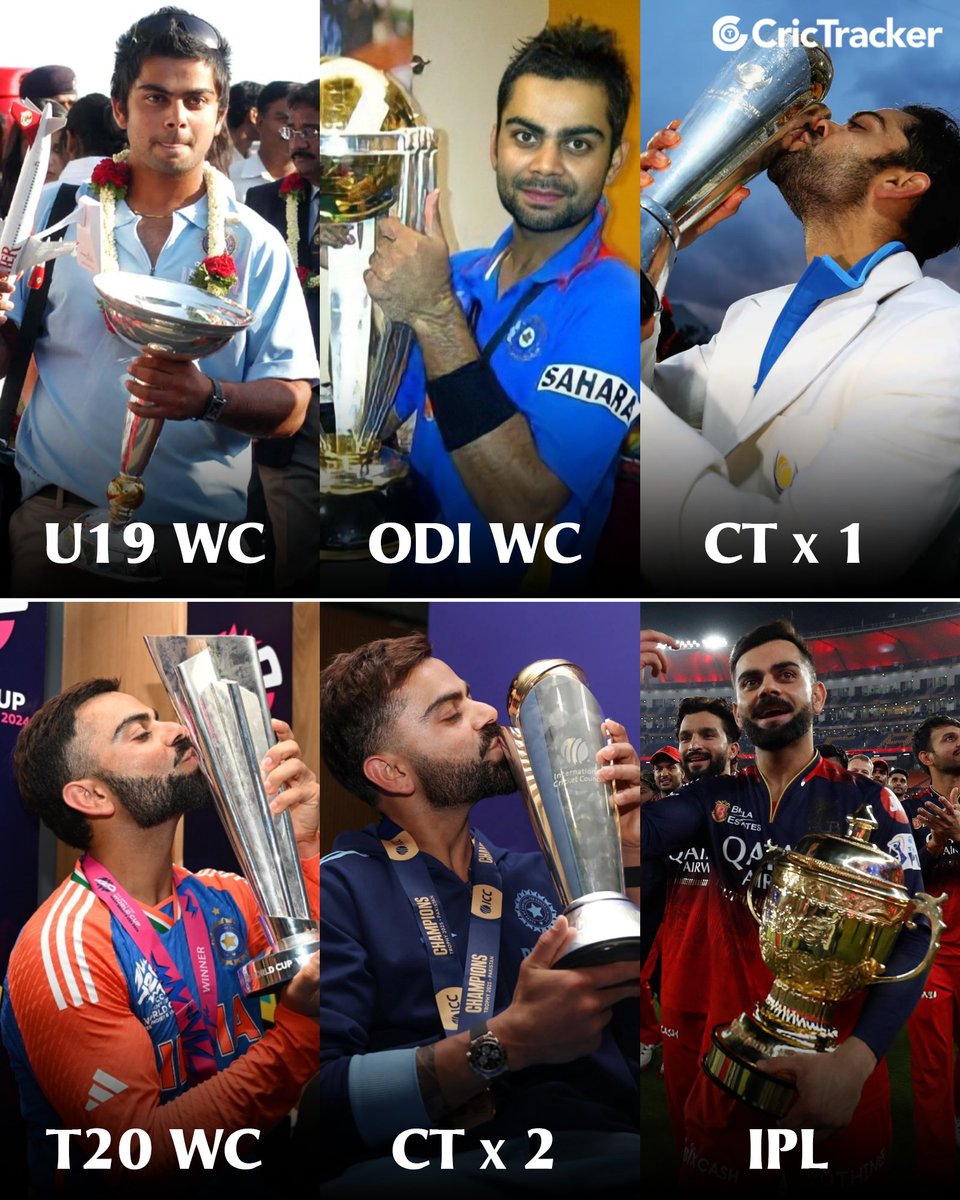
✅U19 WC
✅ODI WC
✅T20 WC
✅T20 WC POTT
✅ODI WC POTT
✅CHAMPIONS TROPHY x 2
✅T20 ASIA CUP
✅ODI ASIA CUP x 2
✅IPL ORANGE CAP x 2
✅IPL MVP
✅10 ICC Awards
& Finally, THE IPL TROPHY.. @imVkohli completes white-ball cricket