Networking protocols you should know as a DevOps Engineer before attending an interview.
1. HTTP 🌐
HTTP = HyperText Transfer Protocol.
It’s used for communication between clients and web servers.
Where to use:
→ Websites
→ REST APIs
→ Microservices
→ Web applications
Example: GET /users → Server returns user data.
------------------------------------------------------
2. HTTPS 🔒
HTTPS = HTTP + SSL/TLS encryption.
It encrypts data between the client and server, preventing attackers from easily reading or modifying traffic.
Where to use:
→ Production websites
→ REST APIs
→ Login/payment systems
→ Any application handling sensitive data
Example: https://t.co/Kaiwzb0rPe
------------------------------------------------------
3. SSH 🖥️
SSH = Secure Shell.
It provides encrypted remote access to servers and lets you securely execute commands.
Where to use:
→ Connecting to Linux servers
→ Server administration
→ Secure file transfers
→ Git operations
Example: ssh user@server
------------------------------------------------------
4. VPN 🔐
VPN creates an encrypted tunnel between your device and another network over the internet.
Where to use:
→ Accessing private company networks
→ Connecting to private cloud resources
→ Secure remote access
→ Site-to-site connectivity
Example: Connecting to an internal AWS VPC from your laptop.
------------------------------------------------------
5. DNS 🌐
DNS = Domain Name System.
It translates human-readable domain names into IP addresses.
Where to use:
→ Finding servers by domain name
→ Service discovery
→ Routing traffic to applications
→ Load balancing
Example:
https://t.co/OqCmrGL02y → 10.20.30.40
------------------------------------------------------
6. SMTP 📧
SMTP = Simple Mail Transfer Protocol.
It’s primarily used to send emails between mail clients and mail servers or between mail servers.
Where to use:
→ Sending emails
→ Application notifications
→ Password reset emails
→ Monitoring/alerting emails
Example: Your application sends an alert email when a production service goes down.
------------------------------------------------------
Save this if you're learning networking for DevOps/SRE.
CoreDNS in Kubernetes
Pods can get new IPs when they're created, deleted, or rescheduled. So you can't rely on hardcoding a Pod's IP.
So how does one Service find another inside a Kubernetes cluster?
That's where CoreDNS comes in.
CoreDNS is the default DNS server in Kubernetes. Its job is simple: translate a Service name into an IP address.
For example:
my-service.default.svc.cluster.local → 10.96.x.x
That IP is the Service's ClusterIP. The Service then routes the traffic to the right Pod.
Kubernetes also automatically configures each Pod's /etc/resolv.conf to use the cluster DNS service, so DNS lookups from inside a Pod just work.
No hardcoded IPs. No manual updates when Pods move.
Just use the Service name, and Kubernetes handles the rest.
AWS is not about how many services you know.
Understanding IAM, networking, compute, storage, load balancing, monitoring, and security deeply will take you much further than knowing the definition of 50 AWS services.
👉Once the fundamentals are strong, learning a new AWS service becomes much easier.
❌Don’t count AWS services.
✅Build AWS understanding.
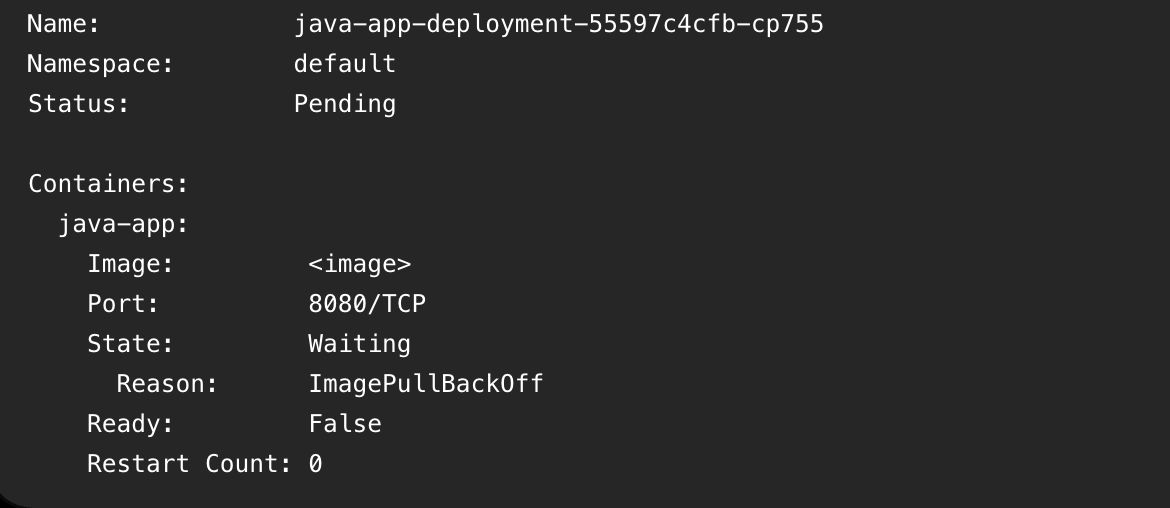
CrashLoopBackOff and OOMKilled aren't the same problem and treating them the same wastes your time:
OOMKilled :
your container used more memory than its limit, kubernetes killed it. fix: raise the memory limit or find the leak.
CrashLoopBackOff :
this isn't the error, it's the SYMPTOM. it means your container keeps crashing and kubernetes keeps backing off before retrying.
the actual cause is buried in `kubectl describe pod` and `kubectl logs --previous`.
CrashLoopBackOff just means "something before this state failed repeatedly," go find what.
don't google "how to fix CrashLoopBackOff." google what's actually in your logs.
Readiness vs liveness probe in Kubernetes
the way i wish someone explained it to me on day one:
Liveness probe fails :
-- kubernetes thinks the container is dead
-- it restarts the pod
Readiness probe fails :
-- kubernetes thinks the container is alive but not ready
-- It pulls the pod OUT of the service, no restart
Mixing these up is how people accidentally restart-loop a pod that's just slow to warm up, instead of just... waiting for it to warm up.
How an application gets to production on AWS EKS:
👨💻 Developer → Writes and commits code
🌿 Feature Branch → Pushes changes for development
🔀 Pull Request → Opens the code for review
🔍 Code Review → Team reviews and approves changes
🚀 Merge to Main → Approved code is merged
🔔 Webhook → Automatically triggers CI/CD
⚙️ Build & Test → Builds the app and runs unit tests
🛡️ Quality & Security → SonarQube, OWASP & Trivy scan the code
🐳 Docker + ECR → Builds and pushes the container image
⎈ Helm / Argo CD → Manages the Kubernetes deployment
☸️ AWS EKS → Deploys the application to Kubernetes
📈 Rollout → Rolling/Canary deployment gradually releases the new version
🌐 Traffic → Service → Ingress → AWS ALB routes traffic
🧪 Validation → Smoke tests verify the deployment
📊 Monitoring → Prometheus, Grafana & CloudWatch track application health
✅ Production → Application is stable and live
If you're integrating M-Pesa Daraja: build your callback handler to be idempotent from day one. Retries will duplicate events eventually.
Save yourself the debugging session.
Over the two days we hosted our Cursor Kenya events, I met some amazing people from this app who are building really cool stuff. It’s always great seeing online connections turn into real conversations, collaborations and friendships. The builder community on X is unmatched.
Terraform drift isn’t always about changes to resources in the cloud.
A change to the Terraform state file can also create drift and in many cases, it’s even more challenging to detect and troubleshoot.
After completing @arpit_bhayani’s Redis video series, I built FlashDB — a lock-free, Redis-compatible database in Rust.
21.3M GET/s
15.7M SET/s
22.5M Pub/Sub/s
Single node Flash vs 6-node Redis Cluster.
🔗 https://t.co/OcxYeFu9LQ
#Rust#Redis#Database#OpenSource
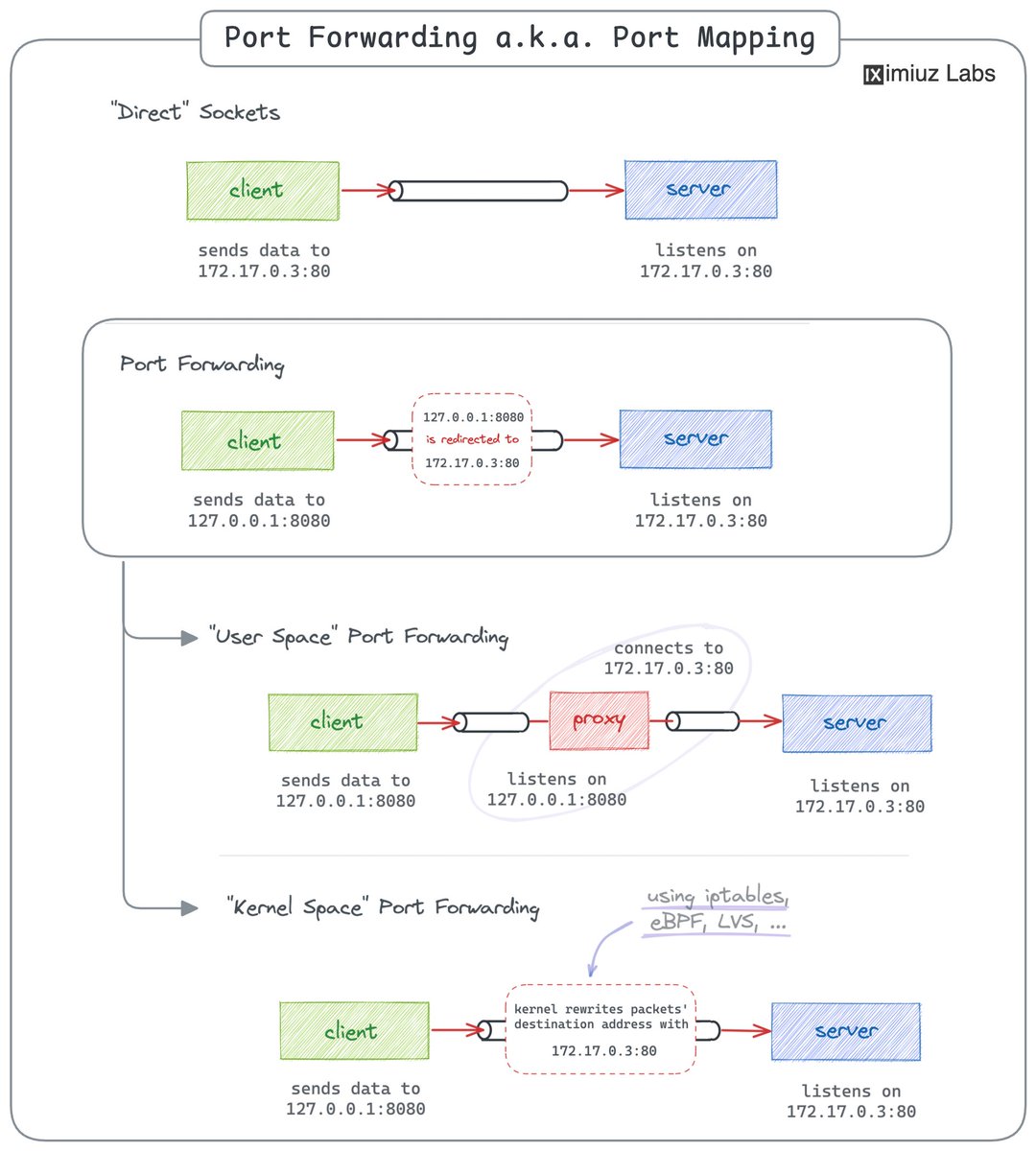
Networking 101: Port Forwarding 🛠️
An ancient trick that can help you make a service available on a different port without a restart, or connect to an endpoint in a home network or a private or VPC subnet.
Practice forwarding ports using:
- socat https://t.co/BMJ4tflgpL
- netcat https://t.co/ANRAQITrvP
- ssh https://t.co/jlaEw8y7zy
- proxy-less https://t.co/GphEAaEHxS
So far, I’ve helped 4 software engineers (Junior, Mid, Senior) land roles.
Mock interviews, teaching concepts, helping them prepare.
Makes me genuinely happy.
But today’s student made me the proudest.
Got a better paying offer✅