Todavía no entiendo por qué todo el mundo no está usando esto. Gracias a esto, una persona logró aumentar sus ingresos hasta 17,000 dólares al mes hace un año.
Andrej Karpathy, cofundador de OpenAI, publicó una idea simple que consiguió 16 millones de visualizaciones: deja de usar la IA para escribir código, úsala para construir un segundo cerebro.
Le indicas a Claude Code una carpeta, colocas ahí cualquier fuente, como un artículo, una transcripción o un PDF, y Claude la lee, la conecta y la guarda en una wiki viva con todo lo que sabes. Se acumula como el interés compuesto: mientras más información le das, más inteligente se vuelve.
La idea es esta:
Instala Obsidian, crea un vault y ábrelo en Claude Code.
Pega el archivo con la idea de la wiki de Karpathy y dile a Claude que la construya.
Claude crea tres carpetas: raw para las fuentes, wiki para sus páginas y CLAUDE, que se encarga de ejecutar todo.
Coloca cualquier fuente dentro de raw y dile: “ingiere esto”.
Haz preguntas sobre todo, para siempre.
Cinco minutos para configurarlo, y nunca más vuelves a empezar con un chat vacío.
Guárdalo en favoritos.
LIST OF 40 WEBSITES TO FIND REMOTE JOBS
1. Linkedin. com
2. Indeed. com
3. Glassdoor. com
4. FlexJobs. com
5. weworkremotely. com
6. Remote. com
7. Upwork. com
8. Freelancer. com
9. Fiverr. com
10. Guru. com
11. Toptal. com
12. AngelList. com
13. Hubstafftalent. com
14. Simplyhired. com
15. Remotive. com
16. Virtualvocations. com
17. workingnomads. com
18. Hired. com
19. cloudpeeps. com
20. taskrabbit. com
21. talent. com
22. remoteok. io
23. dremote. io
24. jooble. org
25. stackoverflow. com/jobs
26. jobspresso. com
27. onlinejobs. ph
28. simplyhired. com
29. themuse. com
30. skipthedrive. com
31. zirtual. com
32. justremote. com
33. hireable. com
34. remoteworkhub. com
35. jobbatical. com
36. freelancewritinggigs. com
37. contentwritingjobs. com
38. problogger. com/jobs
39. behance. net
40. designhill. com
Follow me @Bhanusinghyede
Delete Tiktok
Delete Linkedin
Delete Instagram
Create an Amazon KDP account, and sell AI eBooks.
It's boring... but if you start today, you can make $3,000 by the end of August.
Like + comment "KDP" and I will send you my killer guide totally FREE.
Must follow me to get this proven guide in your DM.
⏳ Free for the next 48 hours
Andrew Ng just dropped a free 2-hour course
On turning one prompt into 100 self-improving agents:
09:14 - Build your first AI agent
33:11 - Run agents inside feedback loops
1:02:46 - Connect agent loops into graphs
1:30:15 - Build agents that rewrite themselves
1:49:05 - Run the entire graph without you
Most people build one agent and call it finished
Andrew Ng is already teaching everything that comes next:
Prompt → Agents → Loops → Graphs → Self-Improving Systems
Single agents are the old workflow
Systems that improve and run without you are the new one
This free 2-hour course is worth more than most $500 agent engineering programs
Bookmark and watch it before everyone catches up
Then read how to run 1,000 agents from one prompt below ↓
Nobody has ever explained all of Claude to you.
But everything you've learned (so far) was level one:
Level 1. Install Claude app, even if you never use it.
You will use the browser 90% of the time, and that's fine. But the day you need Claude to touch a real folder, you don't want to be downloading, logging in and re-granting permissions while the work waits. Set it up on a slow Tuesday. Use it on a fast one.
Level 2. Escalate on failure, not on anticipation.
Don't pick the best model "just in case." Start with Sonnet. When it gives you a bad answer, that's your evidence the task is genuinely hard - then move up. You'll discover most of your work never needed the heavy brain, and the 5% that did is now obvious.
And when you switch, switch inside the same conversation. Claude keeps the thread. Starting fresh throws away everything you already explained.
Level 3. One correct answer = low effort.
That's the whole test. "Reformat this table" has one right answer; don't let it think. "Should we price at 40 or 60" has trade-offs - let it think properly.
The mistake: turning thinking up on a task that had one right answer. You get a reasoned paragraph explaining why the wrong answer is correct.
Level 4. Count your messages before you start.
If the task would take you more than three back-and-forth prompts, it was never a chat task. Hand it to Cowork at prompt one.
And if you've explained the same context twice in two different chats, stop. That's a Project. Set it up once and every future chat starts where you left off.
Level 5. Say the output format in your 1st sentence.
Not after. Ask for "a one-page Word doc" or "an Excel model" up front and you skip the wall of text entirely. Don't generate 900 words, then ask for a doc, then get the 900 words again with headings. Two prompts wasted, every single time.
Level 6. Turn your corrections into instructions.
The second time you correct Claude on the same thing, that correction becomes a Skill.
"Stop using em dashes." "Always give me the number before the explanation." "Never open with a summary."
Correct it twice → write it down once → never say it again. Most people spend a year giving the same three corrections daily.
Your first 20 minutes, in order:
1. Install desktop app.
2. No settings is the best.
3. Connect ONE tool - not everything.
4. Make one Project for the work you do weekly.
5. Write 1st Skill from a correction you already gave.
Step 5 is the one you'll never do, so I'll make it easy.
✦ My favourite Claude Skills are free on https://t.co/psB7XxB2Y4 - the exact ones I use every day.
✦ Open the welcome email (don't skip this).
✦ Click the Notion link → "Skills" folder.
✦ Download the whole Skills library.
✦ Upload to Claude → Settings → Skills.
1. Diabetes - Eating late at night & inactivity.
2. Hypertension - Eating too much salt & sugar.
3. Migraine - Skipping meals.
4. Heart Disease - Physical inactivity & Fast Food.
5. Gastritis - Eating too fast & Junk Food.
6. Acid Reflux - Lying down after meals.
7. Anemia - Drinking tea with meals.
8. Gut Issues - Not drinking enough water.
9. Asthma - Being in dusty environments.
10. Liver Issues - Eating processed foods & drink.
11. Vitamin D Deficiency - Staying indoors
12. Insomnia - Using screens late at night & zero sunlight
All Paid Courses (Free for First 4500 People)
𝗣𝗮𝗶𝗱 𝗖𝗼𝘂𝗿𝘀𝗲 𝗙𝗥𝗘𝗘 (PART - 2)
1. Artificial Intelligence
2. Machine Learning
3. Prompt Engineering
4. Claude, Chatgpt, Grok
5. Data Analytics
6. AWS Certified
7. Data Science
8. BIG DATA
9. Python
10. Ethical Hacking
(72 Hours only)
Like + RT + comment "Drive"
Must Follow me so I can DM you.
These 50 fr33 websites feel illegal to know in 2026👇
1/ https://t.co/AznMCeRS1b - Download any social media video
2/ https://t.co/9zOexvWulC - Free Photoshop
3/ https://t.co/k8oJYMlnvo - One-click temporary email
4/ https://t.co/mt7qpC0Nar - 100+ free tools in one website
5/ https://t.co/A1aMVlBPFk - Access any old webpage
6/ https://t.co/dDBHGqP0c9 - Millions of free textbooks
7/ https://t.co/01KhfktNHW - Free research papers
8/ https://t.co/wEHzIvVRTo - Find free app alternatives
9/ https://t.co/eVrRDWgx8U - Find where to stream any content
10/ https://t.co/Mq40zmIIEJ - 70,000 free classic books
11/ pdfdrive(dot)com - Free PDF downloads
12/ https://t.co/FzLnwbvNFj - Free courses from top universities
13/ https://t.co/q7akDOu5z4 - Instantly solve any math problem
14/ https://t.co/5ZfSSz3ItH - One-click background removal
15/ https://t.co/IdlKOMqdsI - Erase objects from photos
16/ https://t.co/PWn7Ikubsq - Free video background removal
17/ https://t.co/jzFXppZhSv - Free image compression
18/ https://t.co/zhlpp9oG9b - Free hand-drawn charts
19/ https://t.co/26kBFGGFj6 - Turn code into artwork
20/ https://t.co/KSqTWfW1NC - Stunning code screenshots
21/ https://t.co/F0sYcAhsEB - Real-time tracking for any flight
22/ https://t.co/1LzwCHZyfX - Track Amazon price history
23/ https://t.co/Pl47s7RBsV - Check if you have been hacked
24/ https://t.co/wGdQXuWBfE - Scan any file for malware
25/ https://t.co/POT2pkm2BO - Send self-destructing messages
26/ https://t.co/zhfZmNqHUo - Share auto-deleting files
27/ https://t.co/a4UAoQgveq - Permanently save any webpage
28/ https://t.co/p1asw8E1S0 - Delete yourself from any website
29/ https://t.co/C1iY4S7b3e - Listen to any global radio station
30/ https://t.co/ymzQ1jWEfJ - Find songs from any show
31/ https://t.co/uy4BfGNkb9 - Focus music
32/ https://t.co/ZVa5hvyAe8 - Custom focus soundscapes
33/ https://t.co/O7EKrjKc68 - Search every book ever written
34/ https://t.co/UVoZT55lrm - AI research paper assistant
35/ https://t.co/JMIB48WR9U - Search scientific consensus
36/ https://t.co/ExAX8ZTovP - Visualize and map research
37/ https://t.co/CmSWcqScXh - Free academic search
38/ https://t.co/UQA6sA92Yw - Understand any research paper
39/ https://t.co/41IzXqrRN7 - Summarize any YouTube video
40/ https://t.co/LeFplGOiCe - Developer AI search
41/ https://t.co/eBrfYVWfbl - Instantly test any regular expression
42/ https://t.co/SYyfC3O8Wl - Cleanly format any code
43/ https://t.co/k3xMA5SQLc - Understand any terminal command
44/ https://t.co/fub5T2xwXO - Infinite whiteboard in your browser
45/ https://t.co/9avaFFbHwf - Check if any website is down
46/ https://t.co/60hx0AGbN5 - Reverse image search
47/ https://t.co/4CZFGsDOzl - Check your internet speed
48/ https://t.co/v4BEV7qBWJ - Free PDF editing
49/ https://t.co/w78ymDpPvT - Merge and split PDFs
50/ https://t.co/sWvkt2G8Va - Instant temporary email
All legal. All fr33. Bookmark this before it disappears🙌
LIST OF 40 WEBSITES TO FIND REMOTE JOBS
1. Linkedin. com
2. Indeed. com
3. Glassdoor. com
4. FlexJobs. com
5. weworkremotely. com
6. Remote. com
7. Upwork. com
8. Freelancer. com
9. Fiverr. com
10. Guru. com
11. Toptal. com
12. AngelList. com
13. Hubstafftalent. com
14. Simplyhired. com
15. Remotive. com
16. Virtualvocations. com
17. workingnomads. com
18. Hired. com
19. cloudpeeps. com
20. taskrabbit. com
21. talent. com
22. remoteok. io
23. dremote. io
24. jooble. org
25. stackoverflow. com/jobs
26. jobspresso. com
27. onlinejobs. ph
28. simplyhired. com
29. themuse. com
30. skipthedrive. com
31. zirtual. com
32. justremote. com
33. hireable. com
34. remoteworkhub. com
35. jobbatical. com
36. freelancewritinggigs. com
37. contentwritingjobs. com
38. problogger. com/jobs
39. behance. net
40. designhill. com
Follow me @Bhanusinghyede
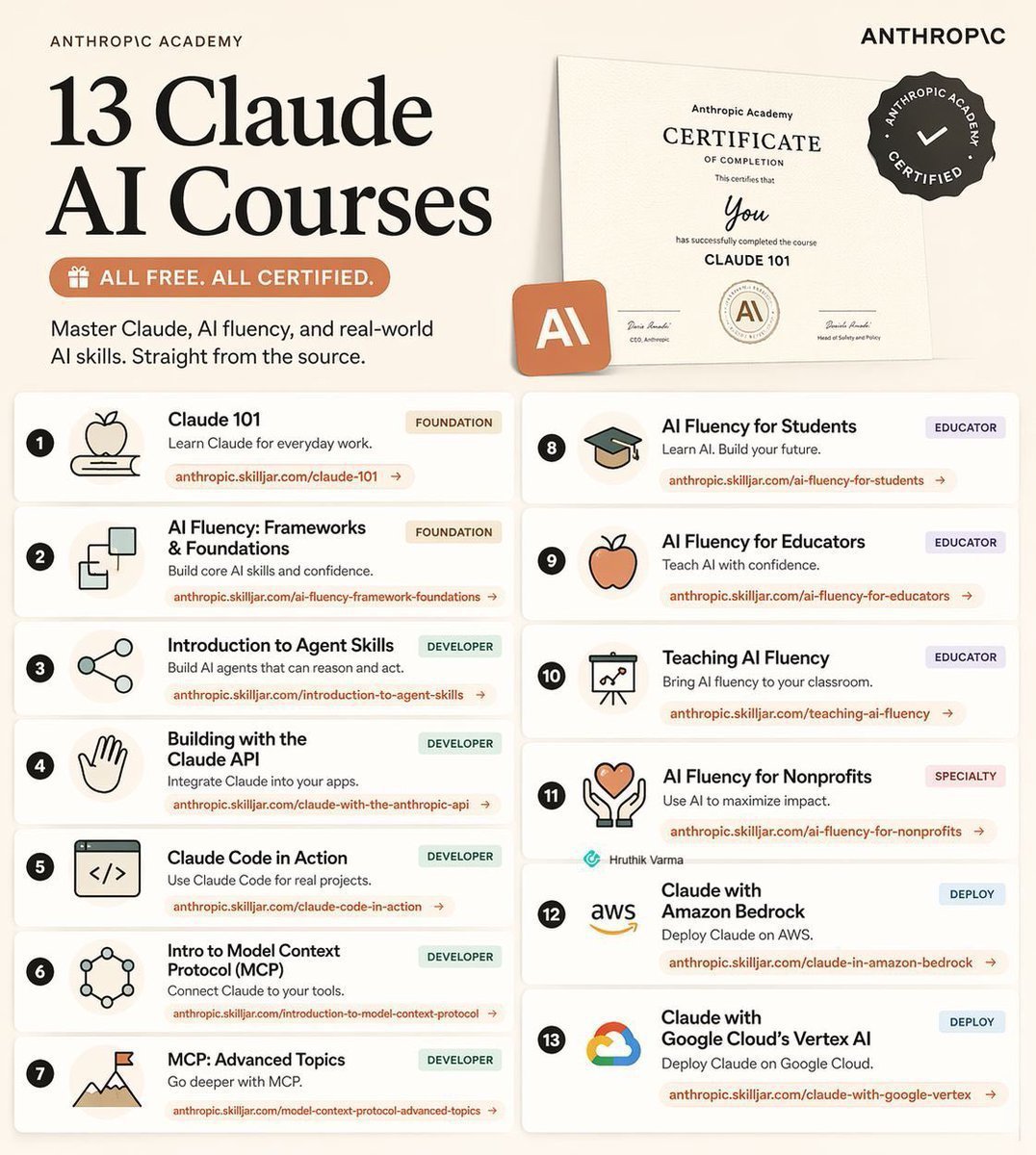
Claude just dropped 13 FREE AI courses (with certificates).
No $500 course needed.
No “guru” required.
Just real skills — straight from Anthropic.
Here’s the full list:
👇
1. Claude 101
https://t.co/nbXOwYd0sr
2. AI Fluency: Frameworks & Foundations
https://t.co/XCQnjhF9in
3. Introduction to Agent Skills
https://t.co/ezwU3q9EUS
4. Building with the Claude API
https://t.co/6juVSjOJ1a
5. Claude Code in Action
https://t.co/yzoAgBRdUZ
6. Introduction to Model Context Protocol
https://t.co/P4BwHj6Arc
7. MCP: Advanced Topics
https://t.co/VsZ0YLjNbh
8. AI Fluency for Students
https://t.co/Q7Y9uK3Pv5
9. AI Fluency for Educators
https://t.co/vUhkqKgkzD
10. Teaching AI Fluency
https://t.co/FknPVk500D
11. AI Fluency for Nonprofits
https://t.co/fa3ZAymV5i
12. Claude with Amazon Bedrock
https://t.co/zf4YXzHJ3g
13. Claude with Google Vertex AI
https://t.co/hyFJweThmt
—
If you go through even HALF of these…
You’ll be ahead of 95% of people using AI.
Most people won’t.
Because they’re still:
• Watching random YouTube videos
• Buying overpriced courses
• “Learning AI” without actually building
Don’t be that person.
Do this instead:
1. Save this post (you’ll come back to it) @AiwithDharmik
2. Pick 1 course → start today
3. Share it with someone who needs this
Free. Practical. No excuses.
En EEUU, unos turistas molestaron a un bisonte en época de celo en el parque natural de Yellowstone, desobedeciendo las órdenes de los guardas de no acercarse mucho al animal y no bajar del coche.
El búfalo pilló al turista y lo hizo volar, dejen a los animales en paz y libres.
LIST OF 40 WEBSITES TO FIND REMOTE JOBS
1. Linkedin. com
2. Indeed. com
3. Glassdoor. com
4. FlexJobs. com
5. weworkremotely. com
6. Remote. com
7. Upwork. com
8. Freelancer. com
9. Fiverr. com
10. Guru. com
11. Toptal. com
12. AngelList. com
13. Hubstafftalent. com
14. Simplyhired. com
15. Remotive. com
16. Virtualvocations. com
17. workingnomads. com
18. Hired. com
19. cloudpeeps. com
20. taskrabbit. com
21. talent. com
22. remoteok. io
23. dremote. io
24. jooble. org
25. stackoverflow. com/jobs
26. jobspresso. com
27. onlinejobs. ph
28. simplyhired. com
29. themuse. com
30. skipthedrive. com
31. zirtual. com
32. justremote. com
33. hireable. com
34. remoteworkhub. com
35. jobbatical. com
36. freelancewritinggigs. com
37. contentwritingjobs. com
38. problogger. com/jobs
39. behance. net
40. designhill. com
Follow me @Tech_Arish
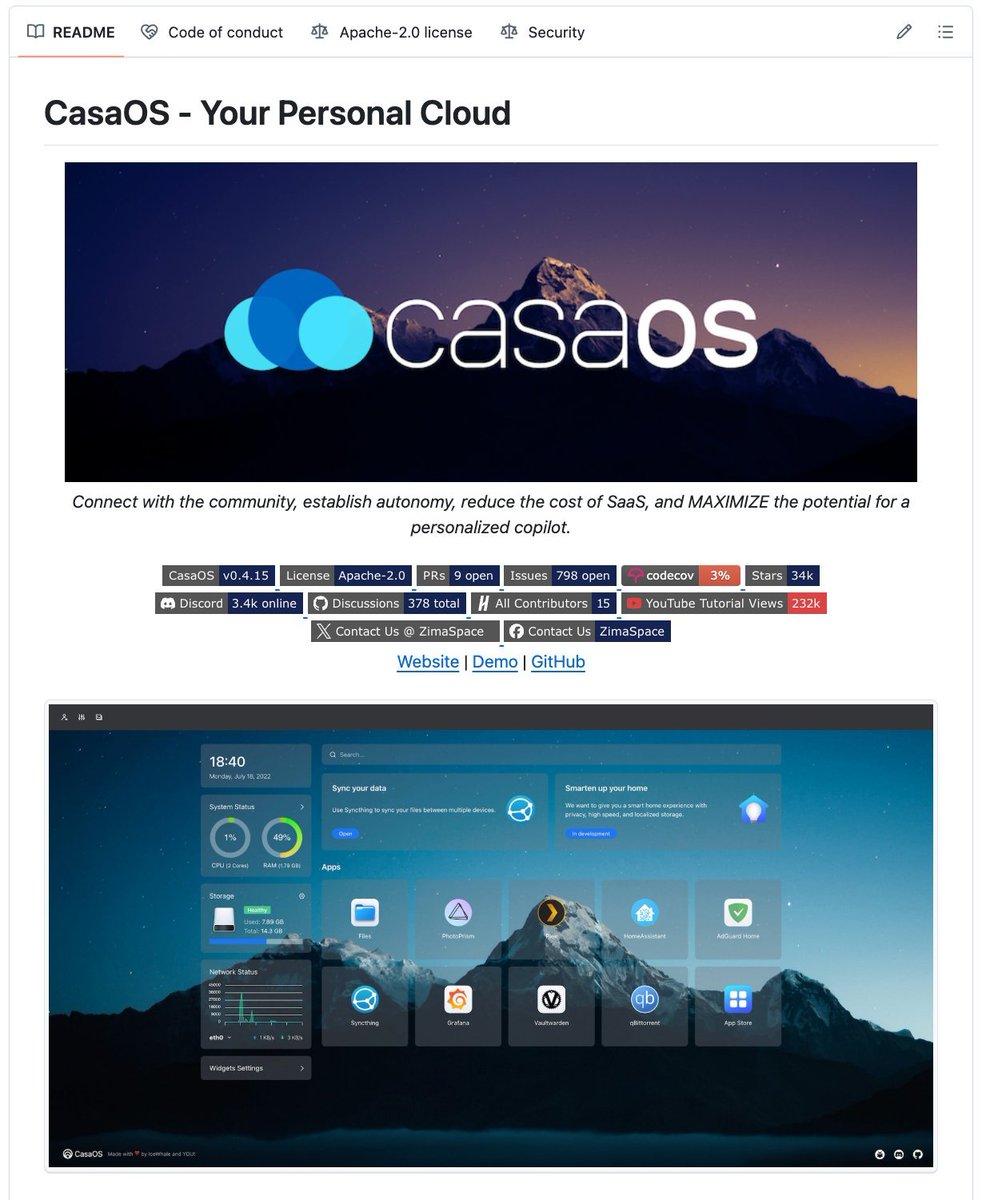
🚨ATENCIÓN: Si tienes un portátil viejo que no usas, no lo tires!
Puede convertirse en tu propia nube privada.
Con CasaOS puedes transformar un portátil antiguo, una Raspberry Pi o un mini PC en un servidor personal.
Sin saber programar.
Lo instalas, abres un panel muy sencillo y eliges las aplicaciones que necesitas:
→ Jellyfin para ver tus propias películas y series
→ Immich para guardar tus fotos
→ Nextcloud para sustituir Dropbox
→ Vaultwarden para guardar contraseñas
→ Syncthing para sincronizar archivos
→ Home Assistant para controlar tu casa
→ AdGuard para bloquear anuncios en tu wifi
Antes, montar algo así requería instalar Linux, configurar Docker y pasar horas resolviendo errores.
Con CasaOS, simplemente haces clic en los iconos.
Es gratuito, open source y funciona en casi cualquier ordenador antiguo.
Link al repo en el primer comentario👇🏻
UI/UX Designers, here are my best sites on the internet for design system resources.
Bookmark it for later 💜
Guide → https://t.co/uwaHFCIsi6
Design system components → https://t.co/WDQ8CpX4MW
Checklist → https://t.co/SwFJAwjCdc
Database → https://t.co/EgC0qeIwyd
Resources → https://t.co/IVOXlvAxH1
Component research → https://t.co/9kAEoD5FUf