As someone building at the AI-crypto frontier, this Bitcoin explainer is the closest thing to a prerequisite for understanding zkML and AI content provenance I've ever seen released for free.
Verifying an LLM actually ran what it claimed. Proving content wasn't generated by GPT. Decentralized training networks like Bittensor. All of it sits on top of the cryptography this video walks through.
25 minutes. Bookmark & watch today. The full math stack behind every LLM is in my article below.
ASK CLAUDE TO MAP YOUR ENTIRE APP'S ARCHITECTURE INTO A SINGLE HTML PAGE AND JSON FILE.
THE HTML IS FOR YOU.
THE JSON IS FOR THE NEXT AGENT WORKING ON A NEW FEATURE.
YOUR CODEBASE NOW EXPLAINS ITSELF.
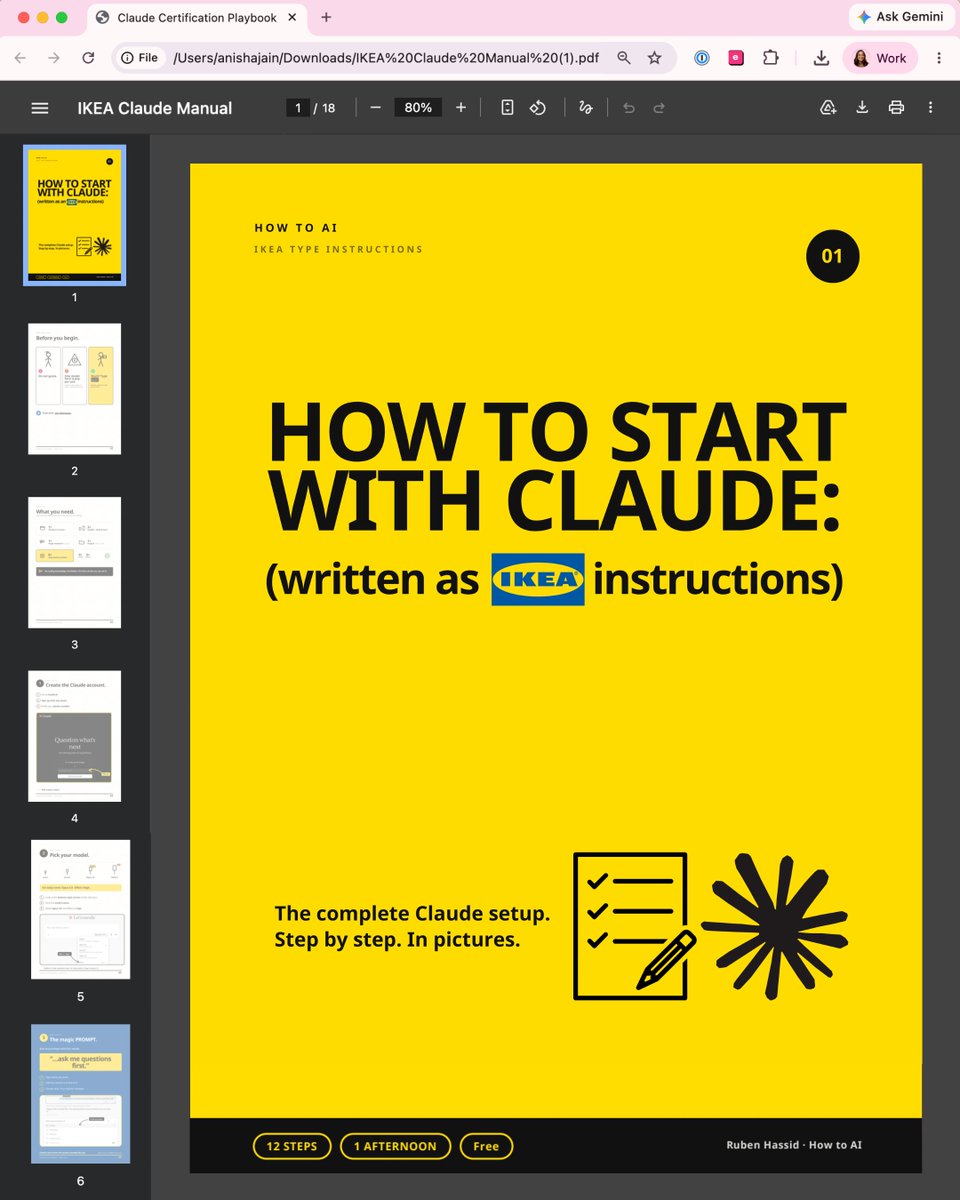
Claude doesn't come with a manual.
So I wrote a simple guide (like IKEA instructions):
Most people open Claude, type a question, get a bad answer & decide it's "just another chatbot."
The problem is nobody handed you the instructions. So I wrote one, like flat-pack furniture.
Here's the whole thing:
1. Get the entire manual (for free)
Go to https://t.co/psB7XxAv8w. Subscribe for free.
Open the received email in your inbox.
Go to the link, download "Ikea Claude manual"
Keep it open in a second tab while you follow along.
2. The one sentence to end every prompt with - it makes you better at Claude than 99% of people
3. Goals vs. tasks: why "write me an email" gets a worse result than telling Claude what you want
4. The Claude rule that stops your chats getting slow, dumb, and expensive
5. How to give Claude a memory, so every chat already knows who you are
6. The expensive model nobody warns you about and when to use it
7. Connecting your Gmail and calendar, and the skills you build once and never rebuild
No coding. No folders. No jargon.
If you can build a bookshelf, you can do this.
Keep it open in a second tab while you follow along:
→ https://t.co/psB7XxAv8w
I removed every word that wasn't necessary and drew the rest.
If your team is still typing one-line questions into a Ferrari, send them this.
(If you share it, mention the newsletter. Be nice.)
IPv8 has been proposed...
and the crazy part is how simple it is for being so powerful.
- 8 octets instead of 4
- fully compatible with IPv4, no dual stacking.
- Can be rolled out as a software patch, no hardware replacement
- 1 device - the Zone Server - acts as DHCP, DNS, NAT (they call it XLATE8), ACL (east and west, north and south), NTP, and OAUTH
- BGP routers reduced to ~175,000 prefixes vs today's 900,000+
- A new metric for routing protocols called Cost Factor derived from RTT, loss, congestion state, stability, capacity, policy, and geography
Here is a blog that breaks down how it works (diagrams included): https://t.co/FKUgRQBUeJ
Andrew Ng:
“AI agents are doing almost 100% of my tasks now - the hype has exceeded my expectations.
in 4-6 months, we’ll all be building graphs to orchestrate self-improving agents. No more prompting.”
In a 20-minute talk, Andrew Ng explains how to build self-improving agentic systems from scratch.
Worth more than a $500 agentic course.
Watch this video, then read the article below on how to become a graph architect.
How to become GOD-LEVEL with Large Language Models.
Here are 50 hands-on projects with solutions that will teach you how Large Language Models work.
You don't need to solve all 50, but if you do, you'll be at the top 0.01% of the field.
It's all Python + Pytorch + SciKit-Learn + Pandas + Numpy + Matplotlib + Seaborn.
Here are the 50 problems from the book (link below):
Tokenization
1. Three tokenization schemes
2. Book lengths in characters, words, and tokens
3. Pandas frequency tables of token lengths
4. Token lengths in characters and bytes
5. Is tokenization compression?
6. Tokenization and compression in different languages
7. Translating between tokenizers
Embeddings
8. Distribution of cosine similarities
9. Sequential cosine similarity
10. Sequential number cosine similarity
11. Network graphs of cosine similarities
12. RSA to compare GPT-2 & BERT embeddings
13. Word similarity via distance and cosine
14. Linear semantic axes
15. Analogy vectors
Output logits
16. Softmax probability distributions
17. Probabilistic token selection
18. Token prediction accuracy
19. LLM loss function
20. Perplexity over sequences, texts, and models
21. Predict token position with linear and logistic regressions
22. Evaluating models with HellaSwag
23. Measuring language biases
Transformer outputs
24. Cosine similarities within and across layers
25. Category selectivity via cosine similarity
26. Current layer = previous layer + adjustments
27. Impact of layer-specific noise and scaling
28. Effective dimensionality of hidden layers
29. Hidden state dimensionality reduction
30. Sentiment analysis with decision trees
31. Logit lens
32. Patching hidden states in indirect object identification
Attention
33. QKV weights characteristics
34. QKV activation characteristics
35. Raw and softmax attention scores
36. Characteristics of attention adjustment magnitudes
37. Token prediction and attention KL divergences
38. Laminar profile of RSA and category selectivity
39. Token frequency, attention adjustments, QK^T
40. Downstream impacts of head silencing
41. Patching heads in IOI
MLP
42. MLP weights and activations characteristics
43. Characterizing the MLP progression
44. Grammar tuning in MLP projections
45. Minkowski distance, mutual information, and token positions
46. Statistics-based lesioning in MLP neurons
47. Supervised probing with XGBoost
48. "Can" vs. "can't" classification via logistic regression
49. Successive median-replacement of MLP activations
50. Recommender systems with MLP projections
Book link below.
It is dangerously easy to build a neural network today without actually understanding how it works.
We live in an era of 'import torch'. You can train a model in three lines of code, but the moment you need to debug a collapsing loss function or a vanishing gradient, syntax won't save you. You need first principles.
I recently went through this notebook collection by Simon J.D. Prince, and it is the antidote to tutorial hell.
Instead of just showing you the code, it forces you to visualize the mechanics:
1./ The Math => It builds the intuition for shallow networks and regions before adding complexity.
2./ The Optimization => It doesn't just use an optimizer; it compares Line Search, SGD, and Adam so you see why they behave differently.
3./ The Modern Stack => It connects the dots from basic backpropagation all the way to Self-Attention and Graph Neural Networks.
Move from running code to engineering systems => this is a goldmine.
Here's the resource: https://t.co/9Sm1sYxpVO
I replaced our Datadog bill with a single binary and cut infrastructure costs by 98% overnight.
It’s called OpenObserve. Logs, metrics, traces, and frontend monitoring in one tool, self-hosted, and it’s built specifically to stop the bill that grows every time you add a host, a user, or a custom metric.
→ One binary, running in under 2 minutes. No cluster, no separate components for logs vs metrics vs traces
→ Built in Rust on the DataFusion query engine, so it stays fast even at petabyte scale
→ Uses Parquet columnar storage on S3-compatible object storage instead of a proprietary format, which is where the real cost savings come from
→ Query with SQL or PromQL instead of a vendor’s proprietary syntax, so your team isn’t learning a new query language just to read a dashboard
→ Full OpenTelemetry compatibility, no proprietary agents required to get your existing instrumentation talking to it
→ Community dashboard library on GitHub for Kubernetes, Docker, Postgres, AWS, and LLM observability, ready to drop in instead of building from scratch
In OpenObserve’s own published benchmark, the same 16-service workload cost $174/day on Datadog and $3/day self-hosted, a 98% cut, before even touching per-host or per-seat fees.
18,000+ GitHub stars. Single binary. Self-hosted, no per-host or per-user tax.
Wait..WHAT!!!
I had been tweaking my Claude prompts for months thinking that was the work until someone shared the LOOPS.md file Andrej Karpathy actually uses in his own setup and the very first response after...
I dropped it in made everything before it feel like I had been using ten percent of something I was paying full price for.
My article explains what loops are and how to build that system yourself.
Full guide below.
Almost nobody knows Claude has secret codes.
Here are 14 you can (actually) download and own:
"Secret codes" sounds like a trick you type. It's not.
It's a Skill - a long, detailed prompt I already wrote, turned into one slash command.
Everything you'd normally type into a long prompt - your voice, rules, structure - lives inside the Skill.
So you type one word instead of one page:
"/my-viral-linkedin-post AI tools I actually use."
That's the secret. The work is already in there.
✦ Part 1 - Download all 14 Claude Skills (in 2 mins):
Step 1. Go to https://t.co/psB7XxAv8w.
Step 2. Subscribe for free. Don't pay anything.
Step 3. Open the welcome email (don't skip this).
Step 4. Click the Notion link inside it.
Step 5. Open the "Claude Skills" folder.
Step 6. Download all 14 Claude Skills.
Step 7. Each one is a small file ending in .md.
✦ Part 2 - Upload the Skills to Claude (3 minutes):
Step 1. Open Claude → Customize in the left menu.
Step 2. Click on Skills.
Step 3. Click Add → Upload a skill.
Step 4. Select the first file you downloaded.
Step 5. Repeat for all 14 (you do this once).
Step 6. Start any chat & type the slash command, like /my-viral-linkedin-post.
That's the whole setup. You'll never do it again.
Now type the slash command. Done.
A few of the 14 you'll reach for daily:
/linkedin-hook: writes the viral format LinkedIn hook
/meeting-notes: turns transcripts into action items.
/excel-style: makes your data look like a pro built it.
/anti-writing: turns AI text into a human-written one.
Want to build your own from scratch? Here's how:
1. Open Claude Cowork. Pick Opus 4.8 (High).
2. Type /skill-creator & name the task.
3. Answer the questions it asks you. Be specific.
4. It writes the SKILL .md for you. Review it.
5. Add: "Do NOT use for [what it should ignore]."
6. Save the folder.
7. Upload it the same way as Part 2 above.
One /command & Claude reads it as you wrote it.
That's the real secret shortcut.
You build it once. It works forever.
Get all 14 Skills, free: https://t.co/psB7XxAv8w.
You run Kernels, not models
The model is just a graph
The Inference Engine serves as a scheduler, optimizer, and executor
But the actual work? That happens in the Kernels
- MatMul Kernels
- Attention Kernels
- RMSNorm Kernels
- KV cache Kernels
- Quantized linear Kernels
- Sampling Kernels
- Fused “please don’t write this back to memory 9 times” Kernels
Same model, same GPU, same VRAM
Wildly different performance
Because one stack is using optimized fused Kernels that understand your hardware
And the other stack is playing hot potato with tensors through 47 tiny launches and pretending the GPU is the problem
Bad Kernels make people say:
“this model is slow”
Good Kernels make people say:
“wait how is this running locally?”
This is why Inference Engines and the Kernels implemented within them matter
The model is the recipe
The hardware is the kitchen
The Kernels are the knives, pans, burners, and the chef not cutting onions with a spoon
Most people benchmark models
The real ones benchmark the Kernels underneath
markov chains are simple but powerful.
they model systems where the next state depends on the current state.
not the whole past.
• states → possible conditions
• transitions → ways the system moves
• probabilities → uncertainty with structure
• memorylessness → only now matters
• steady state → long term behavior emerges
weather.
markets.
language.
biology.
robot navigation.
queues.
markov chains teach you a brutal systems lesson:
complex behavior can emerge from simple transition rules.
Por falar nisso, segue abaixo o meu trabalho de Teoria dos Grafos: Geração de Grafos Aleatórios usando o Modelo de Redes Espaciais Livres de Marc Barthélemy (meu chará) com path tracing via Problema do Carteiro Chinês + Fleury
https://t.co/d0qyIH9heO
Convierte texto en grafos de conocimiento e hiper-grafos para indexado y agentes. Hyper-Extract facilita estructurar información extraída de texto en grafos útiles para búsquedas y QA. https://t.co/5yf6OqyFiq
Rust #genai v0.6.4 Released 🎉
WITH MiniMax provider
More than 25 providers, 200 models
Rust native protocol multi-AI provider.
Built in Rust, for Rust
Give it some stars 👇👇
https://t.co/1QSmlRDyrK
@rustlang@MiniMax_AI@rustlang
this codex prompt is literally the best thing ever
if you are building react apps and want the cleanest possible code
simply run "/goal run npx react-doctor@latest and fix issues until you get a score of 100. do it properly without taking any shortcuts" in codex
thank me later






![rubenhassid's tweet photo. Almost nobody knows Claude has secret codes.
Here are 14 you can (actually) download and own:
"Secret codes" sounds like a trick you type. It's not.
It's a Skill - a long, detailed prompt I already wrote, turned into one slash command.
Everything you'd normally type into a long prompt - your voice, rules, structure - lives inside the Skill.
So you type one word instead of one page:
"/my-viral-linkedin-post AI tools I actually use."
That's the secret. The work is already in there.
✦ Part 1 - Download all 14 Claude Skills (in 2 mins):
Step 1. Go to https://t.co/psB7XxAv8w.
Step 2. Subscribe for free. Don't pay anything.
Step 3. Open the welcome email (don't skip this).
Step 4. Click the Notion link inside it.
Step 5. Open the "Claude Skills" folder.
Step 6. Download all 14 Claude Skills.
Step 7. Each one is a small file ending in .md.
✦ Part 2 - Upload the Skills to Claude (3 minutes):
Step 1. Open Claude → Customize in the left menu.
Step 2. Click on Skills.
Step 3. Click Add → Upload a skill.
Step 4. Select the first file you downloaded.
Step 5. Repeat for all 14 (you do this once).
Step 6. Start any chat & type the slash command, like /my-viral-linkedin-post.
That's the whole setup. You'll never do it again.
Now type the slash command. Done.
A few of the 14 you'll reach for daily:
/linkedin-hook: writes the viral format LinkedIn hook
/meeting-notes: turns transcripts into action items.
/excel-style: makes your data look like a pro built it.
/anti-writing: turns AI text into a human-written one.
Want to build your own from scratch? Here's how:
1. Open Claude Cowork. Pick Opus 4.8 (High).
2. Type /skill-creator & name the task.
3. Answer the questions it asks you. Be specific.
4. It writes the SKILL .md for you. Review it.
5. Add: "Do NOT use for [what it should ignore]."
6. Save the folder.
7. Upload it the same way as Part 2 above.
One /command & Claude reads it as you wrote it.
That's the real secret shortcut.
You build it once. It works forever.
Get all 14 Skills, free: https://t.co/psB7XxAv8w.](https://pbs.twimg.com/media/HMC0uN8XgAAdOUU.png)