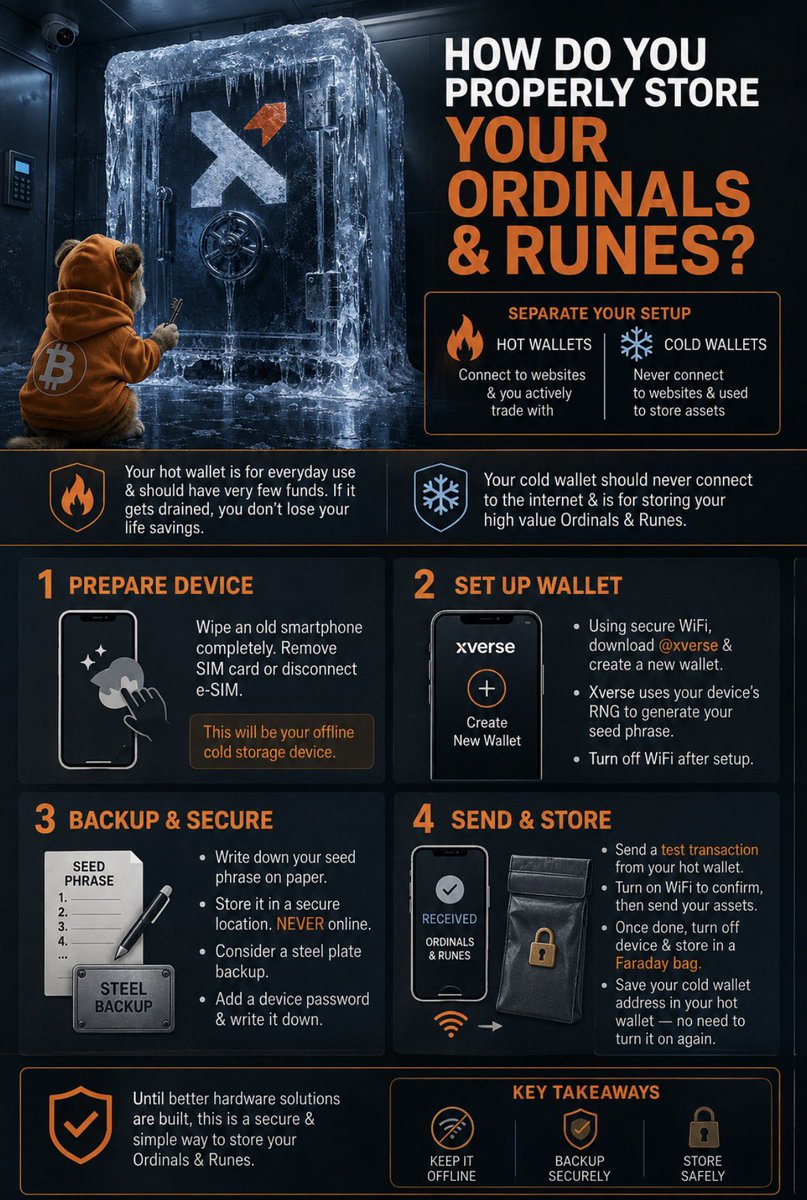
How do you properly store your Ordinals & Runes?
As security & self custody comes back into the forefront of the Bitcoin conversation with the recent @COLDCARDwallet vulnerability, it’s important to discus safe practices for digital assets on Bitcoin.
Currently the only hardware device compatible with Ordinals & Runes is @Ledger paired with @xverse
If you like more information on that solution I recommend reading these articles directly from each company.
Ledger: https://t.co/dBUrpR4cB3
Xverse: https://t.co/qtJ88g3qnt
I have chosen not to use ledger with Xverse & created a make shift cold storage wallet from an old iPhone X.
I will explain my process here to help anyone interested in protecting their assets & do not want to trust hardware devices.
First off, you should think of your setup as a separation between your hot wallets which connect to websites & you actively trade with vs cold wallets which you never connect to websites & use primarily to store assets.
Your hot wallet is your everyday use wallet & should have very few funds in the case you get drained you don’t lose your life savings.
Your cold wallets should never connect to the internet & are primarily used to store your high value Ordinals & Runes.
Step 1: Completely wipe an old smart phone, preferably your own to ensure it wasn’t tampered with. Remove the SIM card or disconnect the e-SIM. This will act as your cold storage hardware device that you will keep disconnected from the internet.
Step 2: Using a secure WiFi connection, download @xverse & create a new wallet. Xverse relies on the RNG (Random Number Generator) from the device you are using to create your seed phrase so ensure your using a trusted model. I chose an iPhone X, Apple products a very high security model & can do the job. Turn off the WiFi once you’ve downloaded the app.
Step 3: Write down your seed phrase on paper & store it in a secure location. DO NOT store it online or any electronic device. Your Xverse wallet already has a backup of your seed phrase stored in the app. You can stamp your seed phrase on a steel plate in the case you lose your device or suffer from a house fire that destroys your device/paper copy. Add a password to your device for added security & make sure to have that written down if you risk forgetting the password.
Step 4: Once your wallet is set up & you have your private seed phrase saved in a secure location you can now begin to send funds & assets to your device. Do a test transaction from your hot/trading wallet to your cold storage. You will have to turn on your secure WiFi to see if it reaches the device. Once you’ve sent all the assets you wish to store in cold storage to your device, you can now turn it off & put it in a faraday bag for added security. Xverse allows you to save the public address of your cold storage device to your hot wallet device so you will never have to turn on your cold storage to send funds/assets.
For now until better hardware solutions are built, this is a sufficient way to store your Ordinals & Runes in a secure way.
Stay safe. $DOG






![uTokenPro's tweet photo. // µToken.
a new layer.
[soon] https://t.co/E3Y9OIb07z](https://pbs.twimg.com/media/HOvhfSxWQAA1_sh.jpg)