Most people are using AI.
Almost nobody is actually getting good at it.
They open ChatGPT, type a question, get an answer.
Call it "using AI."
But there's a massive difference between using a tool and mastering it.
I see this all the time with founders and operators I work with.
They're not bad at AI.
They're just stuck at Level 2 when the real leverage starts at Level 5.
I spent years on this.
The people compounding the fastest aren't prompting better.
They're operating at a completely different tier.
Here's the full breakdown of what each level actually looks like:
→ Level 1: AI Awareness.
You understand what AI is, how LLMs work, and where the limits are.
Most people skip this.
Big mistake.
→ Level 2: AI User.
You're prompting, summarising, researching.
Saving time.
This is where 80% of professionals sit right now.
→ Level 3: AI Power User.
You know few-shot prompting, prompt chaining, structured outputs.
You're building repeatable systems, not one-off queries.
→ Level 4: AI Creator.
You're using APIs, triggers, logic flows, and integrations to create actual AI-powered assets across text, image, video, and audio.
→ Level 5: AI Automation Builder.
You're connecting workflows with tools like Zapier, Make, and n8n.
RAG, memory systems, tool calling.
This is where time starts multiplying.
→ Level 6: AI Agent Builder.
You're building agents that plan and act.
Full stack with frontend, backend, database, and LLM layers working together.
→ Level 7: AI Engineer.
Python, deployment, evaluation.
You're shipping production AI apps, chat systems, SaaS tools.
→ Level 8: AI Architect.
Security, governance, monitoring, cost control.
You're designing enterprise-grade systems at scale.
→ Level 9: AI Researcher.
You're working on transformers, RLHF, alignment, safety, fine tuning.
Pushing what's actually possible.
Most professionals will get real business value by reaching Level 5 or 6.
You don't need to become a researcher.
But you do need to move past "I use ChatGPT sometimes."
The infographic maps every level.
Save it.
Come back to it in 90 days and ask yourself which step you've climbed.
If this kind of content is useful to you,
The rest of my posts are in the same vein.
Worth a follow if you're building seriously with AI.
Pass this along to someone on your team who's been meaning to level up their AI skills.
They'll get it immediately.
Where do you honestly think you sit right now on this scale?
Curious what you say.
🚀 𝗠𝗮𝘀𝘁𝗲𝗿 𝗥𝗔𝗚 𝘄𝗶𝘁𝗵 𝗔𝘇𝘂𝗿𝗲 – 𝗳𝗿𝗼𝗺 𝗱𝗼𝗰𝘂𝗺𝗲𝗻𝘁𝘀 𝘁𝗼 𝗮𝗻𝘀𝘄𝗲𝗿𝘀
Retrieval-Augmented Generation (RAG) isn’t magic.
It’s a well-designed pipeline — and Azure gives you all the building blocks.
𝗧𝗵𝗶𝘀 𝘃𝗶𝘀𝘂𝗮𝗹 𝗯𝗿𝗲𝗮𝗸𝘀 𝗥𝗔𝗚 𝗶𝗻𝘁𝗼 𝟰 𝗰𝗹𝗲𝗮𝗿 𝘀𝘁𝗮𝗴𝗲𝘀 👇
🔹 Indexing
• Parse documents (PDFs, docs, etc.)
• Chunk text for better recall
• Generate embeddings using Azure embedding models
• Store them in a vector database
🔹 Retrieval (R)
• User query → encoded into embeddings
• Semantic search over the vector store
• Fetch the most relevant chunks
🔹 Augmentation (A)
• Combine retrieved chunks
• Build context-aware prompts
• Ground the query with trusted data
🔹 Generation (G)
• Send prompt + context to the LLM
• Generate accurate, hallucination-reduced responses
💡 Key takeaway:
RAG is not about “asking the LLM harder questions”
it’s about feeding the LLM the right context at the right time.
If you’re building enterprise-grade GenAI on Azure, mastering this flow is non-negotiable.
🔖 Save this for reference
💬 Drop a comment if you want a deep dive on any stage
This 2 hour Stanford lecture shows exactly how Stanford trains it's engineers to build AI systems. It's more practical than every Claude tutorial & prompting threads you've seen.
Bookmark & give it 2 hours, no matter what.
🚀 CODING MODELS
If you had to deploy one coding model tomorrow, which would you choose?
🟧 Claude Opus 4.8
🟪 Qwen 3.7 Max
🔵 DeepSeek V4
⚫ GPT-5.5
Benchmarks are useful.
Production experience is better.
Which model are you actually using and why?
👇
#AI#Coding#LLM#GenAI #SoftwareEngineering
🚨 Anthropic just showed a 27-minute workshop on how to actually do prompts for Claude.
Taught by the people who built it.
Free. No registration. No paywall.
I've seen $300 courses that don't cover what they teach in the first 8 minutes.
Watch it and bookmark it now.
INSTEAD OF WATCHING A 2-HOUR MOVIE.
Watch this Anthropic Claude for Finance lecture.
It’s probably the best free hour in quant AI right now.
Bookmark it and watch it today, no matter what.
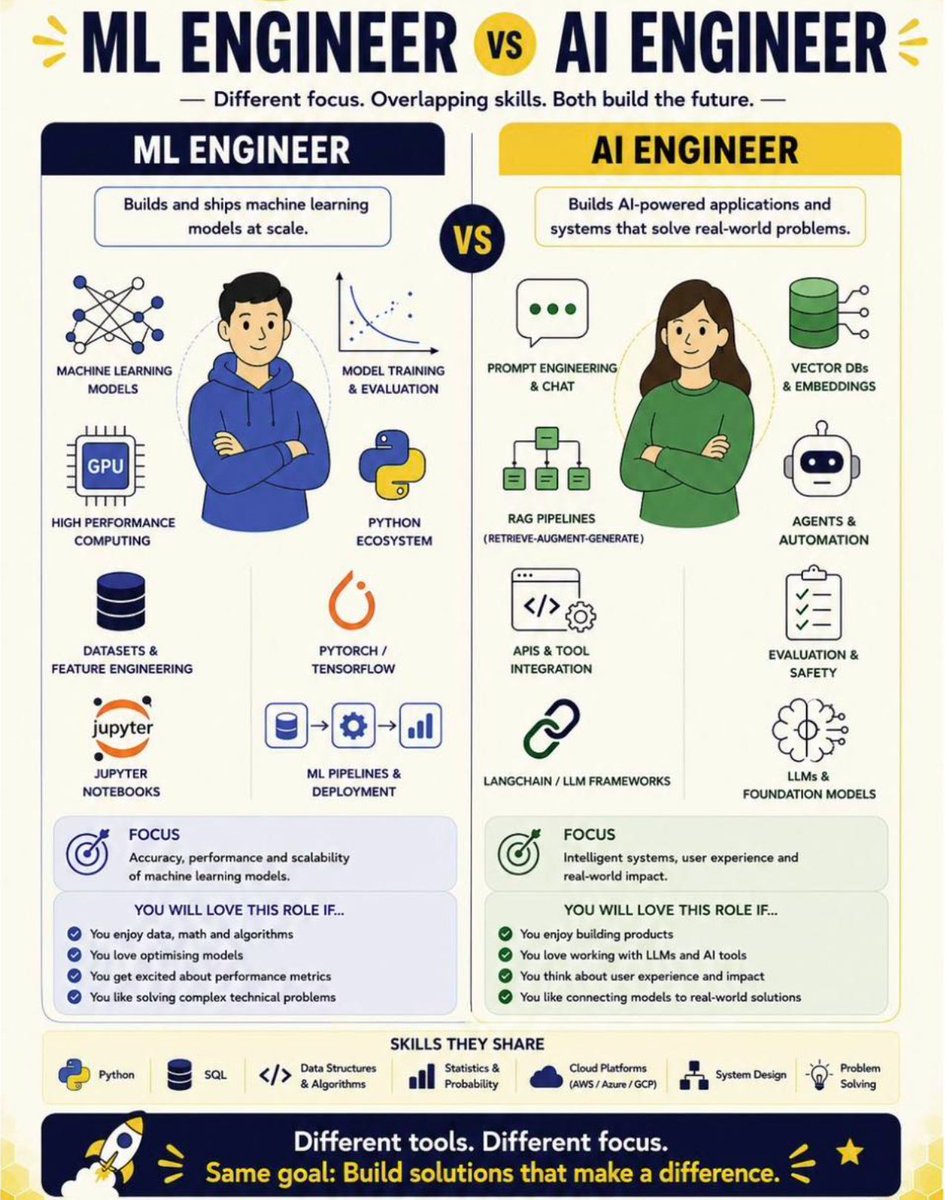
Two of the most confused job titles in tech right now.
ML Engineer. AI Engineer.
People use them interchangeably in job posts, interviews and LinkedIn bios. They are not the same role.
Here is the clearest breakdown I have seen.
An ML Engineer builds and ships machine learning models at scale. The focus is accuracy, performance and scalability. If you love data, math, algorithms and optimising models this is your role.
An AI Engineer builds AI-powered applications and systems that solve real world problems. The focus is intelligent systems, user experience and real world impact. If you love building products, working with LLMs and connecting models to real solutions this is your role.
The skills overlap significantly. Python, SQL, cloud platforms, statistics. Both roles need these.
But the day to day work, the mindset and the problems you solve are fundamentally different.
Save this. Share it with anyone who is trying to figure out which path to take.
♻️ Repost to help someone who is confused about which role to apply for.
#DataScience #MachineLearning #AI #MLEngineer #AIEngineer #DataScientist #LearnAI
How to learn to build AI systems today?
Here's a simple 10-phase roadmap:
1. Understand Agentic AI Basics
• Learn what AI agents actually are
• Compare agents, chatbots, & simple scripts
• Understand automation versus autonomy differences clearly
• Explore real-world practical agent use cases
• Learn how LLMs power agent decisions
2. Learn Core Agent Components
• Understand LLM as central decision-making brain
• Learn prompts as structured instruction inputs
• Explore tools as actions agents can perform
• Understand memory systems for storing information
• Learn environment where agents operate dynamically
3. Learn Prompting for Agents
• Understand system prompts versus user prompts
• Create few-shot examples for better outputs
• Use role-based prompting for structured responses
• Define rules and expected output formats
• Iterate prompts continuously until outputs improve
4. Build Your First Simple Agent
• Choose one simple problem or use case
• Use GPT/Claude through simple interfaces
• Write clear & structured system instructions
• Test with user inputs & evaluate outputs
• Refine prompts until agent performs reliably
5. Add Memory to Your Agent
• Use short-term memory for recent interactions
• Implement long-term memory using vector databases
• Store past conversations & user interactions
• Retrieve relevant data based on user queries
• Continuously update memory after each interaction
6. Use Tools and External APIs
• Learn function calling to connect external tools
• Integrate APIs for real-world task execution
• Add tools like search & webhooks
• Handle API inputs & outputs properly
• Test tool usage within full workflow
7. Build Full Agent Workflow
• Design flow from prompt to final output
• Add fallback mechanisms & error handling
• Use orchestration tools like LangChain/n8n
• Track actions for debugging & improvements
• Test workflows using real-world scenarios
8. Create Multi-Agent Systems
• Assign roles like planner, executor, reviewer
• Enable communication between multiple agents
• Use protocols like MCP/A2A frameworks
• Share memory across agents for coordination
• Test collaborative decision-making across agents
9. Deploy and Monitor Agents
• Deploy agents using platforms like Vercel
• Monitor tokens, latency, and system errors
• Implement safety checks and rate limits
• Set up logs, alerts, & metrics
• Ensure uptime and consistent system performance
10. Join the Builder Ecosystem
• Contribute to open-source agent development frameworks
• Benchmark agents on real-world performance tasks
• Stay updated with latest agent ecosystem trends
If you're building in AI right now, this roadmap will save you months.
#GenAI #AgenticAI #AIAgent #LLM
The roadmap to building AI agents is becoming clearer 👇
1️⃣ Learn LLMs & prompting
2️⃣ Add tools & APIs
3️⃣ Implement memory
4️⃣ Build workflows
5️⃣ Orchestrate multi-agent systems
6️⃣ Deploy, monitor, improve
💡 Great agents are not just intelligent.
They are connected, stateful, and operational.
Via Giuliano Liguori (@ingliguori)
#AI #AgenticAI #Automation