Who's attending #MSIgnite ? Join me at my session to learn about what's coming to #OneNote. See you at Ignite! BRK207 Agentic productivity with new Copilot capabilities in OneNote
What does it look like when teams can turn shared knowledge into actionable insights?
See how @PreciselyData, a unified data management company for AI-ready data, is using Copilot Notebooks to create and share sales-play notebooks across priority customer use cases, giving its sales organization a focused place to learn, explore, and chat with Copilot to uncover the insights they need. https://t.co/2knTrM8Eoz
@Itopride_D2 If you select the pencil with the lines, that is the "Edit in Pages" option that will add the Copilot response into a page that you can then add to the notebook or that will be added into the notebook automatically if you're using the chat inside the notebook already.
@rjeremymartin The new Copilot Notebooks functionality should be rolled out across Frontier by now. Try refreshing a couple times and if that doesn't fix it let us know!
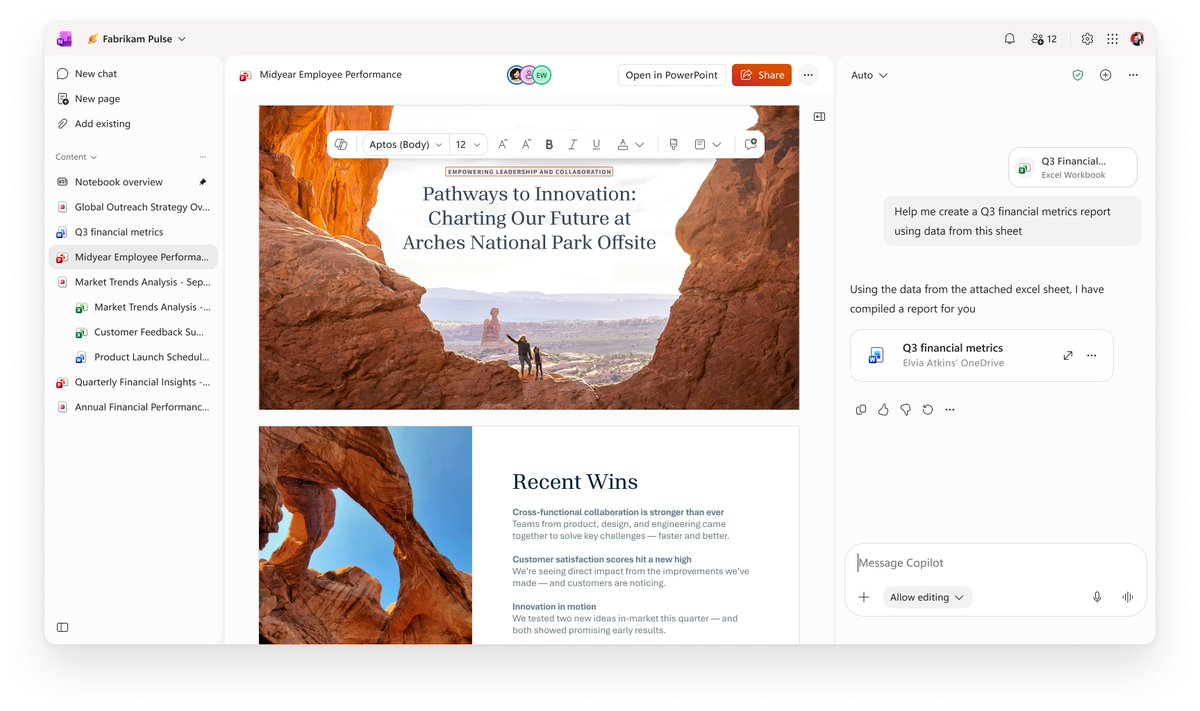
Copilot Notebooks can now delegate simple work to Copilot, create interactive reports, edit Word, Excel, PowerPoint files directly with the full power of Office, and more.
Learn more: https://t.co/iFnHl1JxEh
@designedbyabin Sorry, this is expected. The Copilot functionality on OneNote Mac is only available for Commercial customers right now. So the button being disabled is expected at this point.
Phew! Thanks for the detailed notes.
The consumer experience hasn't received the latest updates yet, should be coming up in the next couple months to match what you see on EDU/Enterprise.
Copilot Notebooks will be coming to OneNote on Mac soon as well https://t.co/0Ypiy0Q8Bf
The Copilot button on OneNote on Mac should be enabled if you're in a notebook associated with an account that has permission to use the Copilot license.
Copilot in OneNote should be able to see printouts you have on the page. If that is not working please send feedback and we can take a look to investigate.
Look at these amazing cookies inspired by OneNote and Copilot Notebooks ✨
Props go to our amazing team admin for ordering these for the bake sale. #MicrosoftLife
If you open a chat from the chat history it should open in that same space vs in the right side panel. Is that not what you're seeing?
The experience inside OneNote (web or Windows) is closer to what you're describing, making it easier to navigate between content and keeping the chat to the right.
@designedbyabin@ezp4rk What do you find is inconsistent between web and OneNote? The experience inside the Copilot app is aligned with the context of that app so it is expected to be a little different from what you see inside OneNote.
Do you have more details on the UX updates for the sidebar?
@DDecoherence@ezp4rk Can you clarify what are you missing? Most of the updates are available to Frontier customers as part of the Notebooks experience.
Many improvements coming to Copilot Notebooks including a refreshed UI! Rolling out to Frontier customers now. Check it out if you have access and send us your feedback.
We’re launching several exciting updates to Copilot Notebooks that help you bring artifacts and context together and turn it into work, all in one place!
Rolling out to Frontier now:
• Start with a goal: describe what you’re working on, and Copilot can build a notebook with relevant references from your work and the web.
• Bring the full power of Office into your notebook: view, edit and collaborate on Word, Excel, and PowerPoint files without leaving your notebook.
• Delegate work in context: ask Copilot to find and add references, synthesize project information, and create or edit files.
• Turn insights into interactive reports: create interactive reports with Copilot Pages.
• Explore your content through richer audio overviews: try Critique and Debate formats, and navigate longer overviews with topic-based episodes.
• Schedule recurring work: set up tasks like a daily brief or weekly status deck.
Blog for more details: https://t.co/oRfjtTAKuh
Please try it out and send us feedback!
Bring offline moments like hallway conversations and brainstorming sessions into your Copilot Notebook. With multimodal capture, you can capture live audio, snap photos, and write manual notes for additional project context in your notebook. Now available on iPad and iOS mobile.
Read more at https://t.co/38K01c98hU