Founder @scorchsoft 📈| AI Strategist & App Expert 👨💻| Author of 2x Business Books 📚| Tech Optimist 😆| Powerlifter💪| Mission to Make World Tech Enabled 🌍
The easiest way to make an AI feature unusable is to hide its uncertainty.
Most AI product failures I see are not because the model is “bad”. They fail because the UI pretends the model is certain, and your users can smell that a mile off.
If you’ve ever watched a smart ops lead or account manager use an AI feature, you’ll notice the same behaviour:
They don’t ask, “Is this correct?”
They ask, “Can I trust this enough to act on it?”
And when the interface gives them a single confident output (with no context), they do the only sensible thing.
They ignore it.
There’s a research idea I really like called “confession mode”. After the model completes a task, it produces a second, brutally honest message about what it did, what shortcuts it took, and where it might have bent the rules.
In tests, it admitted misbehaviour about 74% of the time.
Important caveat: it can’t confess mistakes it doesn’t notice. So no, it’s not a magic wand for safety.
But it is a brilliant product pattern.
If you’re putting AI into a portal, internal tool, or SaaS, consider designing the experience around two (or three) outputs instead of one.
1) The Answer
This is the thing the user came for:
- the recommendation
- the draft email
- the classification
- the extracted fields
- the “next best action”
Keep it clear and usable. Don’t bury it in a wall of AI waffle.
2) The Confession
This is the bit most products skip (and it’s why users don’t trust them).
Make the model state, in plain English:
- what it assumed
- what it didn’t check
- what data it might be missing
- the top reason it could be wrong
Example: “I assumed the customer is on Plan A because the CRM record was last updated 6 months ago. I didn’t verify recent invoices. If they upgraded, this recommendation is wrong.”
Now the user knows where the landmines are.
3) The Safe Next Action
This is where you turn uncertainty into momentum.
Tell the human what to do before anything irreversible happens:
- “Verify these 2 fields in the CRM before sending.”
- “Click ‘Request approval’ rather than ‘Publish’.”
- “Confirm with the customer if X is true.”
- “Run this against the last 30 days of data before you change the workflow.”
This is the difference between AI that feels risky and AI that feels like a competent junior colleague.
A few practical notes (from building this stuff in the real world):
- Don’t make the confession optional or hidden behind a tiny tooltip. If it’s important, it deserves first-class UI.
- Keep it short. 3 bullets beats 3 paragraphs.
- Treat “safe next action” as a product requirement, not a nice-to-have. Especially if the AI can trigger emails, change records, approve refunds, publish content, or touch anything customer-facing.
- If you can, log the confessions. They’re gold for debugging, compliance, and improving prompts and workflows.
You don’t need perfect AI.
You need AI that makes it easy for a sensible person to supervise it (quickly, under pressure, between meetings).
So, if you forced your AI to confess, what would it admit?
And more importantly: would your current UX make that easy to spot, or would it hide it until something goes bang?
A readiness score sounds like a gimmick until you use it to stop yourself wasting six months.
Most founders (and leadership teams) crave certainty, so the instinct is always the same:
- Get a quote
- Get a plan
- Get a timeline
All sensible.
But you can do all of that and still be answering the wrong question.
The real question is: are we actually ready to build?
Because if you are not ready, building is just an expensive way to feel progress. You will ship something, learn something, and still end up in the same place - except now you have code to maintain, a team that is tired, and a slightly awkward relationship with the words "phase two".
This is why I like scoring readiness across a handful of pillars. Not because a number is magic, but because it forces trade-offs into the open.
It stops the classic founder logic:
"If we just build it well enough, the market will understand." (It will not.)
"If we ship faster, we will figure it out." (You might, but you might also just get better at doing the wrong thing quickly.)
Here are two uncomfortable truths:
1) If your product-market clarity is weak, no amount of technical brilliance saves you.
You can build the slickest portal, the cleanest app, the nicest AI workflow. If the user problem is fuzzy, or the buyer is unclear, you are polishing a question mark.
2) If your go-to-market is a guess, speed is not a strategy.
Shipping faster just means you learn the wrong lesson sooner. You will optimise onboarding for the wrong audience, price against the wrong alternatives, and celebrate traction that does not convert into repeatable revenue.
We built a quick assessment that scores startups 0-100 across five areas:
- Product-market
- Technical readiness
- Resources and planning
- Brand and identity
- Go-to-market
But the part people miss is not the score.
It is the critical gaps.
You can be "almost ready" overall and still have one red flag that makes building risky.
Example: a team scores well on tech and resources (they can build), but their go-to-market is basically "my mate knows a few people on LinkedIn". That is not a plan. That is hope with admin.
Or they have a strong market problem, clear buyer, and even early demand... but no realistic delivery plan, no owner, no time, and no budget beyond "we will find it". Again, risky.
So if you do nothing else this week, do this exercise on one page (seriously, one page):
1) Pick the 5 pillars that matter for your business.
You can use ours, or swap them for what fits your world (compliance, data access, partnerships, whatever).
2) Score each pillar 0-10.
Do it quickly, but honestly. If you are arguing between a 6 and a 7, you are probably a 5.
3) For each pillar, write one sentence:
"What would move this up by 1 point in the next 14 days?"
Not 6 months. Not "after we raise". Not "once we hire".
Fourteen days.
That constraint is the whole point. It forces you to pick actions, not vibes.
Then, and only then, decide what to build.
Your roadmap should follow the gaps, not your enthusiasm.
If you want the quick assessment we use, it is here: https://t.co/aesJiFF0UN
Even if you never share the score with anyone, the gaps you uncover will save you time, money, and a lot of avoidable meetings.
The fastest way to break an AI feature is to let it read your data without reading your business.
I recently read a deep-dive on OpenAI’s in-house data agent. The interesting bit wasn’t the scale stats. It was the philosophy: meaning lives in code.
In other words, the numbers in your warehouse don’t magically “mean” anything on their own. They only make sense when you understand the logic that created them (the transformations, the edge cases, the exclusions, the bits of pipeline code someone wrote at 11pm to “just fix it”).
This matters for SMEs because your problem is rarely “we don’t have enough data”.
Your problem is “we have five definitions of the same thing”.
Take revenue. Sounds simple until it isn’t.
Does it include refunds?
Is it cash collected or invoiced?
Do you spread annual contracts monthly or count them upfront?
Are test accounts included?
What about credits, write-offs, free months, implementation fees, usage overages?
Now imagine you’ve built an AI feature that answers questions like:
- “How did revenue perform last month?”
- “Which channel is most profitable?”
- “What happens if we increase prices by 5%?”
- “Which customers are at risk and how much revenue is exposed?”
If the definition of revenue (or churn, or qualified lead, or active customer) lives in somebody’s head, your AI will look impressive in a demo and then quietly ship the wrong decision into the business.
That’s the dangerous bit. It won’t fail loudly. It will be confidently wrong.
And no, the fix isn’t “use a bigger model” or “fine-tune it” or “add more data”. If the business meaning is fuzzy, the model is forced to guess. You’re basically paying for a very convincing coin flip.
The fix is a smaller, clearer layer of context.
Here’s the playbook I’d use if you’re a founder, CEO, MD, Ops lead, or anyone who keeps getting dragged into circular metric arguments.
1) Pick ONE recurring metric you argue about.
Not ten. One.
Good candidates:
- Qualified lead
- Churn
- Active customer
- On-time delivery
- Gross margin
- “Revenue” (if you enjoy pain)
2) Write a one-page Context Receipt for it.
Keep it short enough that someone will actually read it.
Include:
- Definition: the plain-English meaning
- System of record: where the truth comes from (CRM, billing platform, finance system, product DB)
- Exclusions: refunds, test accounts, internal users, cancelled orders, etc.
- Time logic: when something counts (invoice date vs payment date, contract start vs signature)
- Three real examples with the correct answer (so there’s no wiggle room)
3) If the definition depends on pipeline logic, link to the thing that actually implements it.
Not “Dave said it’s like this”.
Not a vague wiki page.
The SQL, the dbt model, the transformation job, or the document that describes the rules precisely.
Why the examples matter: AI (and humans) trip over edge cases. Examples force clarity. If you can’t produce three examples everyone agrees on, you don’t have a definition yet.
Once you have that receipt, AI suddenly becomes reliable.
Not because it got smarter.
Because you stopped making it guess what your business means.
This is also how you scale decision-making without scaling meetings. You turn “tribal knowledge” into explicit rules, then you let software (and AI) apply them consistently.
If you’re already building internal tools, portals, or AI features, this is one of the highest ROI things you can do before you ship anything customer-facing.
Sources:
https://t.co/flWYScgYTE
https://t.co/SL0Jezyqiq
Your junior dev isn’t getting better at engineering just because their PR count doubled.
That’s the trap AI creates when you only measure output.
Anthropic ran a randomised trial with 52 engineers (mostly junior) learning a new Python library. The AI-assisted group finished a touch faster.
But they scored 17% lower on a quiz immediately afterwards.
And the biggest drop was on debugging.
If you lead a product team, that should make you pause. Because shipping quickly is only half the job. The other half is recovering fast when things break, requirements change, or the “simple” edge case turns into a week of pain.
So what do you do with this?
You don’t ban AI. That’s a fantasy (and it will just go underground).
You also don’t pretend “we’re faster” automatically means “we’re better”. Speed can be rented. Competence has to be built.
I like a simple two-mode policy. It’s easy to explain, easy to run, and it keeps speed and skill in the same room.
Mode 1: Delivery Mode
This is when deadlines matter, customers are waiting, and you need throughput.
Use AI aggressively.
But leave a trail. Every PR needs two sentences:
1) What changed.
2) How it could fail in production.
That second line is doing a lot of work. It forces the author to think about failure modes (timeouts, permissions, retries, data shape changes, weird inputs), and it gives reviewers a handle on what to probe.
It also creates a lightweight paper trail for the inevitable “why did this blow up?” conversation.
Mode 2: Learning Mode
This is when you’re developing capability. New library, new part of the codebase, new patterns, new team members.
AI is allowed, but only as a coach.
Ask it for:
- Explanations in plain English
- Alternatives (and why you’d pick each)
- Edge cases you might miss
- Tests you should write
If the AI gives you code, you should be able to explain it back like you’re teaching a new starter.
If you can’t do that, you didn’t “use AI”. You outsourced thinking. And the bill arrives later, usually during an incident when you have the least time and the most stress.
There’s also a leadership point here: you have to decide what you’re optimising for this week.
If you’re in Delivery Mode, be honest about it. Don’t accidentally tell yourself you’re training people when you’re actually just pushing tickets through the system.
Zoom out and the same pattern shows up outside engineering.
AI can narrow short-term performance gaps in marketing, ops, finance, customer support, even sales enablement. You can get decent outputs quickly.
But that doesn’t automatically mean you built competence inside the business.
So don’t ask “did AI save time?”
Ask: if the tool vanished tomorrow, would we still know how to do this?
If the answer is no, you’ve found a risk. Not a reason to panic. Just something to manage deliberately.
Sources:
https://t.co/x65VYd9UzA
https://t.co/lS6J1tI5sY
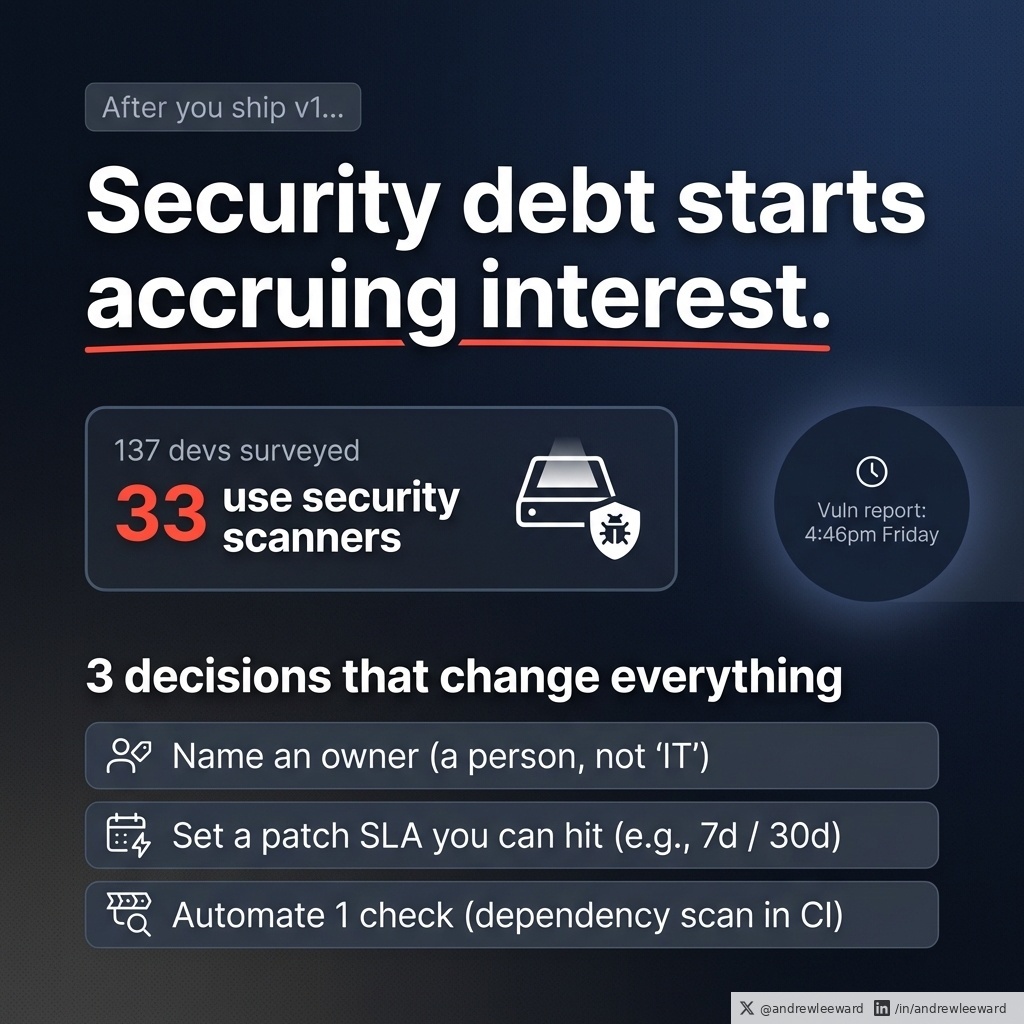
The moment you ship v1, you start accruing security debt interest.
Most teams do the visible stuff.
Logins. Permissions. Encryption.
Then they launch, move on, and quietly hope the internet behaves itself.
That hope is not a strategy.
A developer survey of 137 experienced mobile app developers had a detail I can’t unsee: only 33 said they use vulnerability or security scanners.
Now, I’m not here to dunk on dev teams. Everyone is busy. Roadmaps are packed. Stakeholders want features. And security work is famously bad at looking impressive in a sprint review.
But if you’re a non-technical leader buying or building an app, here’s the unsexy truth:
Your security posture is mostly determined after launch.
Not by the one big “security push” before release.
Not by the pen test PDF you file away.
Not by the fact you used encryption and called it a day.
It’s determined by what happens next.
- How quickly you patch when something breaks
- How often you update dependencies before they become a museum exhibit
- Who owns triage and decisions when a vulnerability report lands at 4:46pm on a Friday
- Whether you discover issues early (automatically) or late (via an angry email)
Security debt works like product debt, but with a nastier kind of interest. The longer you leave it, the more expensive it gets to fix, and the more likely it becomes a real incident rather than a theoretical risk.
So what do you do, without turning yourself into a security expert?
Three decisions change everything.
1) Name an owner
Not “the team”. Not “IT”. Not “someone in engineering”.
A name.
This person is accountable for:
- triage (is this real, how bad is it, what’s the blast radius?)
- comms (who needs to know, what do we tell customers, what do we tell leadership?)
- prioritisation (what gets dropped so this gets done?)
You can delegate work. You can’t delegate accountability.
2) Set a patch SLA you can actually hit
This is where good intentions go to die, so keep it simple.
Something like:
- Critical vulnerabilities: patch within 7 days
- High: patch within 30 days
If you can do faster, great. If you can’t, don’t pretend you can.
The point is to force planning.
Because the real failure mode isn’t “we didn’t care”. It’s “we cared, but we didn’t resource it, and now it’s everyone’s problem at once”.
Also: your SLA is only as real as your ability to ship updates. If your release process is painful, your security posture will be painful too.
3) Automate one check
Don’t try to boil the ocean. Pick one automated control that runs every time you build.
Dependency scanning in CI is a brilliant start because it stops your backlog becoming archaeology.
It catches known vulnerable packages early, when the fix is cheap, and it creates a habit: security is part of delivery, not a separate project you keep postponing.
If you want to go further later, you can add more checks (static analysis, secret scanning, container scanning, etc). But one is enough to change behaviour.
Do those three things and you move from “we hope we’re fine” to “we respond predictably”.
And predictability is what customers, regulators, and insurers are really buying today.
Sources:
https://t.co/a62iXgFHEi
https://t.co/2tVGEH4J9H
Novelty addiction looks like ambition. In a scaling business, it’s usually avoidance.
I see this a lot with founders and leadership teams (especially when things start working). You finally land an offer, a process, a productised service, a sales motion, a delivery rhythm - and it reliably creates an outcome.
Then you get itchy.
So you “improve” it.
New deck. New positioning. New onboarding. New tool. New AI feature. New portal. New pricing. New name. New everything.
Sometimes those changes are smart.
But often it’s sabotage dressed up as innovation, because repeating what works feels vulnerable. Repetition forces you to be judged on delivery, not creativity.
Creativity is safe. You can always say, “We’re iterating.”
Delivery is exposed. You either hit the standard or you don’t.
And in a scaling business, the constraint is rarely “we need more clever ideas”. It’s usually:
- consistency
- throughput
- quality control
- handover
- training
- feedback loops
In other words: operations.
Here’s the shift that helps.
If you’ve got something that reliably creates an outcome, turn it into something that survives your moods.
Not your motivation. Not your energy. Not your latest obsession. Not your need to tinker.
Something that survives you.
Practical playbook (the unsexy bit that makes you money):
1) Name the thing
If it doesn’t have a name, it’s not a process - it’s just you doing stuff.
2) Write the recipe
Not a 40-page manual. A clear sequence:
- what happens first
- what happens next
- what “done” means
3) Define the inputs
What has to be true for this to work?
- what info you need from the client
- what assets you need internally
- what tools you use (and which ones you don’t)
4) Define what “good” looks like
This is where most teams fall over.
“High quality” is not a standard.
Give people examples, checks, and thresholds.
5) Train someone else to deliver it
Not “shadow me for a week”. Proper training:
- watch
- do with support
- do alone
- get reviewed
6) Put a feedback loop on it
If the process never gets inspected, it will decay.
Pick a cadence. Review outcomes. Fix the few steps that cause most of the mess.
If you run an agency, a SaaS, a services business, or an internal product team, this is the difference between:
- you being the hero who saves every project
and
- you being the leader of a machine that produces outcomes
And yes, it can feel a bit grim at first.
Because the moment you standardise the thing that works, you lose the excuse to hide behind novelty.
But you gain something better:
- predictable delivery
- easier hiring
- fewer fires
- more capacity
- more profit
Most importantly, you stop being the bottleneck.
If you’re currently “improving” something that already works, ask yourself a slightly uncomfortable question:
Am I upgrading this because it will materially improve the outcome, or because repeating the same play makes me feel exposed?
Build the recipe. Then earn the right to innovate.
Elon Musk says three casting foundries broke America's entire AI power buildout through 2030.
Every AI company on Earth was racing to scale chip production.
Doubling. Then doubling again. Then doubling again.
Each cluster needed power the day chips arrived.
Musk says the math broke at the generator.
"Those who have lived in software land don't realize they're about to have a hard lesson in hardware."
Permits. Interconnects. Power lines.
The boring infrastructure decided who could turn the chips on.
Then Musk drilled down one more level.
The bottleneck wasn't power plants. It wasn't even gas turbines.
It was a single component inside the turbine.
"It's the vanes and blades in the turbines that are the limiting factor."
The whole AI buildout funneled through one part: the turbine blade.
Musk, who had ganged turbines together for Colossus, traced the supply line back further.
"There are only three casting companies in the world that make these, and they're massively backlogged."
Each blade had to survive 1,500-degree gas at 10,000 RPM, and casting one to spec required a process so specialized that only three companies in the world had mastered it.
Three foundries. All backlogged. Sold out through 2030.
After Musk traced the bottleneck, SpaceX and Tesla started casting blades themselves.
Sold out. Backlogged. Internal-only.
Musk, on what this meant for everyone else:
"In order to bring enough power online, I think SpaceX and Tesla will probably have to make the turbine blades, the vanes and blades, internally."
What's the supply line in your industry that's already booked through the next decade?
P.S. I made a playbook breaking down 100+ most powerful decision making mental models used by history's greatest thinkers.
5,000+ downloads. 113 five-star reviews.
Grab a free copy here:
https://t.co/u2q1uUm9vD
If you're new here, follow @GeniusGTX for content on the greatest minds in economics, psychology, and history.
— Elon Musk ( @elonmusk ), CEO of Tesla and SpaceX, on Dwarkesh Patel's ( @dwarkesh_sp ) podcast
"Users are confused" is rarely feedback. It's a symptom.
It’s the same as “the app is clunky” or “the portal is hard to use”. It’s not a diagnosis. It’s the end result of something upstream failing.
And when someone says they can’t find anything, teams often panic-build:
- Search
- Training videos
- Tooltips
- Another menu
- Another feature “to make it clearer”
Sometimes that helps.
Often it just dodges the simpler truth: the screen isn’t doing its job.
Here’s a quick audit I use on portals and internal tools (especially the ones that are meant to reduce admin, not create more of it):
Context, Cues, Consequences.
1) Context
This is the “where am I, and why does this page exist?” feeling.
If you can’t write a single sentence at the top of the page that starts with:
“This is the place where you…”
…you’ve probably built a junk drawer.
Example:
- Good: “This is the place where you approve supplier invoices and see what’s waiting on you.”
- Bad: “Dashboard” (dashboard of what, for who, and for what decision?)
Context is also about who the page is for. If a finance user and an ops user land on the same screen and neither feels like it was designed for them, you’ll get “confused” every time.
2) Cues
Cues are the obvious next moves.
Most pages need one dominant action and a small number of secondary actions.
If everything is a button, nothing is.
You see this a lot in portals that grew by committee: every stakeholder got their button, every edge case got a shortcut, and suddenly the user is staring at a control panel that looks like it belongs in a small aircraft.
A practical cue check:
- What is the one thing you want most users to do on this screen?
- Can they spot it instantly?
- Is it still obvious on mobile?
If not, no amount of onboarding will save you. People won’t “learn” your UI. They’ll avoid it.
3) Consequences
Consequences are what happens when I click.
If your critical buttons still say “Submit”, you’re making users guess.
Guessing creates hesitation.
Hesitation kills adoption.
And the cost doesn’t show up as a neat line item. It shows up as:
- Half-finished forms
- Duplicate requests
- “Can you just do it for me?” emails
- Workarounds in spreadsheets
- A support inbox that becomes the unofficial UI
Rename actions so the outcome is clear:
- “Submit” becomes “Send for approval”
- “Save” becomes “Save draft” (or “Save and notify”) depending on what actually happens
- “Continue” becomes “Continue to payment details”
Small copy changes, big behavioural change.
The 10-second test
Open your busiest screen. Give yourself 10 seconds. Ask:
1) Who is this for?
2) What can I do here?
3) What happens next?
If you hesitate, your users hesitate too.
Now the AI angle (because someone will suggest it)
If the base workflow is unclear, an AI helper doesn’t save you.
It accelerates confusion.
You’ll end up with a shiny chat box that confidently guides users through a messy process, and then everyone blames “AI” when the real issue is that the underlying journey was never clear.
So the order matters:
Fix the copy and hierarchy first.
Then automate.
If you want a solid baseline for this kind of thinking, https://t.co/H6o22DM0v1’s design principles are still one of the best references around.
Source: https://t.co/eM2ZwjD7DP
Export timeouts are not a "power user" problem. They are a product promise you haven't kept.
I see this all the time in portals and internal tools.
A team ships an export, import, report, sync, or "download everything" feature. It works fine in testing. It works fine for most customers. Then the people who actually rely on it (daily, under pressure, with messy real data) hit timeouts and failures.
And someone inevitably says: "Yeah, but they’re a power user." As if that makes it OK.
It doesn’t.
Your heaviest users are the real product.
They’re the ones with:
- The biggest records
- The longest notes
- The most attachments
- The most historical data
- The most edge cases (because they’ve tried everything)
If the feature only works for the average case, it doesn't work.
This is why I liked Readwise’s fix for Google Docs export failures: they split big request payloads into smaller chunks.
That’s it. That’s the lesson.
Not "optimise the database". Not "increase the timeout". Not "tell them to export less".
Chunk the work.
Because big operations fail for predictable reasons:
- Requests hit size limits
- Jobs exceed timeouts
- One bad record kills the whole run
- A flaky network drops the connection and you lose everything
- The user closes a tab and you’ve got no recovery story
So what should you do instead (especially if you’re running a portal or internal tool where exports are business-critical)?
1) Chunk the work
Break the job into smaller pieces that can succeed independently.
Example: export 500 rows at a time, or process attachments one-by-one, or generate a report per customer/site/project and then combine.
This reduces blast radius. One failure doesn’t nuke the whole thing.
2) Make progress visible
If it takes more than a few seconds, you owe the user feedback.
Show:
- Percent complete (even if it’s approximate)
- Items processed vs total
- What’s happening now
- What failed (if something failed)
Silence trains people to click again, refresh, and generally make the problem worse.
3) Let the user come back later
Long-running work should be resumable.
That usually means:
- Run it in the background (queue/job)
- Store state as you go
- Allow retry from the last successful chunk
- Notify when it’s ready (email, in-app, whatever fits)
If your solution requires the user to keep a browser tab open for 20 minutes, you haven’t built a feature. You’ve built a small ritual.
4) Design for the "biggest" customer from day one
Not because you want enterprise complexity.
Because the biggest customer is where your assumptions get tested.
The uncomfortable truth: reliability is a UX feature.
And it’s one that your best users notice first.
So next time you hear "only power users are affected", translate it properly:
"Only our most valuable users have discovered this is fragile."
Source (Readwise changelog): https://t.co/VBuRMaVv0z
Agents are finally doing real work. Most companies will still use them to generate extra admin.
If you’re a founder or ops lead in an SME, here’s the trap: you buy “AI” and end up with faster emails, prettier slide decks, and 3 new workflows to maintain.
Busywork, but in HD.
The better play is to aim AI at verification before you aim it at execution.
A simple example that stuck with me: an AI agent can take a research paper plus its replication data, rerun the analysis, and report whether the findings hold.
That is not a party trick.
It’s a new quality function.
Now translate that into normal business life (where the “paper” is your management report, and the “replication data” is your raw exports from the CRM, finance system, support desk, or spreadsheet-of-doom).
Verification tasks are where you get leverage without giving the model the keys to the kingdom.
What does “verification” look like in practice?
1) Report vs raw numbers
You hand the agent the finished report and the underlying dataset, and you ask:
- Do the totals match?
- Are there missing rows?
- Are there duplicated entries?
- Are the filters consistent with last time?
It’s amazing how often a single wrong filter makes a team panic (or celebrate) for no reason.
2) KPI pack audit
Every week, someone builds a KPI pack. It goes to leadership. Decisions get made.
So get an agent to do a pre-flight check:
- Flag sudden spikes or drops that don’t match the underlying activity
- Spot broken formulas
- Highlight metrics that changed definition (quietly the most common sin)
- Call out “this chart doesn’t reconcile with that table”
You still decide what it means. The agent just stops you debating nonsense.
3) Replicate last month’s analysis, then explain what changed
This is the underused one.
Tell the agent: “Run the same steps as last month on this month’s data. Then tell me what moved, by how much, and what likely drove it.”
Even if the explanation is only 70% right, you’ve just saved hours of analyst time and you’ve got a short list of places to look.
4) Contract and policy checking (with guardrails)
Not “write my contract”.
More like:
- Compare this new supplier contract to our standard terms
- Highlight deviations
- List the risky clauses
- Suggest questions for legal
Again: verification, not delegation.
Why this works (and why it’s a sensible first step)
- The upside is immediate. Less rework, fewer mistakes, faster decisions.
- The risk is contained. You’re not letting an agent send money, change prices, or email customers unsupervised.
- The data access can be limited. Read-only, scoped datasets, clear audit logs.
- It creates a habit: “nothing ships without a check”. That habit scales.
A practical way to implement it without chaos
Start with one recurring artefact that already exists:
- the weekly KPI pack
- the month-end report
- the pipeline report
- the support performance dashboard
Then define “done” as:
- The agent produces a short list of discrepancies, anomalies, and questions
- A human signs off
- You track how many issues it catches (so you can justify the effort)
And yes, you’ll need some basic plumbing: consistent data exports, a place for the agent to run, and permissions that don’t make your security person sweat.
But compared to “let’s build an autonomous sales agent”, this is the grown-up route.
If you want AI to move the needle, don’t start by asking it to do more work.
Start by asking it to check the work you already do.
Source: https://t.co/uVyxFeBoj7
Their UX is all over the place, and renaming all products as "Microsoft Office 365 Copilot [product name]" is really verbose.
They should have kept simple chat UI as the copilot experience. Or called features within those products copilot enabled like Google has done with Gemini.
Naming everything copilot means the actual AI copilot you have to consciously notice that this is the real copilot copilot.
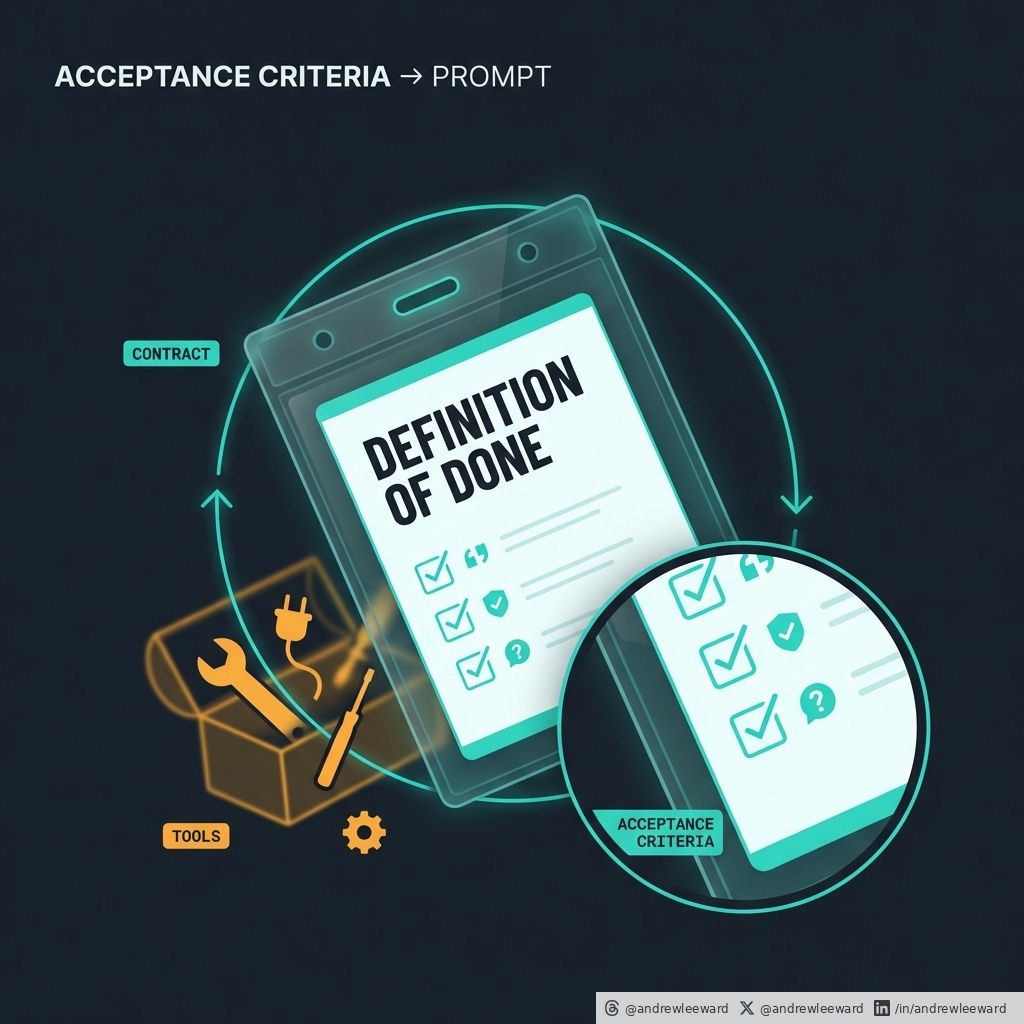
Write the acceptance criteria before you write the prompt.
When a team tells me “the agent is unreliable”, nine times out of ten they’re not describing an AI problem.
They’re describing a missing contract.
The model isn’t sat there thinking, “hmm, I fancy being inconsistent today.” It’s doing what you asked, plus what you implied, plus whatever your context accidentally nudged it towards. If “good” only exists in your head, you’ll get roulette.
OpenAI’s own guidance keeps circling the same point: define the output contract, define what “done” means, and build in a verification loop.
People call that prompt engineering.
It’s really product management.
Because reliability is rarely about clever wording. It’s about shared meaning.
Vercel ran into this building their internal data assistant. Their conclusion wasn’t “add more tools and more agent magic”. They removed a huge chunk of tools and invested in a context store, because the bottleneck was alignment (what things mean inside the business), not capability.
That’s the bit most teams skip.
They jump straight to: “Let’s give it access to everything.”
Then they act surprised when it confidently does the wrong thing.
If you’re a non-technical leader and you want AI to actually move the needle, here’s the move:
Pick ONE repeatable workflow and write a tiny definition of done that a sceptical teammate would accept.
Not a 12-page spec.
Not a vibe.
A contract.
Think of it like this: if you can’t explain what “good” looks like in 4-8 bullet points, you can’t expect a model to hit it consistently.
Example.
“Draft a first response to a support ticket” sounds useful. But it’s only useful if you define what counts.
A practical contract might be:
- It restates the customer’s exact question (so we know it understood)
- It cites the policy or knowledge source it used (so we can audit)
- It flags any missing information needed to proceed (so we don’t guess)
- It suggests the next safe action when it’s unsure (so it doesn’t hallucinate a solution)
Now you’ve got something testable.
Next, build the smallest eval pack you can.
Forget giant datasets. Start with something you can run this week:
- 15 real examples from your operation
- 5 examples where the model should refuse (compliance, risk, privacy, anything you’d rather a human handle)
- 5 examples where it must ask a clarifying question (because proceeding would be unsafe or inaccurate)
Why include refusals and clarifying questions?
Because “reliable” doesn’t mean “always answers”. It means it behaves predictably under pressure.
This is where most internal AI projects quietly fail. Teams only test the happy path, then act shocked when the unhappy path turns into a mess.
Once you’ve got a contract + a tiny eval pack, you can iterate properly:
- Tighten the contract when you spot ambiguity
- Improve context when it cites the wrong thing
- Add a check when it misses a required field
- Track the failure modes over time
Now you’re improving a system.
Not arguing about a chat thread.
And yes, tools can help. A context store can help. Retrieval can help. Guardrails can help.
But none of them replace the basics.
Tools are optional.
Contracts are not.
Sources:
https://t.co/ooRxCPeBIO
https://t.co/FVjLUTlqjc
Your CLAUDE.md is either a 20-line accelerant or a 200-line tax.
If you are currently panic-writing “rules for the agent”, here’s the bit that should calm you down.
Theo (t3) shared a benchmark result that matches what I see in real projects:
- Developer-written context files improved success by about 4%
- LLM-generated context files made it worse by about 3%
- Bigger context pushed costs up by over 20%
So yes, bigger files can literally make your agent more expensive and less effective.
Why? Because more context often means more wandering.
When you dump a mini wiki into CLAUDE.md, you are not “helping the model”. You are giving it more places to get distracted, more edge cases to overfit to, and more chances to interpret your intent in a creative way you did not ask for.
But “delete it” is not the whole lesson.
The real lesson is: stop using these files as documentation, and start using them as behaviour correction.
A good CLAUDE.md is basically an onboarding note for a new hire who is starting today, is smart, and will move fast, but does not know your codebase yet.
It should answer:
1) How do I run the project without wasting an hour?
2) Where are the important things (the bits that matter for most changes)?
3) What are the few non-negotiables that stop me breaking the system?
That’s it.
Everything else belongs somewhere else.
If your file contains paragraphs about theory, long explanations of why you chose a pattern, or a grand tour of every folder, you are paying a tax every single time the agent thinks.
You are also baking in stale information. The code changes weekly. Your 200-line “guide” does not.
A rule of thumb I like (and one that tends to survive contact with reality): keep CLAUDE.md under 200 lines.
And if you genuinely need more guidance, do not inflate the main file. Push detail into smaller, scoped rules that only load when relevant.
If you want a simple structure that works in practice, try this:
Commands
- How to run the app
- How to run tests
- How to lint/format
Architecture
- Where the main modules live
- Where the boundaries are (what should not talk to what)
Conventions
- The 3 patterns you will reject in PR review (be specific)
- The naming rule you actually enforce
Watch outs
- The gotchas that waste hours (migrations, env vars, flaky tests, rate limits, whatever bites people)
Notice what is missing: essays.
The agent does not need your manifesto. It needs guardrails.
If you are unsure what to delete, here’s a simple test: does this line change the agent’s behaviour on the next commit?
If not, it probably belongs in the codebase, the tests, or a real doc site.
Source: https://t.co/8nri1xJqwR
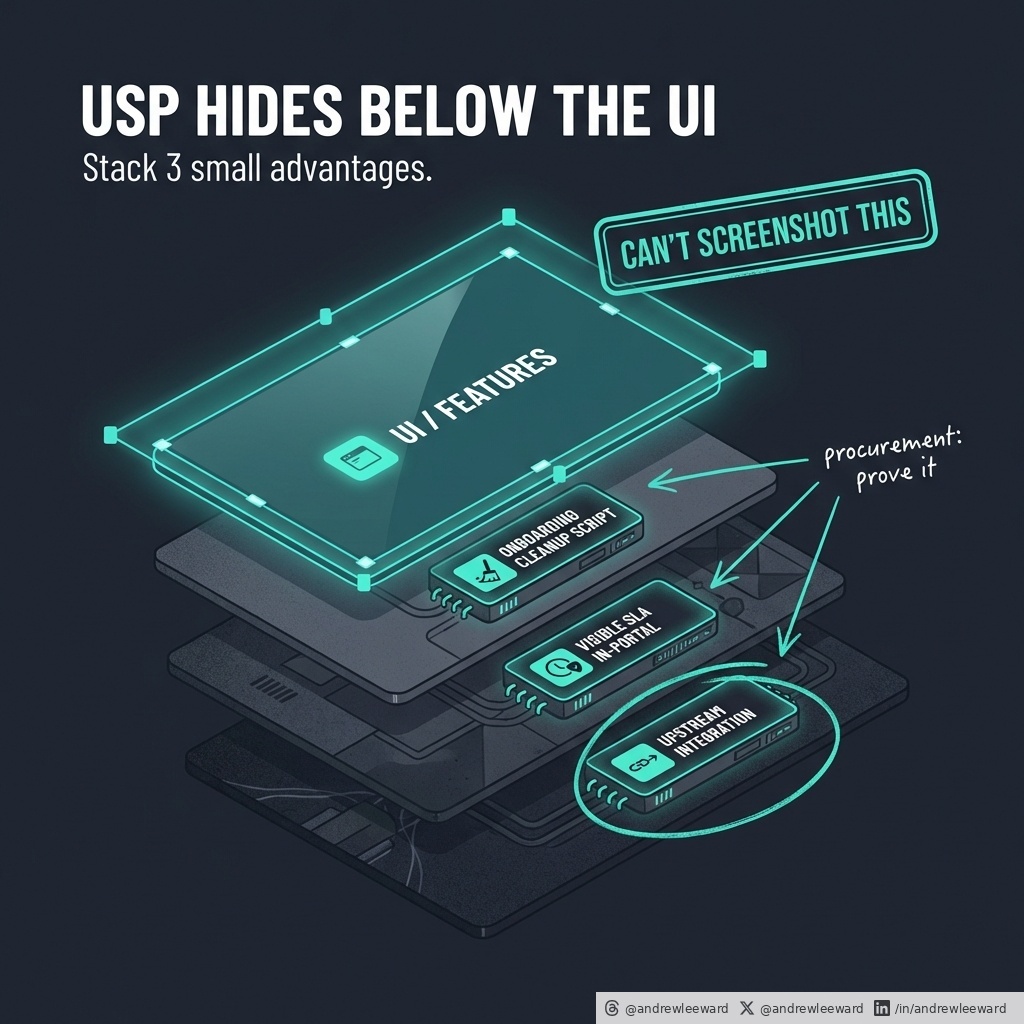
A USP is usually just a feature list with better lighting.
Founders love saying “we’re different”. Procurement loves replying “prove it”.
If your USP lives in the UI, you’ve basically written a spec for your competitors.
They can screenshot it, copy it, and ship a lookalike (sometimes with a slightly smug LinkedIn post attached).
The more useful way to think about “unique” is the Doblin Ten Types of Innovation idea: advantage doesn’t have to come from product features alone. It can come from how you price, how you package, how you onboard, how you support, how you integrate, how you distribute, and how you keep customers engaged.
In other words: the bits your competitors cannot screenshot.
Here’s the practical version I use with app and portal teams.
Stop hunting for one killer feature, and stack three small advantages that compound.
Most teams waste months trying to invent a “wow” feature that users try once, smile politely, then go back to their spreadsheet.
Meanwhile the real differentiators are sat in the boring bits of the journey, quietly causing friction, mistrust, and rework.
A few examples (the unsexy stuff that wins deals):
1) Onboarding that removes pain immediately
Maybe you ship a week-one “data clean-up” script as part of onboarding. Not a consultancy project. Not a “we can help with that”. An actual deliverable that makes their world less messy in week one.
2) Service that is visible, not promised
Maybe you put the service SLA inside the portal. Not hidden in a PDF. Not “call our support line”. A simple, visible commitment that reduces anxiety and increases trust when something goes wrong (because it will).
3) Integrations that remove double entry
Maybe you partner with one upstream system so data never gets re-keyed. No swivel-chair admin. No “export CSV, email it, hope for the best”. Just a clean flow that makes your product feel inevitable.
None of those are headline-grabbing.
Together, they make you harder to replace.
And this is the key: you don’t need one massive advantage. You need a stack of small ones that show up every day.
So how do you find them without running a six-month strategy project?
Ask one question at the right moment.
Right after a customer win (they completed the task, got the outcome, had the little dopamine hit), ask:
“What almost stopped you doing this today?”
That near deal-breaker is where your USP is hiding.
- “I didn’t trust it would work.”
- “I wasn’t sure what would happen if I clicked that.”
- “The approvals were unclear.”
- “We nearly gave up because the data was messy.”
- “Delivery time made it feel risky.”
Those answers are gold because they point to the real barriers to adoption: risk, effort, uncertainty, internal politics, and time.
Fix one of those and you don’t just improve UX - you change the buying decision.
Make it a habit:
Run an Innovation Audit once a quarter.
Then pick one near deal-breaker per month and fix it.
Do that for 6-12 months and you end up with a USP that’s real, not written.
Source: https://t.co/fuYwNZCAYf
@mark_k I thought 5 percentage points in SWE pro was a decent jump. Remember the more of this kind of benchmark they do, the long tail scale of difficulty of the harder problems jumps a lot.
When someone tells you they “made the model cheaper”, ask what they did about the overhead.
Because in the real world, the headline saving (fewer tokens, smaller model, clever compression) often gets wiped out by everything you have to bolt on to make the system usable.
TurboQuant from Google Research is a great example of the principle. The maths is clever, but the commercial lesson is simpler: compression can be real, and still not matter, once you count the extra bits and constants you carry around to make the whole thing work.
In other words: the win dies in the scaffolding.
That is exactly what happens in AI products.
Teams celebrate shaving 20% off token spend, then quietly spend 5x more on:
- Retries, because nobody defined “done” (so the model keeps taking another swing).
- Extra tools, because you don’t trust your data (so you add another database, another connector, another vendor).
- Monitoring, because the output isn’t testable (so you watch it like a hawk and still get surprised).
- Human-in-the-loop “just for now”, because the answer needs tidying (and “just for now” becomes the operating model).
- Meetings, because nobody agrees on definitions (so every edge case becomes a debate).
If this sounds familiar, it’s because most AI cost is not inference.
It’s operational overhead.
Here’s a simple test you can run as a non-technical leader.
If your “AI feature” needs:
- a 40-line prompt
- three vendors in the stack
- and a human to tidy the answer
...you have not built automation.
You have built a Rube Goldberg machine that happens to include an LLM.
So what do you do instead (without doing a six-month “AI transformation programme” that produces a slide deck and a new Slack channel)?
Start by making the work measurable.
Pick:
1) One success metric (something you can count weekly).
2) One top failure mode (the thing that most often breaks trust).
3) One fallback path (what happens when it fails, quickly and safely).
That trio forces clarity.
It also makes cost and reliability improve together, because you stop paying for chaos.
Then treat overhead as a product backlog.
Not as “misc engineering stuff” that gets ignored until the system is on fire.
Practical moves that work:
- Cut tool sprawl. Every extra tool is another point of failure and another contract renewal.
- Make a tiny context pack. Give the model only what it needs (and keep it current).
- Write output contracts. Define the format, the required fields, and what “valid” means.
- Build a small eval set from real examples. Not 10,000 synthetic cases. 30-100 real ones you actually care about.
- Make the output testable. If you can’t test it, you can’t improve it (and you’ll end up buying a bigger model out of frustration).
This is the calm work. The unsexy work. The work that makes a system predictable.
Most teams do it the other way round: they buy a bigger model and hope.
If you want AI that actually moves the needle, don’t just ask “which model?”
Ask “what’s the overhead, and who owns reducing it?”
Source (TurboQuant): https://t.co/U51FtCXI0S
Deletion is a product feature, not a button.
I recently saw a delete confirmation in one of our internal tools that did one thing brilliantly: it named exactly what would disappear.
Not just “this record”.
It spelled out the blast radius: the reports, the transcript, and the files linked to it. Then it finished with the most underrated sentence in product design:
“You cannot undo this.”
That is what good UX looks like in the real world. Not fancy animations. Not a cute warning icon. Just clarity, in plain English, at the moment it matters.
If your portal or internal app has destructive actions, steal that level of clarity.
Because users don’t fear clicking Delete.
They fear not knowing what Delete really means.
And when they’re unsure, one of two things happens:
1) They freeze and abandon the task (then message support, or worse, keep messy data “just in case”).
2) They take the risk, something important disappears, and now you’ve got an incident on your hands. Cue the panicked email: “Can you restore it?”
Sometimes you can.
Sometimes you can’t.
Either way, you’ve just turned a 10 second action into a day of distraction, blame, and database archaeology.
So here are three upgrades you can ship without starting a six-month “platform rebuild” (and yes, they work for customer-facing portals and internal tools).
1) Say what is being deleted (properly)
Don’t say “Are you sure you want to delete this item?”
Say what “this” is. Name it. And list what else goes with it.
For example:
- The client record
- 12 associated reports
- The call transcript
- 4 uploaded files
If there’s a cascade delete behind the scenes, surface it. If there are dependencies, make them visible. You’re not scaring users - you’re respecting them.
2) Offer an export (or a copy)
If you’re deleting something that has value, give people a way to take it with them.
Export isn’t just a “nice to have”. It’s a pressure valve.
It lets a cautious user move forward without feeling like they’re burning the ships. And it reduces the “we need it back” requests later.
Even a basic export (CSV for data, ZIP for files, PDF for a report) can be enough to build trust.
3) Add an undo window (even 30 minutes)
If you can implement a soft delete plus a timed undo, do it.
An undo window is the difference between:
“I’ve made a terrible mistake”
and
“Never mind, fixed it.”
People mis-click. People work fast. People get interrupted mid-flow. A 30 minute grace period saves you from fat-finger disasters and saves your users from that horrible sinking feeling.
If you’re thinking, “Sounds great, but we can’t do undo for everything,” fair. Start with the highest-risk deletes.
The stuff that:
- Has downstream reporting impact
- Can’t be re-created easily
- Has legal/compliance implications
- Triggers a cascade of linked deletions
Treat deletion like a first-class part of your product.
It’s not just a button.
It’s a promise about what happens next.