@DThompsonDev Hi Danny. If you have a chance to take a look at my portfolio (https://t.co/sjQYSoEGOd) and offer any feedback, I'd really appreciate it. Thank you!
@anirudhology@DThompsonDev Completely agree. Taking learning DSA seriously made me a much better programmer and (perhaps more importantly) a better problem solver. Shoutout to Princeton’s Algorithms course on coursera. It’s challenging but very rewarding.
@thdxr Trying to run a simple next app with a post route handler on firebase was such a headache for me recently. It was my first experience with next. Definitely not something I’m rushing back to.
@DThompsonDev Princeton’s Algorithms course on Coursera. Taught by Robert Sedgewick - the man who wrote the book (literally). Very challenging, but I believe it’s made me a much better programmer and problem solver. It’s also free! Honorable mention: Nand2Tetris.
Just listened to #HackneyDiamonds for the first time. WOW! What a treat to exist at the same time as the @RollingStones. Looking forward to a tour next year (and maybe another album?…).
I give up. Spent way too much time trying to get a simple POST route handler setup with @nextjs 13. Tried app router and pages, Firebase and Vercel. Couldn’t successfully POST data on a production server. GET works. POST without data works. Going to try @remix_run or @sveltejs
Loving the @RollingStones new song Sweet Sounds of Heaven. Sounds like it could have come from Exile. Also reminds me of one of my favorite tunes by @ronniewood, “I Gotta See”. Great stuff. Really looking forward to hearing all of Hackney Diamonds.
@Dima_heyqq I got my start with this 8-week, self-guided mindfulness-based stress reduction program (https://t.co/LVhRgDoYyr).
Ajahn Achalo’s guided meditations on Insight Timer are excellent (https://t.co/lMKawyS9tx).
Also worth checking out Ajahn Brahm on YouTube for some great talks.
▲ @Vercel just launched the AI SDK.
You can now build AI-powered apps with streaming – starting with one simple command: `npm i ai`
Here are some examples👇
Whenever I use an AI product that offers a great user experience, I ask myself: "How the F#🤬 did they do it?"
And if the product is open source, I dive deep into the code, the logic, and of course, the almighty prompt.
Today, I was exploring Bamboo AI, a tool that analyzes data using natural language processing.
Being the curious geek that I am, I dove deep into the prompt to see how it was engineered and to see what types of techniques I could pick up to make my own prompts better.
And in this tweet, I will do my best to reverse engineer the prompt into its building blocks.
Feel free to bookmark this tweet for later reference. I've broken down the prompt into simple pieces for you to replicate if you want.
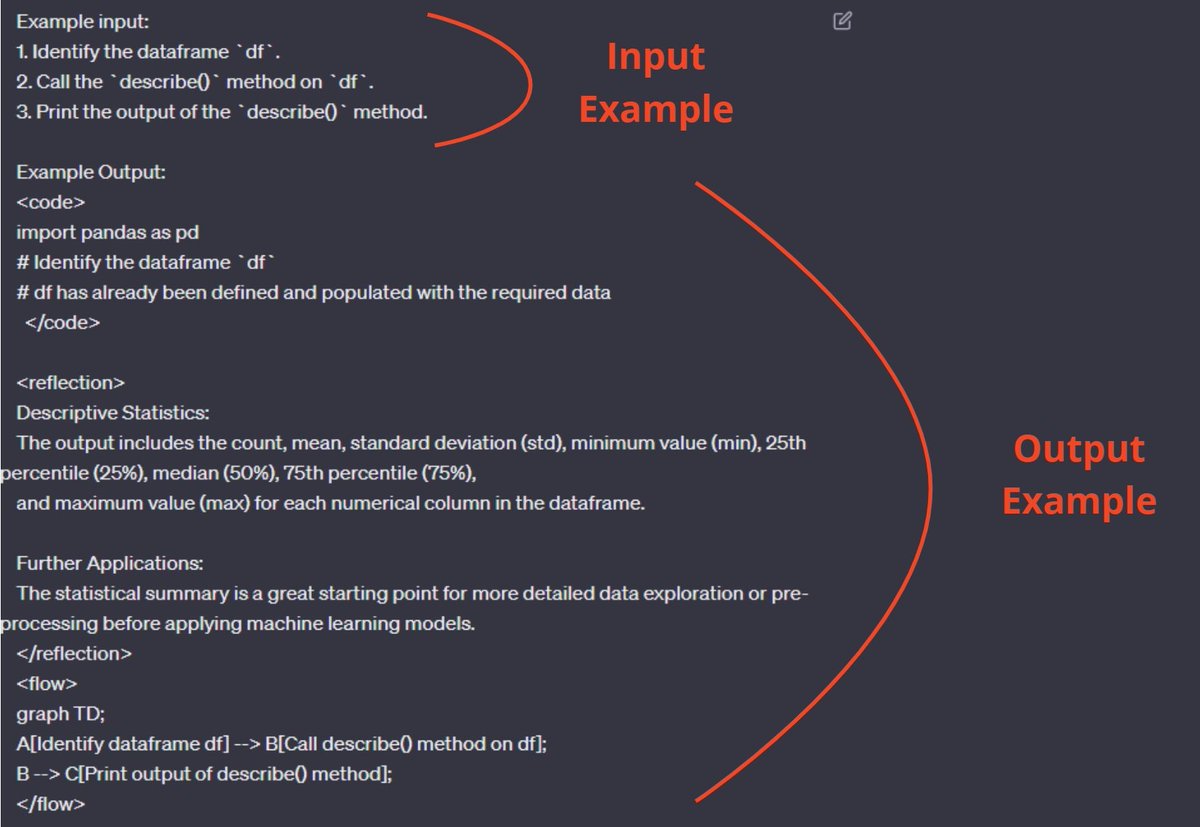
PS: A (slighlty reduced) snippet of the prompt is attached on the images for reference.
Here's what I found:
1. Role
The prompt starts by declaring a clearly defined role for the AI. Most prompts do this, as this has become a standard best practice.
2. Goal
A clearly defined goal on top of the role allows the AI to act in accordance to it. Nothing extraordinary with this prompt until now.
The problem is that most people stop crafting their prompts here, and then wonder why their outputs are useless and random more often than not.
3. Clearly defined input
The prompt clearly states what is the expected input the AI will receive.
This part of the prompt is often overlooked, but I've found it greatly reduces the randomness of the output.
4. Clearly Defined output
Similarly, clearly going over the expected output in minute detail will help steer the model in the exact direction that you want.
This will allow you to pinpoint exactly what it should do, and on top of that, will reduce the need for revisions.
Again, most people never even get to this point and then wonder why the AI never gets them right.
Of course it doesn't; it won't get you right if you haven't told it what to do.
5. Revisions
The prompt clearly states that revisions are to be expected and the output probably won't be the final one.
Once again, clearly stating what can happen during the actual use of this tool.
6. Input example
On top of clearly defining what input to expect, the prompt also shows an input example.
"Show, don't just tell" is a good principle to keep in mind when prompting.
This will greatly reduce the randomness of the model and make for more accurate outputs.
7. Output example
Stating the examples of the output is equally important.
This will allow the model to pick up on the input -> output pattern and make its answers way more relevant, contextual and useful.
See a pattern here?
Clearly state what the AI should do and what to expect.
Don't leave it to chance if you want your outputs to be reliable and useful.
And now that we have reverse engineered how this prompt works, you will hopefully have ideas on how to improve your own prompts.
I sure did.
I have a habit of not sharing my work until it’s perfect, so naturally, I never share anything. In an effort to break the habit, I give you “Word Block”, a game I’m building. It’s still a work in progress. Plenty of bugs. But maybe fun to play anyway? https://t.co/UqhUG9RFmx
ChatGPT and GitHub Copilot Chat have made me so much more productive than I used to be. I can start projects 100 times faster than before. I can also abandon them and move on to something new 100 times faster than before.




![KirkDBorne's tweet photo. *Online* eBook [open access; NO DOWNLOAD] — #MachineLearning from Scratch: https://t.co/xiIOcPl5LZ
—————
#BigData #DataScience #Statistics #AI #DataMining #Mathematics #Algorithms #NeuralNetworks #DeepLearning #DataLiteracy #Python #DataScientists #100DaysOfCode https://t.co/YQw3KsuWOc](https://pbs.twimg.com/media/FyZYZP-WAAAdZFi.jpg)





