My take on the use of internet,New Normal Class.
What if today somebdy would give you a car(Happy! right?) What if the ff. day all of us would've cars for free.
I would've felt dismayed.
Cars would be useless unless roads were widened.
What'll happen when all of us use internet?
Stop killing proportional thinking with unnecessary cross-multiplication. See the proportion first, then solve. Find more math lessons and games at https://t.co/6IWPgTficZ & https://t.co/rryXA5J1hj. #TangMath#TangMathGames
🚀 𝟭𝟲 𝗖𝗵𝗿𝗼𝗺𝗲 𝗘𝘅𝘁𝗲𝗻𝘀𝗶𝗼𝗻𝘀 𝗧𝗵𝗮𝘁 𝗔𝘂𝘁𝗼𝗺𝗮𝘁𝗲 𝗬𝗼𝘂𝗿 𝗪𝗼𝗿𝗸 𝗜𝗻 𝟮𝟬𝟮𝟲
If you're spending hours in Chrome every day, the right extensions can save you time, reduce repetitive work, and make your workflow much smoother.
1. 𝗧𝗼𝗱𝗼𝗶𝘀𝘁 ✅
Task management, project tracking, reminders, and team collaboration.
2. 𝗖𝗹𝗼𝗰𝗸𝗶𝗳𝘆 ⏱️
Time tracking, project timers, and productivity reporting.
3. 𝗠𝗲𝗿𝗹𝗶𝗻 𝗔𝗜 🤖
Use AI on any webpage, summarize content, and reply to emails with one click.
4. 𝗚𝗿𝗮𝗺𝗺𝗮𝗿𝗹𝘆 ✍️
Grammar checking, writing improvement, and vocabulary suggestions.
5. 𝗘𝘃𝗲𝗿𝗻𝗼𝘁𝗲 𝗪𝗲𝗯 𝗖𝗹𝗶𝗽𝗽𝗲𝗿 📌
Note-taking, webpage saving, and article annotation.
6. 𝗣𝗼𝗰𝗸𝗲𝘁 ❤️
Save articles for later, read offline, and get personalized content suggestions.
7. 𝗦𝗰𝗿𝗶𝗯𝗲 📝
Auto-generate step-by-step guides from any workflow you perform on screen.
8. 𝗙𝗼𝗿𝗲𝘀𝘁 🌱
Focus timer with gamification, website blocking, and virtual tree planting.
9. 𝗟𝗼𝗼𝗺 🎥
Record your screen, send video messages, and collaborate with teams.
10. 𝗣𝗲𝗿𝗽𝗹𝗲𝘅𝗶𝘁𝘆 𝗔𝗜 🔍
Search the web with AI, get cited answers, and research any topic quickly.
11. 𝗟𝗶𝗴𝗵𝘁𝘀𝗵𝗼𝘁 📷
Fast and easy screenshot capture tool.
12. 𝗦𝗶𝗱𝗲𝗿 𝗔𝗜 💬
Chat with AI on any webpage, summarize PDFs, and translate text instantly.
13. 𝗧𝗼𝗴𝗴𝗹 𝗧𝗿𝗮𝗰𝗸 📊
Track time, generate project reports, and manage team workloads.
14. 𝗭𝗮𝗽𝗶𝗲𝗿 ⚡
Automate workflows, connect apps, and eliminate repetitive tasks.
15. 𝗔𝘀𝗮𝗻𝗮 📋
Manage tasks, track projects, and keep teams aligned.
16. 𝗡𝗼𝘁𝗶𝗼𝗻 𝗪𝗲𝗯 𝗖𝗹𝗶𝗽𝗽𝗲𝗿 📚
Save any webpage directly into your Notion workspace with one click.
�� 𝗕𝗼𝗻𝘂𝘀:
The best productivity stack for most professionals:
📝 Todoist or Asana → Task management
⚡ Zapier → Automation
🤖 Perplexity AI + Merlin AI → Research & AI assistance
✍️ Grammarly → Better writing
🎥 Loom → Faster communication
📌 Notion Web Clipper → Save valuable resources
Which Chrome extension do you use the most? 👇
❤️ Like
🔁 Retweet
🔖 Bookmark
Follow @MeenakshiYACS for more such posts
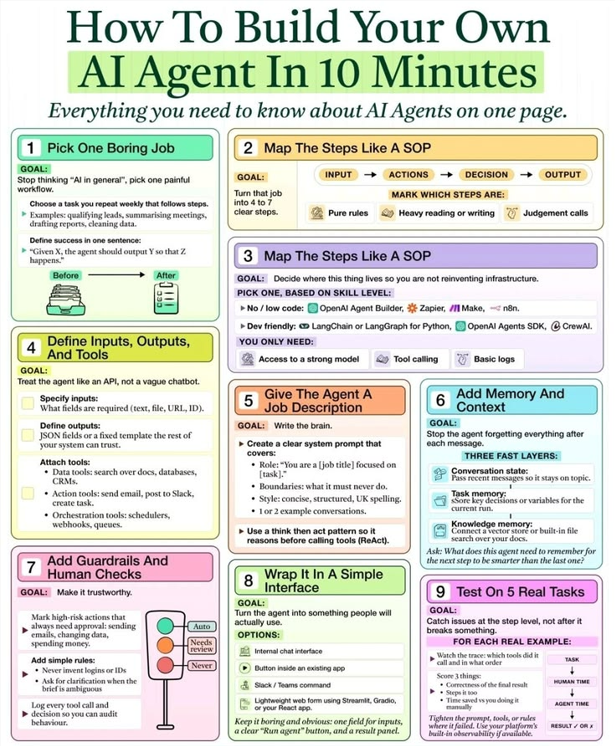
Everyone is talking about AI Agents. Few know how to build one.
You don't need to be an AI researcher or spend months learning machine learning.
You need a structured workflow.
Here's a practical framework to build your first AI agent in under 10 minutes:
1. Pick one repetitive task.
Don't start with "I want an AI assistant."
Start with a painful, repetitive workflow.
Examples:
• Summarizing meeting notes
• Responding to customer FAQs
• Qualifying sales leads
• Writing social media drafts
• Analyzing spreadsheets
• Reviewing resumes
The narrower the task, the better the AI performs.
2. Break the workflow into steps. Think like an operations manager.
Map:
Input → Actions → Decision → Output
Separate:
• Rule-based tasks
• Research tasks
• Human judgment
AI excels when the process is clearly defined.
3. Choose the right framework. You don't need to reinvent the wheel.
Popular options include:
• OpenAI Agents SDK
• LangGraph
• LangChain
• CrewAI
• Zapier AI
• n8n
• Make
Choose based on your technical skills—not hype.
4. Define inputs, outputs, and tools. Every AI agent needs context.
Give it:
• The data it should receive
• The result it should produce
• The tools it can access
Examples:
✓ Google Drive
✓ CRM
✓ Email
✓ Slack
✓ Databases
✓ APIs
✓ Web search
An AI without tools is just a chatbot.
5. Give the agent a clear job description.
Instead of saying:
"Help me."
Say:
"You are a customer support assistant for a luxury hospitality brand. Your role is to answer guest queries, recommend room categories, and escalate complaints when required."
Specific prompts produce better decisions.
6. Add memory.
Good AI remembers.
Store:
• Previous conversations
• Customer preferences
• Business rules
• Company knowledge
• Historical decisions
Memory transforms isolated responses into intelligent assistance.
7. Add guardrails.
Never let AI operate without boundaries.
Define:
• What it can do
• What it cannot do
• When human approval is required
• Security and privacy rules
• Escalation conditions
Reliable AI is controlled AI.
8. Build a simple interface.
Your users shouldn't need technical knowledge.
A simple web page, Slack bot, Teams integration, or internal dashboard is often enough.
If people won't use it, the AI has no business value.
9. Test with real scenarios.
Don't ask:
"Does it work?"
Ask:
• What happens when information is missing?
• What if the user asks something unexpected?
• Does it recover from mistakes?
• Can it explain its reasoning?
• Does it consistently produce useful results?
Production-ready AI is built through iteration—not the first prompt.
The biggest misconception about AI agents is that they're magical.
They're not.
An AI agent is simply a language model connected to tools, memory, rules, and a clearly defined workflow.
Companies that understand this are already automating repetitive work, improving customer experience, and freeing teams to focus on higher-value tasks.
The competitive advantage won't come from using AI.
It will come from designing better systems around AI.
What's the first repetitive task in your business that you'd automate with an AI agent?
#AI #AIAgents #ArtificialIntelligence #Automation #GenerativeAI #BusinessAutomation #OpenAI #Productivity #DigitalTransformation #FutureOfWork #AIInnovation #NoCode #TechLeadership #BusinessStrategy #Innovation
ChatGPT vs Gemini vs Claude vs Grok vs DeepSeek.
Each one has different strengths and use cases.
Some excel in multimodal creativity, others stand out in deep research, real-time updates or lower costs.
Choosing the right one helps you become truly effective with AI.
[ 🔖 bookmark this post for later ]
Here's your complete guide:
1. ChatGPT
The all-rounder AI is ideal for text, audio, video, code, and automation-focused tasks.
2. Gemini
Ideal for Google Workspace users, with deep integration across Gmail, Docs, Sheets, and Drive.
3. Claude
An AI built for safety, with long-context reasoning and strong accuracy in legal or policy-heavy work.
4. Grok
A real-time social AI for X/Twitter, delivering witty answers and keeping up with breaking news.
5. DeepSeek
An open-source powerhouse that’s cost-efficient, technically strong, and designed to scale.
Mastering AI goes beyond picking a single “best” model.
The key is matching the right tool to the right job.
Save this guide. Share it. Start with one use case.
📌 Get Advanced ChatGPT Guide (free): https://t.co/kOBWfKrBaX
👉 Follow me @AndrewBolis for more and 🔄 Repost this to help others use AI
How to Start Learning AI Agents 🤖📘
Want to get into AI Agents but don’t know where to start?
Here’s your roadmap, from GenAI & RAG basics to Advanced Agent Skills 🚀
Also I’ve compiled 1000+ Materials, including AI Agents, LLMs, RAG, Prompt Engineering & Automation Guides 💼
To get it 👇
1️⃣ Follow me ( @codewithimanshu ) so I can DM you
2️⃣ Repost this post 🔁
3️⃣ Comment “Agent” 💬
Follow @codewithimanshu for more AI, LLM & Automation materials ✨
#AI #AIAgent #MachineLearning #PromptEngineering #DeepLearning #Tech
Everyone keeps sharing the same AI tools… so here are 11 actually useful ones no one talks about.
1/ https://t.co/U7Nw46qH48
– Auto-design slide
2/ https://t.co/sRR5rO2v8Z
– Research + long-form writing
3/ https://t.co/jZgYDhtC6D
– Deep AI search
4/ https://t.co/G05yVWrkfp
– Turn long videos into clips
5/ Claid. ai
– Enhance product photos
6/ TaskMagic. com
– No-code task automation
7/ Typefully. com
– Write + schedule posts
8/ Looria. ai
– Find products
9/ https://t.co/xwhz6nDEtS
– AI assistant for Mac
10/ Superhuman. com
– Speed up email
10 AI Tools to replace your tedious work:
1. https://t.co/icKUKUEPtX - AI Website Builder
2. https://t.co/F8ZfXlhrvt - AI Meeting Assistant
3. https://t.co/fG8kRxRO9g - Create viral videos in sec
4. https://t.co/awzD1v4wk6 - AI Voice Generator
5. https://t.co/NjjV7lT508 - Use AI while browsing
6. https://t.co/vIF7F3mLhR - AI Resume Builder
7. https://t.co/I8Z9DBEENX - Personal AI copywriter
8. https://t.co/DsO77Qo7eS - Summarize YouTube video
9. https://t.co/tIJn42b3bX - Chat with any PDF
10. https://t.co/sLHOVQWIj2 - Write excel formulas with AI
10 AI Tools to Make Your Daily Life 10x Productive:
1. AI Research ➝ https://t.co/LZ4nvMXLPR
2. AI Images ➝ https://t.co/bY7tA0GW71
3. AI Meetings ➝ https://t.co/4PYCvhbNLh
4. AI GIFs ➝ https://t.co/n5CTKuwFto
5. AI Websites ➝ https://t.co/eBICDIxhzh
6. AI YT Summaries ➝ https://t.co/H9DD57tXIj
7. AI Speed Writing ➝ https://t.co/vqLPpbuCJp
8. AI Automation - https://t.co/odCduTp5zc
9. AI Carousels - https://t.co/c0TRfqCwh2
10. AI Models ➝ https://t.co/HJz8bo8gQ5







![AndrewBolis's tweet photo. ChatGPT vs Gemini vs Claude vs Grok vs DeepSeek.
Each one has different strengths and use cases.
Some excel in multimodal creativity, others stand out in deep research, real-time updates or lower costs.
Choosing the right one helps you become truly effective with AI.
[ 🔖 bookmark this post for later ]
Here's your complete guide:
1. ChatGPT
The all-rounder AI is ideal for text, audio, video, code, and automation-focused tasks.
2. Gemini
Ideal for Google Workspace users, with deep integration across Gmail, Docs, Sheets, and Drive.
3. Claude
An AI built for safety, with long-context reasoning and strong accuracy in legal or policy-heavy work.
4. Grok
A real-time social AI for X/Twitter, delivering witty answers and keeping up with breaking news.
5. DeepSeek
An open-source powerhouse that’s cost-efficient, technically strong, and designed to scale.
Mastering AI goes beyond picking a single “best” model.
The key is matching the right tool to the right job.
Save this guide. Share it. Start with one use case.
📌 Get Advanced ChatGPT Guide (free): https://t.co/kOBWfKrBaX
👉 Follow me @AndrewBolis for more and 🔄 Repost this to help others use AI](https://pbs.twimg.com/media/HMTI2i-asAAul7R.jpg)

![Trisha_Techie's tweet photo. AI Tools That Make Work 10x Faster.
1. https://t.co/3prSCJiyMt – Email writer
2. https://t.co/hMgBR9fze8 – Video edits
3. https://t.co/yLaU7Evt1M – Meme maker
4. https://t.co/R0YDC0aOaf – AI decks
5. https://t.co/N26dHuOrCH – Audio editor
6. https://t.co/L5t3BZFK5t – Deep search
7. https://t.co/MoAdQXNsUR – Vector art
8. https://t.co/NwIruZswWH – Voice changer
9. https://t.co/HIcrSpjchT – Pitch builder
10. https://t.co/ui7FNpmfdk – Video magic
[ Bookmark for later 🔖 ]](https://pbs.twimg.com/media/G7pBrNSa4AARFHL.jpg)