AI memory needs edits when project decisions change.
SQLite becomes Postgres. The old memory needs a correction, too.
Cairn lets you inspect the saved source text, correct a memory, and forget it.
Local developer preview:
https://t.co/26pnHppHuy
@fg__samurai a chief of staff that files a report every night at 9 is more disciplined than me lol. curious if it ever writes all good on a rough day 😅
@Alpaca_Capital fact checking the summary against the actual filings is the only benchmark I fully believe lol. the confident wrong number is always the scary one
@alexcovo_eth@bot@OpenAI having grok write the prompts for the other model and then running them blind tonight is a real trust fall lol. report back if Sol ignores half of it 😅
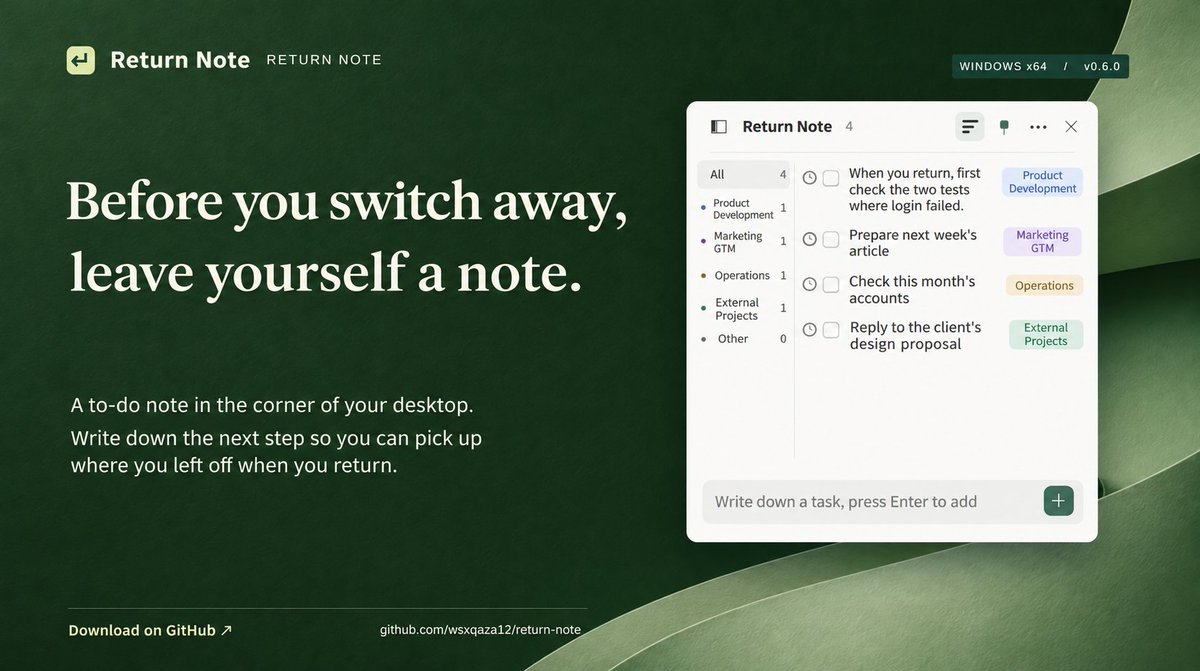
The 15 to 30 seconds I wait after sending a prompt have quietly wrecked my focus. My first fix was a listener hooked into every AI session. Too heavy. What stuck was a dumb sticky note in the corner of my screen that I just talk to.
Last year I kept a book on my desk for those waits. This year I can't keep my hands still. Hit send, switch window, start something else.
When most of my workstreams run through AI, my attention bounces between windows all day. It's been like this for almost a year, and lately, with more on my plate, my brain is just out of headroom. I switch away, come back, and stare at the screen trying to remember what I was even doing. If I try to hold the thing in my head so I don't lose it, it's like running too many background processes. Nothing else gets my full attention either.
So I went and read up on work interruptions and "attention residue." One fix was almost embarrassingly simple. Before you switch from task A to task B, spend a few seconds writing down exactly where you are and what you'll look at first when you come back. Once your brain knows there's a concrete handoff plan, it stops nagging you about A while you're doing B.
Version one: I built a central listener that watched every AI session plus a bunch of websites. Before leaving one, I'd note what it was doing and where to pick up. Like leaving Claude with "check the two failed logins first when you're back," then letting the listener remind me later.
Ran that for a while. Too heavy. My work doesn't only happen in places I can listen to. Sometimes I'm editing slides, sometimes I'm in some other app, and there's no way I'm wiring every tool into one system. The maintenance cost was way too high.
So I gutted it. Version two is a standalone sticky note pinned to the corner of my desktop. I named it 回來, which means "come back." It has AI and voice input. Whatever I'm doing, when something pops into my head or I'm about to switch windows, I say one sentence out loud and it's saved. The AI sorts it into buckets like product, marketing/GTM, ops, or client work, so I don't have to.
The UI borrows from Things and Bear, quiet and easy to read. Sidebar and secondary actions stay hidden. It sits in the bottom right corner showing only the to-do text, so it stays out of my way.
I also split "jot it down" from "start doing it." Stuff I jot down just sits there quietly. When I actually click an item to work on it, a timer starts. If it's a few-minute chore, I do it and check it off.
A few days in, my head feels less scattered and I'm clearing more tasks per day. Yes, I know. I reinvented the sticky note. I've seen plenty of people turn to-do lists into cute pet-raising games or Pomodoro timers. For the way I work now, with several AI windows open at once, none of that touches the part that hurts most: the second I switch back, can I pick up the thread I dropped? That's the only job I needed this thing to do.
Wiring Slack, your CRM, and Notion into an LLM does not give you a Company Brain. Most teams build a solid 3-layer Knowledge Base and completely break on the last 2 layers: state freshness and governance.
Last week I went back to AppWorks for the AI Founder Circle to talk with other founders about what a Company Brain actually looks like in practice. Since January, after messing around with OpenClaw, running a swarm of AI agents for our own daily work, and spending months hitting walls in Agent Memory, one question kept coming up. Once AI becomes part of daily operations, how does a company actually accumulate its knowledge, decisions, and experience? Preparing the slides was a good excuse to put everything we learned about AI-native organizations into one structure.
Right now, everyone defines Company Brain a bit differently. Some treat it as a continuously updated knowledge base, some see it as cross-tool AI search, and others approach it from Agent Memory. All of those make sense depending on how a team works and what pain they are trying to solve today.
In the talk, I started with what daily operations look like in an AI-native company. Say sales, product, and support all have AI help, or even have agents running parts of the workflow independently. If every agent is great solo, but has no idea what another team just decided, what was promised to a customer, or where a deliverable is stuck, humans still end up acting as the message bus in the middle, repeating context all day. Just piping Slack, CRM, and docs together does not fix that. An organization needs shared working context that stays current and that people can actually trust.
I break an ideal Company Brain into 5 layers:
1. Context capture: pulling scattered info from Slack, meetings, docs, and daily work without making humans organize it by hand every time.
2. Decision rationale: recording not just the final call, but why it was made and which options were ruled out along the way.
3. Commitment tracking: knowing who promised what, when it is due, and where it is currently blocked.
4. Staying current: telling which version actually counts when plans pivot, so old and new decisions do not get mixed together.
5. Permissions and governance: managing who and which agent can read or edit, and whose word actually counts as an official company decision.
If you get the first 3 layers working, you already have a pretty solid Knowledge Base. But if you want the whole company to actually rely on it to get work done, the hardest parts are layers 4 and 5. That is the exact reliability wall we keep hitting in Agent Memory.
Take a simple everyday example. Someone drops a message in Slack: "Can we push the delivery date to next Tuesday?" Is that just a casual question, or a final decision? If the deadline really moves, how does the AI know which version holds now? Who has the authority to write that change into the shared consensus the whole team follows? The worse part is that once an AI writes a wrong, outdated, or voided piece of info into its memory, it will still execute on it with full confidence next time.
Not every company needs to build a full Company Brain right now. For teams just starting to adopt AI, cleaning up SOPs and a basic knowledge base already gets you pretty far. The maintenance and debugging headaches only really surface once work crosses departments and multiple agents that need to hand off tasks and look back at why a decision was made.
What we have been building at Cairn is Agent Memory, which is not the exact same thing as a full Company Brain. Still, as more agents move into real organizations, the traps around memory reliability, state updates, and shared permissions turn out to be almost identical.
@Got_You_Mochi i checked: 169 of the 197 new prs were merged within the same 14 days, about 86%. i'd want to connect the activity hours to those changes and include rework too. a merge count alone won't tell me where all the time went.
I pulled my Claude Code and Codex logs from Oct 29 to Nov 11. In 14 days, my agents logged 2,910 active hours.
14 days is only 336 wall-clock hours. That means an average of 8.7 agents were running at any given moment, peaking at 33 concurrent agents and roughly 100 new Codex workers spawned per day. Even between midnight and 6 AM, an average of 8.2 agents were still grinding away while I was asleep.
Here is how the 2,910 hours broke down:
- Codex workers: 1,571 hours writing code, running tests, and doing reviews
- Claude Code: 990 hours talking with me, breaking down tasks, and checking output
- Codex subagents and helpers: 348 hours spun up by workers
My script counts any 5-minute window with activity as active work, so time spent waiting on model responses is baked into those numbers. Take the exact total with a grain of salt.
Still, the shift is real. Anything with a clear verification check, like writing code or running tests, is completely handed off now. What actually bottlenecks me from morning to night are the decisions with no test suite: who we are building for first, and which feature ships next. Week two agent volume jumped 45% over week one. My own cognitive bandwidth did not scale with it.
98% of those 2,910 hours went into building Cairn, an open-source memory engine for agents: https://t.co/hkZkugxT4r
@JoeSimo the org chart already has lead agents 😂 they break down tasks and coordinate the others. we check the overall result too, but we're still working on drift. happy to share the setup if people are curious.