WTF, this guide is insane, one founder runs a whole marketing team on 14 Claude jobs
Just copy paste it in your Claude and start getting clients
But if you don't have time, here's all you need to remember
1/ Write one CLAUDE.md that every job reads: let Claude interview you one question at a time, rules section included
2/ Give each job its own folder: a DAILY.md brief, a JSON registry of everything it already did, one launchd schedule
3/ Watch 10 accounts in adjacent niches and keep only giveaway posts from the last 7 days, ranked by comments, not likes
4/ Never repeat a format from your last 3 posts: two posts on the same topic within 3 days both do worse
5/ Remake the winner for your niche every morning: same structure, your topic, and always a giveaway behind it with its own tracked link
6/ Slice your X posts out of your long articles: 19 articles gave a backlog of 116 slices, one a day with an annotated screenshot
7/ Answer every comment for 60 minutes after each post
8/ Six hours later, DM every connected commenter the giveaway link
9/ Send a personal DM built on one real finding from their own site: 1,301 sends got 236 replies, 18.1%
10/ Spend your time on who you message, not on wording: four openers over 1,352 sends all landed between 13% and 17%
11/ Before calling a lead pool dry, check what your filter can't see: 3,032 leads stayed invisible because they were never enriched
12/ Build one cockpit for every job's health and turn every correction into a dated rule in CLAUDE.md
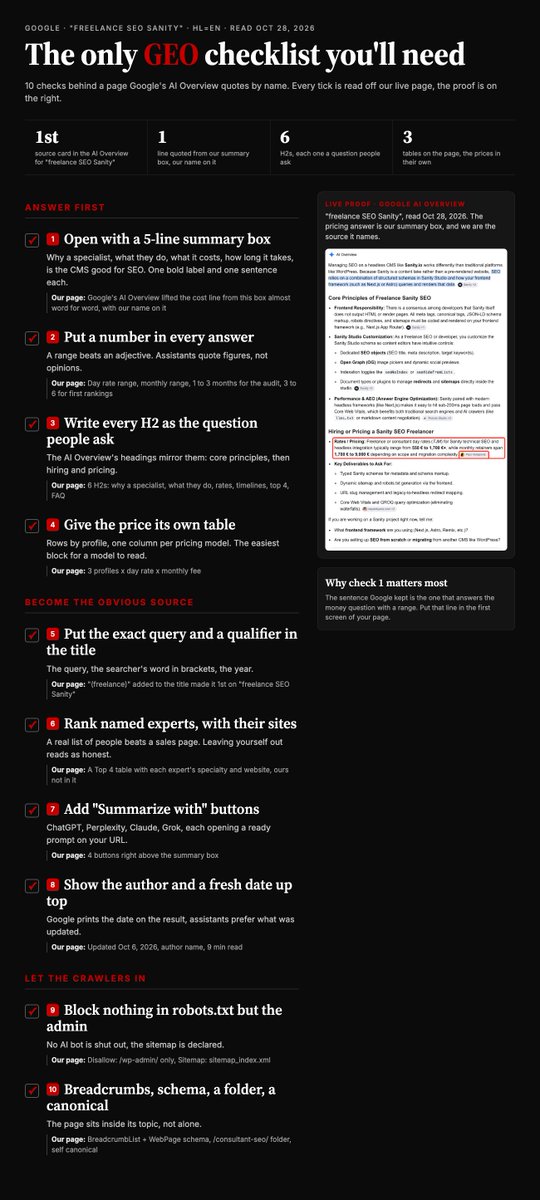
The only GEO checklist you'll need: 10 checks behind a page Google's AI Overview quotes by name
Bookmark this and go through it one check at a time
1/ Open with a 5-line summary box that answers the money question
-> Google's AI Overview took our pricing line from it almost word for word, and named us as the source
2/ Put a number in every answer
-> A range beats an adjective: rates, monthly fees, 1 to 3 months for the audit, 3 to 6 for first rankings. Assistants quote figures, not opinions
3/ Write every H2 as the question people ask
-> Why a specialist, what they do, rates, timelines, top 4, FAQ. The AI Overview's own headings mirror them
4/ Give the price its own table
-> One row per profile, one column per pricing model. The easiest block on the page for a model to read
5/ Put the exact query and a qualifier in the title
-> The query, the searcher's word in brackets, the year. Adding "(freelance)" made us the 1st source on "freelance SEO Sanity"
6/ Rank named experts, with their sites
-> A Top 4 table with each expert's specialty and website, and we left ourselves out. A real list of people reads as a source, not a sales page
7/ Add "Summarize with" buttons
-> ChatGPT, Perplexity, Claude and Grok, each opening a ready prompt on your URL, right above the summary box
8/ Show the author and a fresh date up top
-> Author name, "Updated Oct 6, 2026", reading time. Google prints the date on the result and assistants prefer what was updated
9/ Block nothing in robots.txt but the admin
-> Disallow /wp-admin/ only, sitemap declared. No AI crawler is shut out
10/ Give the page breadcrumbs, schema, a folder and a canonical
-> BreadcrumbList + WebPage schema, a /consultant-seo/ folder, a self canonical. The page sits inside its topic, not alone
The best SEO hire I onboarded never touches a page
3 rules I'd add to his harness
• Compare 28 days with the same 28 days last year, not last month
• Clicks down but position flat? Read the SERP and the title first
• Refresh one page at a time, so you know what moved it
Search Console: 8 steps to turn your 0-click queries into clicks, without a new page, in 20 minutes
They are searches Google already shows you for, on a page that never answers them
1/ Open Search Console > Performance, last 28 days, tick Impressions
-> sort by impressions: the 0-click rows on top are your free wins
2/ Keep the rows at positions 5 to 20 with 0 clicks
-> many impressions on a query is the strongest signal there is: Google already finds you relevant
3/ Click the query, then the Pages tab, to see which page Google shows
-> on our site, "similarweb competitors" got 4,384 impressions in 28 days and 0 clicks
4/ Open that page and look for the exact words of the query
-> if they are not there, Google is guessing: your page is close, it is not the answer
5/ Add one section that answers the query, under a heading with its exact words
-> one section on the page Google already shows, never a new page competing with it
6/ If it is the page's best query, put it in the title too
-> the query with the most impressions and the fewest clicks is the one the title should carry
7/ Change it once, then leave the page alone for 90 days
-> Google needs about 3 months to settle a page after a real change, and a second edit restarts the clock
8/ At 90 days, filter on that exact page AND that exact query
-> it is the only view where the average position tells you where you really stand
Prepared by SEO experts at ChatSEO, the AI agent for SEO and GEO