@xdadevelopers WizTree is good at showing what's large. SizeTrend also adds cleanup suggestions and recent changes, so you can see what grew and what is worth reviewing: https://t.co/5Rwi4ljM1H
@ovipositionbaby Yes, uninstalling Clipchamp can remove the app while leaving its scratch data behind. SizeTrend can identify those leftovers and show that they belonged to Clipchamp: https://t.co/5Rwi4ljM1H
@SPE5291992 Start with the Temp folder and Recycle Bin, then uninstall apps you don't use. SizeTrend can show you the largest cleanup candidates, but only you can decide which files and apps you no longer need.
@abdelrhman_dev1 That Minecraft entry is probably installed game data. If you don't use Minecraft, uninstall it through Windows Settings rather than deleting the folder directly. SizeTrend can show you actual cleanup candidates instead: https://t.co/5Rwi4ljM1H
@R_A_N_B_I_N_ Try SizeTrend. Its Overview shows cleanup candidates right away, and you don't even need a previous scan: it uses the Windows change journal to show recent changes that might explain where those 70 GB went. https://t.co/5Rwi4ljM1H
@xdadevelopers For WinSxS, I'd let DISM decide what can be reclaimed. For the rest of the drive, SizeTrend shows cleanup suggestions and what changed between scans, including growth Storage Sense misses. https://t.co/5Rwi4ljM1H
@astwts If 22 GB comes back every day, I'd look at what changed overnight instead of doing another cleanup. SizeTrend can scan automatically and compare scans so you can see what's growing: https://t.co/5Rwi4ljM1H
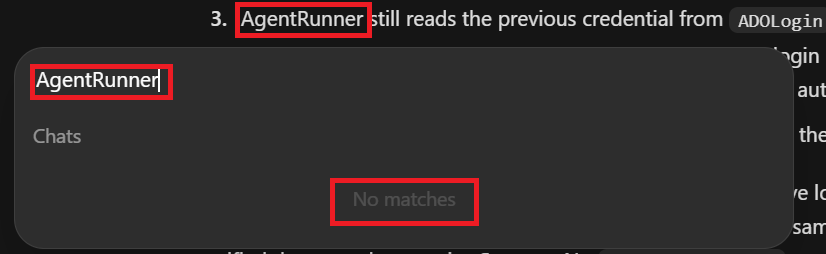
Codex can write my code, but finding a word in a chat that visibly contains it is apparently still frontier research.
It's 2026. Can we get working search please?
@OpenAI@OpenAIDevs
@xdadevelopers Good list. The annoying part is remembering every place this stuff hides. SizeTrend scans the whole drive and puts safe cleanup suggestions (hundreds of them) in one list instead of making you hunt through folders: https://t.co/5Rwi4ljM1H