built an animated cloaked hero with claude opus 5.5 + blender..
straw hat, painted blue cloak, full idle and walk cycle
here’s the workflow:
- step 1: concept: one front and one back view of the hero, cloak included
- step 2: blender + mcp: opus blocks out the body: “simple stylized proportions, match the concept”
- step 3: blender: opus adds the outfit as separate meshes: shirt, trousers, boots, hat
- step 4: blender: the cloak gets painted strokes, “hand-painted blue, visible brush marks”
- step 5: blender: opus rigs the body, then gives the cloak its own bone chains
- step 6: blender: idle and walk cycles, with the cloak bones lagging behind the body
- step 7: blender: review scene: flat floor, fixed light, concept pinned in the corner
- step 8: blender: opus renders every clip with its name and a counter, then lists what’s off
the cloak never moves with the body. it follows it, a few frames late. that delay is what makes it look like fabric
You can now build custom themes for Claude Code on desktop with mods! Change the colors, add an animated background, and make it your own.
Just tell Claude how you want it to look, or get started quickly with the theme-examples plugin. We'd love to see what you make!
Fable 5.2 is insane for building a team of coding agents...
send this prompt to Claude Fable 5.2 and it will turn into a team of 20+ senior developers at 10% of the cost
then read the full guide to building self-improving agent team Fable in the article below ↓
walkable 5 km forest in Unreal Engine 5 with Gpt-6 Astra + C++..
the trick is prototyping small and scaling up. here’s the workflow:
- step 1: have astra prototype a 100m x 100m patch of forest first
- step 2: write the forest rules in c++: tree spacing, paths, streams, rocks, grass density
- step 3: add the details: stream beds with river stones, fallen logs, ferns, a pond, a bench
- step 4: walk it with the default unreal mannequin and fix anything that looks off up close
- step 5: once the 100m patch feels right, expand the same rules to 5km x 5km
- step 6: let unreal’s built-in lighting do the heavy lifting: sun through the trees, shade, time of day
- step 7: add movement like tree climbing, then test it from every angle
if the small patch looks fake, the big one will look fake 2,500 times over (dev: awasemiso+)
Not one prompt. Not one afternoon.
~400 hours of locked in work, and this little guy finally runs almost the way I imagined.
Solo mom dev. My own characters, AI as a full-time assistant for the technical base (3D, rig, animation), and me polishing every step in Blender + Unity.
Demo is ~70% there. What should I show next?
(WIP not final companion)
here’s how to build and animate a game character in blender with claude opus 5.5...
a hooded hunter with a red cloak, 23 animations, and every clip checked against the concept art in one review scene
building a review scene before building the clips.
here’s the workflow:
- step 1: connect opus 5.5 to blender through blender mcp, and send the concept art as the reference
- step 2: opus builds the character part by part: boots > pants > tunic > cloak > head > hair
- step 3: rig it in a separate pass, with extra bones for the cloak and the braid
- step 4: animate one clip at a time: idle, turn, walk, run, then combat
- step 5: add secondary motion: the cloak swings and settles after every stop and turn
- step 6: build a review scene: neutral floor, fixed camera, the concept art pinned in the corner, clip name and number on screen (1/23)
- step 7: have opus play every clip in the review scene and list what looks off before fixing anything
- step 8: export one fbx with the rig, the mesh and every clip
who does what:
> the concept art: the target
> opus 5.5: modeling, rigging, animation, review
> blender: the scene, the rig, the timeline
animate in a review scene, not in the game. same light, same floor, same camera every time, so the only thing that changes is the motion
GitHub is a goldmine for game developers.
I found 10 insane repos that can help you build AAA-style games using Claude Code and Codex.
Bookmark this for later:
1. Jolt Physics
The physics library used in Horizon Forbidden West and Death Stranding 2. Add rigid bodies, collisions, and believable physical interactions to your game.
https://t.co/uShaht0fDH
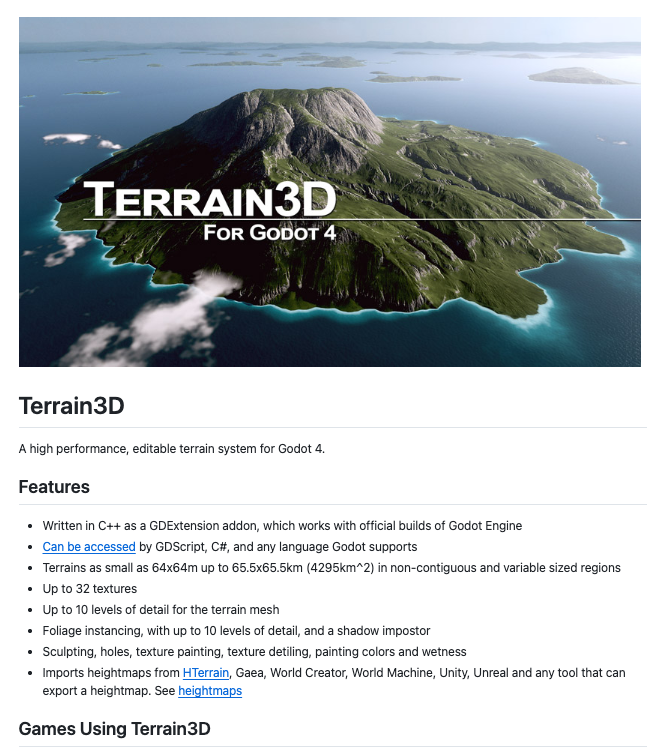
2. Terrain3D
Build massive landscapes in Godot. Sculpt mountains, paint terrain, import heightmaps, and add foliage with multiple levels of detail.
https://t.co/3mdcZ7VVYX
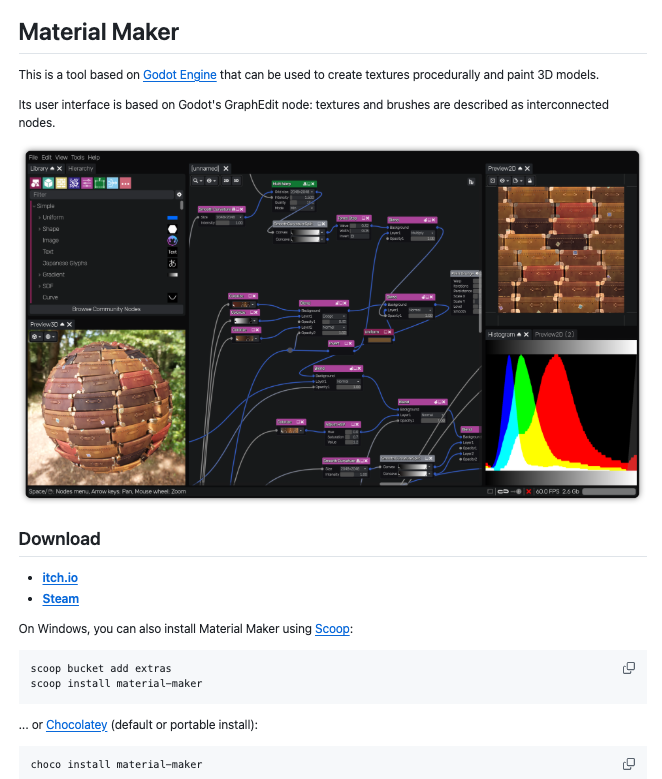
3. Material Maker
Create procedural textures and paint directly onto 3D models. Build materials through visual nodes instead of making every texture from scratch.
https://t.co/1tLhPSuvlR
4. Effekseer
Create particle effects for explosions, magic spells, combat, and environments. Export them as 2D animations or integrate 3D effects into your engine.
https://t.co/tz3HsjWXvt
5. Voxel Tools for Godot
Build worlds players can dig through and destroy. Supports caves, tunnels, overhangs, and terrain that streams as players explore.
https://t.co/KeW59rEcOx
6. Recast Navigation
Help enemies and NPCs navigate your levels. Generate navigation meshes, calculate paths, and simulate crowds with collision avoidance.
https://t.co/f8vliMkUQI
7. ozz-animation
Load, play, and blend character animations. A performance-focused library for building smooth movement into your own engine.
https://t.co/Aea6xTwX1x
8. The Forge
Building a custom engine? Start with cross-platform graphics infrastructure, resource loading, and animation systems instead of writing everything yourself.
https://t.co/y4ZNj1PwEJ
9. meshoptimizer
Detailed models can crush performance. Optimize, simplify, and compress your meshes to make assets smaller and more efficient to render.
https://t.co/0hXd6tUAAx
10. FastNoise2
Build procedural terrain and texture generators. Combine noise patterns in a visual node editor, then load those setups into your game.
https://t.co/lfKVcH3JDs
Give Claude Code or Codex the relevant docs and ask it to help integrate the systems your project needs.
What did I miss?
Epic Games released an official plugin that lets Claude Code control Unreal Engine directly.
It connects Claude Code to the Unreal Editor and exposes hundreds of editor tools across 30+ toolsets:
→ Actors, Blueprints and materials
→ Niagara effects, Control Rigs and Sequencer
→ State Trees, widgets and the Gameplay Ability System
→ Automation testing
Install it from Anthropic's official plugin marketplace:
/plugin install unreal-engine-skills-for-claude-code@claude-plugins-official
In Unreal, enable the ModelContextProtocol and AllToolsets plugins, then start the MCP server with the editor open.
Works on Mac, Linux, and Windows through Git Bash or WSL.
https://t.co/LYM4whQ8Ev
here’s how to build a game-ready room in blender and move it into unreal engine 5 with claude opus 5.5...
nobody opened a 3d app by hand, and now it runs in real time
the trick is letting opus decide how each object gets made, smart way to set it up:
- step 1: connect opus 5.5 to blender through blender mcp
- step 2: give it one reference image for the room: layout, mood, light
- step 3: simple objects get modeled directly in blender (walls, desk, shelves, boxes, blinds)
- step 4: complex props get a reference image first, then tripo turns it into 3d (chair, monitors, figurines)
- step 5: opus cleans up the tripo props in blender and places them in the room
- step 6: light the scene in blender until the stills look right
- step 7: have opus port the whole scene from blender to unreal engine 5
- step 8: the room now runs live in the engine, ready for gameplay
the agent works, you direct. he still checked every result and gave notes along the way
DUNE (3/6) : FRANK HERBERT
Gotta say that these are the book that changed my life
I jumped into the reading realm after I watched DUNE (Film) and along the way it was like mind blowing with the storytelling and world building and all the elements in this book are so rich.
Yo ! been collecting Sci-Fi books and some other books lately , more like the journey into another realm at the age of 30, might have a few thoughts to share and discuss later
Let me know if you have any book recommendation !
📚💜