Claude Code users, if you didn’t know, Herdr now has its 𝗼𝘄𝗻 𝗱𝗲𝘀𝗸𝘁𝗼𝗽 𝗮𝗽𝗽.
Install it, and Opus 5.5 can coordinate 𝘂𝗽 𝘁𝗼 𝟭𝟬 𝘄𝗼𝗿𝗸𝗲𝗿𝘀 through Herdr: Claude Code writes the code, nitpick-obsessed Codex Astra reviews it, and the app comes with a perfect dashboard built in.
Hand off the heavy implementation work to Claude Code, including polishing your pages’ layout, interactions, and visual details.
Set it up once. Here’s how 👇
1. Open Claude Code and install Herdr and its Skill
Select Opus 5.5 and ask it to run these two commands (Mac):
curl -fsSL https://t.co/1H0FBkIz2w | sh
hc --skill
Once installed, have Opus 5.5 confirm that hc works.
𝗬𝗼𝘂 𝗸𝗲𝗲𝗽 𝘄𝗼𝗿𝗸𝗶𝗻𝗴 𝗶𝗻 𝗖𝗹𝗮𝘂𝗱𝗲 𝗖𝗼𝗱𝗲. Herdr manages the workers in the background, so you don’t have to switch interfaces.
2. Have Opus 5.5 finish the setup
Paste this prompt:
“Use the official Herdr docs and the instructions from hc --skill and herdr-app --skill to create a coordination Skill called herdr-desktop. Keep the main conversation in this Claude Code session and use hc to manage background workers. Don’t require me to operate inside a Herdr terminal.
Start separately named background workers for this task, explicitly setting the working directory. Check whether Claude Code CLI and Codex CLI are installed. If either is missing, install it. If authentication is needed, ask me to sign in.
After authentication, start one Codex worker using Astra, with reasoning effort explicitly set to xhigh. Give it a read-only task: inspect the project and explain its main entry points. Run Codex with --no-daemon and allow network access in its sandbox, or it can’t reach hc. The first time it starts in a new folder, it asks whether to trust that folder. If it gets stuck there, tell me. Wait for it to finish and read back its actual response to confirm that task dispatch and result retrieval work. If the model or configuration is unavailable, tell me. Don’t silently substitute another.
When the Herdr app is open, put the workers in a space so I can see them in the sidebar.
Save the verified startup, dispatch, wait, and result-reading procedures in the Skill. Don’t modify project code during setup.”
3. Sign in to your Codex account
Opus 5.5 will check Codex’s login status.
If needed, follow the prompts to authenticate with your ChatGPT account.
After that, you keep assigning tasks in Claude Code, while Codex runs in the background using your ChatGPT account’s allowance.
4. Tell Opus 5.5 how to delegate
Paste this prompt:
“From now on, use this workflow:
You are the coordinator.
→ Handle project understanding, planning, task decomposition, integration, and final review. Make the best decision that will elevate all three: the user experience (UX), developer experience (DX), and agent experience (AX) always, without breaking anything.
→ When a task needs substantial implementation, debugging, test fixes, or multi-file changes, delegate it to Claude Code through herdr-desktop. For frontend work, have it refine the layout, visual details, and actual interactions. Give it this rule: Do not design for rare or future cases nobody asked about.
Use Opus 5.5 for Claude Code workers and Astra for Codex workers, both with reasoning effort explicitly set to xhigh.
Briefly explain the division of work, then start independent tasks in parallel. Choose concurrency based on the task, machine load, and available allowance, up to 10 workers. You don’t need to use all 10.
Give each task a clear objective, working directory, necessary context, deliverable, and completion criteria. Use separate worktrees for parallel code changes. You own the integration.
Send follow-up feedback to the original worker whenever possible and continue its existing conversation. Don’t start over every round.
After a worker finishes, inspect the actual changes yourself and run the necessary checks after integration. For page changes, open the browser and check them.
After code changes, hand the review to a Codex worker that didn’t work on the implementation, with this rule: Rate each bug from 1 to 10 on how often it would happen and how bad it would be. If the two scores multiplied are below 5, just file it as an issue and leave the code alone.
Don’t treat a task as finished just because another agent says it is.
At the end, show me the result, what was verified, and any unresolved issues. Release task resources that are no longer needed while preserving the work and records needed to continue.”
A few tips:
1. Save the delegation instructions from step 4 in herdr-desktop too, so you can invoke the Skill at the start of future tasks.
2. Pair the Skill with a clear end goal. For example: “Finish this pricing page, keep it consistent with the existing site, and check the mobile layout and plan switching.”
3. Each account still has its own usage limits. Adjust concurrency to the task and remaining allowance.
4. For long tasks, keep a record of progress, key decisions, and next steps. When switching conversations, check the actual state before continuing.
It works the other way around, too: Codex coordinates, and Claude Code executes. Swap the roles and their corresponding settings.
I struggled with Git until I learned these 19 commands:
1 git add: It lets you add changes from working directory into staging area
2 git commit: It lets you save a snapshot of currently staged changes in local repository, with a message
3 git push: It lets you upload commited changes from local repository to a remote repository
4 git fetch: It lets you download changes from a remote repository, without applying them locally
5 git pull: It lets you fetch & then merge changes from a remote repository into local branch
6 git merge: It lets you combine changes from one branch into another
7 git diff: It lets you see changes not staged or commited yet
8 git diff HEAD: It lets you see changes between current working directory & latest commit
9 git status: It shows you current state of working directory & staging area
10 git branch: It lets you see all local branches
11 git checkout: It lets you create a branch or switch between branches
12 git log: It shows you commits on current branch with extra details
13 git stash: It lets you temporarily save uncommitted changes & apply them later
14 git rebase: It lets you apply commits from one branch to another
15 git reset: It lets you undo changes in working directory & move back to a specific commit
16 git revert: It lets you undo changes by creating a new commit
17 git cherry pick: It lets you apply commits from one branch to another
18 git bisect: It lets you narrow down bugs quickly
19 git init: It lets you create an empty repository
Anything else you'd add to this list?
1 RR to help others learn git.
2 If you want to become a better engineer, @systemdesignone is your guy.
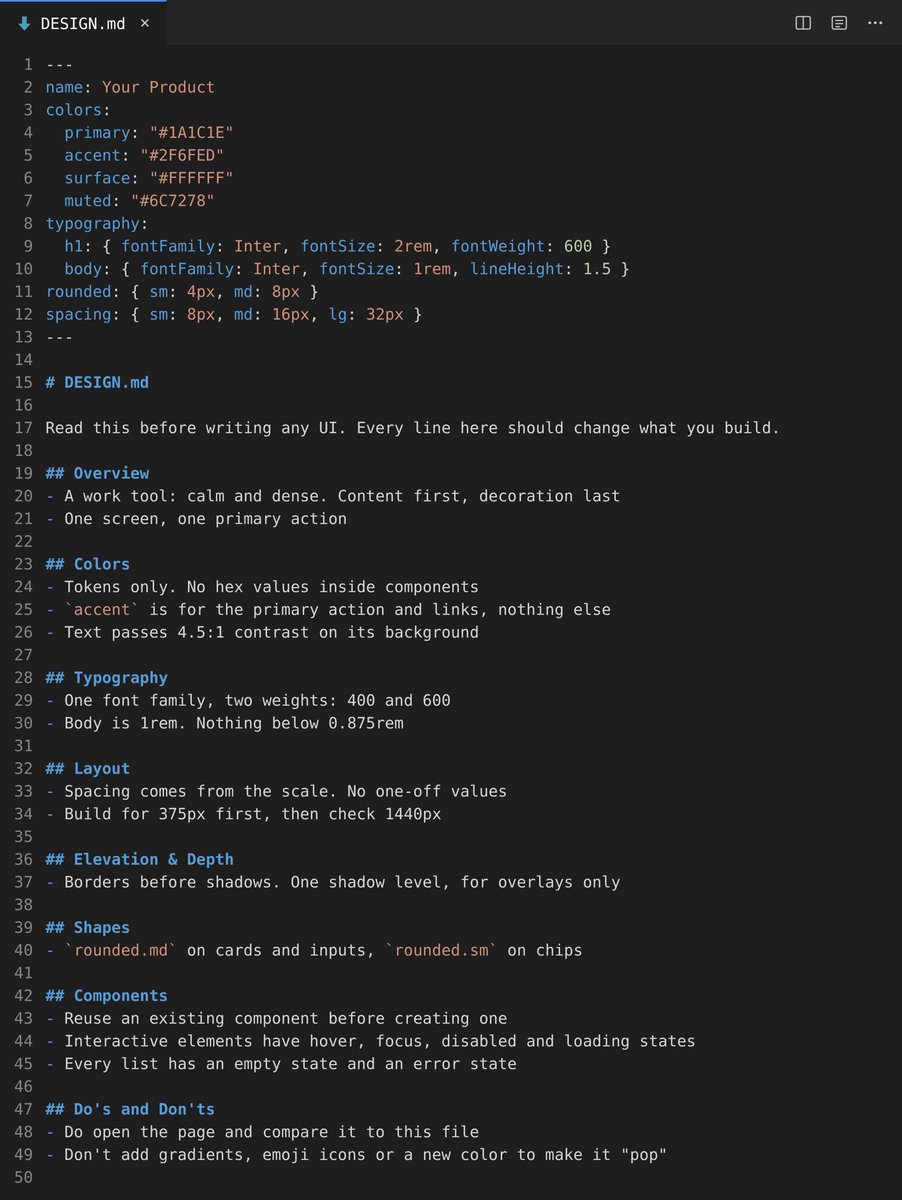
This 𝗗𝗘𝗦𝗜𝗚𝗡.𝗺𝗱 stops Claude Code and Codex from 𝘀𝗵𝗶𝗽𝗽𝗶𝗻𝗴 𝗴𝗲𝗻𝗲𝗿𝗶𝗰 𝗔𝗜 𝗨𝗜.
It's Google's open format. Stitch reads it natively. Claude Code and Codex read it once you add one line to AGENTS .md:
"Read DESIGN .md before any UI work."
Tokens on top, rules below:
→ Overview
→ Colors
→ Typography
→ Layout
→ Elevation & Depth
→ Shapes
→ Components
→ Do's and Don'ts
The agent stops inventing a new color and spacing value on each screen, so 𝗲𝘃𝗲𝗿𝘆 𝘀𝗰𝗿𝗲𝗲𝗻 𝗹𝗼𝗼𝗸𝘀 𝗹𝗶𝗸𝗲 𝘁𝗵𝗲 𝘀𝗮𝗺𝗲 𝗽𝗿𝗼𝗱𝘂𝗰𝘁.
Claude Code users: also install the official frontend plugin:
/plugin install frontend-design@claude-plugins-official
Check your file against the spec:
npx @google/design.md lint DESIGN .md
Copy and paste it into your DESIGN .md 👇
We'll be spending a lot more time trying to understand the outputs of language models. A few thoughts, tips & tricks:
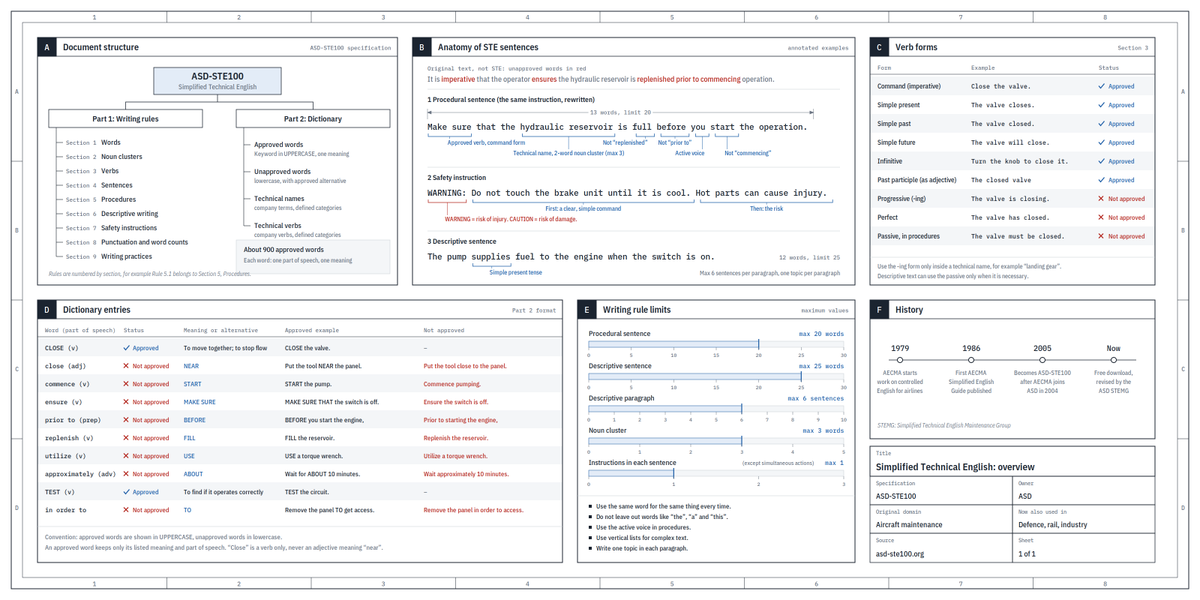
Writing. Something I've had success with: Ask your LLM to explain something in ASD-STE100, it's a controlled language specification originally developed for aerospace maintenance documentation. LLMs well-versed in this language and it comes with heavy constraints on clean writing style that I often find a lot more readable. Sometimes I've tried to soften it a bit e.g. ask for "80% of the way to ASD-STE100" because the spec is quite stringent. But even better:
Diagrams / images. Instead of writing, ask your LLM to create a diagram. These can be a lot easier to process, parse, and understand. But even better:
Web pages. Ask for output "in HTML" to get a beautiful, interactive webpage. LLMs are getting really good at frontend and can create beautiful experiences, animations, etc. But even better:
Explainer videos. The output format I am most bullish on is fully custom / bespoke explainer videos generated on any arbitrary topic. Experiment with things like "Create a 3b1b style video explainer on X. Use my ElevenLabs API key for audio narration". (you'd need an API key for the latter or you can ask your LLM to find you decent free alternatives that use your local compute). This is actually starting to work!
In summary:
- As LLMs get better, they will do more and more of the legwork autonomously, and a lot more of our work will rise up the abstractions into oversight and understanding.
- Luckily, LLMs can help here too because as intelligence and code are increasingly abundant, you can ask for large, custom, discardable software artifacts (e.g. web apps, video explainers) that would have never made sense to create before. Push the boundaries here and you'll be surprised.
Prompt of the day:
/retro read my last 10 coding agent sessions and find ways to make my repo easier to navigate. Find where agents take too long to find relevant information, or rely on out-of-date docs.
Improving navigability is such an underrated way to save tokens.
[PUBG Drama/PUBG Asia Star 2026]
In a for fun PUBG tournament where stream sniping wasn't considered a violation under the rules, a Korean streamer successfully 'faked a foul', stirred up drama, rallied their viewers, and pressured Krafton into changing the rules, breaking them in the process, just to appease Korean public opinion and retain their sponsors.
Vietnamese players, Himass and Tanvuu, were banned from competing over an unofficial tournament where they weren't actually in the wrong. Shortly after, a large number of influential Vietnamese players, streamers, and pro players uninstalled PUBG. With no publisher present, the game is expected to be banned in Vietnam soon, and PUBG will likely lose around 50% of its esports viewership in the near future.
Had a great trade on $iNu so far, however shaved quite a lot due to the internal noise it had last week. Managed to accumulate some more today as it went to its local low at 7M today.
I enjoy the content they're releasing and see alignment within the community.
Natan's continual bullish sentiment on LONG really got me thinking - whatever coin you want to standby with LONG that ends up getting to where it needs to be, will be greatly rewarded, in time.. if you have the hands and belief for them.
I am very bullish on Robinhood cementing their spot via longevity this Q4 onward. $AI will go LONG and thrive, many more success stories will be made. Will continue to look at ones that have yet to make their move as well ($MOO)