I hope you've found this post helpful.
Follow @heyshrutimishra for more. Like/Repost to help others learn AI.
If you want to level up with AI in your day to day life, signup my newsletter! https://t.co/BdmJhRQ8Tk
Connection pooling explained.
Handling API requests often requires querying the database. Creating a new connection for each API call introduces unnecessary overhead.
Connection pooling mitigates this by reusing existing connections.
This reduces the overhead associated with establishing and closing connections, leading to faster response times and reduced resource consumption.
This makes connection pooling a key technique for optimizing resource management and enhancing application performance.
So how does it work?
At its core, connection pooling involves maintaining a cache of database connections that can be reused, rather than creating a new one each time a connection is requested.
When a connection is needed, an available connection from the pool is used, and when the task is completed, the connection is returned to the pool for future use.
For example, imagine we had an e-commerce application, it could be handling thousands of users simultaneously.
Without connection pooling, each user action that requires database access would create a new connection, overwhelming the database.
With connection pooling, the application reuses existing connections, efficiently managing multiple user requests.
Below are some of the most key components.
🔸 Connection pool manager: oversees the pool, managing the lifecycle of connections.
🔸 Idle connections: connections that are currently not in use but are ready to be allocated.
🔸 Active connections: connections currently in use by the application.
Like most things in software engineering, there are best practices:
🔹 Optimal pool size: determine the right pool size based on your application load to avoid too few or too many connections.
🔹 Connection timeout: set appropriate connection timeouts to avoid holding onto idle connections for too long.
🔹 Monitoring and tuning: regularly monitor pool performance and tune parameters to match evolving workloads.
Connection pooling improves efficiency, but its implementation can be challenging, some languages more than others.
💭 I’d love to hear your thoughts. What would you like to add? What topics would you like me to cover? 💬
~~
Thank you to our partner CodeCrafters who keeps our content free to the community.
Want to become a better software engineer? CodeCrafters helps you master real-world challenges & level up.
We’ve partnered with CodeCrafters to bring our community a rare 40% lifetime discount.
💡 Pro tip: many engineers expense it through their team’s learning budget.
It’s free to try: https://t.co/uByZbBrLOd
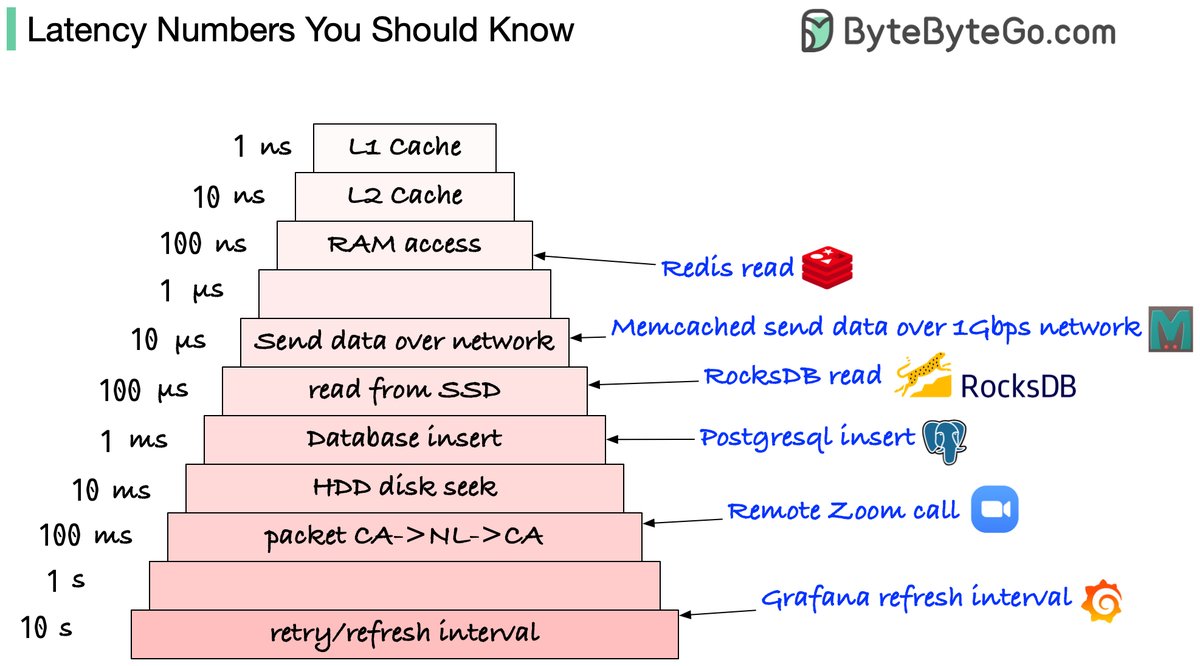
Which latency numbers you should know?
Please note those are not precise numbers. They are based on some online benchmarks (Jeff Dean’s latency numbers + some other sources).
🔹L1 and L2 caches: 1 ns, 10 ns
E.g.: They are usually built onto the microprocessor chip. Unless you work with hardware directly, you probably don’t need to worry about them.
🔹RAM access: 100 ns
E.g.: It takes around 100 ns to read data from memory. Redis is an in-memory data store, so it takes about 100 ns to read data from Redis.
🔹Send 1K bytes over 1 Gbps network: 10 us
E.g.: It takes around 10 us to send 1KB of data from Memcached through the network.
🔹Read from SSD: 100 us
E.g.: RocksDB is a disk-based K/V store, so the read latency is around 100 us on SSD.
🔹Database insert operation: 1 ms.
E.g.: Postgresql commit might take 1ms. The database needs to store the data, create the index, and flush logs. All these actions take time.
🔹Send packet CA->Netherlands->CA: 100 ms
E.g.: If we have a long-distance Zoom call, the latency might be around 100 ms.
🔹Retry/refresh internal: 1-10s
E.g: In a monitoring system, the refresh interval is usually set to 5~10 seconds.
Notes
-----
1 ns = 10^-9 seconds
1 us = 10^-6 seconds = 1,000 ns
1 ms = 10^-3 seconds = 1,000 us = 1,000,000 ns
--
Subscribe to our weekly newsletter to get a Free System Design PDF (158 pages): https://t.co/xOtKy03EXx
URL, URI, URN - Do you know the differences?
The diagram below shows a comparison of URL, URI, and URN.
🔹 URI
URI stands for Uniform Resource Identifier. It identifies a logical or physical resource on the web. URL and URN are subtypes of URI. URL locates a resource, while URN names a resource.
A URI is composed of the following parts:
scheme:[//authority]path[?query][hashtag# fragment]
🔹 URL
URL stands for Uniform Resource Locator, the key concept of HTTP. It is the address of a unique resource on the web. It can be used with other protocols like FTP and JDBC.
🔹 URN
URN stands for Uniform Resource Name. It uses the urn scheme. URNs cannot be used to locate a resource. A simple example given in the diagram is composed of a namespace and a namespace-specific string.
If you would like to learn more detail on the subject, I would recommend W3C’s clarification.
--
Subscribe to our weekly newsletter to get a Free System Design PDF (158 pages): https://t.co/FIzCeaWsZV
OAuth 2.0 Explained.
OAuth 2.0 is an authorization framework that enables applications to access a user’s data on another service (like Facebook or GitHub) without sharing the user’s password.
It’s essentially a digital handshake between the app, service, and user, with everyone agreeing on what is shared.
Now that we’ve covered what it is, let’s dive into how it works.
The process generally follows 6 steps with 4 components typically involved:
🔸 Client (app wanting access)
🔸 Resource owner (user)
🔸 Authorization server
🔸 Resource server
To understand the process, let’s take a look at how a game would connect to a player’s Facebook account.
Step 1) Request access
Within the game (client), the player (user) clicks on a “connect with Facebook” button to link their profile and find friends.
Step 2) Redirect to service
The game redirects the player to Facebook’s (service’s) login page.
Step 3) Permission request
After logging in, the data that the game is requesting access to will be shown to the player which they can either allow or deny.
Step 4) Authorization code
If the player gives their approval, Facebook redirects the player back to the game with an authorization code (from authorization server). The code is a temporary credential that proves the player’s consent.
Step 5) Exchange code for token
The game now sends the authorization code along with its own identification to Facebook’s server in the background. Facebook identifies the authorization code and the game’s identity and returns an access token.
Step 6) Use the token
The game can now use the access token to request the agreed-upon data from Facebook (from the resource server), like the player's friends list.
In this process, the player’s Facebook credentials were never shared, but the game was able to access the agreed-upon player data from Facebook. This is what OAuth 2.0 facilitates; allowing third-party applications to access data from services in a secure manner without sharing credentials.
~~
Thank you to our partner Kickresume who keeps our content free to the community.
Did you know you can turn your LinkedIn into a resume with one click?
Check it out: https://t.co/JT2uDp2SO1
Load balancing algorithms you should know.
Effective load balancing is crucial in system design, providing high availability and optimizing resource utilization.
Let's look at how some of the most popular load balancing algorithms work.
🔹 Static Algorithms
1) Round robin
It distributes requests sequentially between servers, ensuring equitable distribution.
Despite its simplicity, it does not account for server load, which might be a drawback when demand changes significantly.
2) Random
Implements a simple way of distributing requests regardless of server load or capability.
This form of load distribution is basic, less precise, and suitable for less complicated applications.
3) IP hash
Uses a consistent hashing method depending on the client's IP address to route requests.
This technique is one way to ensure session persistence by consistently directing requests from the same client to the same server.
4) Weighted round robin
Improves round robin by assigning requests based on server capacity, aiming to better utilize resources by allocating more requests to higher-capacity servers.
This approach seeks to optimize resource use, though actual results can vary with request complexity and system conditions.
🔹 Dynamic Algorithms
5) Least connections
Intelligently sends requests to the server with the fewest active connections, adapting to changing loads.
This technique aims to better reflect current server utilization, potentially leading to more efficient resource consumption.
6) Least response time
Targets performance by routing requests to the server with the quickest response time.
By considering both current server load and performance, this technique supports faster processing, potentially reducing response times for users.
While these are some of the most popular load-balancing strategies, there are other algorithms that also address specific needs and challenges. Choosing the right algorithm is very important to ensuring your application remains scalable, reliable, and efficient.
~~
Thank you to our partner Postman who keeps our content free to the community.
📣 Postman has a special online event. The CTO is discussing AI & APIs.
Secure your seat before they run out (it’s free): https://t.co/75LouY0nPO
Top 5 Kafka use cases
Kafka was originally built for massive log processing. It retains messages until expiration and lets consumers pull messages at their own pace.
Let’s review the popular Kafka use cases.
- Log processing and analysis
- Data streaming in recommendations
- System monitoring and alerting
- CDC (Change data capture)
- System migration
Over to you: Do you have any other Kafka use cases to share?
--
Subscribe to our weekly newsletter to get a Free System Design PDF (158 pages): https://t.co/uc5M7CdXXC
Life is Short, Use Dev Tools
The right dev tool can save you precious time, energy, and perhaps the weekend as well.
Here are our favorite dev tools:
1 - Development Environment
A good local dev environment is a force multiplier. Powerful IDEs like VSCode, IntelliJ IDEA, Notepad++, Vim, PyCharm & Jupyter Notebook can make your life easy.
2 - Diagramming
Showcase your ideas visually with diagramming tools like DrawIO, Excalidraw, mindmap, Mermaid, PlantUML, Microsoft Visio, and Miro
3 - AI Tools
AI can boost your productivity. Don’t ignore tools like ChatGPT, GitHub Copilot, Tabnine, Claude, Ollama, Midjourney, and Stable Diffusion.
4 - Hosting and Deployment
For hosting your applications, explore solutions like AWS, Cloudflare, GitHub, Fly, Heroku, and Digital Ocean.
5 - Code Quality
Quality code is a great differentiator. Leverage tools like Jest, ESLint, Selenium, SonarQube, FindBugs, and Checkstyle to ensure top-notch quality.
6 - Security
Don’t ignore the security aspects and use solutions like 1Password, LastPass, OWASP, Snyk, and Nmap.
7 - Note-taking
Your notes are a reflection of your knowledge. Streamline your note-taking with Notion, Markdown, Obsidian, Roam, Logseq, and Tiddly Wiki.
8 - Design
Elevate your visual game with design tools like Figma, Sketch, Adobe Illustrator, Canva, and Adobe Photoshop.
Over to you: Which dev tools do you use?
–
Subscribe to our weekly newsletter to get a Free System Design PDF (158 pages): https://t.co/uc5M7CdXXC
Oauth 2.0 Explained With Simple Terms.
OAuth 2.0 is a powerful and secure framework that allows different applications to securely interact with each other on behalf of users without sharing sensitive credentials.
The entities involved in OAuth are the User, the Server, and the Identity Provider (IDP).
What Can an OAuth Token Do?
When you use OAuth, you get an OAuth token that represents your identity and permissions. This token can do a few important things:
Single Sign-On (SSO): With an OAuth token, you can log into multiple services or apps using just one login, making life easier and safer.
Authorization Across Systems: The OAuth token allows you to share your authorization or access rights across various systems, so you don't have to log in separately everywhere.
Accessing User Profile: Apps with an OAuth token can access certain parts of your user profile that you allow, but they won't see everything.
Remember, OAuth 2.0 is all about keeping you and your data safe while making your online experiences seamless and hassle-free across different applications and services.
Over to you: Imagine you have a magical power to grant one wish to OAuth 2.0. What would that be? Maybe your suggestions actually lead to OAuth 3.
--
Subscribe to our weekly newsletter to get a Free System Design PDF (158 pages): https://t.co/uc5M7CdXXC
The world is a dangerous place.
The diagram below shows some possible network attacks in 7 OSI model layers.
🔹 Application Layer
- Pushing
- Malware injection
- DDos attacks
🔹 Presentation Layer
- Encoding/decoding vulnerabilities
- Format string attacks
- Malicious code injection
🔹 Session Layer
- Session hijacking
- Session fixation attacks
- Brute force attacks
🔹 Transport Layer
- Man-in-the-middle attacks
- SYN/ACK flood
🔹 Network Layer
- IP spoofing
- Route table manipulation
- DDos attacks
🔹 Data Link Layer
- MAC address spoofing
- ARP spoofing
- VLAN hopping
🔹 Physical Layer
- Wiretapping
- Physical tampering
- Electromagnetic interference
Over to you - What did we miss?
--
Subscribe to our weekly newsletter to get a Free System Design PDF (158 pages): https://t.co/uc5M7CdXXC
I asked 121+ software developers this question and 5 methods came out on top.
“How to improve the performance of your API?”
[1] Caching
The idea of caching is simple.
Store frequently accessed data in a cache so that you can access it faster when needed.
If there’s a cache miss, fetch the data from the database.
It’s quite effective actually but cache invalidation and deciding on the caching strategy can be challenging.
[2] Scale-out with Load Balancing
If one server instance isn’t enough, you can think of scaling your API to multiple instances.
So - where’s the catch?
You need to find a way to distribute requests between these multiple instances.
Enter Load Balancing
It not only helps with performance but also makes your application more reliable.
However, load balancers work best when your application is stateless and easy to scale horizontally.
[3] Async Processing
Sometimes, you can’t solve multiple problems together.
The best way is to park them for later.
With async processing, you can let the clients know that their requests are registered and under process.
Then, you process the requests one by one and communicate the results to the client later on.
This allows your application server to take a breather and give its best performance.
But of course, async processing may not be possible for every requirement.
[4] Pagination
If your API returns a large number of records, you need to explore Pagination.
Basically, you limit the number of records per request.
This improves the response time of your API for the consumer.
[5] Connection Pooling
An API often needs to connect to the database to fetch some data.
Creating a new connection for each request can degrade performance.
It’s a good idea to use connection pooling to set up a pool of database connections that can be reused across requests.
This is a subtle aspect but in highly concurrent systems, connection pooling can have a dramatic impact on performance.
So - what is your number one method for improving API Performance?
I'm sure there are many more tricks to boost API performance
Explaining 9 types of API testing.
🔹 Smoke Testing
This is done after API development is complete. Simply validate if the APIs are working and nothing breaks.
🔹 Functional Testing
This creates a test plan based on the functional requirements and compares the results with the expected results.
🔹 Integration Testing
This test combines several API calls to perform end-to-end tests. The intra-service communications and data transmissions are tested.
🔹 Regression Testing
This test ensures that bug fixes or new features shouldn’t break the existing behaviors of APIs.
🔹 Load Testing
This tests applications’ performance by simulating different loads. Then we can calculate the capacity of the application.
🔹 Stress Testing
We deliberately create high loads to the APIs and test if the APIs are able to function normally.
🔹 Security Testing
This tests the APIs against all possible external threats.
🔹 UI Testing
This tests the UI interactions with the APIs to make sure the data can be displayed properly.
🔹 Fuzz Testing
This injects invalid or unexpected input data into the API and tries to crash the API. In this way, it identifies the API vulnerabilities.
--
Subscribe to our newsletter to download the 𝐡𝐢𝐠𝐡-𝐫𝐞𝐬𝐨𝐥𝐮𝐭𝐢𝐨𝐧 𝐜𝐡𝐞𝐚𝐭 𝐬𝐡𝐞𝐞𝐭. After signing up, find the download link on the success page: https://t.co/Wl7p8j1p8e
Github Certifications are now available for General 🐙
Earning a GitHub certification will give you the competitive advantage of showing up as a GitHub expert.
Check out more here: https://t.co/9Vqwb5ieAE










![KirkDBorne's tweet photo. [1048-page PDF] MIT's "#Mathematics for Computer Science" at https://t.co/NvcSyKfTvZ from @MIT_CSAIL
#ComputerScience #Algorithms https://t.co/GDuIjQAfxY](https://pbs.twimg.com/media/GZDZbYdbUAAFlGe.jpg)
![bytebytego's tweet photo. URL, URI, URN - Do you know the differences?
The diagram below shows a comparison of URL, URI, and URN.
🔹 URI
URI stands for Uniform Resource Identifier. It identifies a logical or physical resource on the web. URL and URN are subtypes of URI. URL locates a resource, while URN names a resource.
A URI is composed of the following parts:
scheme:[//authority]path[?query][hashtag# fragment]
🔹 URL
URL stands for Uniform Resource Locator, the key concept of HTTP. It is the address of a unique resource on the web. It can be used with other protocols like FTP and JDBC.
🔹 URN
URN stands for Uniform Resource Name. It uses the urn scheme. URNs cannot be used to locate a resource. A simple example given in the diagram is composed of a namespace and a namespace-specific string.
If you would like to learn more detail on the subject, I would recommend W3C’s clarification.
--
Subscribe to our weekly newsletter to get a Free System Design PDF (158 pages): https://t.co/FIzCeaWsZV](https://pbs.twimg.com/media/GZLakagakAEmoC0.jpg)