You can remove preinstalled Microsoft Store apps such as Clipchamp, Xbox, Weather, and Feedback Hub. Follow our guide to learn more:
https://t.co/ag8YAaQSle
#MSIntune#Microsoft#Apps#SCDudes
#Dell Command | Endpoint Configure for Microsoft Intune (2.0.4.278) Released:
- Fixed the issue where the DCEC version 2.0.3 failed to install on non-English Windows operating system.
https://t.co/XkbJB0L1HV
#SYSADMIN#INTUNE#MECM#SCCM
Massive Security win! You can now manage policies for #VSCode in #Intune!
As of the #Windows June Preview Update (26200.8524), MS have unblocked the VSCode ADMX registry path, meaning that uploading the ADMX shipped with a VSCode install allows you to create a policy to deploy allowed extensions (either by publisher or individually), as well as things like control chat capabilities and MCP servers - All of which have been proven as a serious supply chain attack or data exfiltration risks!
VSCode policy docs: https://t.co/A2Ceq6etFE
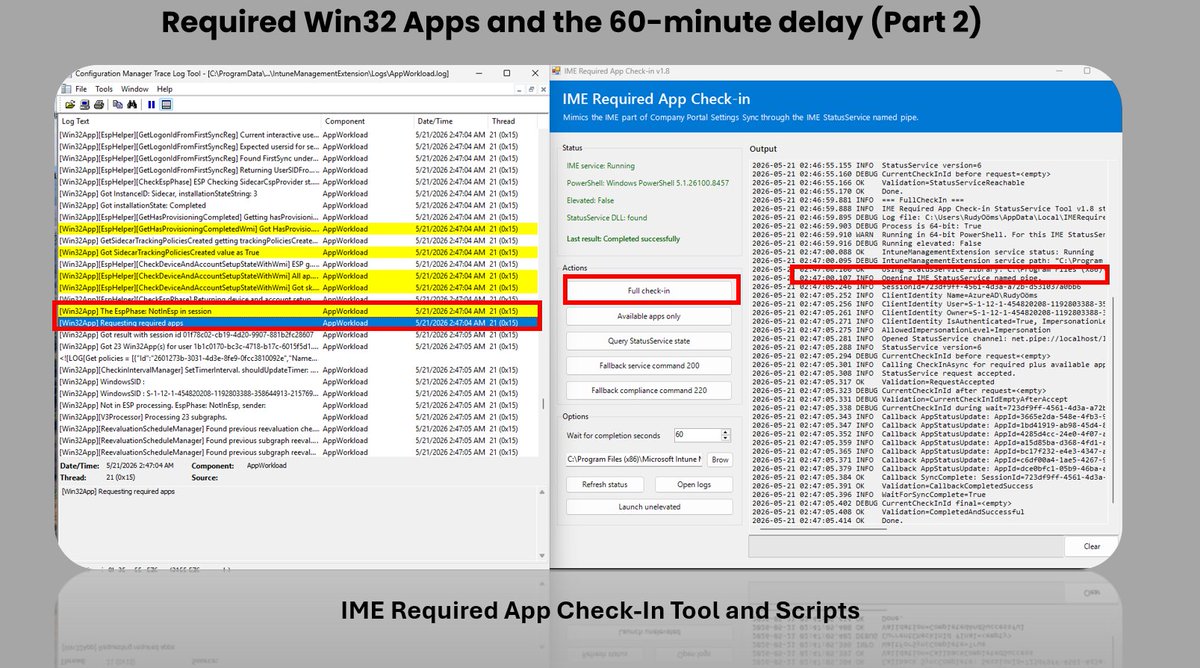
Required Win32 Apps and the 60-minute delay (Part 2)
We have all seen this issue showing up after a device is enrolled with Autopilot or when we publish a new App
It could take up to 60 minutes for the IME to start installing the Win32App.
Pressing Sync in Intune feels like the obvious fix, but that only wakes up the MDM policy side of Windows. It does not directly instruct IME to resume processing Win32 apps.
So I kept investigating the IME....
What if we stop waiting for the next cycle and give IME the nudge ourselves?
That turned into a small app that can kickstart the required app check-in from IME itself. The same idea can also be used for a PowerShell remediation.
No reboot. No service restart. Just triggering asking the IME nicely....
https://t.co/pY1kpUQn3a
#Intune #MSIntune #Patchmypc #WindowsAutopilot
Secure Boot certificate expiration in June 2026 is getting very real.
We have a guide to help:
✅ Update Secure Boot certificates using Intune
✅ Monitor device readiness
✅ Improve visibility with reporting dashboards
https://t.co/n2AALsVcSV
#MSIntune#Windows#SecureBoot
Microsoft released 7 signed PowerShell scripts for enterprise Secure Boot certificate rollout.
Solutions that complete what Microsoft started:
https://t.co/7nFzeRnkja
#SecureBoot#PowerShell#SCCM#Intune
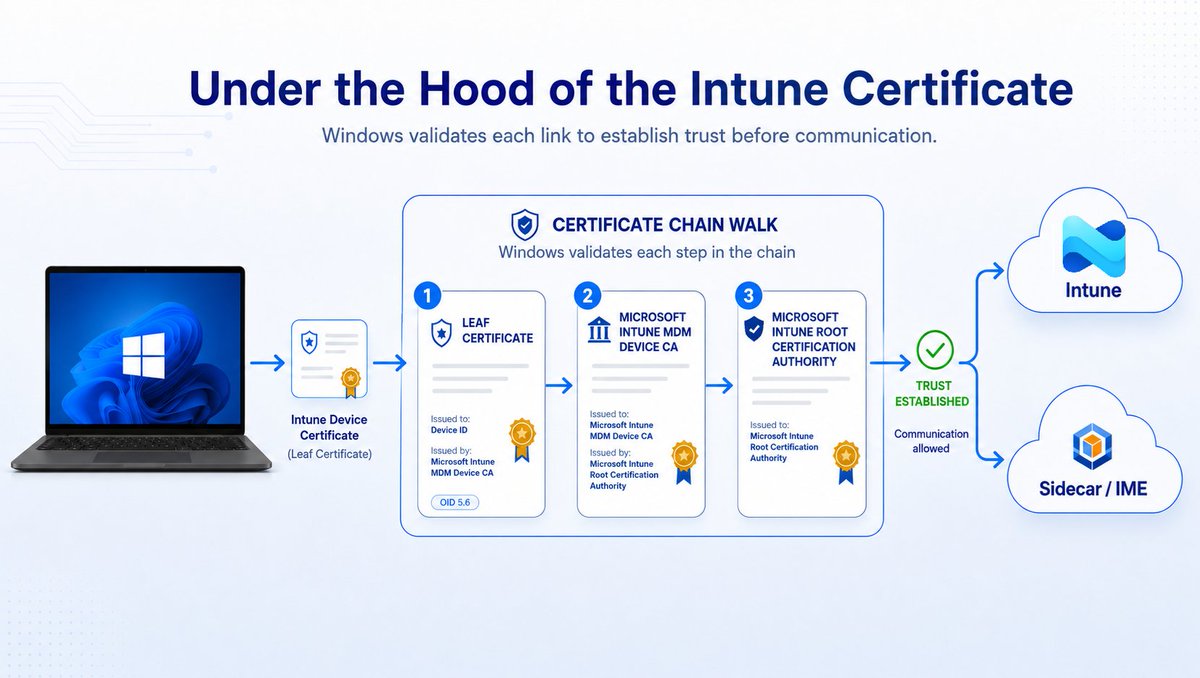
Under the Hood of the Intune Certificate
The Intune certificate matters more than most people think. That Certificate keeps the policy sync alive and is also needed for IME communication, which means apps and scripts depend on it as well.
But when the certificate or its chain breaks, things can get funny. The device can still show a recent last check-in, while it is no longer able to receive the latest policies, apps, or scripts.
In this webinar, we will explain what the Intune MDM device certificate does, what changed with the Intune Intermediate certificate renewal, why some devices may have missed it, and how to find devices that still appear healthy but may not be.
But hey, it is all fine because the last check-in still moved… right?
Register here: https://t.co/gZtj8m09Fp
#Intune #MSIntune
Dell SupportAssist update is crashing PCs with constant blue screens and reboot loops — the boot service built for system recovery is the culprit of unending instability https://t.co/cHWFKALbS7
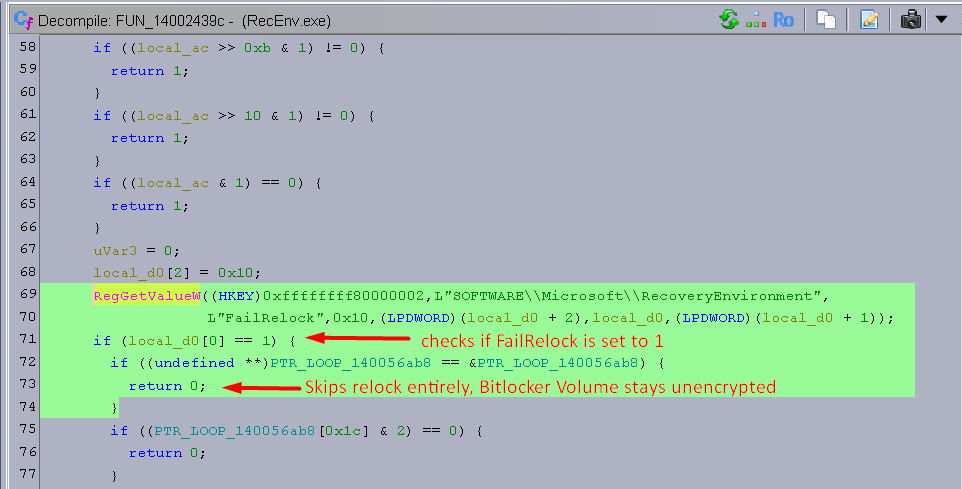
I just reverse engineered the YellowKey BitLocker bypass
Microsoft shipped code that checks for a flag called "FailRelock" in every Windows 11 recovery image. When it's set to 1, after recovery unlocks your BitLocker drive, it never relocks it. All you need is a USB stick.
This code only exists in the recovery environment. Not in normal Windows. They left an entire debug testing framework in production.
TESTED: Windows 11's upcoming "Low Latency Profile" mode brings genuine performance improvements to the OS, speeding up flyout and app launches significantly.
We've benchmarked opening some apps on video with the Low Latency Profile enabled and disabled, and you can see differences in how quickly things appear. For some things, it's a fraction of a second faster, for others, it's a significant increase in speed.
In our testing, this new Low Latency Profile is a major improvement in overall responsiveness when it comes to opening apps and flyouts. Our tests were conducted on a clean install of the latest Windows 11 preview build on the same hardware. https://t.co/QX1IzKUhx9
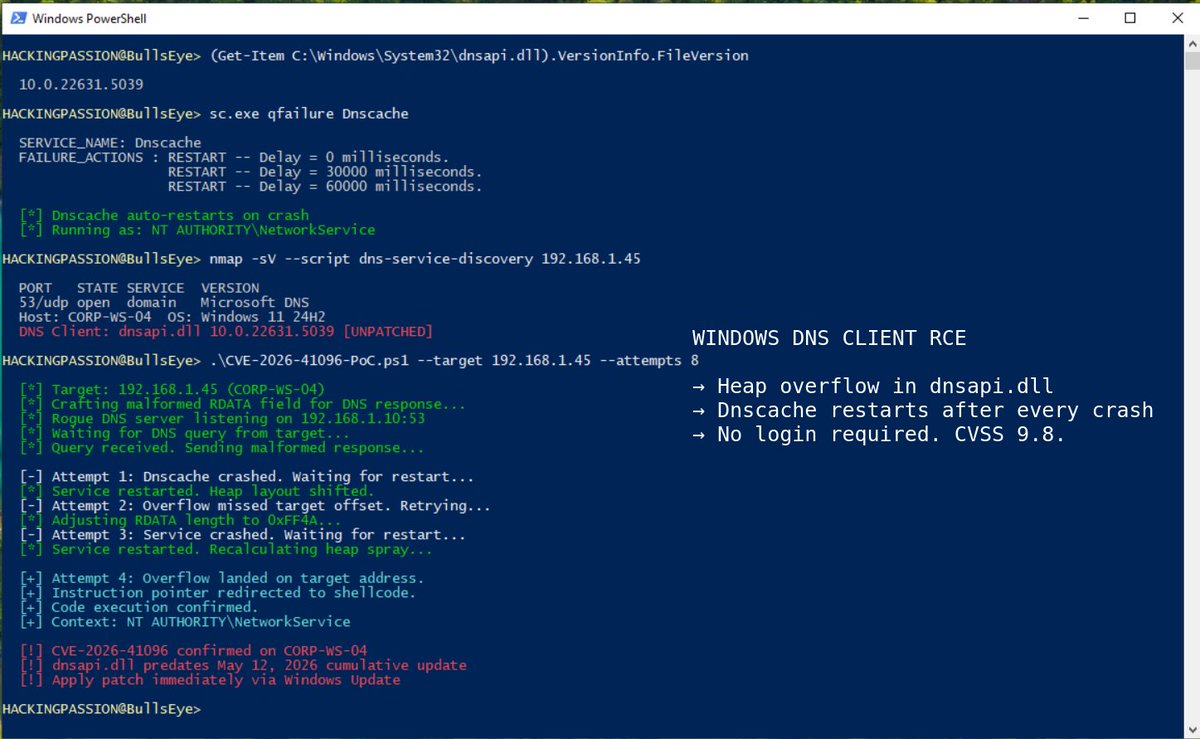
‼️🚨 Microsoft has patched a critical Windows DNS Client remote code execution vulnerability that allows an unauthorized attacker to execute code over a network. All it takes is a malicious DNS response.
The vulnerability is tracked as CVE-2026-41096 with a CVSS score of 9.8. It is a heap-based buffer overflow in dnsapi.dll, the Windows component that processes DNS answers on every machine.
To trigger it, an attacker needs a position where they can influence DNS responses: a rogue DNS server, a poisoned resolver, a compromised router, hostile WiFi, or a man-in-the-middle placement.
That puts ordinary Windows DNS activity in the blast radius. Browsers, VPN clients, enterprise apps, update checks, and background services constantly ask DNS where to connect. The vulnerable processing sits in the Windows DNS Client path, not an edge-facing server product.
Microsoft assessed exploitation as "less likely," and Rapid7 lists the issue as not publicly disclosed and not known to be exploited at release.
On the contrary, a 9.8 unauthenticated network RCE in DNS client handling is exactly the kind of bug defenders should assume will be reverse-engineered quickly.
Defenders should:
- Deploy the May 2026 cumulative updates and confirm coverage across endpoints and servers
- Restrict DNS traffic to trusted resolvers where possible
- Monitor Dnscache and svchost.exe for abnormal child processes or unexpected outbound activity
- Treat public WiFi and untrusted resolver paths as higher-risk until patching is complete
Maintenance Windows were announced for the Intune Settings Catalog.
That sounded pretty nice...
OS updates, drivers, firmware, install actions, restart actions, all wrapped inside a proper maintenance window Settings Catalog
But then the "What's in development announcement" suddenly disappeared.
The Settings Catalog announcement is gone, but luckily, the Windows Update CSP still documents the maintenance window settings.
So the Update policy itself is still there. The Intune UI part is the bit that vanished.
For now, it is back to using the Custom OMA URI if we want to deploy and test this new maintenance window
https://t.co/pYwOrDMJ8n
#Intune #MSIntune #WindowsUpdates