🎯THE COMPLETE CLAUDE COMMAND
THE ULTIMATE CHEAT SHEET | 90 COMMANDS
---
1. START & CREATE
/new → Start a fresh conversation
/project → Create a new project
/upload → Attach files for Claude to read
/paste → Paste from clipboard
/template → Use a pre-built prompt structure
/import → Import from a file
/scan → Scan documents
/voice → Use voice input
---
2. FOCUS & CONTEXT
/focus → Tell Claude exactly what you want
/context → Add background so answers are sharper
/details → Provide more details
/examples → Give examples
/clarify → Let Claude ask the right questions first
/define → Define terms
/assumptions → List assumptions
/priorities → Set priorities
/constraints → Set constraints
---
3. THINK & SOLVE
/analyze → Break any problem into parts
/compare → Put two options head to head
/pros-cons → List pros & cons
/evaluate → Evaluate ideas
/recommend → Get recommendations
/brainstorm → Generate ideas fast, no filter
/solve → Solve the problem
/challenge → Challenge assumptions
---
4. WRITE & EDIT
/write → Generate content from scratch
/edit → Clean up what you already have
/rewrite → Same message, better delivery
/shorten → Cut the fluff, keep the punch
/expand → Add more detail
/improve → Improve writing
/summarize → Summarize text
/paraphrase → Paraphrase text
/proofread → Proofread text
---
5. ORGANIZE & STRUCTURE
/outline → Build a skeleton before writing
/structure → Organize content
/bullet → Turn text into scannable points
/numbered → Make numbered list
/table → Organize comparisons visually
/summary → Summarize content
/key-points → Extract key points
/mindmap → Map out connected ideas
/flowchart → Create flowchart
---
6. CODE & TECH
/code → Write code in any language
/debug → Find and fix issues
/explain → Explain code
/optimize → Make code faster and cleaner
/refactor → Improve code structure
/test → Write tests
/convert → Convert formats
/documentation → Write docs
/review → Review code
---
7. DATA & ANALYSIS
/analyze-data → Find patterns in raw data
/visualize → Turn numbers into charts
/insights → Extract key insights
/forecast → Make predictions
/report → Generate report
/stats → Calculate statistics
/clean → Clean data
---
8. AUTOMATE & INTEGRATE
/workflow → Design repeatable process
/automate → Remove manual steps
/api → Connect tools via API
/integrate → Integrate systems
/schedule → Schedule tasks
/trigger → Set triggers
/tasklist → Create task list
/checklist → Create checklist
---
9. PERSONALIZE & CONTROL
/preferences → Set preferences
/memory → Save what to remember
/tone → Set tone (formal, casual, bold)
/style → Match writing style/persona
/length → Control response length
/format → Change format
/reset → Reset conversation
/clear → Clear context
---
10. LEARN & RESEARCH
/search → Get current info from web
/research → Deep dive into topic
/learn → Beginner explanation
/tldr → Summary of key points
/sources → Find sources
/fact-check → Verify information
/explore → Explore related topics
---
11. COLLABORATE & SHARE
/share → Share conversation
/export → Save output
/download → Get file instantly
/copy → Copy to clipboard
/email → Draft and send
/publish → Publish content
/feedback → Send feedback
---
BONUS: POWER SHORTCUTS
Use “/” commands for quick access
Combine commands for better results
Add context early for better answers
Be specific and clear
Iterate and refine
Save and reuse what works
❤️ Like
🔁 Retweet
🔖 Bookmark
Follow @MeenakshiYACS for more such posts
🧠 Avoid Claude limits with smarter workflows:
• Start new chats regularly
• Keep prompts short
• Batch similar tasks
• Use Projects & Memory
• Plan before generating
• Edit, don’t retry
⚡ Save tokens, reduce limits, get better results.
Everyone's vibecoding the same (ugly) AI website.
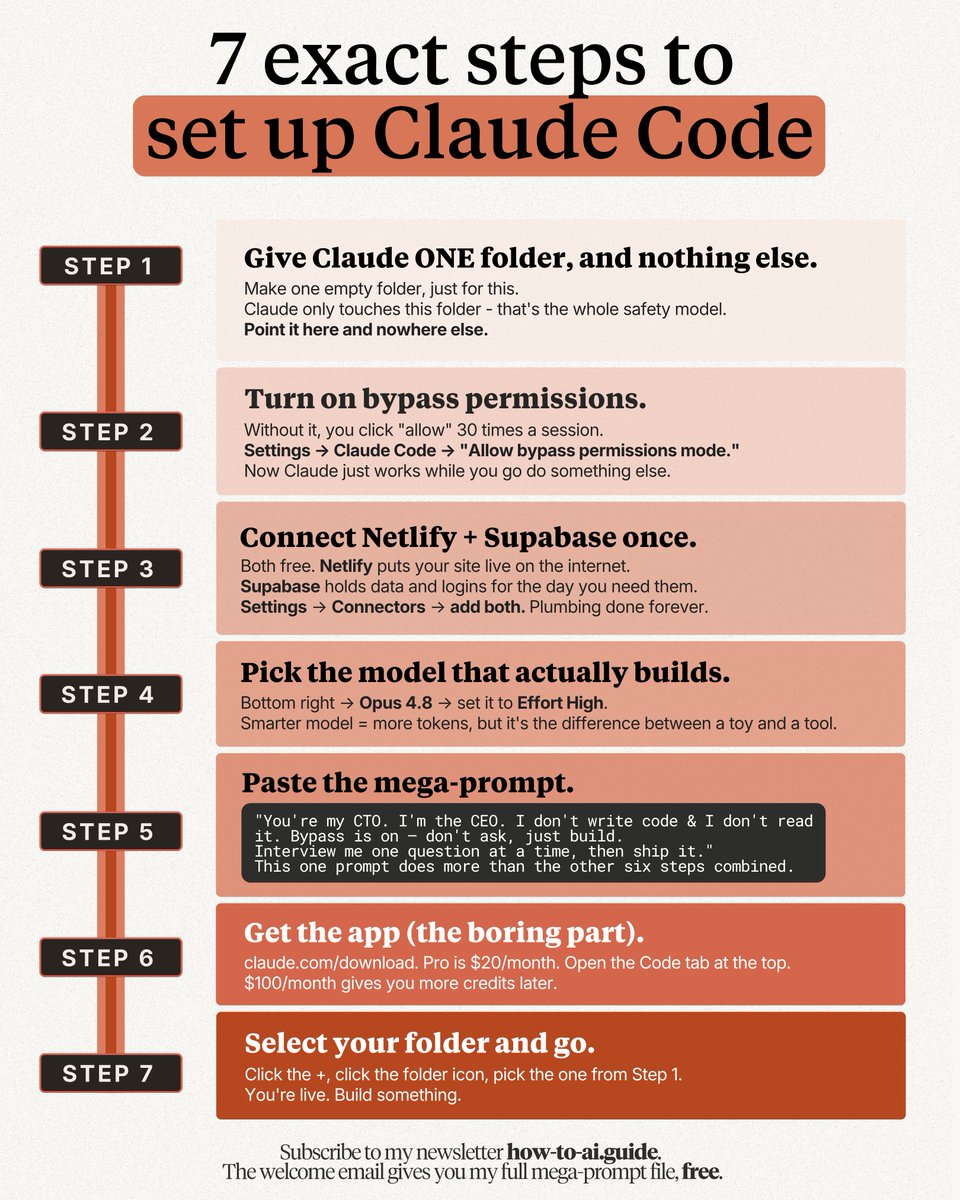
Here's the 7-step Claude Code setup that doesn't:
Use this (free) DESIGN .md trick that makes your site look like Stripe or Airbnb: https://t.co/psB7XxB2Y4
✦ Don't pay anything. Reply to the email.
✦ Get my Notion link. Open the '.md file' folder.
✦ Download the prompt. Paste it into Claude Code.
✦ Drop a DESIGN .md in your folder.
✦ Prompt "Use this folder for all styling."
I built this setup after the new Claude Code dropped, so you don't have to figure it out alone.
To know how to use it with detailed step-by-step, check my guide here: https://t.co/O2kJvFkgan
By the way, here's the full 7-step setup:
1. Turn on bypass permissions.
Stop clicking "allow" 30 times a session.
2. Pick Opus 4.8 model (High Effort).
The default makes your site look cheap.
3. Make ONE clean folder. No passwords.
Claude only touches this one.
4. Connect Netlify + Supabase. Free.
Your site goes live, your logins live here.
5. Get the app, open the Code tab. Pro is $20.
That's enough to start.
6. Select your folder.
Click the +, click the folder icon, pick yours.
7. Paste the mega-prompt.
"You're my CTO. I don't read code. Just build it...."
People are still hand-coding, or worse, paying $200/month for an app they could build in a day.
You want to help your network?
♻️ Repost this so they stop shipping the same AI site as everyone else.
To download all of my Claude infographics:
Step 1. Go to https://t.co/psB7XxB2Y4.
Step 2. Subscribe for free. Don't pay anything.
Step 3. Open my welcome email (most skip this).
Step 4. Hit the automatic reply button inside.
Step 5. Download my infographics from my Notion.
Bonus. Get my full Claude Code mega-prompt + handoff prompt, too.
Your AI Isn't Failing Because of the Model. It's Failing Because of the Memory System.
Most people spend hours comparing GPT, Claude, Gemini, and open-source models.
Very few spend time designing the instruction architecture that guides them.
The difference between an AI assistant that feels unreliable and one that delivers consistent results often comes down to a single file:
CLAUDE.md (or an equivalent AI operating manual).
Here's the framework that actually works:
1. Global Rules Define universal standards that apply everywhere: • Coding style • Naming conventions • Security requirements • Communication preferences
Think of this as your AI's permanent personality.
2. Project Rules Add context specific to a product: • Tech stack • Build commands • Testing strategy • Team workflows
This prevents the AI from making generic assumptions.
3. Folder-Level Rules Create local overrides for specific modules: • API conventions • Component standards • Utility patterns
The closer the instruction is to the work, the more powerful it becomes.
A simple rule hierarchy:
Global → Project → Folder
When conflicts occur, the most specific instruction wins.
---
The best AI documentation follows a simple structure:
WHAT
What is this project?
What technologies are used?
How is the repository organized?
WHY
Why were architectural decisions made?
Why do naming conventions exist?
Why should certain patterns be avoided?
HOW
How do you build?
How do you test?
How do you deploy?
Most teams document WHAT and HOW.
Elite teams document WHY.
That's where consistency comes from.
---
5 mistakes that make AI instructions useless:
❌ "Write clean code"
✅ "Use camelCase for variables and PascalCase for components"
❌ "Test everything"
✅ "Maintain 80% coverage for utilities and run npm test before commits"
❌ Giant 2,000-line instruction files
✅ Focused, scannable rules under 500 lines
❌ Duplicate configuration
✅ Reference existing files like package.json and tsconfig
❌ Set-and-forget documentation
✅ Review and update monthly
---
The future isn't about prompting better.
It's about building systems that make good outputs the default.
Prompts create moments. Instruction architecture creates consistency.
That's the real AI leverage most teams are still missing.
#AI #ArtificialIntelligence #ClaudeAI #ChatGPT #AIAgents #SoftwareEngineering #DeveloperTools #Productivity #TechLeadership #Coding #LLMs #AIEngineering
Anthropic tiene una academia de cursos gratuitos sobre Claude.
La mayoría no sabe ni que existe.
9 cursos oficiales, organizados en 3 niveles, de básico a avanzado.
Guárdatelo, no lo necesitas ahora pero lo necesitarás:
NIVEL 1: Fundamentos
→ Claude 101: tareas del día a día y funciones básicas
https://t.co/NkUUjHZUeM
→ AI Capabilities and Limitations: cómo funciona realmente la IA
https://t.co/WxDGLxUNZ1
→ AI Fluency: Framework & Foundations: colaborar con IA de forma efectiva y segura
https://t.co/i6qWCGkDj3
NIVEL 2: Flujos de trabajo reales
→ Introduction to Claude Cowork: trabaja con tus archivos y proyectos reales
https://t.co/9QBKJ4zStG
→ Introduction to agent skills: crea y comparte Skills reutilizables
https://t.co/abP3KMQjuw
→ Claude Platform 101: construye sobre la plataforma de Claude desde cero
https://t.co/jANJT21FJq
NIVEL 3: Movimientos pro
→ Claude Code 101: integra Claude Code en tu flujo de desarrollo
https://t.co/Q0I6nNaFZ6
→ Introduction to Model Context Protocol: construye servidores MCP propios
https://t.co/HkD46cdcIF
→ Introduction to subagents: delega tareas con subagentes especializados
https://t.co/m0lJwDvNCb
Un nivel por sesión. Aplica lo que aprendes antes de pasar al siguiente.
El ingeniero que creó Claude Code acaba de publicar un vídeo de 28 minutos sobre cómo escribir prompts que realmente funcionan
He visto cursos de 300 dólares que no cubren lo que él muestra en los primeros 10 minutos
Archivos CLAUDE.md, atajos de memoria, sesiones paralelas, patrones de prompts
Todo en un solo vídeo y completamente gratis
Después de verlo, el siguiente paso son los agentes
He escrito una guía completa sobre cómo crear uno tú mismo con Claude Code
Artículo a continuación
🤖 𝟮𝟵 𝗖𝗟𝗔𝗨𝗗𝗘 𝗦𝗛𝗢𝗥𝗧𝗖𝗨𝗧𝗦
🔖 𝗦𝗔𝗩𝗘 𝗧𝗛𝗜𝗦 𝗕𝗘𝗙𝗢𝗥𝗘 𝗬𝗢𝗨 𝗙𝗢𝗥𝗚𝗘𝗧
If you're using AI and not using these shortcuts, you're missing out on better prompts and better results.
1. 𝗔𝗖𝗧 𝗔𝗦 — makes Claude speak in a specific role.
2. 𝗧𝗟𝗗𝗥 — summarizes a very long text in a few lines.
3. 𝗖𝗛𝗔𝗜𝗡 𝗢𝗙 𝗧𝗛𝗢𝗨𝗚𝗛𝗧 — shows intermediate reasoning.
4. 𝗘𝗟𝗜𝟱 — is used to explain as if to a 5-year-old.
5. 𝗙𝗢𝗥𝗠𝗔𝗧 𝗔𝗦 — enforces a specific format (table, XML, JSON, etc.).
6. 𝗕𝗥𝗜𝗘𝗙𝗟𝗬 — forces a very short answer.
7. 𝗦𝗧𝗘𝗣-𝗕𝗬-𝗦𝗧𝗘𝗣 — lays out reasoning step by step.
8. 𝗔𝗨𝗗𝗜𝗘𝗡𝗖𝗘 — adapts the response to a chosen audience.
9. 𝗖𝗛𝗘𝗖𝗞𝗟𝗜𝗦𝗧 — turns a response into a checklist.
10. 𝗧𝗢𝗡𝗘 — changes the tone (formal, witty, empathetic, etc.).
11. 𝗙𝗜𝗥𝗦𝗧 𝗣𝗥𝗜𝗡𝗖𝗜𝗣𝗟𝗘𝗦 — rebuilds from fundamental basics.
12. 𝗦𝗪𝗢𝗧 — produces a strengths/weaknesses/opportunities/threats analysis.
13. 𝗖𝗢𝗠𝗣𝗔𝗥𝗘 — puts two or more things side by side.
14. 𝗘𝗫𝗘𝗖 𝗦𝗨𝗠𝗠𝗔𝗥𝗬 — gives a quick executive-style summary.
15. 𝗝𝗔𝗥𝗚𝗢𝗡 — asks to use technical vocabulary.
16. 𝗥𝗘𝗪𝗥𝗜𝗧𝗘 𝗔𝗦 — rephrases in a requested style.
17. 𝗗𝗘𝗩 𝗠𝗢𝗗𝗘 — simulates a raw, technical developer style.
18. 𝗠𝗨𝗟𝗧𝗜-𝗣𝗘𝗥𝗦𝗣𝗘𝗖𝗧𝗜𝗩𝗘 — shows several points of view.
19. 𝗡𝗢 𝗔𝗨𝗧𝗢𝗣𝗜𝗟𝗢𝗧 — forbids superficial, autopilot responses.
20. 𝗣𝗠 𝗠𝗢𝗗𝗘 — gives a project-management perspective.
21. 𝗦𝗖𝗛𝗘𝗠𝗔 — generates a structured outline or a data model.
22. 𝗖𝗢𝗡𝗧𝗘𝗫𝗧 𝗦𝗧𝗔𝗖𝗞 — keeps multiple layers of context in memory.
23. 𝗥𝗘𝗙𝗟𝗘𝗖𝗧𝗜𝗩𝗘 𝗠𝗢𝗗𝗘 — prompts Claude to reflect on its own answer.
24. 𝗕𝗘𝗚𝗜𝗡 𝗪𝗜𝗧𝗛 / 𝗘𝗡𝗗 𝗪𝗜𝗧𝗛 — forces starting or ending with something.
25. 𝗗𝗘𝗟𝗜𝗕𝗘𝗥𝗔𝗧𝗘 𝗧𝗛𝗜𝗡𝗞𝗜𝗡𝗚 — forces slower, more thoughtful reasoning.
26. 𝗘𝗩𝗔𝗟-𝗦𝗘𝗟𝗙 — asks for a critical self-evaluation of the response.
27. 𝗥𝗢𝗟𝗘: 𝗧𝗔𝗦𝗞: 𝗙𝗢𝗥𝗠𝗔𝗧: — explicitly defines the role, the task, and the expected format.
28. 𝗣𝗔𝗥𝗔𝗟𝗟𝗘𝗟 𝗟𝗘𝗡𝗦𝗘𝗦 — examines from several angles in parallel.
29. 𝗦𝗬𝗦𝗧𝗘𝗠𝗔𝗧𝗜𝗖 𝗕𝗜𝗔𝗦 𝗖𝗛𝗘𝗖𝗞 — asks to identify biases.
❤️ Like
🔁 Retweet
🔖 Bookmark
Follow @HChoure48859 for more such posts
#AI #ArtificialIntelligence #GenerativeAI #CareerGrowth #Upskilling
EL CREADOR DE CLAUDE CODE YA NO ESCRIBE PROMPTS
Boris, la persona que construyó la herramienta, soltó esto en una entrevista:
"Ya no escribo prompts. Escribo loops, y los loops hacen el trabajo. Mi trabajo es escribir loops."
Mientras la mayoría de devs sigue puliendo el prompt perfecto, él ya pasó a otra cosa.
En 30 minutos enseña su setup diario real:
→ Claude Code + loops + workflows dinámicos
→ Su flujo de trabajo de cada día
→ Cómo aplicarlo desde hoy
Vale más que cualquier curso de vibe coding de 500$.
Gratis. Subtitulado a español e inglés.
Y después lee esto: todo lo que necesitas saber sobre loops para aplicar lo que cuenta ↓
Guarda los dos. Este es tu plan del finde.
I use 5 Claude features that most people
have never opened once.
They change how the entire tool works.
Here is what each one does (save this):
𝟭. 𝗠𝗲𝗺𝗼𝗿𝘆 (Free, all plans)
↳ Claude remembers your work context across chats
↳ Settings > Capabilities > Generate memory
↳ You stop re-explaining yourself every session
↳ Think of it like a coworker who never asks twice
𝟮. 𝗣𝗿𝗼𝗷𝗲𝗰𝘁𝘀 (Pro, Team, Enterprise)
↳ A saved workspace with your files and rules
↳ Claude already knows your context before you type
↳ Click Projects in the sidebar > Create
↳ Upload instructions, examples, reference files
↳ Best for: client accounts, content calendars
𝟯. 𝗦𝗸𝗶𝗹𝗹𝘀 (Pro and above)
↳ An instruction manual for one specific task
↳ Claude follows it the exact same way every time
↳ Think of it like handing a chef a recipe card
↳ Best for: weekly reports, audits, formatted emails
𝟰. 𝗠𝗖𝗣 (375+ connectors)
↳ Claude reaches into your other apps live
↳ Google Drive, Slack, Notion, Stripe, Figma
↳ Plus icon in chat > Connectors > toggle apps
↳ Sign in once. Claude remembers.
𝟱. 𝗔𝗿𝘁𝗶𝗳𝗮𝗰𝘁𝘀 (Free, all plans)
↳ Claude builds real working things next to the chat
↳ Code that runs. Diagrams that render. Apps that open.
↳ No setup needed. Just ask it to build something.
↳ Best for: dashboards, calculators, landing pages
Memory stops the re-explaining.
Projects hold your context.
Skills lock your process.
MCP connects your tools.
Artifacts build the output.
5 features. Most people use zero.
Which feature did you not know existed?
Follow Muhammad Ayan ♻️ Repost to help others.
10 Free AI Courses With Certificates
Anthropic has quietly released 10 free AI courses designed for beginners, professionals, educators, students, and developers.
Access all courses:
https://t.co/73OFivelsU
──── ୨୧ ────
Before we dive in, quick invite
👉 https://t.co/wXYUBrw1YW
I share practical AI playbooks, prompts & frameworks to help you grow your audience and income — with clarity, not noise.
──── ୨୧ ────
Here’s what’s available:
✦ Claude 101
https://t.co/G6us91OVGf
✦ AI Capabilities and Limitations
https://t.co/5onJSBNr9c
✦ AI Fluency: Framework & Foundations
https://t.co/JoZtGxIzi5
✦ Introduction to Claude Cowork
https://t.co/58ILrMGtax
✦ AI Fluency for Small Businesses
https://t.co/mrRk7m1fzG
✦ AI Fluency for Students
https://t.co/GKcTsT5o6P
✦ AI Fluency for Educators
https://t.co/LJeINi6gpL
✦ Building with the Claude API
https://t.co/bkadqLy9bU
✦ Introduction to Model Context Protocol (MCP)
https://t.co/07I2D0Vr5j
✦ Claude Code in Action
https://t.co/WrtZ8ALanP
Why this matters:
✦ Free access to structured AI education
✦ Learn at your own pace
✦ Earn certificates for completed courses
✦ Covers everything from AI fundamentals to APIs and MCP
✦ Useful for beginners and advanced users alike
Most people consume AI content.
Very few build a systematic understanding of it.
These courses help close that gap.
Which course are you starting with first?
- Follow @coder_surya
- Save the post.
- Repost to your network.
- Join AI Community: https://t.co/ioQEJKhR1q
____________________________
The slowest way to use Claude is to keep prompting it.
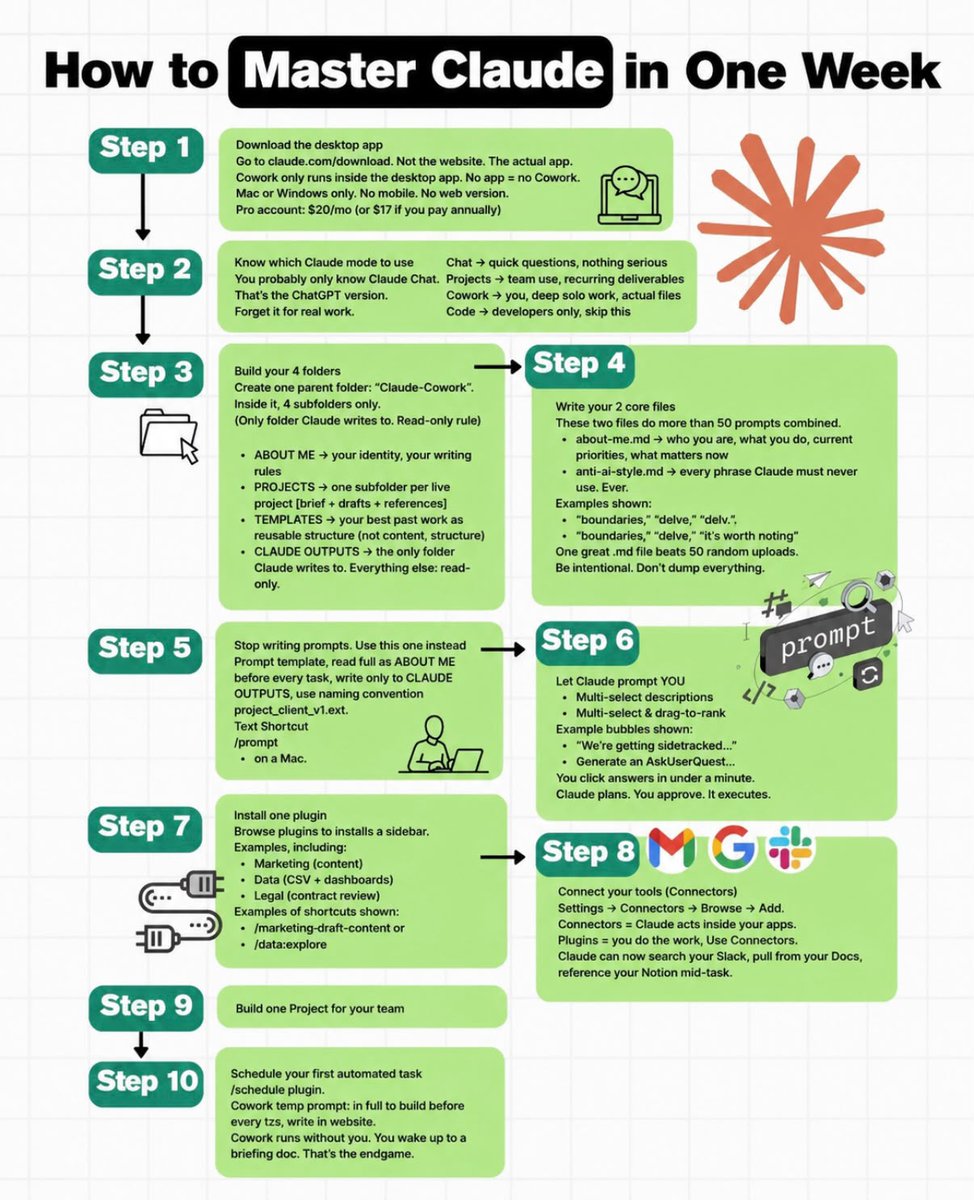
This (one-time) setup makes Claude work like you:
Cowork
☑ Chat forgets you. Cowork remembers:
Chat starts from zero every time.
Cowork reads your files before it answers.
↳ Download the Claude app, get Pro, open Cowork.
The Cowork folders
☑ A folder beats a clever prompt:
Make one folder called "Claude Cowork."
Add 3 subfolders: about-me, outputs, templates.
↳ Point Cowork to it. This is now Claude's brain.
The settings
☑ The defaults are why your answers feel generic:
Select Opus 4.8 for hard tasks.
Turn on Thinking & Effort = High.
↳ Block 20 minutes and set it up once.
The files
☑ Three sharp files beat 50 messy ones:
Open a fresh session. Ask Claude to interview you.
Build your about-me, anti-ai-writing-style, and my-company files.
Trim each one under 2,000 tokens. If a line doesn't change Claude, cut it.
↳ Don't write them from scratch. You can download mine at https://t.co/psB7XxAv8w.
The habits
☑ The setup is useless if you keep your old habits:
Talk, don't type. Install Wispr Flow (it's free).
End prompts with "ask me questions."
Call out the mistake. Don't accept it.
↳ Start a new session every 20 messages.
The system
☑ Most people quit before they build the system:
Save your best work as a template.
Reuse it instead of retyping it.
↳ One folder. 3 files. Claude works like you, forever.
Copy my folder & download my 3 personal .md files:
Step 1: Subscribe for free at https://t.co/psB7XxAv8w.
Step 2: You will have two choices: free or paid.
Step 3: Choose the free tier. Don't pay for anything.
Step 4: Open your welcoming email. Reply to it.
Step 5: Trace the Notion link. Open '.md files' folder.
Step 6: Access my entire folder + 3 files template.
Step 7: Send this image to your team's channel.
Step 8: Read 2x newsletter per week (for free).
Step 9: Become the "AI guy" at work, forever.
@bancoplatamx ¿ahora le hacen el trabajo al gobierno o a las compañías telefónicas?
No estoy de acuerdo que quieran amedrentar con que se usa para servicios bancarios y puedo tener dificultades para usar los servicios…